
cosmic-dock
 cosmic-dock copied to clipboard
 pop-os
Support for SUPER+NUMBER app launching
I think supporting Super + Number launching would complement the COSMIC workflow nicely, so as it is already a d2d feature it wouldn't be really hard to implement.

Using dconf editor I managed to enable this functionality with setting the following
org.gnome.shell.extensions.dash-to-dock hot-keys true
I also think this would be very useful to add as an option. Super + number allows you to launch an app if it is closed and switch focus to it if it is already open (and toggle focus between multiple instances). If you want to open a new window of an already opened application, you can use Super + Ctrl + number. These are quite useful and it would be great to put them front and center for the keyboard driven workflow PopOS is encouraging.
Thanks for the tip of using dconf directly @FlyinPancake , this worked for me gsettings set org.gnome.shell.extensions.dash-to-dock hot-keys true.

Another thing to consider would be, if we could skip or disable these shortcuts for launcher, workspaces & applications icons in the dock because we already have system shortcuts assigned to them. Or other than removing them from the dock, we could always manually place them on the right side of the dock, so our favorite applications has the priority.

I honestly don't care for those buttons, since we have other shortcuts for them (Super, Super+A etc). Just remove them from the dock plain and simple.
A bit late to the party, but someone might get use from it. It's easy enough to reestablish these KBS with gsettings. I only use super + number 4 through 8, but I do it on multiple machines. It's as easy as;
gsettings set org.gnome.shell.keybindings switch-to-application-4 "['<super>4']"
Now whatever app is in position 4 in the dock will launch with super + 4.
For a list of available keys use gsettings list-recursively org.gnome.shell.keybindings.

I too struggled quite some time with this, until I found this issue and the gsettings fix. I'd suggest the cosmic team to simply enable it by default, as it's the case with Gnome, KDE, Cinnamon and even Windows.

I also think Super+Number would be a handy default feature for Cosmic Dock. It would fit nicely with the already keyboard-centric flow. I've seen this feature request pop up a couple of times in r/pop_os. It seems to be popular — users may just not be that familiar with making a request on GitHub.

Super+Number would be a nice improvement to Pop_OS, it's a very handy feature!

This might help,
Use the following command to list shortcuts set for each application on dock, to make sure if any shortcuts exist already
gsettings list-recursively | grep switch-to-application | sort
Then use this command to set shortcuts for each application on dock
⚠️ This command works properly if you use the default layout of DOCK with Launcher, Workspaces and Applications Icons enabled on dock
for i in {4..9}; do gsettings set org.gnome.shell.keybindings switch-to-application-$i "['<Super>$((i-3))']"; done
If you have any or some of the icons for Launcher / Workspace / Applications disabled then modify the command
For example, if you have a layout like this
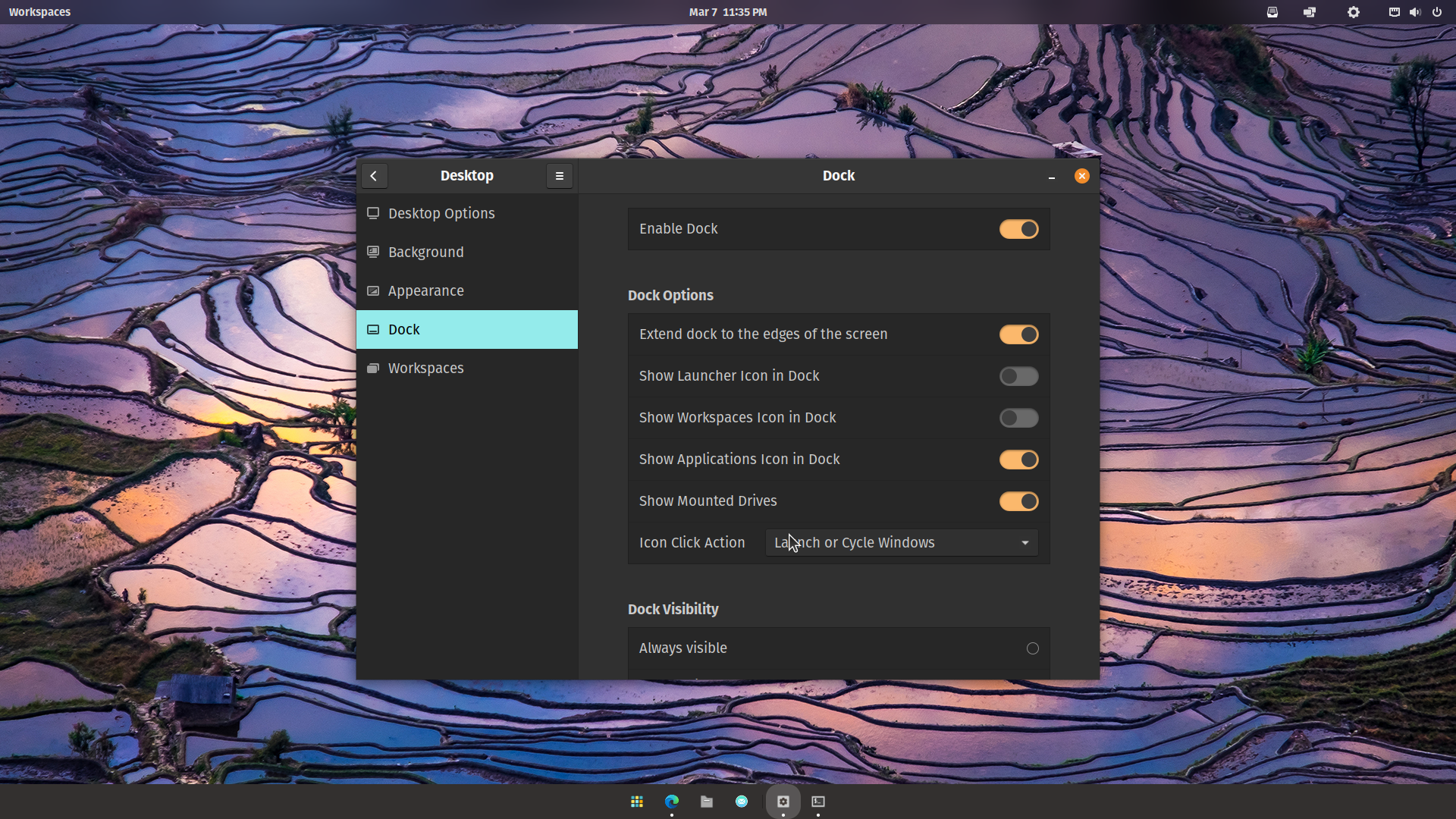
then modify the command to be
for i in {2..9}; do gsettings set org.gnome.shell.keybindings switch-to-application-$i "['<Super>$((i-1))']"; done

