
plotly.py
 plotly.py copied to clipboard
 plotly
Failing to create 3d scatterplots as subplots
Trying to get subplots of 3d scatterplots on Google Colab, plotly version 4.4.1
from plotly.subplots import make_subplots
import plotly.graph_objects as go

fig = make_subplots(rows=18, cols=5, start_cell="top-left")

fig.add_scatter3d(go.Scatter3d(x=[1],y=[2],z=[3]),row=0,col=0)
fig.show()
And the resultant stack is:
---------------------------------------------------------------------------
ValueError                                Traceback (most recent call last)
<ipython-input-70-0caaeab6c904> in <module>()
      4 fig = make_subplots(rows=18, cols=5, start_cell="top-left")
      5
----> 6 fig.add_scatter3d(go.Scatter3d(x=[1],y=[2],z=[3]),row=0,col=0)
      7 fig.show()

6 frames
/usr/local/lib/python3.7/dist-packages/plotly/graph_objs/_figure.py in add_scatter3d(self, connectgaps, customdata, customdatasrc, error_x, error_y, error_z, hoverinfo, hoverinfosrc, hoverlabel, hovertemplate, hovertemplatesrc, hovertext, hovertextsrc, ids, idssrc, legendgroup, line, marker, meta, metasrc, mode, name, opacity, projection, scene, showlegend, stream, surfaceaxis, surfacecolor, text, textfont, textposition, textpositionsrc, textsrc, texttemplate, texttemplatesrc, uid, uirevision, visible, x, xcalendar, xsrc, y, ycalendar, ysrc, z, zcalendar, zsrc, row, col, **kwargs)
  10640             zcalendar=zcalendar,
  10641             zsrc=zsrc,
> 10642             **kwargs
  10643         )
  10644         return self.add_trace(new_trace, row=row, col=col)

/usr/local/lib/python3.7/dist-packages/plotly/graph_objs/__init__.py in __init__(self, arg, connectgaps, customdata, customdatasrc, error_x, error_y, error_z, hoverinfo, hoverinfosrc, hoverlabel, hovertemplate, hovertemplatesrc, hovertext, hovertextsrc, ids, idssrc, legendgroup, line, marker, meta, metasrc, mode, name, opacity, projection, scene, showlegend, stream, surfaceaxis, surfacecolor, text, textfont, textposition, textpositionsrc, textsrc, texttemplate, texttemplatesrc, uid, uirevision, visible, x, xcalendar, xsrc, y, ycalendar, ysrc, z, zcalendar, zsrc, **kwargs)
  34740         # ----------------------------------
  34741         _v = arg.pop("connectgaps", None)
> 34742         self["connectgaps"] = connectgaps if connectgaps is not None else _v
  34743         _v = arg.pop("customdata", None)
  34744         self["customdata"] = customdata if customdata is not None else _v

/usr/local/lib/python3.7/dist-packages/plotly/basedatatypes.py in __setitem__(self, prop, value)
   3488             # ### Handle simple property ###
   3489             else:
-> 3490                 self._set_prop(prop, value)
   3491
   3492         # Handle non-scalar case

/usr/local/lib/python3.7/dist-packages/plotly/basedatatypes.py in _set_prop(self, prop, val)
   3775                 return
   3776             else:
-> 3777                 raise err
   3778
   3779         # val is None

/usr/local/lib/python3.7/dist-packages/plotly/basedatatypes.py in _set_prop(self, prop, val)
   3770         validator = self._validators.get(prop)
   3771         try:
-> 3772             val = validator.validate_coerce(val)
   3773         except ValueError as err:
   3774             if self._skip_invalid:

/usr/local/lib/python3.7/dist-packages/_plotly_utils/basevalidators.py in validate_coerce(self, v)
    624             pass
    625         elif not isinstance(v, bool):
--> 626             self.raise_invalid_val(v)
    627
    628         return v

/usr/local/lib/python3.7/dist-packages/_plotly_utils/basevalidators.py in raise_invalid_val(self, v, inds)
    281                 typ=type_str(v),
    282                 v=repr(v),
--> 283                 valid_clr_desc=self.description(),
    284             )
    285         )

ValueError:
    Invalid value of type 'plotly.graph_objs.Scatter3d' received for the 'connectgaps' property of scatter3d
        Received value: Scatter3d({
    'x': [1], 'y': [2], 'z': [3]
})

    The 'connectgaps' property must be specified as a bool
    (either True, or False)
which is not really comprehensible to me. I tried to set connectgaps explicitly but no avail. It seems, somehow, the values for the coordinates are fed into the argument connectgaps. But not really sure how that can happen.

Hi @mehmetalianil.
You probably figured it out but just in case someone finds this issue looking for answers.
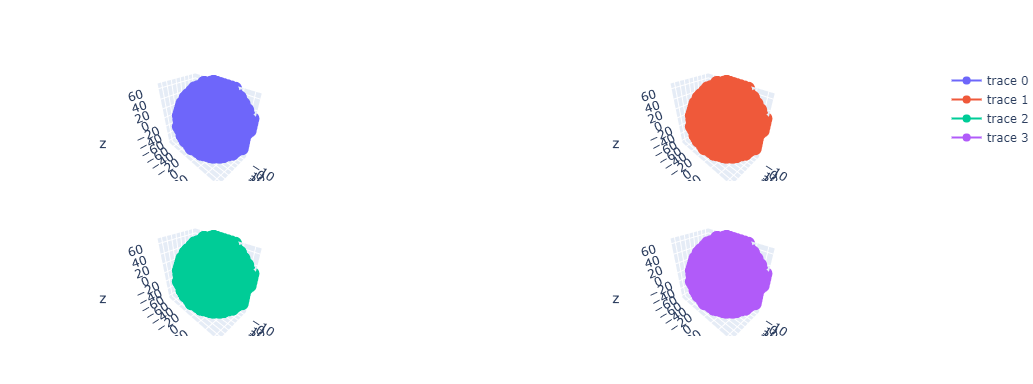
For version 5.8.2, you need to specify the type of graph that every plot is going to be using the spec argument..
For your case, you would need a 18 x 5 array filled with {"type": "scatter3d"}.
For instance, for a 2x2 plot:
fig = make_subplots(
    rows=2,
    cols=2,
    start_cell="top-left",
    specs=[
        [{"type": "scatter3d"}, {"type": "scatter3d"}],
        [{"type": "scatter3d"}, {"type": "scatter3d"}]
    ]
)

fig.add_trace(
    go.Scatter3d(
        x=x,
        y=y,
        z=z
    ),
    row=1, ################NOTICE IT STARTS IN 1, NOT 0
    col=1
)

fig.add_trace(
    go.Scatter3d(
        x=x,
        y=y,
        z=z
    ),
    row=1,
    col=2
)
...
And there you go.

In case anyone wonders, the documentation states:
- Indices of the outer list correspond to subplot grid rows starting from the top, if start_cell=’top-left’, or bottom, if start_cell=’bottom-left’. The number of rows in ‘specs’ must be equal to ‘rows’.
- Indices of the inner lists correspond to subplot grid columns starting from the left. The number of columns in ‘specs’ must be equal to ‘cols’.
so you can use:
sp_type = "scatter3d"
specs = [[{"type": sp_type} for _ in range(0, num_subplot_cols)] for _ in range(0, max_num_subplot_rows)]
fig = make_subplots(rows=max_num_subplot_rows, cols=num_subplot_cols, specs=specs)

Problem appears to be solved. If another problem is encountered, we can reopen this issue.
