
Plan
 Plan copied to clipboard
 plan-player-analytics
Player time other formats
I would like to be able to..
I would like to make a suggestion. You can use placeholders to display the playing time in the scoreboard. My suggestion would be that you can choose the time display yourself. At the moment it is displayed like this: HH: MM: SS and this format cannot be changed. I would like that you can decide for yourself whether you only want to display the hours or hours and minutes or everything.
Is your feature request related to a problem? Please describe.
No it´s a suggestion :D

Currently this format is formatted the same as the numbers on the webserver (under the Formatting settings)

So if I changed this, would it be displayed differently? If so, where can I find this setting?
Plan config under Formatting (Time_amount) https://github.com/plan-player-analytics/Plan/wiki/Bukkit-Configuration
Ok so if I comment something out now, would the time in the game be displayed differently or do I get it wrong? Because I would like to have it in hours.
If you comment it out a new one will be generated. Set it as empty string instead "" if you want something removed
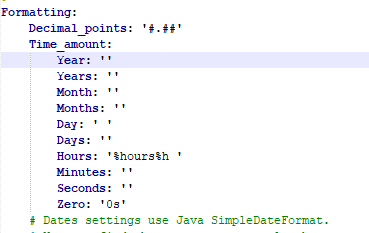 is that so right?
Yeah, note that it will now no longer show any time over 24h since the other time groups are still being formatted - I would suggest leaving in days, months & years
It'll roll back to 0 and continue counting since the 24h rolled over to days
Ah ok and if I leave it in day and hour it would then show 1d 0h or? Or is there a limit for days where it also starts at 0?
Yes that's correct, except zeros are not shown by default so it would show 1d, then 1d 1h etc
Can I also omit the month and year thetically? And then after 31 days it would then show 32d
If I leave months and years off now, would it eventually start wider at 0 or would it continue counting and after I say 3 months of playing time would show 90d?
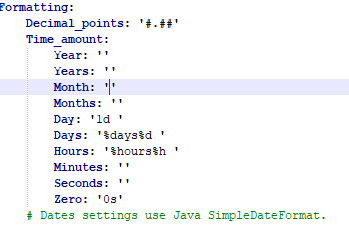 To better understand what I mean, I've now set it to what would happen if I did that and 1 month was over. would he then continue counting for days or start again at 0?
29d 23h -> 1 month -> 1 month 1h -> 1 month 1d -> 1 month 1d 1h -> 11 month 29d 23h -> 1 year -> 1 year 1h etc
Plan now supports _raw placeholders that return milliseconds. You can use the JavaScript expansion for papi and do something like this, so I'm closing this issue.
Download the expansion:
Placeholder expansion has to be downloaded from https://api.extendedclip.com/expansions/javascript/ and put in the PlaceholderAPI/expansions/ folder
/papi reload
PlaceholderAPI/javascripts/milli_to_hours.js:
function milli_to_hours(duration) {
    if (isNaN(duration)) return "Loading..."

    return "" + Math.floor((duration / (1000 * 60 * 60)));
}

milli_to_hours(Number(args[0]));
Modify javascript as needed to have a different format
PlaceholderAPI/javascript_placeholders.yml:
milli_to_hours:
  file: milli_to_hours.js
then reload papi with /papi reload
and then use the placeholders like this: %javascript_milli_to_hours_{plan_player_time_total_raw}%