
Plan
 Plan copied to clipboard
 plan-player-analytics
Extended Domains functionality
I would like to be able to..
I would like to propose an idea to make the function of viewing domains more functional. split each domain line by line and display statistics for each for a day / week / month with trend display as in the screenshot.
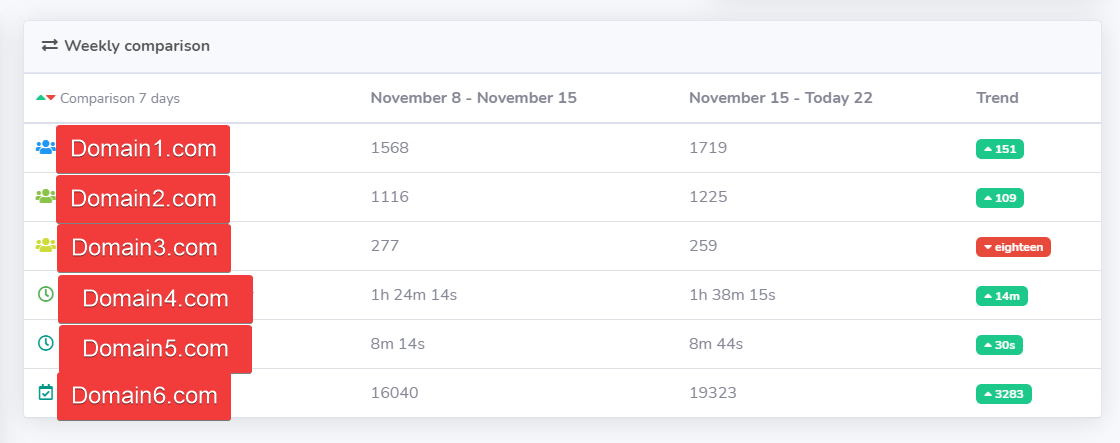
Is your feature request related to a problem? Please describe.
Track the effectiveness of advertising, or track a particular action by directing players to a specific domain, then see which action, the advertisement was effective.

It is very good that you put the related problem, since this domain gathering feature was added specifically for this.
Currently use of this data is limited and could be extended. Until this is implemented check out the Query page (Make a query) and the Join Address filter - with this you can see at least some information about the players who joined with specific campaign. - You might need to perform multiple queries with different addresses selected on the filter to get a more throughout picture at the moment.

I just want to comment on this feature.
Currently we are able to see join address in "Playerbase -> Overview -> Join Address" and we see a pie chart of which join address all players within the plan database are using. At least this is my currently understanding of this chart given the data I see in my installation showing thousands of players per join address.
I would like a time frame feature implemented in some way to represent this data with the option similar to the "Server Overview" pages "Zoon" settings for the graph. It would be much more useful to see join address data of all players that logged in within the past 12 hours, 24 hours, 7 days, 30 days (deepening on some sort of "Zoom" option like overview page.
The reason behind this is because it is a good / only way to track where a servers traffic is coming from. If I purchase advertising I use a different join address than my default address. Same for voting topsites; each topsite gets it's own join address. By being able to see only the past 1/7/30 days of join information compared to all data a server owner is able to determine the effectiveness of paid advertising, voting sites, endorsements, or other.
I use a wildcard to point to my server IP and then reference a different sub domain for the join address based on where I am advertising my server.
The current work around is as you mentioned: going to the "Query" page and making a filter for join address and see which players joined from what address. However, this requires you to make a query for each join address or for all join addresses and then go into each players profile to see which one they actually joined from. As you can see this isn't ideal and makes it difficult to trace where a server is gaining most of its traffic from.

Join address data is now visualized on the 'Join Addresses' page when Frontend BETA is enabled from the config.
I think it is enough to satisfy the need for viewing the effectiveness of advertising and close this ticket - if you can think of further additions please open a new ticket with the ideas :)