
flutter_inappwebview
 flutter_inappwebview copied to clipboard
 pichillilorenzo
onLoadStop() method is not being called on IOS platform when upgrading flutter to 3.7
Recently I upgraded my flutter version from 3.3.1 to 3.7, previously onLoadStop method was working normally on IOS but now this method is not firing when the webpage stops loading the URL without any exception occurring on run-time please check this issue.
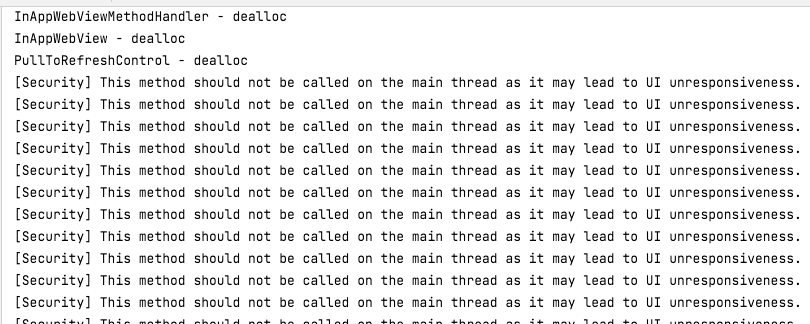
Although everything is working fine on Android. Below is my code, also there is some native warning of swift warning in the code but that is not the case. See in below screenshot about the warning. I believe this warning is not causing this issue there is something else.
InAppWebView(
            key: inAppWebViewKey,
            initialUrlRequest: URLRequest(url: webUrl),
            onLoadStop: (webViewController, webUrl) {
              print("what the hell is this?");
              /**
               * When the web page is finally loaded we'll turn this
               * "showWebShimmer" variable to '0' to show the InAppWebView
               * as InAppWebView is on index '0'.
               */
              setState(() => showWebShimmer = 0);
            },
            onLoadStart: (webViewController, webUrl) async {
              String stringUrl = webUrl.toString();
              if (stringUrl
                  .contains('get-licensed.co.uk/close/search/web_view')) {
                List<String> setData = stringUrl.split('?').last.split('&');
                Navigator.of(context).pushReplacement(
                  MaterialPageRoute(
                    builder: (context) => ThankFullScreen(
                      loader: false,
                      routeID: MainBottomNavigation.route,
                      courseId: int.parse(setData[0]),
                      paymentType: PaymentType.upgradePlan,
                    ),
                  ),
                );
              }
            },
            onWebViewCreated: (InAppWebViewController webViewController) {
              /**
               * We'll clear cookies etc and also we'll fetch the controller
               * of web view in below code. when the InAppWebView is initialized
               */
              inAppWebViewController = webViewController;
              webViewController.clearCache();
              CookieManager cookies = CookieManager.instance();
              cookies.deleteAllCookies();
              Timer(const Duration(seconds: 1), () {
                setState(() => showWebShimmer = 0);
              });
            },
          ),

👋 @hamza-bilal-gaya
NOTE: This comment is auto-generated.
Are you sure you have already searched for the same problem?
Some people open new issues but they didn't search for something similar or for the same issue. Please, search for it using the GitHub issue search box or on the official inappwebview.dev website, or, also, using Google, StackOverflow, etc. before posting a new one. You may already find an answer to your problem!
If this is really a new issue, then thank you for raising it. I will investigate it and get back to you as soon as possible. Please, make sure you have given me as much context as possible! Also, if you didn't already, post a code example that can replicate this issue.
In the meantime, you can already search for some possible solutions online! Because this plugin uses native WebView, you can search online for the same issue adding android WebView [MY ERROR HERE] or ios WKWebView [MY ERROR HERE] keywords.
Following these steps can save you, me, and other people a lot of time, thanks!
![github-actions[bot] avatar](https://avatars.githubusercontent.com/in/15368?v=4 "Published by a pub.dev verified publisher")
👋 @hamza-bilal-gaya
NOTE: This comment is auto-generated.
Are you sure you have already searched for the same problem?
Some people open new issues but they didn't search for something similar or for the same issue. Please, search for it using the GitHub issue search box or on the official inappwebview.dev website, or, also, using Google, StackOverflow, etc. before posting a new one. You may already find an answer to your problem!
If this is really a new issue, then thank you for raising it. I will investigate it and get back to you as soon as possible. Please, make sure you have given me as much context as possible! Also, if you didn't already, post a code example that can replicate this issue.
In the meantime, you can already search for some possible solutions online! Because this plugin uses native WebView, you can search online for the same issue adding
android WebView [MY ERROR HERE]orios WKWebView [MY ERROR HERE]keywords.Following these steps can save you, me, and other people a lot of time, thanks!
already researched a lot about this no satisfactory answers are available online.

Yeah, I have done a temporary workaround with this issue there is a method called onWebViewCreated() in my case I have to show a loader until the website loads and after the website gets loaded the loader would be removed and the actual website would be displayed on the screen. So, I have manually given the loader an estimated delay of 2 or 3 seconds as our website load time is 2 seconds. So below is just an example code of mine just to get an idea:
 onWebViewCreated: (InAppWebViewController webViewController) {
              /**
               * We'll clear cookies etc and also we'll fetch the controller
               * of web view in below code. when the InAppWebView is initialized
               */
              inAppWebViewController = webViewController;
              webViewController.clearCache();
              CookieManager cookies = CookieManager.instance();
              cookies.deleteAllCookies();
              if (Platform.isIOS) {
                Timer(const Duration(seconds: 2), () {
                  setState(() => showWebShimmer = 0);
                });
              }
            },
actually my issue is onLoadStop only called once on IOS but for android it works perfectly. I have to check the URL every time the new page is loaded. How to make it possible?
onLoadStop only called once on IOS
I'm also having this issue. onLoadStop is called on the first page only. Any other navigation from the first page does not trigger onLoadStop.
Edit: Used the shouldOverrideUrlLoading and it works for my use case which is displaying a widget on particular url paths.

@hamza-bilal-gaya @oyedsamu I'm having the same problem and I solved using onUpdateVisitedHistory


Any update here?
InAppWebView(key: webViewKey,
                          initialUrlRequest:
                              URLRequest(url: WebUri("http://flutter.dev")),
                          onWebViewCreated: (controller) async {
                            print("created");
                            webViewController = controller;
                            var result = await webViewController
                                .evaluateJavascript(source: "1+12");
                            print("Evaluation result: $result");
                          },
                          onLoadStart: (controller, url) {
                            print("started $url");
                          },
                          onLoadStop: (controller, url) {
                            print("stopped $url");
                            controller.evaluateJavascript(source: "buy();");
                          },
                          onLoadError: (controller, url, code, message) {
                            print("EEEerror $url, $code, $message");
                          },
                          onLoadResource: (controller, resource) {
                            print(resource);
                            getIt<TvChartCubit>().chartLoaded(controller);
                            print("resource");
                          },
                          onReceivedError: (controller, request, error) {
                            print("onReceivedError");
                            print(error);
                          },
                          onConsoleMessage: (controller, consoleMessage) {
                            print("onConsoleMessage");
                            print(consoleMessage.message);
                          })
My onLoadStart and onLoadStop functions are not getting called.

Any update here?
InAppWebView(key: webViewKey,
                          initialUrlRequest:
                              URLRequest(url: WebUri("http://flutter.dev")),
                          onWebViewCreated: (controller) async {
                            print("created");
                            webViewController = controller;
                            var result = await webViewController
                                .evaluateJavascript(source: "1+12");
                            print("Evaluation result: $result");
                          },
                          onLoadStart: (controller, url) {
                            print("started $url");
                          },
                          onLoadStop: (controller, url) {
                            print("stopped $url");
                            controller.evaluateJavascript(source: "buy();");
                          },
                          onLoadError: (controller, url, code, message) {
                            print("EEEerror $url, $code, $message");
                          },
                          onLoadResource: (controller, resource) {
                            print(resource);
                            getIt<TvChartCubit>().chartLoaded(controller);
                            print("resource");
                          },
                          onReceivedError: (controller, request, error) {
                            print("onReceivedError");
                            print(error);
                          },
                          onConsoleMessage: (controller, consoleMessage) {
                            print("onConsoleMessage");
                            print(consoleMessage.message);
                          })
My onLoadStart and onLoadStop functions are not getting called.
Any update of this issue? I am facing same issue.

@anarnoli did you check if the methods are supported on your platform? web capabilites are very limited
https://github.com/pichillilorenzo/flutter_inappwebview/issues/2026
Hi @Bitsy-Chuck
https://github.com/pichillilorenzo/flutter_inappwebview/issues/2026 worked for me as an interim solution.
This issue is stale and has been automatically closed because it has been open for more than 365 days with no activity. Please reopen a new issue if you still have it.