
freebsd-wifibox
 freebsd-wifibox copied to clipboard
 pgj
pgj
Macbook Air with Broadcom BCM4360
Hola! My Macbook Air with BCM4360 - 2015-ish machine (core i7 something or other) dies horribly when trying to start wifibox. Assigned the ppt device (to the right pci dev), and once starting the nvme disk (and possibly other devices) freeze up or drop off the bus.
Any ideas what might be causing this? I know it's not likely to be wifibox-related but thought I'd start here..
13.1-RELEASE running on the box.
/Eirik

This might be related to #29 because wifibox mistakenly tries to "reload" the vmm kernel module which can unleash such kind of disasters. As it is mentioned in the comments, I created a development snapshot of the net/wifibox-core where this problem is fixed: https://github.com/pgj/freebsd-wifibox-port/tree/3496d6ae1a2e345fd842f3494d7324dd469a7e98 -- this might be worth a try before digging deeper in this issue.

This simply changes /usr/local/sbin/wifibox in one place, right? The path to the .ko file? If so, I made that change manually (getting a new port/package across is really a chore since it has no network), but it makes no difference.
I've also been inaccurate in my error description: There's no nvme, just an ada0 device. And nothing seems to disappear from the bus per se, but I/O towards ada0 just ... fails. Hence the errors shown in the screenshot. Soon after, ZFS will tell me the pool is suspended because of I/O errors. Nothing which reads from disk works after that, of course. Prior to that, any disk read returns garbage - if anything at all.
This is extremely mysterious.
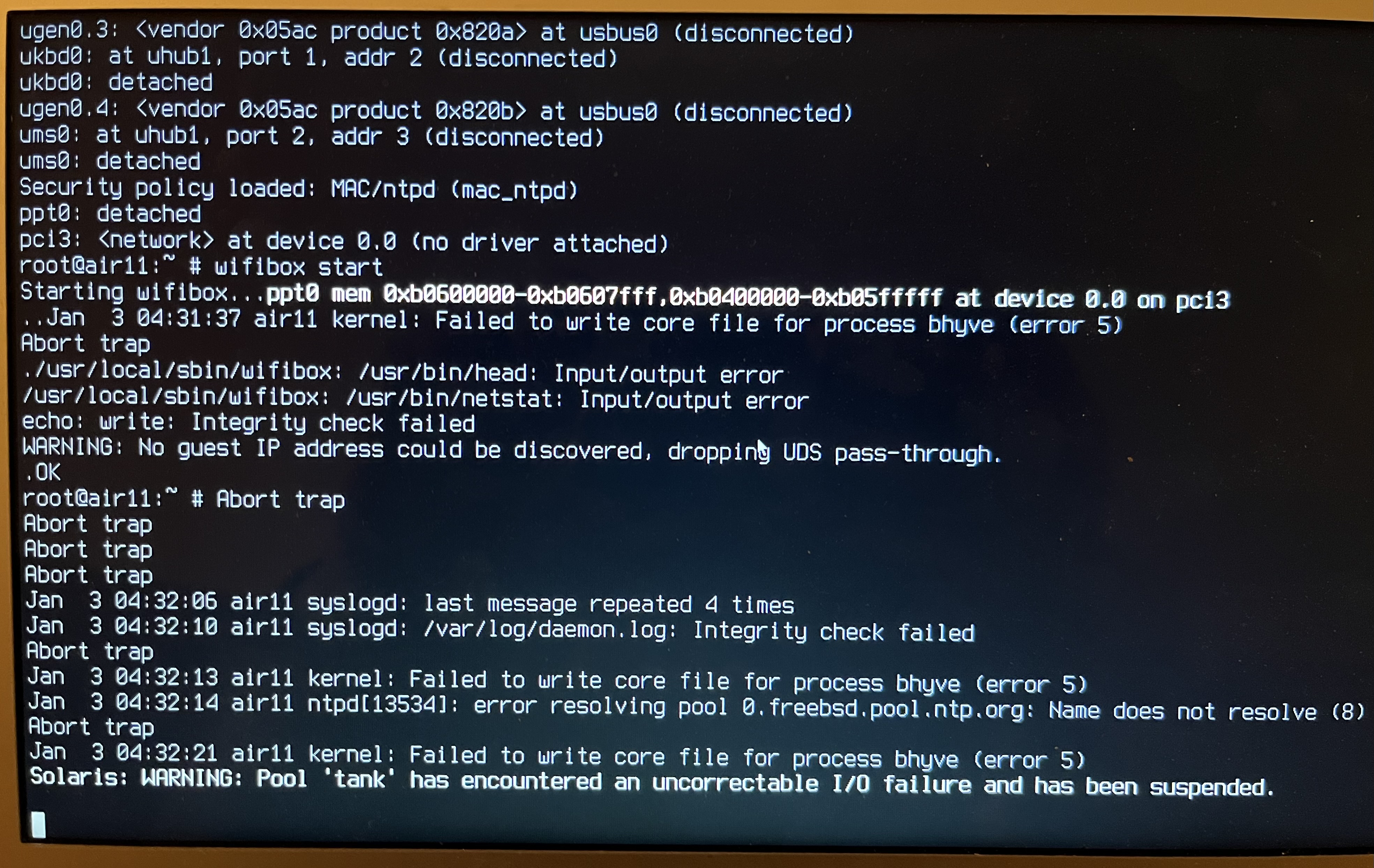
Yeah, I was talking about f7ac871, the one-liner change about the default vmm.ko location. I naively assumed that if you could install wifibox, you could also do that same with a modified version of it. But you are right, it is plenty to change the wifibox script for the same effect. I usually recommend this method for the consistency.
Other than that, this seems to be a bhyve problem. The screenshot shows that on launching the guest, bhyve technically dumped core. Could this be due to some non-standard setting on the system? Are there any?
Nope, this is a clean 13.1-installation.
One thing I find confusing on all the machines I've used this: pciconf -lv says foo@pci0:x:y:z. In the case of this Macbook, this is ppt0@pci0:3:0:0.
In loader.conf, I have pptdevs="3/0/0", and wifibox' bhyve.conf has passthru=3/0/0.
But then the message on the cosole reads device 0.0 on pci3, which is .. confusing. I believe it's the same on my ThinkPad, but I've spent quite some time trying to determine if things are configured correctly...
I think the pciconf(8) output can be trusted. The device 0.0 on pci3 from the console logs can be corresponded to 3/0/0 since it is talking about PCI bus 3, slot 0, function 0. But still, if the PCI device would not be assigned correctly, the PCI ID should still give enough information for the driver to not to try to use a disk controller as a wireless device.
It might be worth to test different setups: start the guest without PCI pass-through configured and check for errors, use a different bhyve-based VM with PCI pass-through to see if the problem is related to that. You can also try a 13-STABLE snapshot or even 14-CURRENT to see if vmm or bhyve has gained a fix for the problem since 13.1-RELEASE.
Is this still an issue? Could you please test it again with a more recent development version (e.g. 20230916) from pgj/freebsd-wifibox-port?
I am now closing this ticket because there was no response for more than a month. But feel free to re-open this ticket or create a new one for the latest version if the problem still persists.