bun
 bun copied to clipboard
 oven-sh
bun install doesn't work while other do
Version
0.1.11
Platform
Linux msi14a10rb 5.19.9-arch1-1 #1 SMP PREEMPT_DYNAMIC Thu, 15 Sep 2022 16:08:26 +0000 x86_64 GNU/Linux
What steps will reproduce the bug?
I create a simple package as example for my library.
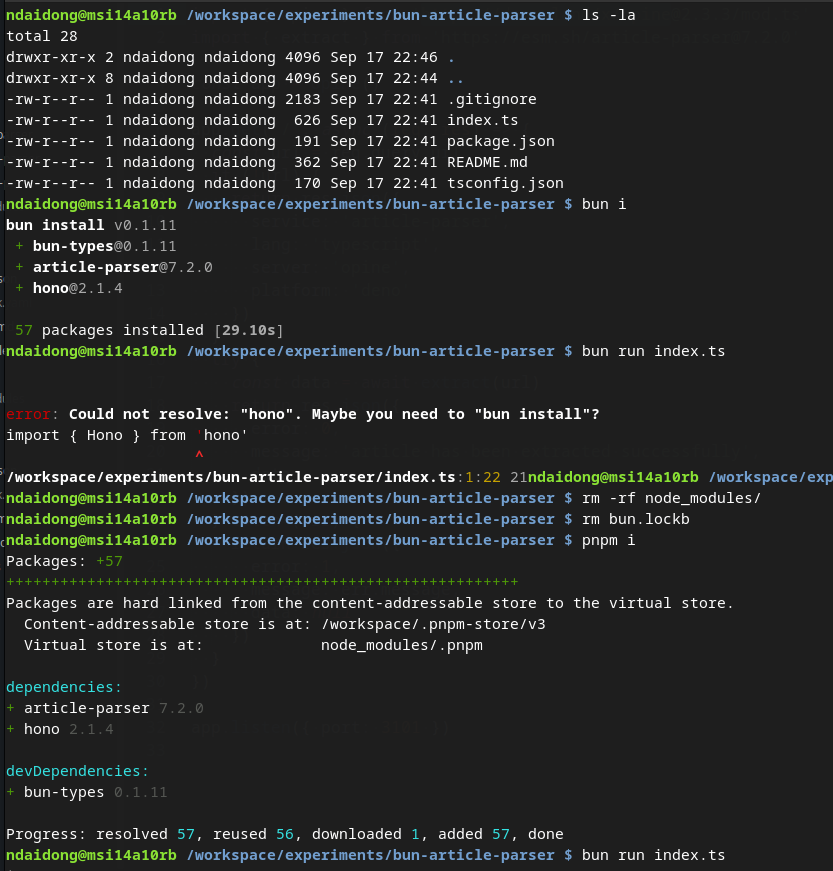
When I try to install dependencies with bun install, the process finishes as well, but I can not start with bun run. There is always some error with one of the dependencies.
If I remove all downloaded modules by bun, and reinstall with npm or pnpm or `yarn, everything works like a charm.
How often does it reproduce? Is there a required condition?
Always.
What is the expected behavior?
The standard steps must work:
bun install
bun run index.js
What do you see instead?
error: Could not resolve: "hono". Maybe you need to "bun install"?
import { Hono } from 'hono'
                     ^
/workspace/experiments/bun-article-parser/index.ts:1:22 21
Additional information
The above error occurs on my laptop, which runs EndeavourOS (Arch based), Gnome 42.
I've checked with my server (debian 11) and got the same problem.
Linux debian-hel 5.10.0-17-amd64 #1 SMP Debian 5.10.136-1 (2022-08-13) x86_64 GNU/Linux
It seems relate to the symlink between downloaded nodejs packages stored at ~/.bun/install/cache folder and local node_modules.

I'm not sure what the cause is here. Can you:
- Try again with bun v0.1.12
- If that doesn't work, try
bun install --backend=copyfile
Can you also find out what filesystem you're using? I wonder if there is some subtlety with hardlinks there.
I'm not able to repro this. I am able to use hono successfully after bun install on my local machine on both linux and macOS.

@Jarred-Sumner thank you for help, bun install --backend=copyfile works for me. I tried several times and it's always success.
My filesystem is ext4.
Workaround is to use:
bun install --backend=copyfile
We're tracking this issue here: #362