
tom-select
 tom-select copied to clipboard
Published
20 hours ago •
 orchidjs
orchidjs
Plugins `clear button` and `remove button` don't work well together
Describe the bug
When using clear button and remove button plugins together with a multiple select row,
clear button is not well placed and cannot be differentiate with other remove buttons.
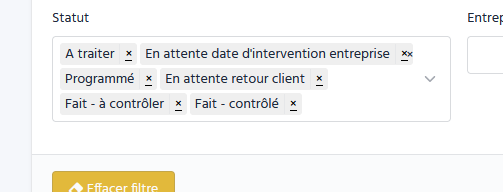
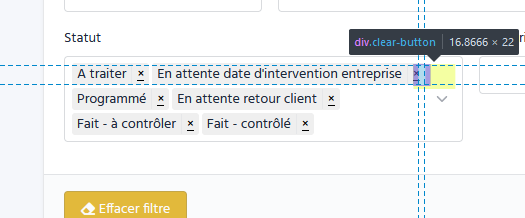
To Reproduce
- Have
clear buttonenabled - Have
remove buttonenabled - Select multiple items
- Have select with multiple lines
- Hover the select
Expected behavior
- The clear button should more recognizable than the remove button.
- It should be as the same height as the drop down caret.
- Maybe clear button needs his own place that item couldn't take ?
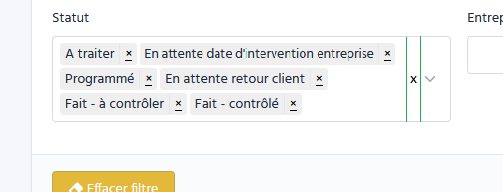
Green lines are safe zone for the clear button:
- Select items will never cross that line
- Dropdown caret should not cross that line
Additional context
- OS: Windows
- Browser: Firefox
- Version: 2.0.3
- Bootstrap: 5
- Theme/Template: www.Tabler.io

**To Reproduce**
Create an example on JSFiddle, CodePen or similar service and outline the steps for reproducing the bug.

Here is a demo : https://jsfiddle.net/florian_allsoftware/f0wkpyd9/8/
Using :
- Symfony (only for class naming)
- Tabler.io (Template)
- TomSelect
Make it like that.
- Symfony -> Add
form-selectclass toselect - Tabler.io -> Stylize
form-selectby adding the caret at the end. - TomSelect -> Don't use the caret because there's not the class
single(multicurrently), but Tabler.io added it anyway.