
plugins
 plugins copied to clipboard
 opnsense
Add multiply Prefix lists to BGP route map Issue
Describe the bug Cannot add multiply prefix-list's to bgp route-map.
To Reproduce Steps to reproduce the behavior:
- Go to 'Routing-BGP-Prefix Lists'
- Add some prefix-list
- Go to - Routing - BGP - Route maps
- Click to plus
- Write name and click section "prefix-lists"
- Add two or more prefix-list
- See error "Related item not found"
Expected behavior Add multiply prefix lists
Screenshots
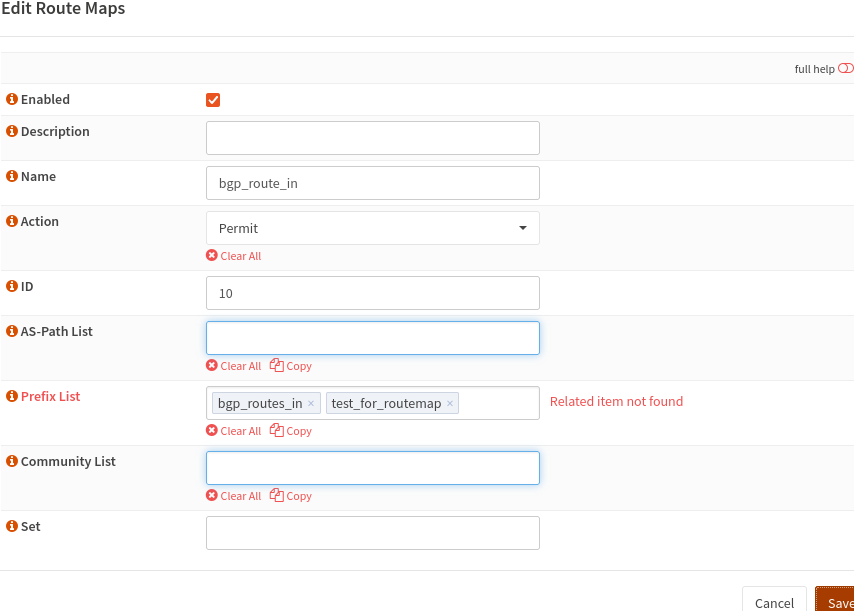
Relevant log files not applicable
Additional context No additional
Environment
OPNsense 22.7.4 (amd64, OpenSSL) Network Intel® I210-AT Plugin Version os-frr 1.29

Thank you for creating an issue. Since the ticket doesn't seem to be using one of our templates, we're marking this issue as low priority until further notice.
For more information about the policies for this repository, please read https://github.com/opnsense/plugins/blob/master/CONTRIBUTING.md for further details.
The easiest option to gain traction is to close this ticket and open a new one using one of our templates.

I can confirm experiencing the same issue with OPNsense 22.7.1-amd64:

The route-map is designed to handle multiple entries: https://github.com/opnsense/plugins/blob/3d2144223206b8a5edfcf22b0aa50dd2bbdc991b/net/frr/src/opnsense/mvc/app/controllers/OPNsense/Quagga/forms/dialogEditBGPRouteMaps.xml#L40-L47
Similar issue seen with other plugins apparently, maybe this is some generic issue and not specific to FRR/BGP? https://github.com/opnsense/plugins/blob/7d682dd143fd413eb9b1a3f42cc2c2293cdfcd60/security/acme-client/src/opnsense/mvc/app/controllers/OPNsense/AcmeClient/Api/SettingsController.php#L370-L373
The validation part of Quagga/BGP seems to be here: https://github.com/opnsense/plugins/blob/16f3522d08d30919b17e66bdec38352ef4c75208/net/frr/src/opnsense/mvc/app/controllers/OPNsense/Quagga/Api/GeneralController.php#L56-L63
I'm not too familiar with the code base with OPNsense. Changing above functions to e.g. disable validation or output more details don't reflect in the UI for some reason, also not after restarting webui.
This is quite limiting for my new setup now. Any help would be appreciated.

Multiple PrefixLists can be added but Running Configuration is different from /usr/local/etc/frr/bgpd.conf and multiple PrefixLists are not working correctly. Router advertise just one of the lists (and it matches the Running Configuration)
Running Configuration (under GUI - Routing - Diagnostics - General)
Building configuration...

Current configuration:
!
frr version 7.5.1
frr defaults traditional
hostname gw1.lan
log syslog critical
!
router bgp 65000
 no bgp ebgp-requires-policy
 bgp graceful-restart
 neighbor 192.168.255.1 remote-as 65002
 neighbor 192.168.255.1 update-source vtnet9
 !
 address-family ipv4 unicast
  neighbor 192.168.255.1 route-map NewNetwork in
  neighbor 192.168.255.1 route-map NewNetwork out
 exit-address-family
!
ip prefix-list PrivateA seq 10 permit 10.0.0.0/8 le 32
ip prefix-list PrivateB seq 15 permit 172.16.0.0/12 le 32
ip prefix-list PrivateC seq 20 permit 192.168.0.0/16 le 32
!
route-map NewNetwork permit 11
 match ip address prefix-list PrivateC
!
line vty
!
end
File: /usr/local/etc/frr/bgpd.conf
!
! Zebra configuration saved from vty
!   2017/03/03 20:21:04
!
log syslog critical
frr defaults traditional
!
!
!
router bgp 65000
 no bgp ebgp-requires-policy
 bgp graceful-restart
 neighbor 192.168.255.1 remote-as 65002
 neighbor 192.168.255.1 update-source vtnet9

 address-family ipv4 unicast
  neighbor 192.168.255.1 activate
  neighbor 192.168.255.1 route-map NewNetwork in
  neighbor 192.168.255.1 route-map NewNetwork out
 exit-address-family
!
 address-family ipv6 unicast
 exit-address-family
!

ip prefix-list PrivateA seq 10 permit 10.0.0.0/8 le 32
!
ip prefix-list PrivateB seq 15 permit 172.16.0.0/12 le 32
!
ip prefix-list PrivateC seq 20 permit 192.168.0.0/16 le 32
!
!
!
!
route-map NewNetwork permit 11
 match ip address prefix-list PrivateA
 match ip address prefix-list PrivateB
 match ip address prefix-list PrivateC
!
!
!
line vty
!

I have the same experience as FilipK-CZ (tested on opnsense 22.7.11_1 / os-frr 1.31).

I am afraid this is not fixed. I have the exact same behavior as @FilipK-CZ running OPNsense 23.7.6-amd64 with os-frr 1.36_1
While /usr/local/etc/frr/bgpd.conf has the expected route-map like this:
route-map MY_ROUTE_MAP permit 100
 match ipv6 address prefix-list MY_LIST1
 match ipv6 address prefix-list MY_LIST2
the output showing the running configuration displays
route-map MY_ROUTE_MAP permit 100
exit
!
I can reproduce that only the first prefix-list added to the route-map works and any others are ignored. I read a workaround to give all your prefix-lists the same name, but this does not work for me either. (https://www.reddit.com/r/OPNsenseFirewall/comments/zdre2q/issue_with_frr_bgp_routemaps_and_prefix_lists/)

This usually happens when you have a syntax error. What happens when you log into CLI -> vtysh and add the exact command there? Any error?
