
stylus
 stylus copied to clipboard
 openstyles
FR: Increase undo buffer in codemirror editor
Can you please increase the size of the undo buffer in the codemirror editor? Thanks.

You can run the following code in devtools console:
prefs.set('editor.options', {...prefs.get('editor.options'), undoDepth: 500})
We won't be exposing such low-level options, but we can allow configuring them via JSON like Violentmonkey does:
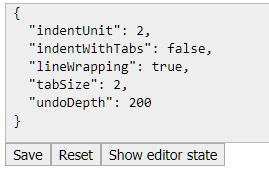
There'll be a gear icon or a button/link in the Options block that opens a dialog similar to linter config.

@tophf
- Thank you for the devtools command.
- For undoDepth, is that the number of steps, bytes, KB, or something else?
- Yes, configuring them all via JSON like VM or the linter would be wonderful.
You can find out yourself what that means. I think ... indicates thoughtfulness.
@tophf
I finally had a few minutes of free time to try the code you provided.
To test it, I tried the following in a devtools console in Firefox:
prefs.set('editor.options', {...prefs.get('editor.options'), undoDepth: 2})
I want to increase the undoDepth, not decrease it, but I first wanted to test the code you provided to ensure it works.
According to the CodeMirror manual, undoDepth accepts any integer.
Yet after doing this, the depth of the undo function within Stylus is still much greater than 2.
Do you know how to get your code working?
Also, I would like to change the ctrl+space keyboard shortcut within the CodeMirror editor to something else. How would that be done?
That's because CodeMirror resets undoDepth to infinity when we call its method clearHistory(). Probably a bug in CodeMirror. ~I'll add a workaround in our code~. The next version of CodeMirror will be fixed. Meanwhile you'll have to manually run editor.getEditors().forEach(cm => cm.doc.history.undoDepth = 2) each time you open the editor.
change the ctrl+space
Run this once:
prefs.set('editor.options', {...prefs.get('editor.options'), extraKeys: {...CodeMirror.defaults.extraKeys, 'Esc': 'autocomplete'}})
@tophf
Thanks so much!
When is Stylus calling the clearHistory() method?
To clarify, the detailed steps I took were:
- Open a style in the Stylus code editor
- Open devtools console
- Run the following code:
prefs.set('editor.options', {...prefs.get('editor.options'), undoDepth: 2})
- Perform a bunch of edits in the Stylus code editor
- Try to undo 10+ edits (which works, instead of failing as expected)
When in that sequence is Stylus calling the clearHistory() method?
Also, is Stylus supposed to save these CodeMirror settings between Firefox sessions (once CodeMirror is updated... per your reply)?
Regarding both new code tidbits you provided... much thanks. I'm hoping to have a few minutes of free time to try them both this weekend.
When in that sequence is Stylus calling the clearHistory()
When the editor is initialized.
is Stylus supposed to save these CodeMirror settings
Yes, except for the undoDepth hack.
@tophf I performed a reboot a few hours ago, and the original code you provided to change the undo depth now is working. Obviously, it wasn't the reboot that caused it to work, but more likely Firefox being closed and then re-opened.
It's also stored in the Stylus export file, which is real good.
I'm going to try the keyboard shortcut key hack next.
I like your idea of "a gear icon or a button/link in the Options block that opens a dialog similar to linter config" to edit a JSON representation of CodeMirror settings.