
stf
 stf copied to clipboard
 openstf
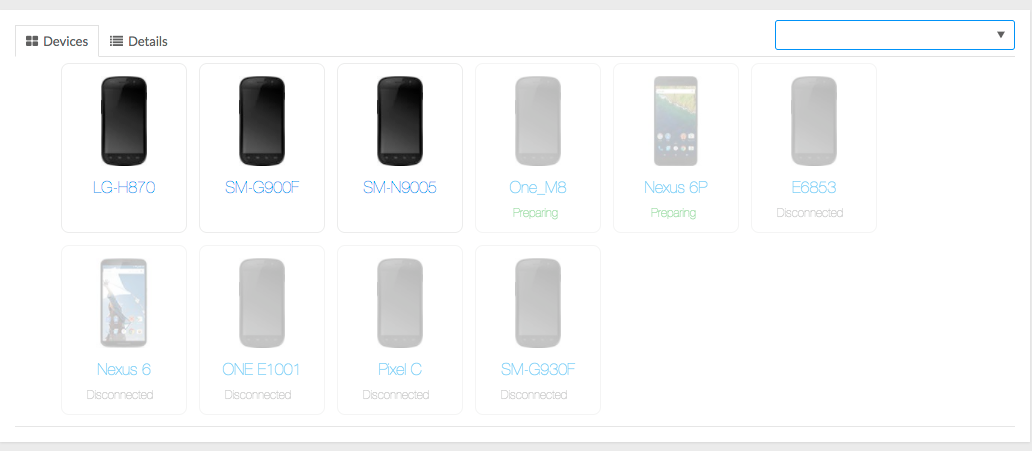
Device remains in preparation mode.
Hi guys, since I have upgraded to the latest version some devices are stuck in preparing mode and other two devices appear as "disconnected" even when I can list them in adb
adb devices -l df50c2e6 device usb:343150592X product:hltexx model:SM_N9005 device:hlte 341abad4 device usb:343158784X product:kltexx model:SM_G900F device:klte FA619WM01162 device usb:343163136X product:htc_europe model:HTC_One_M8 device:htc_m8 988637333547315955 device usb:343163648X product:heroltexx model:SM_G930F device:herolte CB5A2C10HQ device usb:343163392X product:E6853 model:E6853 device:E6853 LGH87077af27a0 device usb:343080960X product:lucye_global_com model:LG_H870 device:lucye ENU7N15B14006014 device usb:343154688X product:angler model:Nexus_6P device:angler
stf doctor INF/cli:doctor 36272 [] OS Arch: x64 INF/cli:doctor 36272 [] OS Platform: darwin INF/cli:doctor 36272 [] OS Platform: 16.6.0 INF/cli:doctor 36272 [] Using Node 8.1.2 INF/cli:doctor 36272 [] Using ZeroMQ 4.2.2 INF/cli:doctor 36272 [] Using RethinkDB 2.3.5 INF/cli:doctor 36272 [] Using ADB 1.0.39 INF/cli:doctor 36272 [] Using GraphicsMagick 1.3.25 INF/cli:doctor 36272 [*] Using ProtoBuf 3.3.0

You really need to provide the full output STF shows you. Otherwise there's nothing we can do.

Ok. I guess this is what you are looking for. I will try to uninstall the package with adb or factory reset the devices to see if that fixes the issue
FTL/device 36990 [988637333547315955] Setup had an error Error: /data/local/tmp/STFService.apk could not be installed [INSTALL_FAILED_INSUFFICIENT_STORAGE]
    at /usr/local/lib/node_modules/stf/node_modules/adbkit/lib/adb/command/host-transport/install.js:28:23
    at runCallback (timers.js:800:20)
    at tryOnImmediate (timers.js:762:5)
    at processImmediate [as _immediateCallback] (timers.js:733:5)
FTL/util:lifecycle 36990 [988637333547315955] Shutting down due to fatal error
INF/provider 36968 [*] Cleaning up device worker "988637333547315955"
ERR/provider 36968 [*] Device worker "988637333547315955" died with code 1
INF/provider 36968 [*] Restarting device worker "988637333547315955"
FTL/device 36991 [CB5A2C10HQ] Setup had an error Error: /data/local/tmp/STFService.apk could not be installed [INSTALL_FAILED_INSUFFICIENT_STORAGE: Package couldn't be installed in /data/app/jp.co.cyberagent.stf-1: Creating application package jp.co.cyberagent.stf failed]
    at /usr/local/lib/node_modules/stf/node_modules/adbkit/lib/adb/command/host-transport/install.js:28:23
    at runCallback (timers.js:800:20)
    at tryOnImmediate (timers.js:762:5)
    at processImmediate [as _immediateCallback] (timers.js:733:5)
Use three backticks to format a block of code.
That looks like a relatively obvious error - is the disk full?
Ok, run STF with DEBUG=adb* stf local and you should see the pm install command it runs. Copy that command and try running it manually. Paste the full output here. Also, run adb shell ls -l /data/local/tmp/ and paste the full output here.
In my case, some devices keep in preparation status are due to stf service can't be started directly, on some devices, we should start activity first then start the service by issuing:
  adb shell am start -n jp.co.cyberagent.stf/.IdentityActivity
  adb shell am startservice  -n jp.co.cyberagent.stf/.Service

You should look for a setting on the phone to allow the service to auto start.
On Wed, Aug 23, 2017 at 0:20 thinkhy [email protected] wrote:
In my case, some devices keep in preparation status are due to stf service can't be started directly, on some devices, we should start activity first then start the service by issuing:
dbb shell am start -n jp.co.cyberagent.stf/.IdentityActivity adb shell am startservice -n jp.co.cyberagent.stf/.Service
— You are receiving this because you commented.
Reply to this email directly, view it on GitHub https://github.com/openstf/stf/issues/674#issuecomment-324060370, or mute the thread https://github.com/notifications/unsubscribe-auth/AAB-_V695495pGZGtfQebyp9ARjVMShWks5savHYgaJpZM4O4fFN .
On some devices of Meizu, we can't start a service before activating the activity ...
I'm sure they have the auto start setting but it 's actually not working for STF service. Now I hit the problem only on devices of Meizu.
i got the same problem on a "Lava Iris 870" Starting the service manually solved it for me as well

This happened to me today but it was because the mobile had the SDK 31 and openstf/stf does NOT support this version.
To fix it, we upgraded to https://github.com/devicefarmer/stf and worked like a charm! (it supports newer SDKs)
