openai
How to restart the training from checkpoint?
Hi, I want to train the model with my dataset. But there is a little question , would you please help me. How to restart the training from checkpoint? How to import the checkpoint of CLIP model to calculate cosine similarity ?

model.load_state_dict("checkpoint_file_name.pt", map_location=device)
You can replace device with "cuda" or "cpu"
For more info on loading checkpoints look into torch documentation: Load checkpoints

Hi, @sarveshwar-s @vinson2233 I try to train the CLIP model by my datasets. With the code [CLIP Training Code](https://github.com/openai/CLIP/issues/83)
import numpy as np
import torch,os
from pkg_resources import packaging
import clip
from torch.utils.data import DataLoader
from torch import nn
from torch import optim
from PIL import Image

BATCH_SIZE = 100
EPOCH = 5000

print("Torch version:", torch.__version__)
print(torch.cuda.is_available())
print(clip.available_models())
# If using GPU then use mixed precision training.
device = "cuda:0" if torch.cuda.is_available() else "cpu"

#Must set jit=False for training
model, preprocess = clip.load("ViT-B/32",device=device,jit=False)

#checkpoint = torch.load("./ViT-B-32.pt")
#model.load_state_dict(checkpoint['model_state_dict'])

#Define Function
class image_title_dataset():
    def __init__(self, list_image_path,list_txt):
        self.list_txt = list_txt
        self.image_path = list_image_path
        self.title  = clip.tokenize(list_txt)
        #you can tokenize everything at once in here(slow at the beginning), or tokenize it in the training loop.

    def __len__(self):
        return len(self.list_txt)

    def __getitem__(self, idx):
        image = preprocess(Image.open(self.image_path[idx])) # Image from PIL module
        title = self.title[idx]
        return image,title


# use my dataset
list_image_path = []
list_txt = []
Path = "./image/"
list_dir = os.listdir(Path)
for subdir in list_dir:
    Path_subdir = Path + subdir + '/'
    list_file= os.listdir(Path_subdir)
    for i in range(len(list_file)):
        list_image_path.append(Path_subdir + list_file[i])
        list_txt.append(subdir)


print("len[list_image_path] = ",len(list_image_path))
print("len[list_txt] = ",list_txt[0],len(list_txt))

dataset = image_title_dataset(list_image_path,list_txt)
train_dataloader = DataLoader(dataset,batch_size = BATCH_SIZE) #Define your own dataloader

#https://github.com/openai/CLIP/issues/57
def convert_models_to_fp32(model):
    for p in model.parameters():
        p.data = p.data.float()
        p.grad.data = p.grad.data.float()

if device == "cpu":
  model.float()
else :
  clip.model.convert_weights(model) # Actually this line is unnecessary since clip by default already on float16

loss_img = nn.CrossEntropyLoss()
loss_txt = nn.CrossEntropyLoss()
optimizer = optim.Adam(model.parameters(), lr=5e-5,betas=(0.9,0.98),eps=1e-6,weight_decay=0.2) #Params used from paper, the lr is smaller, more safe for fine tuning to new dataset

# add your own code to track the training progress.


for epoch in range(EPOCH):

  for batch in train_dataloader :
      optimizer.zero_grad()
      images,texts = batch

      images= images.to(device)
      texts = texts.to(device)

      logits_per_image, logits_per_text = model(images, texts)

      ground_truth = torch.arange(len(images),dtype=torch.long,device=device)

      total_loss = (loss_img(logits_per_image,ground_truth) + loss_txt(logits_per_text,ground_truth))/2
      total_loss.backward()

      if device == "cpu":
         optimizer.step()
      else :
        convert_models_to_fp32(model)
        optimizer.step()
        clip.model.convert_weights(model)
  if (epoch%100==0):
      print("[",epoch,"]\t total_loss = ", total_loss)

torch.save({
        'epoch': epoch,
        'model_state_dict': model.state_dict(),
        'optimizer_state_dict': optimizer.state_dict(),
        'loss': total_loss,
        }, f"model_checkpoint/model_clip_test.pt")
        #just change to your preferred folder/filename
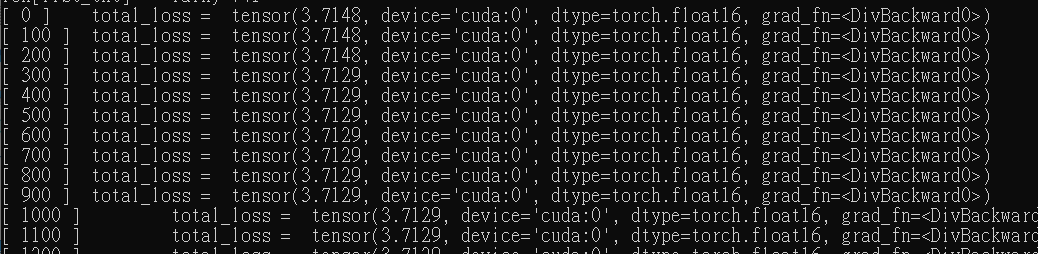
In the training of my code , the total_loss is always the same .
But I have no idea what's wrong with it.
column
[epoch] total_loss