

 obsproject
Virtual Camera will start one time and will not restart until reboot
Operating System Info
Ubuntu 21.04
Other OS
No response
OBS Studio Version
27.0.0
OBS Studio Version (Other)
No response
OBS Studio Log URL
https://obsproject.com/logs/Cy96Hu3XHeD7c-Zb
OBS Studio Crash Log URL
No response
Expected Behavior
I should be able to toggle Virtual Camera on and off.
Current Behavior
I'm able to start and stop Virtual Camera one time. After that, it will not start again until my next reboot. Each click on the "Start Virtual Camera" button inserts a single line of text into the log:
04:00:54 PM.094: Failed to start virtual camera
Steps to Reproduce
- Reboot
- Launch OBS
- Click "Start Virtual Camera"
- Click "Stop Virtual Camera"
- Click "Start Virtual Camera". The button text remains the same ("Start Virtual Camera") and the VC is never started.
Anything else we should know?
This began happening immediately after an OS upgrade from Ubuntu 20.10 to 21.04. Things worked fine in Ubuntu 20.10 using the same version of OBS (27.0.0).
The attached log shows me launching OBS immediately after a reboot. I click to start the virtual camera. I enter my sudo pw. I click to stop the virtual camera. So far so good. I click to start the virtual camera - three times - and all three times result in failure and an error message in the log: "Failed to start virtual camera."
The output of v4l2-ctl --list-devices immediately after reboot:
UVC Camera (046d:0821) (usb-0000:00:14.0-8.4):
	/dev/video4
	/dev/video5

Integrated_Webcam_HD: Integrate (usb-0000:00:14.0-9):
	/dev/video0
	/dev/video1
	/dev/video2
	/dev/video3
The output of v4l2-ctl --list-devices after I've tried and failed to get the Virtual Camera to start:
OBS Virtual Camera (platform:v4l2loopback-000):
    /dev/video6

UVC Camera (046d:0821) (usb-0000:00:14.0-8.4):
    /dev/video4
    /dev/video5

Integrated_Webcam_HD: Integrate (usb-0000:00:14.0-9):
    /dev/video0
    /dev/video1
    /dev/video2
    /dev/video3
This is on a Dell XPS 13 laptop, model 9300. If it matters, I'm not using the integrated webcam, I'm using Logitech C910 USB cam.

If I quit OBS, then remove the modprobe rule with:
sudo modprobe -r v4l2loopback
I'm able to restart OBS and launch the Virtual Camera successfully (without rebooting) - but again, only one time.
Hi, for what it's worth, I'm experiencing the exact same thing having updated to 21.04 earlier today. I have been able to reliably restart the VC after a reboot. And I've been able to successfully restart it after killing OBS and running sudo modprobe -r v4l2loopback per above and have been able to do it more than once.

Reporting the same issue, with the exact modprobe solution. Problem started after upgrade from Ubuntu 20.10 to Ubuntu 21.04.
System info: OS: Ubuntu 21.04 Apt package: obs-studio/hirsute,hirsute,now 27.0.0-0obsproject1~hirsute amd64 Version: OBS Studio 27.0.0 (64 bit)

I have the same problem on Pop!_OS 21.04 and the workaround of sudo modprobe -r v4l2loopback works as well for me as the others have described.
I built from source just now (commit https://github.com/obsproject/obs-studio/commit/16a49eb10d4609198fc6b1502319d5e73ce0c3ee) and the problem persists.
I also went back to build 26.1 from source (commit 38ad3ba18fc27846e122bd56f589ccb34c4578e2) and the problem persists there.
I wish I had more to offer.


[Edit after post: Swapped "OUTPUT" and "CAPTURE" to correctly identify the capabilities. --Pm]
On my system, the problem appears to be related to the "exclusive_caps=1" option of the v4l2loopback module.
If I remove "exclusive_caps=1" from whatever is creating the virtual camera device, then obs is able to start / stop / restart the virtual camera with no difficulty, both within a single obs-studio invocation and across multiple invocations.
Unfortunately, removing "exclusive_caps=1" means that the v4l2loopback output device is no longer accessible by Chrome and some other programs. The version of Zoom that I have still works -- it finds the virtual device just fine -- but Chrome no longer finds it.
If I understand correctly, exclusive_caps=1 tells v4loopback to start the virtual device in "OUTPUT" capabilities (so that programs such as Chrome won't find it), then switch to "CAPTURE only" capabilities once something like obs starts sending data to the virtual device. However, when the data stream stops, the virtual device remains in "CAPTURE only" mode and I think this prevents OBS from either finding or re-opening the device on second and subsequent attempts. The only reliable solution is to restart the virtual device altogether, either via a reboot or a rmmod/modprobe of the device as mentioned by others above.
Ideally I think the virtual device should reset itself to advertising OUTPUT capabilities when it no longer has an active input data stream -- but that would be a fix to v4l2loopback instead of obs. Alternatively, obs should find/open the device for streaming even if it's not currently advertising OUTPUT capabilities.
Hope this helps point the way to a solution.
Pm

To follow-up a bit on my previous post: If I set up the loopback device without "exclusive_caps=1", then "v4l2-ctl -d /dev/video0 --all" gives me the following output:
pmichaud@kiwi:~$ sudo v4l2-ctl -d /dev/video0 --all
Driver Info:
	Driver name      : v4l2 loopback
	Card type        : Dummy video device (0x0000)
	Bus info         : platform:v4l2loopback-000
	Driver version   : 5.11.22
	Capabilities     : 0x85200003
		Video Capture
		Video Output
		Read/Write
		Streaming
		Extended Pix Format
		Device Capabilities
	Device Caps      : 0x05200003
		Video Capture
		Video Output
		Read/Write
		Streaming
		Extended Pix Format
Priority: 2
This part of the output remains the same no matter how many times "Start Virtual Camera" and "Stop Virtual Camera" are selected. Zoom recognizes the virtual loopback device just fine, but Chrome does not find it.
If I add "exclusive_caps=1" when loading the virtual device via modprobe, the device initially appears as follows:
pmichaud@kiwi:~$ sudo v4l2-ctl -d /dev/video0 --all
Driver Info:
	Driver name      : v4l2 loopback
	Card type        : Dummy video device (0x0000)
	Bus info         : platform:v4l2loopback-000
	Driver version   : 5.11.22
	Capabilities     : 0x85200002
		Video Output
		Read/Write
		Streaming
		Extended Pix Format
		Device Capabilities
	Device Caps      : 0x05200002
		Video Output
		Read/Write
		Streaming
		Extended Pix Format
Priority: 2
Once I hit "Start Virtual Camera" in OBS, the device settings change to:
pmichaud@kiwi:~$ sudo v4l2-ctl -d /dev/video0 --all
Driver Info:
	Driver name      : v4l2 loopback
	Card type        : Dummy video device (0x0000)
	Bus info         : platform:v4l2loopback-000
	Driver version   : 5.11.22
	Capabilities     : 0x85200001
		Video Capture
		Read/Write
		Streaming
		Extended Pix Format
		Device Capabilities
	Device Caps      : 0x05200001
		Video Capture
		Read/Write
		Streaming
		Extended Pix Format
Priority: 2
Stopping the Virtual Camera in OBS (or exiting OBS) results in:
pmichaud@kiwi:~$ sudo v4l2-ctl -d /dev/video0 --all
Driver Info:
	Driver name      : v4l2 loopback
	Card type        : Dummy video device (0x0000)
	Bus info         : platform:v4l2loopback-000
	Driver version   : 5.11.22
	Capabilities     : 0x85200000
		Read/Write
		Streaming
		Extended Pix Format
		Device Capabilities
	Device Caps      : 0x05200000
		Read/Write
		Streaming
		Extended Pix Format
Priority: 2
Note that the video device no longer advertises either output or capture capabilities. As a result, OBS won't or can't re-open the device to restart the loopback video stream.
So this looks to me like something that needs to be fixed within v4l2loopback.
Pm
@pmichaud THANK YOU. I haven't duplicated/verified the exclusive_caps BUT using modprobe to re-initialize:
- sudo modprobe -r v4l2loopback
- sudo modprobe v4l2loopback works well for Zoom, even if Zoom has been started and I wanted to switch to using OBS.
I was having this issue as well using POP_OS and 27.1.0 but the modprobe was my hotfix. I just one of my machine using Debian Stable and I just built OBS 27.1.1 and the start/stop of the virtual camera appears to be working just fine.

Just tested OBS 27.1.3 and it looks like the issue is still there.
It looks to be a bug in the v4l2loopback kernel driver. The issue isn't really in OBS, of any version.

Right you are. Looks like a v4l2loopback bug referencing this one has been filed. https://github.com/umlaeute/v4l2loopback/issues/442
I found a fix for now.
The version of v4l2loopback included with Ubuntu 20.04 is apparently no good. You've got to manually install the latest version.
Download the latest .deb from https://packages.ubuntu.com/groovy/all/v4l2loopback-dkms/download
Install it:
sudo dpkg -i v4l2loopback-dkms_0.12.5-1_all.deb
This will replace v4l2loopback version 0.12.5-1ubuntu1 with 0.12.5-1. I guess this is technically a downgrade, according to the dpkg output...
After that, Virtual Camera will work as expected. You can toggle it on and off to your heart's content.
So here's the weird thing - doing an apt upgrade after this point will reverse what you've done and put you back on 0.12.5-1ubuntu1, however Virtual Camera will continue to work properly. EDIT- This only lasted until a reboot. I had to roll back again.
@bmn001 Thanks for this! I have confirmed the following:
- version
0.12.5-1works as expected; it does not exhibit this issue - version
0.12.5.-1ubuntu1does not work as expected; it does exhibit this issue
I did the following, after downloading version 0.12.5-1 of the package from https://packages.ubuntu.com/groovy/all/v4l2loopback-dkms/download:
$ sudo modprobe -r v4l2loopback
$ sudo dpkg -i $HOME/Downloads/v4l2loopback-dkms_0.12.5-1_all.deb
$ sudo apt-mark hold v4l2loopback-dkms
$ sudo apt-get update
$ sudo apt-get upgrade
Reading package lists... Done
Building dependency tree... Done
Reading state information... Done
Calculating upgrade... Done
The following packages have been kept back:
  v4l2loopback-dkms
0 upgraded, 0 newly installed, 0 to remove and 1 not upgraded.
That seems to work for me. I can switch the Virtual Camera off then on repeatedly in OBS Studio.
Just a note to anyone who ups to Ubuntu 21.10 (impish, released today), it ships with v4l2loopback-dkms_0.12.5-1ubuntu3.deb and the problem is still there, so definitely install and hold the previous version
Hi all, please go here https://bugs.launchpad.net/ubuntu/+source/v4l2loopback/+bug/1946660/+affectsmetoo and state "This bug affects me" (you need to be logged in)

Subscribed, same issue w/Pop_OS 21.04 (aka Ubuntu 21.04). The modprobe command works to restart it...
...as long as you close OSB.

Thanks for this! From Russia with love) ! Ubuntu 21.10 5.15.5-051505-generic OBS Studio 27.1.3 version v4l2loopback-dkms_0.12.5-1_all works as expected; version 0.12.5.-1ubuntu3_all does not work as expected;

v4l2loopback-dkms_0.12.5-1_all can you explain what you meant with the second version? on my system i have
Package: v4l2loopback-dkms Version: 0.12.5-1ubuntu3

v4l2loopback-dkms_0.12.5-1_all can you explain what you meant with the second version? on my system i have
Package: v4l2loopback-dkms Version: 0.12.5-1ubuntu3I have my system version 0.12.5-1ubuntu3 default too, but, work only: ftp.ubuntu.com/ubuntu/ubuntu/pool/universe/v/v4l2loopback/v4l2loopback-dkms_0.12.5-1_all.deb link: "http://ftp.ubuntu.com/ubuntu/ubuntu/pool/universe/v/v4l2loopback/v4l2loopback-dkms_0.12.5-1ubuntu3_all.deb" is my typo (
@bmn001 Thanks for this! I have confirmed the following:
* version `0.12.5-1` works as expected; it does _not_ exhibit this issue

* version `0.12.5.-1ubuntu1` does _not_ work as expected; it _does_ exhibit this issue
I did the following, after downloading version
0.12.5-1of the package from https://packages.ubuntu.com/groovy/all/v4l2loopback-dkms/download:$ sudo modprobe -r v4l2loopback $ sudo dpkg -i $HOME/Downloads/v4l2loopback-dkms_0.12.5-1_all.deb $ sudo apt-mark hold v4l2loopback-dkms $ sudo apt-get update $ sudo apt-get upgrade Reading package lists... Done Building dependency tree... Done Reading state information... Done Calculating upgrade... Done The following packages have been kept back: v4l2loopback-dkms 0 upgraded, 0 newly installed, 0 to remove and 1 not upgraded.That seems to work for me. I can switch the Virtual Camera off then on repeatedly in OBS Studio.
I could not find 0.12.5-1 there, the link was not opening for me, but I found 0.12.3-1ubuntu0.4 which is marked as a security update, I tried this one (downgrading from 0.12.5.-1ubuntu1 and it's working for me. I'm using Kubuntu 21.04
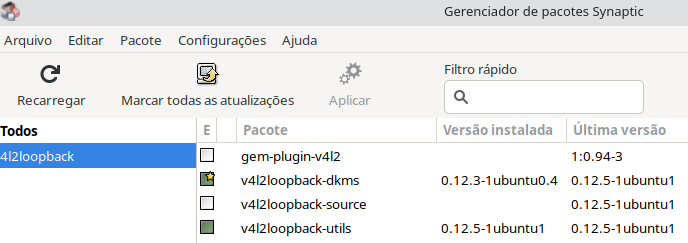

I found a Debian package for version 0.12.5-1 at https://packages.debian.org/bullseye/all/v4l2loopback-dkms/download
After reviewing this, it seems that comments on Ubuntu v4l2loopback Bug 1946660 and https://github.com/umlaeute/v4l2loopback/issues/404 (specifically, https://github.com/umlaeute/v4l2loopback/issues/404#issuecomment-1001995043 and the following two comments) conclude that this is a bug in https://github.com/umlaeute/v4l2loopback/. It looks like this is meant to be addressed in https://github.com/umlaeute/v4l2loopback/pull/359 which is still a WIP/RFC in Draft status. I'm not sure if there's anything we can do about this on OBS' side.

For Ubuntu users coming here after a recent upgrade to 22.04 LTS who are now running into this issue, the temporary downgrade/workaround discussed above still works:
- Grab
v4l2loopback-dkms_0.12.5-1_all.debfrom https://packages.debian.org/sid/all/v4l2loopback-dkms/download - Install it:
sudo dpkg -i v4l2loopback-dkms_0.12.5-1_all.deb - Hold it back so system updates don't wipe it out:
sudo apt-mark hold v4l2loopback-dkms - Remove the hold in the future when upstream gets fixed:
sudo apt-mark unhold v4l2loopback-dkms
The last version of v4l2loopback that worked properly is 0.12.5-1 and that's what we're installing above.
(Ubuntu 21.04 includes 0.12.5-1ubuntu1 and Ubuntu 22.04 includes 0.12.5-1ubuntu5)
For Ubuntu users coming here after a recent upgrade to 22.04 LTS who are now running into this issue, the temporary downgrade/workaround discussed above still works:
* Grab `v4l2loopback-dkms_0.12.5-1_all.deb` from https://packages.debian.org/sid/all/v4l2loopback-dkms/download

* Install it: `sudo dpkg -i v4l2loopback-dkms_0.12.5-1_all.deb`

* Hold it back so system updates don't wipe it out: `sudo apt-mark hold v4l2loopback-dkms`

* Remove the hold in the future when upstream gets fixed: `sudo apt-mark unhold v4l2loopback-dkms`
The last version of v4l2loopback that worked properly is 0.12.5-1 and that's what we're installing above. (Ubuntu 21.04 includes
0.12.5-1ubuntu1and Ubuntu 22.04 includes0.12.5-1ubuntu5)
for anyone looking to see if this works with Pop_OS, the error also occurs there but can be fixed with the above steps. Great work everyone on this thread to get a temporary and a permanent fix dealt with.

I have just upgraded to Pop!_OS 22.04, I have reinstalled v4l2loopback-dkms version 0.12.5-1, and I have rebooted.
OBS Studio will not restart the Virtual Camera unless I do this:
- Exit OBS Studio
sudo modprobe -r v4l2loopback- Launch OBS Studio
Am I missing something? Did something change? What can I try? I don't remember all the details from last year, when I was actively trying to figure this out.
UPDATE 2022-07-26: The version of this package found at https://launchpad.net/~flexiondotorg/+archive/ubuntu/v4l2loopback behaves correctly for me on Pop!_OS 22.04. I can stop/start the virtual camera several times in OBS Studio without restarting the application. I can also use the virtual camera in Video Facilitator and Google Meet.
On Ubuntu Studio 22.04, can confirm this issue is present. Unfortunately, both workarounds presented do not sufficiently work:
sudo modprobe -r v4l2loopback throws "modprobe: FATAL: Module v4l2loopback is in use." (even with the -f parameter)
And, while rolling back to the Debian package fixed this issue, OBS cannot access my camera / video capture device with this package.
[EDIT: The modprobe command works if you terminate everything using it; I was under the impression stopping the VC in OBS was enough for it to "not be in use" anymore, but you have to fully close OBS]

Edit to add details about https://github.com/umlaeute/v4l2loopback/pull/485
For Ubuntu users, I've made a PPA containing builds of v4l2loopback for 20.04 (Focal), 21.10 (Impish), 22.04 (Jammy), 22.10 (Kinetic) that includes backports of the following patches:
🩹 https://github.com/umlaeute/v4l2loopback/pull/477 🩹 https://github.com/umlaeute/v4l2loopback/pull/485
The patch above fixes the ability to start/stop the Virtual Camera in OBS many times. It "works for me"™
The PPA is here:
📦 https://launchpad.net/~flexiondotorg/+archive/ubuntu/v4l2loopback
Feedback welcome. If this fix works widely, I'll work towards landing in the official packages for Ubuntu.

@flexiondotorg I've just tried your PPA and while it does let me start virtual camera in OBS multiple times without having to rmmod v4l2loopback, it also prevents any other application from seeing the virtual camera device for me.
