
embark
 embark copied to clipboard
 oantolin
Sort the embark-verbose-indicator items?
I think I'm using the right term here, I'm using the embark-verbose-indicator and would like to sort the lines by key. Is this possible? Ideally there would be a command bound to toggle the sorting between key and command name.
As near as I can tell from the source this isn't possible. The closest I found was embark--formatted-bindings which says "The keybindings are returned in their order of appearance."

Turns out I asked this on reddit two months ago and you gave a solution which I'm using, but is not working.
I take it back, it is working. And to sort by key (or close to it) use car instead of cadr. It would be nice if this was easily done via a defcustom and toggle-able.
I had a vague recollection of that reddit conversation. :) I'm glad you found it. Probably a defcustom for the sort order is warranted.

I'm playing with embark again and see that the keymaps have gotten pretty large. I think this is good but I'm finding the default indicator to be less useful. I don't think I'm adding to the keymaps and here's what's displayed when doing embark-act on a command:
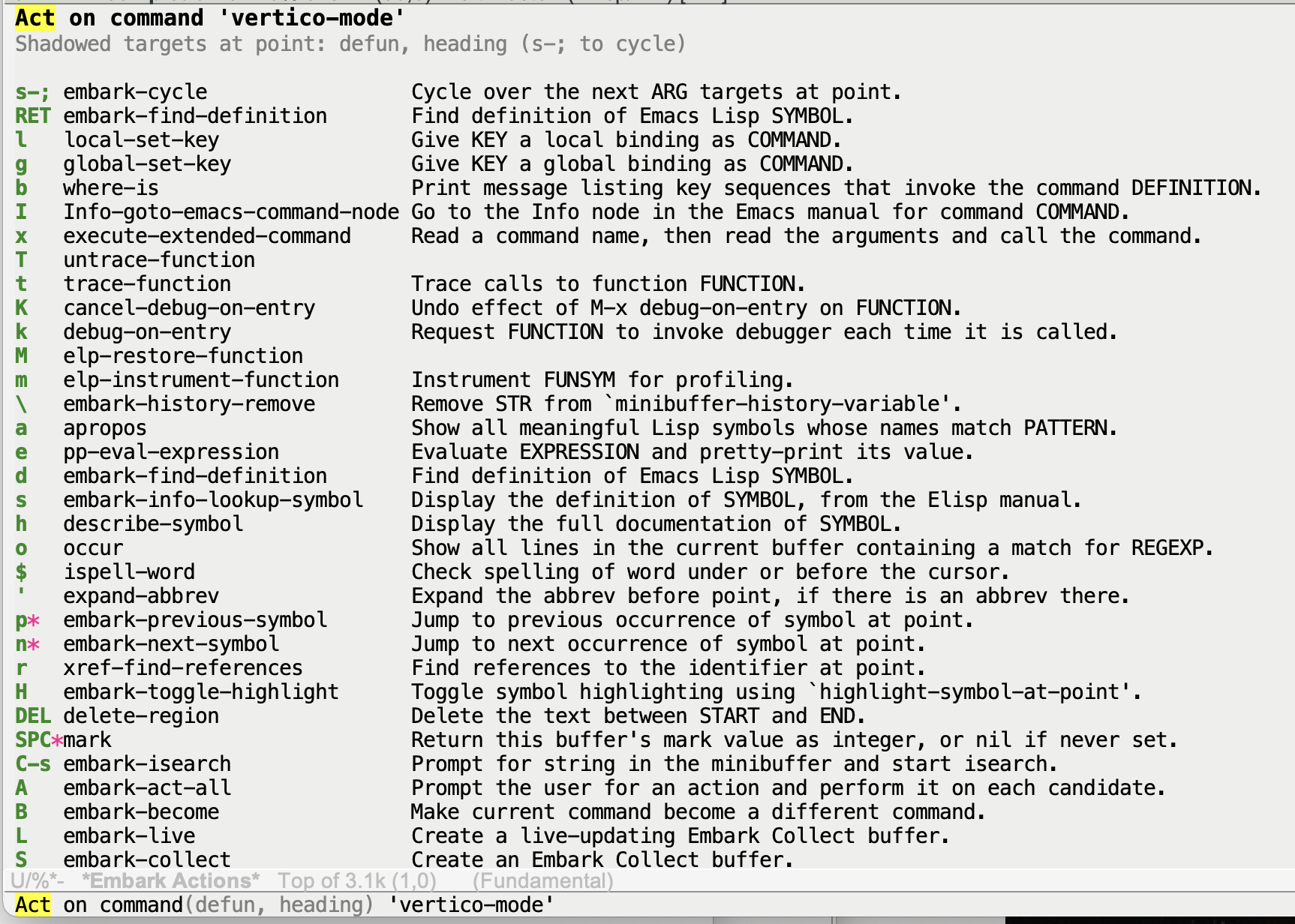
It's a lot of lines and doesn't fit in what I think is a good sized window. Even with the sorting recommended above it wasn't that helpful (of course I was looking for kill-new on w which is on the next page).
I recently learned which-key has an option, which-key-sort-uppercase-first which is surprisingly helpful when set to nil. The more commonly used commands are on lowercase bindings so showing them first is helpful. I think this might make a good default sort for the indicator.
Ouch! Since I don't often use the verbose indicator I hadn't noticed how unwieldy it has gotten. Ultimately I think the paradigm of listing a bunch of stuff and having the user read it without computer assitance is very limited. This is also the paradigm which-key uses and I don't much like it there either. Why am I scrolling or paging through things and reading everything myself when I'm most often searching for something fairly specific? Aren't computers supposed to be good at searching? I find it much more convenient to use the completing-read prompter to explore large lists of bindings using completion to zoom in on the commands I'm interested in.
As you probably know, you can switch from the keymap prompter to the completing-read prompter by pressing embark-help-key (which is C-h by default). It prompts you for an action and you can match against either the keybinding or the command name —assuming you use a completion style like substring or orderless that doesn't need matches to start at the beginning of the string!. (If the verbose indicator is open, switching to the completing-read prompter hides to avoid a duplicate display of actions). So if you can't find what you want and you do remember some bit of the name you can use that to find the command quickly. In this example when you were searching for kill-new you could type C-h ki and probably those two letters would have been enough (assuming you remembered the name had "kill" in it, which I admit is still a problem, but for that too completion helps: you can quickly sift through alternatives: "was it copy? save? kill-ring something?").
But even so, things can certainly be improved in the verbose indicator with some sensible sorting and filtering options. I think for filtering we're set: there's a embark-verbose-indicator-excluded-actions variable were you can put commands and regexps matching command names that you don't want listed in the verbose indicator. That sounds like it's good enough.
I'll look into adding a couple of sorting options. I guess we should have: by key binding with lowercase first, by key bindings sorting lower and upper case together, by command name, and the current sort which puts them in order of appearance in the keymaps, which I like because it puts the specific actions first and the ones in the embark-general-map last. (Of course that last bit is problematic when the action you want to remember is one from the embark-general-map!)
Finally, let me point out that kill-ring-save usually bound to M-w would also have worked. The action keymaps are just suggestions of shorter key bindings for actions you may want, but you can definitely use key bindings you already have muscle memory for. One that took me a while to learn is o for occur on a symbol, in fact I still sometimes use M-s o!
@oantolin Maybe the addition of the vindicator wasn't the best idea. It gives the impression that you are a big which-key fan :joy:
I have a few improvement proposals:
- We could add more information regarding quitting and repeating instead of the asterisk.
o find-file-other-window[q] ...." andSPC mark[r] ...`. I am sure we find even more helpful information to put there to confuse the user. ;) - Add a multi column mode to fit even more actions on to the screen :D
- Group by keymap (see also #219). Maybe adding empty lines would already help. In Emacs GUI one can use empty lines with reduced height or even add only thin separator lines as I have in the consult-register-window.
The question is if someone is interested in putting more work into the vindicator. I am a happy minidicator user.

I'll admit that by far my major uses of embark are Snapshot and w to copy a symbol. While I agree that search (completion) is more useful than browsing, browsing is useful to see what the capabilities are to try to learn to use it more. FWIW I've become a big fan of transients. I've defined a bunch for various things that have some unwieldy keymaps or just things I want to learn more thoroughly. Here's one I use for help, it was really useful in the top section to layout the columns and use similar keybindings per area and to layout the rows to be the same objects in similar order. I have others I commonly use for rg.el, ediff, frame commands, etc.
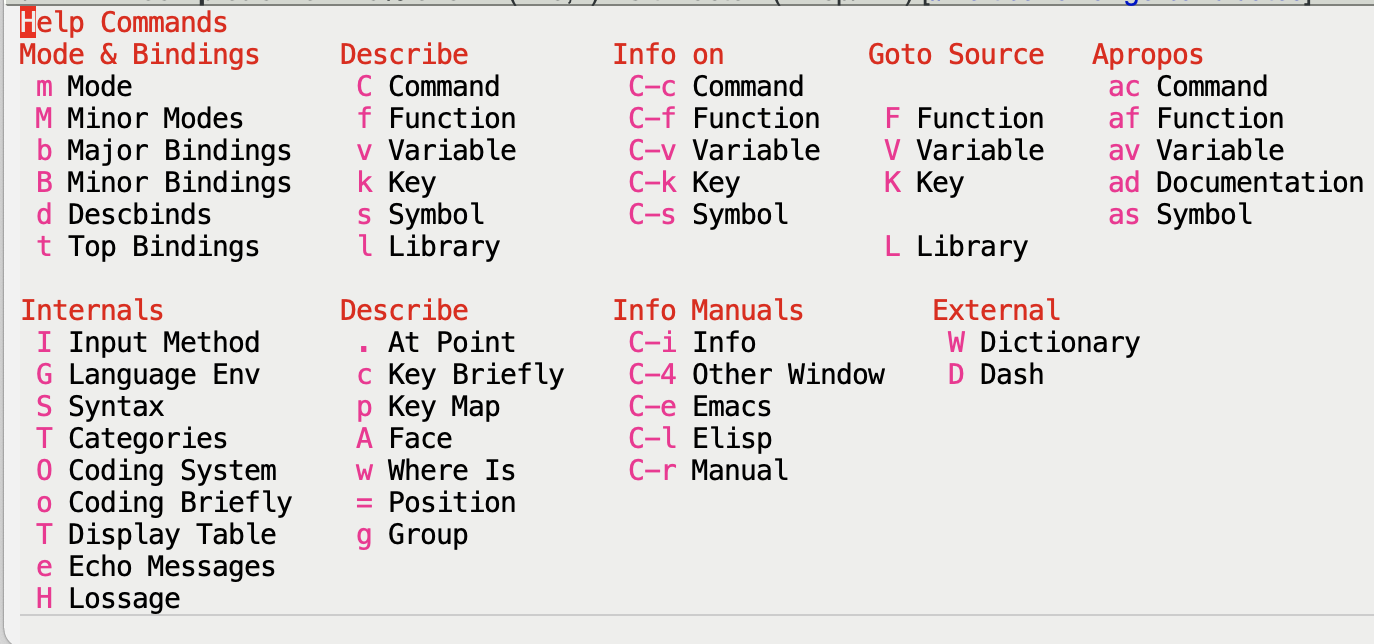
Maybe an embark indicator could do columns for each constituent keymap? So for a command the columns would be Command, Function, Symbol, Identifier, General. I think doing that would help teach the map reuse that the embark does.
Also I think the embark README could be a little tighter on this stuff and one of the headings should have the word "Help" in it 😀. I think a starting paragraph should introduce the term indicator and say how by default, after a short delay embark will show help, that C-h can be used to change to completion, and in that @ can be used to pick a key. Then get into the various options for customization of the help system. Help is pretty important for a new user and embark uses its own terminology (Indicators, Prompter) which I don't think needs to change, but could be introduced a little gentler.
@hmelman I don't think the embark indicator can do as good as transients simply because these are hand tuned. But I also don't really see the point. Emacs has many keymaps which act as menus without immediate visual feedback. There is no point in turning those into transients. Embark is nothing else than those maps, just context sensitive. The only niche I am seeing for transients is if you want to specify multiple flags for an operation that follows. But which-key users probably see this differently.
@minad I wasn't proposing embark actually use transients, just an indicator that used such a layout.
While I agree that search (completion) is more useful than browsing, browsing is useful to see what the capabilities are to try to learn to use it more.
I agree that browsing is useful to learn about what is available, @hmelman, but I'd add that I find even browsing to be significantly aided by completion.
First of all, you can just plain read through everything if you want: just scroll through all the completions or pop up a completions buffer or an embark collect buffer. This already means that the completing-read prompter could completely replace the verbose indicator. (Like Djikstra said of Algol 60, the completing-read prompter is an improvement on most of its succesors 😛).
Second, even for exploration I prefer reading through filtered subsets of a few sentences at time. Are there any actions to do with sentences?; type "sen" to find out, etc.
I think your idea, @hmelman, of an indicator without docstrings and with several columns might be nice to have. The which-key indicator of course is like that, but the column don't mean anything, they aren't one column per keymap in the inheritance chain as you proposed. As usual, I think the multi-column indicator is even better with completion, so what I actually use is the Embark completing-read prompter in Vertico's grid mode! (But again the columns don't correspond to keymaps.)
I've also sometimes wondered if a transient prompter (not indicator!) would be a good fit for Embark.
Mmh. What about a simplified keymap grouping: just put a blank line before the bindings found in embark-general-map? Maybe with "Specific actions" and "General actions" headings? In @hmelman's screenshot, the general actions start with delete-region.
I've also sometimes wondered if a transient prompter (not indicator!) would be a good fit for Embark.
I also feel that indicators and prompters should be unified somehow. Regarding completing-read vs cluttered buffers - the good thing is that we have means to move in either direction. For the one way use embark-collect and for the other way use consult-line or consult-focus-lines. These powers are unfortunately not really accessible in the case of the indicator, but in principle it is there. :)
Mmh. What about a simplified keymap grouping: just put a blank line before the bindings found in embark-general-map? Maybe with "Specific actions" and "General actions" headings? In @hmelman's screenshot, the general actions start with delete-region.
Yes, that would work too. But why not just add a line for every keymap inheritance? It shouldn't be hard to do this. (Emacs 28 comes with a separator-line face in the style of the consult-register-window. The change should be quite subtle but will still give some more helpful structure.)
Yes, that would work too. But why not just add a line for every keymap inheritance?
A line is fine. Making up a heading for each keymap in the inheritance chain seems more difficult. The advantage of just separating into specific and general is that we could add heading "Specific" and "General".
Making up a heading for each keymap in the inheritance chain seems more difficult.
I was curious if embark uses the keymap naming hints that which-key uses (which I think is a standard emacs feature). If so these could be keymap level params to embark-define-keymap and extracted to use as line or column headings.