
content
 content copied to clipboard
 nuxt
nuxt
How to auto import Components in Source Content folder?
Currently, we can use components/content folder to write components that will be used in markdown files.
But, that's not an optimum workflow especially when adding some component, which will be only used in a particular markdown file. It can be similar to Vitepress or Vuepress, but instead of writing javascript in md file, write it in nearby component, and just use it in md file.
So, it would be better to write such components alongside the markdown file itself (both in same folder inside content folder), and then directly use that component inside the markdown file.
So, how to auto import such component inside content folder?
I tried this in nuxt.config.ts: (It doesn't work)
import { defineNuxtConfig } from 'nuxt'

// https://v3.nuxtjs.org/api/configuration/nuxt.config
export default defineNuxtConfig({
  components: {
    "dirs": [
      {
        "path": "~/components/global",
        "global": true
      },
      "~/components",
      {
        "path": "~/content", // this doesn't work
        "global": true
      }
    ]
  },
  modules: ['@nuxt/content'],
  content: {
    // ignores: ['.*\\.vue'],
  }
})
It still gives this warning (if md-hello component (which is inside content folder) is used anywhere in any markdown file)
[Vue warn]: Failed to resolve component: md-hello
If this is a native custom element, make sure to exclude it from component resolution via compilerOptions.isCustomElement.

I would not recommend to mix content & components in the same directory, content lives at runtime where components are part of the build process. Later if we want to generate a manifest to make build faster, it will be harder to track.
But I won't stop you if you want to organize it that way, you have to make sure no prefix are added, you can go to http://localhost:3000/_vfs/ and open the .nuxt/components.d.ts file to see the list of components with their respective names.

The .nuxt/components.d.ts path shows list of all the Module's components, and my components in components/ or components/content/ folder, but no component from content/ folder.
Even this in nuxt.config doesn't show up any components inside content folder
components: {
    "dirs": [
      {
        "path": "~/components/global",
        "global": true
      },
      "~/components",
      {
        "path": "~/content",
        // "global": true,
        pathPrefix: false,
        preload: true,
        prefix: "md",
      }
    ]
  },
I even tried adding a local Module in modules/contentcomponents.ts
import { defineNuxtModule } from '@nuxt/kit'
import { join } from 'path'

export default defineNuxtModule({
  setup(options, nuxt) {

    nuxt.hook('components:dirs', dirs => {
      // Add ./components dir to the list
      dirs.push({
        path: join("C:/Users/manas/OneDrive/Desktop/dev/content-app/", 'content'),
        // prefix: 'md'
      })
    })
  }
})
And registering it in nuxt.config (doesn't work)
modules: ['@nuxt/content', /* './modules/contentcomponents' */],
What should be the config to pick up these components?
BTW, if that's not the recommended way, kindly let me know what can be the alternative? Because using this approach, though I know is an unconventional way, we can truly separate Code part and Articles part. We can simply focus on one Content Folder henceforth for all writing purposes, and only open the main app folder just to publish the website.
Do you mind providing a small reproduction using Stackblitz? https://stackblitz.com/github/nuxt/starter/tree/doc-driven
It will be easier for us to debug :blush:
Sure, https://stackblitz.com/edit/mm-content-auto-components?file=README.md

These tags are not resolved

@Atinux I have updated the stackblitz repo.
I found that only components in content folder are ignored. 😕 Components in totally random new folder are auto imported properly with this setting
components: {
dirs: [
      {
        "path": "~/interact", /* Components in this folder work in md files, with `MdComponentName` syntax,
                                      but change the folder to `~/content` and then it doesn't work. */
        "global": true,
        pathPrefix: false,
        preload: true,
        prefix: "md",
      }
  ]
}
Update (issue only in app's content folder) (no issue with Multi-Source folder)
So, this setting properly auto-imports.
// File: nuxt.config.js

import { defineNuxtConfig } from 'nuxt'

// https://v3.nuxtjs.org/api/configuration/nuxt.config
export default defineNuxtConfig({
  components: {
    "dirs": [
      {
        path: process.env.MM_OBSIDIAN_FOLDER + "/Personal", /* Components nested anywhere inside this folder work properly in md files
                                          which may be either in app's `content` folder or in My Obsidian Folder. */
        global: true,
        pathPrefix: false,
        preload: true,
        prefix: "md",
      },
      {
        "path": "~/content", // Components in this folder are not imported. ❌❌❌ So, still an Issue.
                                       // If these components are used in md file, they give warning in terminal (see below)
                                     // [Vue warn]: Failed to resolve component: md-pinkbox
                                     // If this is a native custom element,
                                // make sure to exclude it from component resolution via compilerOptions.isCustomElement.
        "global": true,
        pathPrefix: false,
        preload: true,
        prefix: "md",
      },
      {
        "path": "~/interact", /* Test purpose folder */ /* Components in this folder work properly in md files which may be
                                         either in app's `content` folder or in My Obsidian Folder. */
        "global": true,
        pathPrefix: false,
        preload: true,
        prefix: "md",
      }
    ]
  },
  modules: ['@nuxt/content']
  content: {
    ignores: ['.*\\.vue', '.*\\.svg', '.*\\.png', '.*\\.jpg', '.*\\.webp', '.*\\.webm', '.*\\.excalidraw', '.*\\.aac'], // Have to add all this because of Content issue
    sources: [
       {
         name: 'personal', // It will add {source: 'personal'} in each file
         prefix: '/personal', // It will add {_path: 'personal/<file...>'} in each file
         driver: 'fs',
         base: process.env.MM_OBSIDIAN_FOLDER + "/Personal",
       }
    ],
    markdown: {
      // remarkPlugins: ['remark-obsidian-links', ['remark-emoji', { emoticon: true }]], /* '@docus/remark-mdc' */
      // mdc: false
    },
  }
})
// File: MM_OBSIDIAN_FOLDER /Personal/vuecomponents/BlueBox.vue

<template>
	<div style="background:aqua; width:100px">Blue Box Text</div>
</template>
<!-- File: content/a/b.md -->
<MdBlueBox></MdBlueBox>

This works nicely.
<!-- File: MM_OBSIDIAN_FOLDER /somefile.md -->
<MdBlueBox></MdBlueBox>

Even this works nicely.
Nuxt does not load components from content dir, because the content module adds source directories into Nuxt ignore paths. (https://github.com/nuxt/content/blob/main/src/module.ts#L286-L295) Otherwise, Vite's server will rebuild on every file change.
Maybe we can ignore .vue files from this ignore pattern.

@farnabaz
That would be nice.
Also, following is another issue, but related to the link you shared.
Because here https://github.com/nuxt/content/blob/df85e8e6b81a273345103e81b6b139c2cce2998d/src/module.ts#L289, only those sources that being ignored which are inside the actual app, and not the sources coming from anywhere else on the PC.
So, just simple edits + save in some md file in non-content Source rebuilds Vite's server again and again, and the app (similar to #1398) crashes on hard refresh.
So, if possible, kindly ignore them too?
@ManasMadrecha Could you update stakblitz project to reproduce this behavior?
@farnabaz I have updated it.
- The
interactfolder's components are showing properly in md files, - but
contentfolder's components aren't showing.
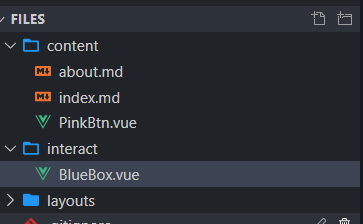
So inside index.md, <MdBlueBox></MdBlueBox> works fine, but not <MdPinkBtn></MdPinkBtn>.
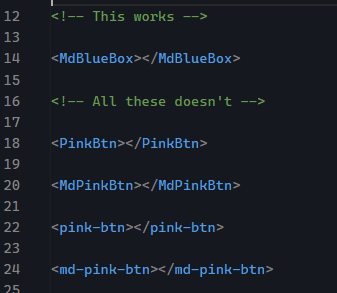
This is despite both folders being set up inside nuxt.config.

I don't know how to add local PC's folder in Module's multi-source option inside stackblitz. But on my PC, I have added the code as I wrote above, and even that folder's components are also showing properly.
So, only content folder had the issue, as you rightly pointed out.
Regarding the another issue ---> if the non-content source folder has hundreds and hundreds of md files, and you display even if just their 1-line title on app's index page, and change just one md file elsewhere on your PC, and come back and hard refresh the app's index page a couple of times, the app crashes.
I recently updated my node from 16 to 18..., and I haven't encountered this issue now, but when I was using 16, it did happen 15--20 times. And this crashing issue went away, when I removed that source folder from nuxt.config.
So, I thought maybe, that's related to the link you sent, that Vite server gets rebuilt again and again because the Module isn't ignoring that non-content folder in that line of code in above comment. Because, having hundreds and hundreds of md files in content folder doesn't cause an issue; the issue arises only when picking files from another non-content folder outside the app.
AFAIK ignore option only applies to files inside rootDir and all files outside of root dir will not be affected by this.
Also, I couldn't reproduce the issue in my simple reproduction, maybe I'm missing something. It would be nice if you create a reproduction for it (a github repo) to reproduce this behavior.
I will create a PR for Vue file inside the content directory.