
docs
 docs copied to clipboard
 nunit
nunit
Issue with Name format assignment in 3.12
According to the documentation for the "SetName" property: "The SetName property of TestCaseData allow setting the format string for the individual test case. So long as no format specifiers are used in the name, there will be no change in how this works."
With a name being assigned as "String name", we would expect no hierarchical change in the name of the test. However, the {m} section is being removed regardless. We can manually add the {m} format specifier in each case, however this conflicts with provided documentation.
There is an additional issue can resulted as part of this problem, when test case data is shared across multiple tests. If multiple items end up sharing the same name (due to the {m} being missing) it causes the remaining test information to become statically listed within MSTest, and several other Test Runners (including the Resharper test runner).
Code to replicate is included:
    [TestFixture]
    public class DemoTestClass
    {
        [Test, TestCaseSource(nameof(GetTestCases))]
        public string objectUsedAsParamImpactsName(TestObjectClass obj)
        {
            Console.Write(obj.id);
            return obj.name;
        }

        private static IEnumerable<TestCaseData> GetTestCases()
        {
            var data = new TestObjectClass() {name = "Test Name", id = 1};
            var testCase = new TestCaseData(data);
            testCase.SetName("String used as name");
            testCase.Returns("Test Name");
            yield return testCase;
        }

        [Test, TestCaseSource(nameof(GetStringTestCasesData))]
        public string stringUsedAsParamShowsCorrectname(string str)
        {
            return str;
        }

        private static IEnumerable<TestCaseData> GetStringTestCasesData()
        {
            var testCase = new TestCaseData("Test Name");
            testCase.SetName("String used as name");
            testCase.Returns("Test Name");
            yield return testCase;
        }

        public class TestObjectClass
        {
            public string name;
            public int id;
        }
    }

The wording appears in the documentation for NUnit TestSpeciicationLanguage, not in the docs for TestCaseData.
The "no change" phrase refers to the original implementation of SetName, which has been around for a long time. What it is trying to say is that SetName continues to work the same as in the past if you don't use any format specifiers. That's true, as your problem description indicates.
We added template-based naming and the ability to use it with SetName to solve the precise problem you are having. People didn't want to just use a constant string as a name. They wanted to be able to include (for example) the method name but decorate it differently based on the arguments provided. The {m} specifier allows doing just that.
If you don't provide the {m} specifier, NUnit could add it for you but that would break code for those who rely on the past and existing behavior. The template-based approach gives you the flexibility to use it or not but with that flexibility comes the need for you to tell NUnit what you want.
Note that the examples, which follow the cited line of the docs, do indicate that {m} must be added if it is wanted. That said, I agree it's a bit confusing without all the background. I'll edit the page to see if I can make it clearer.

Sorry for the lack of clarity on the documentation referenced.
In regards to my exact issue: Without the ".SetName" being used, the test name would follow: "...{Fixture Name}.{Method Name}.{Attributes}" in older version of nunit, i was able to manipulate the TestName by just using the "SetName" method without using any template modifiers, and it would be "...{Fixture Name}.{Method Name}.{Custom Name}"
In the most recent version, I can use the SetName and a basic string (as seen above) and i get the following: "...{Fixture Name}.{Custom Name}"
This causes issues with the embedded VS test runner, and the Resharper Test Runner (i didn't test any others), when it comes to a Test Fixture that contains multiple methods with the same test cases. Without appending a custom format (which causes other aesthetic issues in the runner), the fixture creates a temporary test case name (appending a [x] where x is the first unique number) but does not clear the temporary test name from the runners historical information (i'm pretty sure this is an issue with the runner, and not Nunit [i could be wrong]).
Currently working around this by adding the {m} into the format, and i've restarted VS to clear the historical information with incorrect names from the runners.
What are your thoughts?
See updated page at https://github.com/nunit/docs/wiki/Template-Based-Test-Naming
I appreciate the increased clarity on that page.
However I believe there to still be a misunderstanding (possibly on my part)
The line:
testCase.SetName("String used as name");
Expected:
"...{Fixture Name}.{Method Name}.String used as name"
Actual:
"...{Fixture Name}.String used as name"
Can you point out the passage in the document that leads you to expect the method name? Can I clarify it in some way?
Standard Name Formats Internally, NUnit uses certain standard formats unless overridden by the user. The standard format for generating a name from a test method and its arguments is:
{m}{a} // Name
In previous versions (2.6.3, and 3.0) both had this behaviour
If i take the code above, i can put it in the two different versions mentioned, there is a behaviour change.
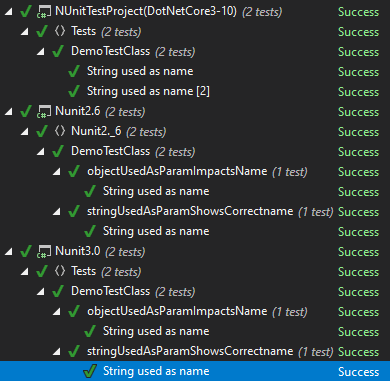
That citation has to do with the default. Once you use SetName, the default behavior is no longer operable. As it says, the name you supplies overrides the default.
Actually, I don't see a difference in the NUnit test name in any of your examples. All of them are listed as "String used as name", with the exception that TestExplorer has added "[2]" to one of them in the first example. That node - the leaf node - represents what NUnit refers to as a test case and that's the name of the test case.
I do see that TestExplorer has created a different hierarchy in each case. This can mean one of two things:
- There's some sort of bug in TestExplorer
- NUnit is passing different info to TestExplorer, which is misleading it.
- For the NUnit 2 case only, the V2 framework driver extension, which uses NUnit V2 code is working differently.
For 3, we would need to know the version of the extension being used, which correlates to some version of NUnit V2 - not the version your tests are referencing.
None of these possiblilities AFAICS represent a documentation problem. They are problems with three different pieces of software, so maybe we should figure out if there is a problem rather than continuing with the docs.
The documentation we are looking at, BTW, relates to what the framework does. It doesn't even try to deal with how things may look in the VS TestExplorer, which didn't exist when it was first created. That may signal the need for new documentation that cuts across those boundaries, but that's rather bigger than just this issue!
When I have a bit more time, I'll try to debug through your example and see if I can explain what's happening a bit better.
I appreciate the extra information. I'm not certain that this is entirely a 3.10+ issue with NUnit, however i can still replicate the previous Hierarchy behavior within the runner in older versions which leads me to believe that case 2 is the most likely scenario.
Thanks for all your help.
If you consider this an issue with the code, rather than a documentation issue, it should go to the people working on the particular code that seems to be the culprit. I'd do the following in that case:
-
Run nunit3-console using the same test and examine the output xml file. If that's OK, an NUnit problem is ruled out because it shows that NUnit is passing the proper structure to the console. You could also do this using nunitlite. If the XML has lost the hierarchical structure, then an nunit30 (i.e. framework) bug should be filed.
-
If it's not a framework bug, then file an issue with the NUnit3 test adapter. You should specify what version of the adapter and of Visual Studio you are using.
[Different people work on these things, so you'll get better results by targeting the right project. Currently, I do a bit of work on the framework and none on the adapter, for example. The docs are handled by whomever has a bit of time because things can usually be fixed on the fly.]
Sounds good. I'll look into this direction when time is available. In the meantime, (if you have time) can you verify which direction this needs to go?