
meshio
 meshio copied to clipboard
 nschloe
Element type not available: CPE4 (Q4)
One of my students wants to move our codes from Abaqus to FEniCS and meshio could be very helpful (thanks for your nice work!). However, most of our models involve linear (4-node) quadrilateral 2D elements. Apparently meshio cannot handle this yet, are there any plans to do so? (Linear and quadratic quadrilaterals are widely use in the solid mechanics community) Where can I see a list of the elements supported? Thank you

I think the plain old quad shell elements in Abaqus are S4; see http://web.mit.edu/calculix_v2.7/CalculiX/ccx_2.7/doc/ccx/node37.html. See here for a complete list of Abaqus elements supported in meshio.
CPE4 are strain/stress elements (http://web.mit.edu/calculix_v2.7/CalculiX/ccx_2.7/doc/ccx/node47.html). Many mesh formats don't have an equivalent for that, but it'd be nice if they could be read still.
I'll be happy to review PRs for it.

Thank you, Nico, for your fast reply. Yes, I am interested in solid elements, CPE4 or CPE8 are probably the most popular in the solid mechanics community. Are these kind of element supported in other formats? For example, can meshio convert Q4 elements of Ansys/GMSH/etc to Dolfin? If this has been done, I presume that the extension to Abaqus is relatively easy.
Are these kind of element supported in other formats?
Don't know. In the main readme, I put links to all supported formats, perhaps you'll find some info there.
For example, can meshio convert Q4 elements of Ansys/GMSH/etc to Dolfin?
By "Dolfin" I assume you mean XDMF, the file format used in Dolfin. Regular quad4 elements are supported by all mesh formats, so that's no problem at all. You're asking for something else though if I understand correctly.
Thank you Nico. I am asking about regular quad4 (and/or quad8) elements. You say that they are supported by "all mesh formats" - except for Abaqus I presume?
I was thinking that, if one can use meshio to convert regular quad4 from (e.g.) GMSH to Dolfin XML, then it should be easy to extend the Abaqus part of meshio to do the same thing. Am I right? (at the end of the day, what probably GMSH and Abaqus provide is the same thing, nodal coordinates and element connectivity)
Is there any particular reason why quad4 elements can be converted from most mesh formats to Dolfin XML but this has not been implemented in the Abaqus case?
Thank you
You say that they are supported by "all mesh formats" - except for Abaqus I presume?
No, Abaqus as well. They are called "S4" elements in their lingo.
I was thinking that, if one can use meshio to convert regular quad4 from (e.g.) GMSH to Dolfin XML, then it should be easy to extend the Abaqus part of meshio to do the same thing. Am I right?
That's already possible.
Dolfin XML
Dolfin XML is a legacy format and I discourage you from using it.
Is there any particular reason why quad4 elements can be converted from most mesh formats to Dolfin XML but this has not been implemented in the Abaqus case?
It is implemented.
Thank you Nico for your fast reply. However, I may be missing something. I am a very experienced Abaqus user (+6 years), and I am quite sure that regular quads (plane stress/strain 4-node solid quadrilateral elements) are named CPE4 (or CPS4) in Abaqus. S4 denotes shell elements.
When I use meshio to convert from Abaqus to Dolfin (I was trying XML, I should do XDMF) I get the error that the element is not supported. This is consistent with your previous link - CPE4 elements are not supported in the current meshio implementation. Given that it is possible with other mesh formats, I presume that this implementation will be straightforward for someone familiar with meshio.
Thank you
regular quads
Okay, maybe we're talking about something else when we say "quad". What I mean are these:
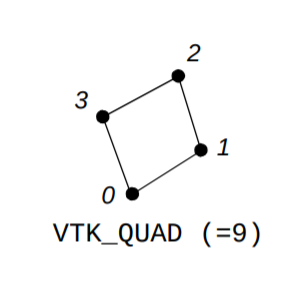
(Example taken from the VTK manual.) Those feature four points which coincide with the corners of the quadrilateral. There are variants which also feature the midpoints (quad8), and more. Is this not "S4" in Abaqus? If not, what is S4?
I see. Now it is clear why we did not understand each other. Yes, that is a quad and then meshio has the capability of converting a mesh of quads in Abaqus to XML/XMDF, is just that one has to rename the element type from CPE4 (or CPS4) to S4.
S4 in Abaqus are shell elements. And of course, the formulation of a solid and a shell element differs significantly but it is true that the meshing does not. The only difference lies in that in shell elements one defines the stack direction but this goes in the *Section definition in Abaqus and can probably be done in FEniCS.
Problem solved then, maybe is worth editing the meshio file relative to Abaqus such that when the element type is CPE4 or CPS4 the message "element type not supported" does not appear anymore but the underlying code reads it as an S4.
Thank you very much for your time!
Uhm, I just realized that there may be another difference. When employing shell elements (e.g., S4), the nodal coordinates are given in the 3D space (x,y,z). But when using solid quads you only provide with x and y coordinates. I don't know how meshio will handle this.
Plane stress or plane strain quadrilateral elements. As opposed to other elements with 4 nodes, such as shells, which are intended to model 3D structural problems with loads acting in the out-of-plane direction. See for example: https://www.javelin-tech.com/blog/2012/10/shell-vs-solid-elements/
You do not need a z coordinate if you are using solid quads, as you deal with loads acting in the x-y plane.
See for example: javelin-tech.com/blog/2012/10/shell-vs-solid-elements
This has solid hex/tet elements, and quad shell elements. Still don't get what you mean by "solid quad".
See here for the case of ANSYS (and 8 nodes, the quadratic version):
http://www.ansys.stuba.sk/html/elem_55/chapter4/ES4-145.htm
Or what is referred as Q1 in the Periodic Table of Finite Elements:
http://femtable.org/femtable.pdf
I believe that this is the most widely used element in solid mechanics.
Have you tried simply adding "CPE4" to the list:
https://github.com/nschloe/meshio/blob/master/meshio/abaqus_io.py#L35

@kinnala This is the same as basically changing in my Abaqus input file "CPE4" by "T4", as for meshio they should be identical (except for the fact that T4s have 3 nodal coordinates and CPE4 have 2).
However, I get an error: "Segmentation fault (core dumped)". I am unsure where this comes from.
Can you upload a simple example .inp-file so we could try it out? I currently don't have access to Abaqus myself.
This works for me almost out of the box BUT it seems that _read_cells in abaqus_io.py expects a line starting with *:
https://github.com/nschloe/meshio/blob/a2b733511e943e337d7230403091d12daa0874cc/meshio/abaqus_io.py#L180
so you need to add * to the end of the file.
This is probably a bug (assuming your .inp-file was created using Abaqus and was not modified afterwards).
Most likely you have only defined mesh and nothing else although in typical .inp-files you also have more data related to the problem.
_read_cells should include another stopping criterion than a line starting with * (i.e. end of file).
Yes, I removed all the information not related to the mesh, that is why there is an asterisk missing.
May I ask, you just did meshio-convert abaqus_mesh_ex.inp out.xml?
No, I cloned the repository via git clone, modified the file and run the following in ipython:
In [1]: import meshio

In [2]: mesh = meshio.read("abaqus_mesh_ex.inp")

In [3]: mesh.points
Out[3]:
array([[  0.        , -59.1693649 ],
       [  1.60000002, -62.1937714 ],
       [  6.        , -57.4229317 ],
       ...,
       [  8.05196381,  37.4882774 ],
       [  8.52560902,  37.4882774 ],
       [  9.02530479,  36.9946899 ]])
When I do that I get the error "KeyError: '.inp'"
And when I type "meshio-convert abaqus_mesh_ex.inp out.xml" I get "AssertionError", and when I type "meshio-convert abaqus_mesh_ex.inp out.xdmf" I get "ImportError: No module named lxml".
When I do that I get the error "KeyError: '.inp'"
We need the entire error message to diagnose. Anyhow, sounds like you're using an old meshio version.
"ImportError: No module named lxml".
You know what that means: Install lxml!
Thank you for your comments. I've made some progress.
I can do what @kinnala suggests if I use python (and not python3). It seems that I've installed meshio in python2 (the one by default in Ubuntu).
By installing a couple of modules, meshio-convert abaqus_mesh_ex.inp out.xdmf seems to work, at least it returns an .h5 file and an .xdmf file.
I am trying to plot the mesh and use it in a simple calculation to confirm that everything is fine. So far without success (did I mention that I am a newbie to FEniCS?)
Thank you Nico. I was aware of that. I have tried following this: https://fenicsproject.org/pub/course/lectures/2017-nordic-phdcourse/lecture_20_tools_for_visualisation.pdf
But it seems that some of the instructions given do not work (older versions?).
Let me clarify that the mesh looks good in ParaView if the .xdmf file is opened. I would just like to confirm by running some analysis when time allows.
If I see correctly, there are no actionable items here for us. Feel free to reopen if something isn't working as expected!