node-red
 node-red copied to clipboard
 node-red
Inject node with cronti
- [x] New feature (non-breaking change which adds functionality)
Proposed changes
The Inject node was failing in advanced time settings. That's why projects had to install external cron packages.
I used the cronti package to set up a advanced cron. The cronti package converts the timing expressions used in daily life into crontime expression. The inject node needed such a package. With the cronti package, you can develop an interface quite easily.
Cronti briefly, it translates daily expressible recipes on the calendar into crontime expression. Produces a valid crontime expression. Link for detail.
What's New?
- Create cron of the spesific date: This feature is used when you want it to be triggered once every year on the same calendar day. For example, on June 4, 2022, on June 4, 2023, on June 4, 2024... By default, the time is set to 12:30. Time can be entered wherever the date is entered (datetime type). This feature is used when the selected day is desired to be repeated every month and every year. By default, the time is set to 12:30. Time can be entered wherever the date is entered (datetime type). For example, June 4th, July 4th, August 4th, September 4th 2022, 2023, 2024...
- Create the cron for the week the date is in: This feature is used when you want the week of the specified calendar day to be repeated every year, triggering every day of the week. For example, the days to trigger for June 4, 2022 are May 30, May 31, June 1, June 2, June 3, June 4, and June 5, 2022, 2023, 2024... By default, the time is set to 12:30. Wherever the date is entered, the time can be entered (datetime type). In addition, the starting day of the week may differ depending on the country. In the example I gave, the day of the week is Monday.
- Create a cron that will run at regular intervals between two dates: This feature is used when you want it to be triggered every day or at certain periods, repeating every year between two specified calendar days. For example, it can be triggered every day from June 4, 2022 to July 10, 2022... In a different alternative example, it can be triggered every 2 days between June 8, 2023 and July 5, 2023... Years don't matter here. For ease of use, the selection screen can be simplified to select the day, month, hour, minute and period. By default it is set to 12:30. Time can be entered wherever a date is entered (datetime type)
- Create cron with various combinations of month, week, weekdays, hours, minutes and tick: This feature takes shape when fully triggered. Each entry is optional. Some can be filled if desired. All can be filled if desired. If desired, only 1 can be filled. All are left blank if desired. By default, the time is set to 12:30. Time can be entered wherever the date is entered (datetime type)
More Examples:
- If only the month(0..11) and week(0,1,2,-1) parameter is filled, the crontime expression that will be triggered every day from the first day of the week to the last day of that week is returned.
- If only the month(0..11), week(0,1,2,-1) and weekdays(0..6) parameters are populated, the crontime expression for that weekday is returned.
- If only the week(0,1,2,-1) parameter is populated, the crontime expression that will be triggered every day during that week is returned. Except for the last week of the month(-1).
- If only the month(0..11) parameter is populated, the crontime expression is returned for each day in that month.
- If only the weekdays(0..6) parameter is populated, the crontime expression is returned for this weekday every month.
- If only the month(0..11) and weekdays(0..6) parameters are populated, the crontime expression is returned for these weekdays of this month.
- If no parameters are filled in, the crontime expression is returned for each day of each month.
- Enter valid cron expression: For people who know how to use crontime expressions, it is a feature used to schedule from a shortcut. For example 0 2 * * *...
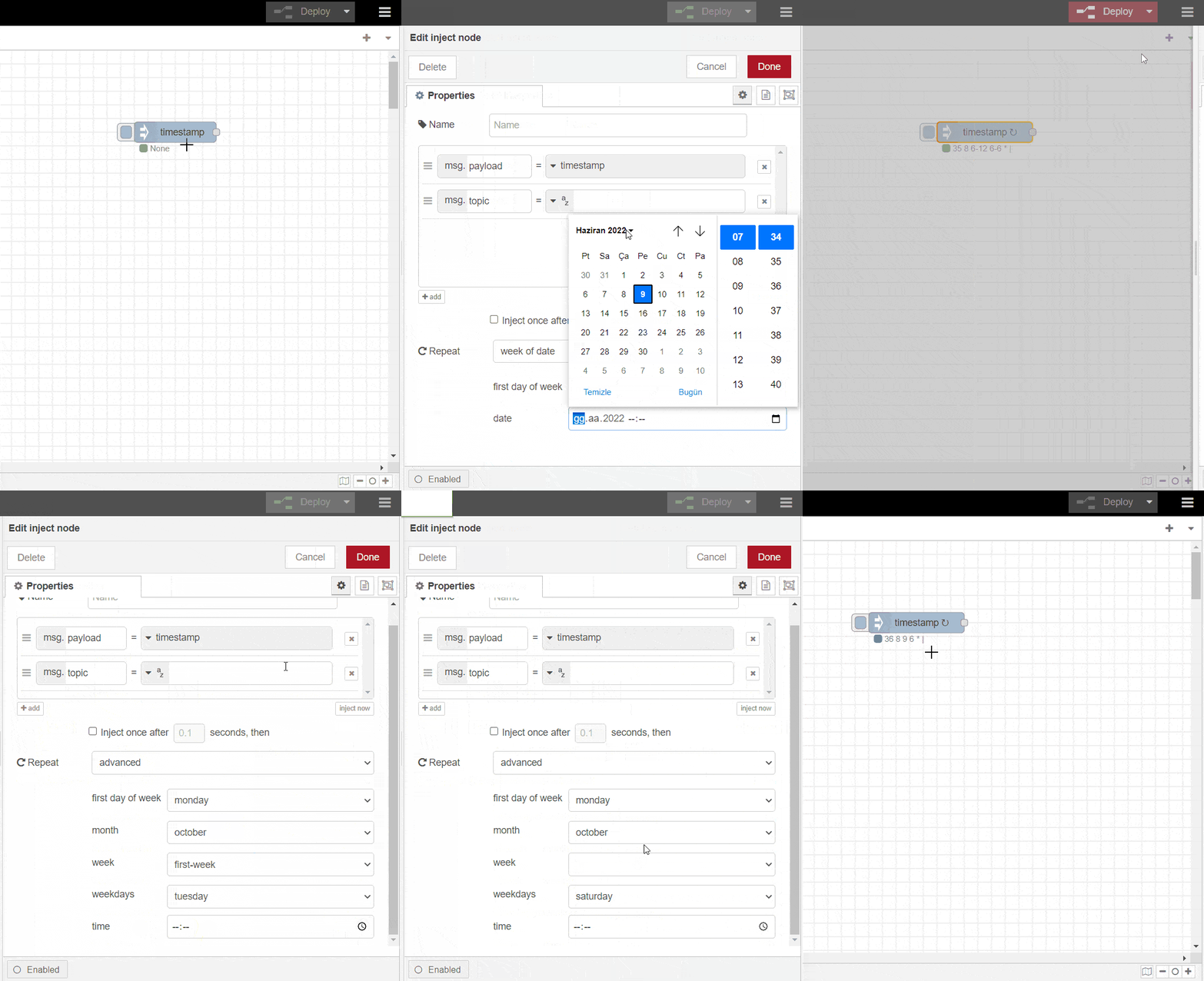
Try this version of core inject node with cronti from github package.
Node-Red Package: GitHub - buglss/node-red-clone-inject-with-cronti: It is an extended clone of core inject node with cronti package.
The cronti package has no dependencies if you are concerned about dependency management. Written directly in spaghetti javascript. Since I use the cronti package in my development for the Node-red core inject node, there is never any problem with dependencies.
Why extend to the core package with this feature instead of using similar additive node packages?
- Since the cronti package is used, it does not break the simplicity of the core inject node in the frontend. By expanding the scope of simply and well, there will be no need to install additional packages and accordingly increase the dependencies in the projects.
- You will not lose anything when you expand the core inject node with this enhancement. There will be no clutter of code side and no clutter on the frontend. The core inject node will not become heavy, it will remain slim.
- One more dependency that you have to check will not be added. On the contrary, it will be an additional feature that you can easily include and exclude without any effort.
Checklist
- [x] I have read the contribution guidelines
- [x] I have run
gruntto verify the unit tests pass

Thank you for this contribution, could you please do the following:
- Please make sure you rebase your change set against the head of the dev branch so it only includes your changes. (This will make it a lot easier to review)
- Can you add a link to the Slack or Forum post where this was change was discussed (as mentioned in the contribution guidelines for Pull Requests.
Thanks,

Thank you for this contribution, could you please do the following:
- Please make sure you rebase your change set against the head of the dev branch so it only includes your changes. (This will make it a lot easier to review)
- Can you add a link to the Slack or Forum post where this was change was discussed (as mentioned in the contribution guidelines for Pull Requests.
Thanks,
Thank you for guiding me. Ok i will do it as soon as possible.
Hi,
I have completed.
- [X] Please make sure you rebase your change set against the head of the dev branch so it only includes your changes. (This will make it a lot easier to review) (59aa58714aa41f2bb2fdded2d3b69785808dc5ea) (https://github.com/buglss/node-red/tree/inject-node-with-cronti)
- [X] Can you add a link to the Slack or Forum post where this was change was discussed (as mentioned in the contribution guidelines for Pull Requests. (https://discourse.nodered.org/t/inject-node-with-cronti/63438)
Thanks.
The cronti package version used in the inject node has been upgraded. Release version is v3.0.0.
npm: https://www.npmjs.com/package/cronti Release Notes: https://github.com/buglss/cronti/releases/tag/v3.0.0
Summary:
- onDay method has been removed. Instead onDate method has been extended. (https://github.com/buglss/cronti/commit/f75fa1844daae80e7d31b663da2d38c7d2b317b1)
- License changed GPL-3.0 to Apache-2.0 (https://github.com/buglss/cronti/commit/38d8708067722aa74b1e6c7c6a24d631d5271f12)

The committers listed above are authorized under a signed CLA.
- :white_check_mark: login: buglss / name: Levent Sencer Şahin (59aa58714aa41f2bb2fdded2d3b69785808dc5ea, 6a69ce9fbfa4718a58d6348eb069023c54b3f451)
![linux-foundation-easycla[bot] avatar](https://avatars.githubusercontent.com/in/17893?v=4 "Published by a pub.dev verified publisher")
Given we do not plan to integrate cronti into the core Inject node, I'm going to close this PR.