
re4_tweaks
 re4_tweaks copied to clipboard
 nipkownix
`D3DCREATE_MULTITHREADED` flag removal
E: here's a build if anyone wants to try this out, should give some performance improvement, might help if you struggle to reach 60 - game might crash on launch sometimes (it's usually been fine for me lately though), but if you manage to load in it should hopefully be stable: re4_tweaks1.7.4-RemoveD3DCREATE_MULTITHREADED.zip
Like mentioned at https://github.com/nipkownix/re4_tweaks/issues/5#issuecomment-954563654, the game uses the D3DCREATE_MULTITHREADED flag when creating the D3D9 device, which adds extra thread safety to the D3D funcs at a cost of performance.
Removing games frame cap showed removing this flag allowed going from 220FPS to 270FPS in one area, would probably be good for people that struggle running the game at 60 and end up with game slowdown due to it.
Unfortunately the game seems pretty unstable with this flag removed, obviously they didn't bother making it thread safe on Windows - however, it seems the game does have a pair of nullsubs around certain graphics-threading related things, kinda seems like they were meant to be a pair of funcs for locking/unlocking a mutex, but that's just a guess.
(On X360 the D3DCREATE_MULTITHREADED flag is apparently non-functional, not sure if that means X360 always had thread-safety stuff added, or maybe X360 devs had to be more careful with threading, which would explain the nullsub pair - but doesn't explain why they removed the code inside ;_;)
So I did another one of my experiments, hooked the two nullsubs to call lock()/unlock() on a std::recursive_mutex - sadly this resulted in a crash on boot, seems the UnlockMutex hook was being called before LockMutex for some reason, maybe the code for locking it got removed or something, just got around that by adding a hack to skip first call to it. (E: no longer needed)
Then the game just started hanging before intro movie, one thread was waiting on the mutex lock to get unlocked by another first, some reason there's a few LockMutex calls in the game without accompanying UnlockMutex after it - likely an accident, since the func for locking mutex also returns the D3D pointer, they probably added some Win32 specific code and needed a way to get D3D device, and didn't bother adding UnlockMutex afterward since Win32 didn't actually need it. (seems this missing UnlockMutex only happens around calls to D3DXCreateTextureFromFileInMemoryEx - guessing that func was probably added for Windows)
Hooking the calls to that D3DX func & making it use UnlockMutex afterwards seems to let it continue though, managed to load into a game fine with it, + haven't had any crashes yet (besides a crash on exit, probably not too hard to fix though)
(not sure how proper that fix is though, game seems to be doing something with a ptr returned from that D3DX func, so maybe it should only be unlocking after it's done with the ptr, instead of right after calling D3DX, not sure...)
Need to do more testing with it (only tried like 5 minutes in game so far), might need to make Imgui make use of those mutex funcs too if that also uses the D3D device. (also need to check performance with it now, could be adding this mutex stuff slows it down the same as the thread flag)
Code:
#include <mutex>
[...]

std::recursive_mutex g_D3DMutex;

void __cdecl D3D_LockMutex_Hook() // hooks 0x9391C0
{
	g_D3DMutex.lock();
}

void __cdecl D3D_UnlockMutex_Hook() // hooks 0x9391D0
{
	g_D3DMutex.unlock();
}

int(__stdcall* D3DXCreateTextureFromFileInMemoryEx_Orig)(
	int a1,
	int a2,
	int a3,
	int a4,
	int a5,
	int a6,
	int a7,
	int a8,
	int a9,
	int a10,
	int a11,
	int a12,
	int a13,
	int a14,
	int a15);

int __stdcall D3DXCreateTextureFromFileInMemoryEx_Hook(
	int a1,
	int a2,
	int a3,
	int a4,
	int a5,
	int a6,
	int a7,
	int a8,
	int a9,
	int a10,
	int a11,
	int a12,
	int a13,
	int a14,
	int a15)
{
	auto ret = D3DXCreateTextureFromFileInMemoryEx_Orig(a1, a2, a3, a4, a5, a6, a7, a8, a9, a10, a11, a12, a13, a14, a15);
	D3D_UnlockMutex_Hook();
	return ret;
}

void ThreadFix_Hook()
{
	const int D3DCREATE_MULTITHREADED = 4;
	// Clear D3DCREATE_MULTITHREADED flag from D3D CreateDevice call
	auto pattern = hook::pattern("68 ? ? ? ? 68 ? ? ? ? 6A 44 56 8B 35");
	auto ptr_CreateDevice_BehaviorFlags = pattern.count(1).get(0).get<uint8_t>(0xB);
	Patch(ptr_CreateDevice_BehaviorFlags, uint8_t(*ptr_CreateDevice_BehaviorFlags & ~D3DCREATE_MULTITHREADED));

	// Game has a pair of nullsubs that are always called just before graphics-threading related code is used
	// Kinda seems like they were meant to be a pair of funcs for locking/unlocking a mutex, but that's just a guess.
	// Restore these so that flag removal above can be made more stable
	pattern = hook::pattern("E8 ? ? ? ? A1 ? ? ? ? A3 ? ? ? ? 89 1D ? ? ? ? A3 ? ? ? ? E8 ? ? ? ? 8B 35");
	auto ptr_D3D_LockMutex = injector::GetBranchDestination(pattern.count(1).get(0).get<uint32_t>(0)).as_int();
	InjectHook(ptr_D3D_LockMutex, D3D_LockMutex_Hook);

	pattern = hook::pattern("E8 ? ? ? ? 68 ? ? ? ? FF 15 ? ? ? ? A1 ? ? ? ? 50 FF 15");
	auto ptr_D3D_UnlockMutex = injector::GetBranchDestination(pattern.count(1).get(0).get<uint32_t>(0)).as_int();
	InjectHook(ptr_D3D_UnlockMutex, D3D_UnlockMutex_Hook);

	// Game calls D3D_LockDevice before D3DXCreateTextureFromFileInMemoryEx
	// LockDevice returns pointer to D3D device, so they probably used that as a quick way to retrieve it, but forgot/didn't care about using UnlockDevice afterward
	// Hook the misbehaving calls so we can add UnlockMutex calls to them
	// (not sure if this is safest way to do it though - game seems to do something with the ptr returned by D3DXCreate...
	// maybe UnlockMutex should be after it's finished with that ptr, would be harder to patch in tho...)
	pattern = hook::pattern("53 E8 ? ? ? ? 50 E8 ? ? ? ? 8B 36 8B 0E 8D 55 ?");
	auto ptr_caller1 = pattern.count(1).get(0).get<uint32_t>(7); // 0x98009D
	ReadCall(ptr_caller1, D3DXCreateTextureFromFileInMemoryEx_Orig);
	InjectHook(ptr_caller1, D3DXCreateTextureFromFileInMemoryEx_Hook);

	pattern = hook::pattern("57 E8 ? ? ? ? 50 E8 ? ? ? ? 8B 06 8B 10 8B 52 ? 8D 4D ?"); // 0x980234 & 0x981049
	InjectHook(pattern.count(2).get(0).get<uint32_t>(7), D3DXCreateTextureFromFileInMemoryEx_Hook);
	InjectHook(pattern.count(2).get(1).get<uint32_t>(7), D3DXCreateTextureFromFileInMemoryEx_Hook);

	pattern = hook::pattern("53 E8 ? ? ? ? 50 E8 ? ? ? ? 8B 36 8B 0E 8D 55 ? 52"); // 0x9E4B82, unused?
	InjectHook(pattern.count(1).get(0).get<uint32_t>(7), D3DXCreateTextureFromFileInMemoryEx_Hook);

	pattern = hook::pattern("57 E8 ? ? ? ? 50 E8 ? ? ? ? 8D 4D ? 8B F8 8B 06 8B 10 8B 52 ?"); // 0x9E6619
	InjectHook(pattern.count(1).get(0).get<uint32_t>(7), D3DXCreateTextureFromFileInMemoryEx_Hook);

	// Lone UnlockMutex call at 0x955792 - doesn't have a LockMutex call before it for some reason
	// this would cause game crash on startup, and skipping it caused game crash on exit - nopping it instead seems to fix both
	pattern = hook::pattern("89 0D ? ? ? ? A3 ? ? ? ? 89 99 ? ? ? ? 89 99 ? ? ? ? E8 ? ? ? ?");
	Nop(pattern.count(1).get(0).get<uint8_t>(0x17), 5);
}

Oh, this looks interesting!
BTW does anyone know any perf-heavy levels worth trying with this?
I remember people back in the day were reporting slowdowns in this room, while fighting the armors:
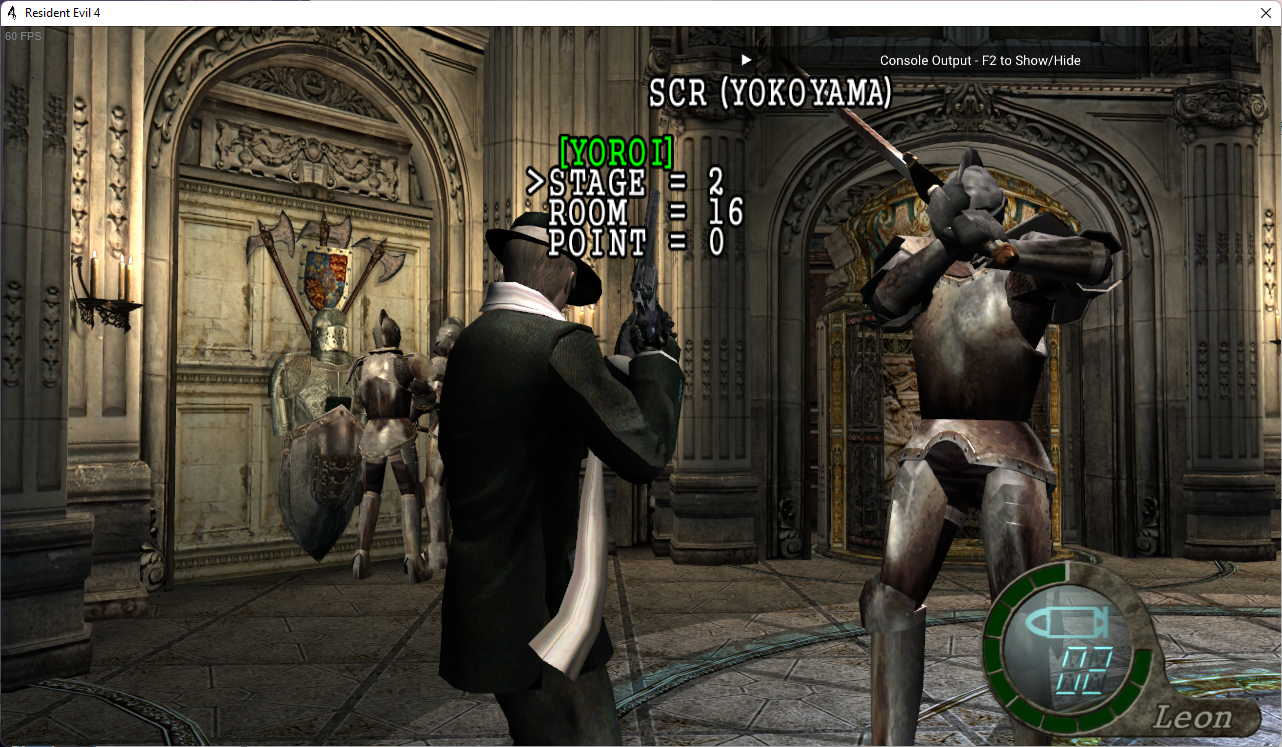
It even happened to me once or twice, but my computer was worse back then.

Had a look at the X360 build, seems those nullsubs are filled in there, not entirely sure what the code is doing though (looks like LockMutex copies thread ID into somewhere (maybe pG[0x2B08]), while UnlockMutex just resets it to 0 - doesn't seem either of those funcs waits/locks anything though... maybe another part of code is checking that 0x2B08 value against running thread ID somewhere)
Looks like 0x2B08 does get compared to GetCurrentThreadId at 0x8259F59C/0x825A76E4/0x825A79E0/0x825B2D10 (x360), kinda seems like those are maybe X360 SDK functions though (since they use kernel calls like VdSwap which games wouldn't have access to), guess that probably means the function that sets 0x2B08 is an SDK function too - maybe X360 had something that allowed setting a thread as the main render thread or something.
In any case I'm pretty sure X360 didn't use mutexes like the code above, but maybe using mutex can give the same effect as X360 had, need to play through with it some more.
Managed to get somewhere with D3D9Ex (as mentioned at https://github.com/nipkownix/re4_tweaks/issues/250#issuecomment-1176835475)
First extended our hook_Direct3DDevice9 stuff with the Ex functions and made it use Direct3DCreate9Ex, but that just resulted in game crashing on launch.
Eventually found out that Ex doesn't support D3DPOOL_MANAGED, which UHD seems to make use of in a bunch of spots, luckily we can just change those to D3DPOOL_DEFAULT and it seems to be fine for now
(device lost errors will require us to handle recreating textures by ourselves though apparently, hopefully won't be too hard to figure out)
Didn't have much luck with it initially but seems there was 1 spot using it that I hadn't mapped out in IDA yet, with that and all the other uses patched the game actually seems to run fine.
Only noticed two issues with it so far:
- video playback thru sofdec is broken with a green screen for some reason (even though I patched the MANAGED flag for it...)
- loading a game while already in-game seems to show a previous frame on the "loading..." screen for a couple frames for some reason
Haven't tested it all that much yet though so could be more too.
Tried out removing the D3DCREATE_MULTITHREADED flag and game actually seems pretty stable now, only issue I've seen with that is one time game launched to black screen and hung.
As long as game is actually stable once loaded in black screen on launch x% of the time isn't really a huge deal IMO, if it lets us give user better performance.
(was mostly wanting to use 9Ex so we could use PresentEx to hopefully fix some multithreaded issues, but already seems more stable without even needing it... guess 9Ex might be handling multithread stuff better)
Will have to try checking uncapped framerate of that vs normal DX9 later on.
Awesome work!
I wonder how possible it would be to do something like this or this. I had a go at it when I first pushed our hook_Direct3DDevice9, but never go too far with it.
Darn, patching out the framelimiter showed 9Ex was still getting hung at the Present call, none of PresentEx flags seemed to help.
APITrace (only tool that could reproduce the hang) showed that normally game would call EndScene right before Present, but with framelimiter + multithread patch it seemed some texture was being modified after EndScene but before Present, which must have messed things up.
Took a little while to dig into it but seems it's some of the D3DXCreateTextureFromFileInMemoryEx calls that were doing that, the mutex stuff in OP was actually meant to help with threading issues around those D3DX calls, so added the mutex stuff back in, and now the hang seems fixed 😸
Framelimiter patch showed +~40-~60 FPS with that, maybe will try making a PR with just that mutex stuff + multithread patch soon, so more people could try it out and see if it's working well or not.
(think some of the CPU usage issues could be related to how their framelimiter works though, seems to be a busy loop that occasionally uses Sleep(0) to yield the CPU, maybe could be improved somehow)
Just to note it down, framelimiter patch for 1.1.0:
	Nop(0x654A9C, 2);
	Nop(0x654AAB, 2);
	Nop(0x654A7D, 0x18);
(think some of the CPU usage issues could be related to how their framelimiter works though, seems to be a busy loop that occasionally uses Sleep(0) to yield the CPU, maybe could be improved somehow)
Did an experiment with replacing games framelimiter with https://github.com/ThirteenAG/d3d9-wrapper/blob/c1480b0c1b40e0ba7b55b8660bd67f911a967421/source/dllmain.cpp#L46, CPU usage on main menu went from 7% to 1%, ingame from 10% to 4% 😮 (using the FPS_ACCURATE mode of that limiter)
Maybe worth looking into more, might need to customize it with the EventMgr::IsAliveEvt stuff the games limiter checks for though.
Ohh, I remember when the PR for that frame limiter was opened. Looks pretty good, and I thought about bringing it over, but I didn't think it would make such a great difference. Exciting stuff!
I tried replacing 0x654AAB with empty instructions, 0x654A9C. The CPU usage did decrease. But the game is much faster.

I tried replacing 0x654AAB with empty instructions, 0x654A9C. The CPU usage did decrease. But the game is much faster.
For now you might be able to use an external framelimiter to fix the speed issue, if you use nVidia there's one in the NV control panel:
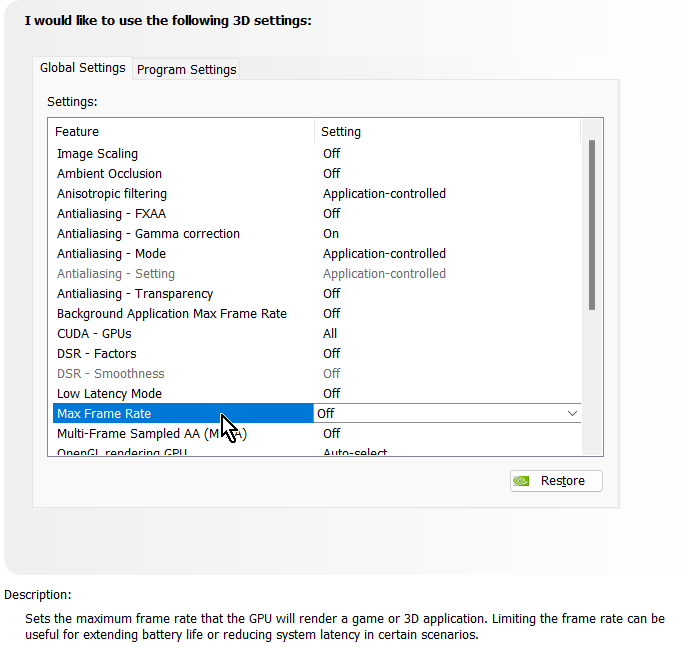 Not sure if game will have the correct pG->deltaTime value set though, animations and other stuff use that to tell what rate to animate at, normally the games framelimit code sets that up, might need to add a patch to set that to 0.5 (60fps) or 1 (30fps) manually.
If anyone would like to try the new CPU-usage-reduced framelimiter, here's a build which has it implemented: dinput8-newFramelimiter.zip
Like mentioned above:
CPU usage on main menu went from 7% to 1%, ingame from 10% to 4%
Should work across all the usual EXEs except 1.0.6 debug, guess something is slightly different there which breaks the sigs, will fix that up later.
Source code at https://github.com/emoose/re4_tweaks/commit/223368b15fe4cbe729c2493dee31ff7c1d6ad362, will make a PR once I know it's stable (and once I get 1.0.6 debug working)
I tested this building, it works very well, my CPU usage is reduced from 40% to about 20%.
Glad to hear! Let's just hope everything is still stable with the new limiter too.
I did just notice some in-engine cutscenes seem to disable the limiter and run at 1000FPS+, must be the IsAliveEvt stuff, guess I'm not handling it properly yet.. will look into it some more.
E: made a PR for the framelimiter, updates will be posted there: https://github.com/nipkownix/re4_tweaks/pull/257
Would appreciate anyone giving it a try!
Update for the new framelimiter, should fix issue with cutscenes: dinput8-newFramelimiter-v2a.zip
(if you grabbed v2, replace it with v2a above)
This also adds an experimental DisableFixedFrametime option to the [DEBUG] section at end of dinput8.ini, if that's set to true then the actual elapsed frametime will get passed along to game, which should almost eliminate any slowdown when FPS doesn't reach the actual games framerate setting.
Many things might act strange when they aren't using a fixed frametime though, I expect audio will probably have some issues at least...
E: also a small bonus with this, if you edit your games config.ini you can set variableframerate to whatever you like, and game should handle it mostly fine, of course there's many issues with going above 60FPS though (see #50), but it's definitely possible with this. (make sure to set IgnoreFPSWarning in dinput8.ini too)