tailwind
 tailwind copied to clipboard
 ngneat
Unhandled exception, keyword "id" not supported. use "$id" for schema ID
I'm submitting a...
[ ] Regression (a behavior that used to work and stopped working in a new release)
[X] Bug report
[ ] Performance issue
[ ] Feature request
[ ] Documentation issue or request
[ ] Support request
[ ] Other... Please describe:
Current behavior
Running ng add @ngneat/tailwind throws the following
An unhandled exception occurred: NOT SUPPORTED: keyword "id", use "$id" for schema ID
See "path/to/log" for further details.
Expected behavior
Running ng add @ngneat/tailwind proceeds normally.
Minimal reproduction of the problem with instructions
Create a new angular app with angular 13.
ng new test ng add @ngneat/tailwind
What is the motivation / use case for changing the behavior?
My supposition is due to angular advancing to version 13 and deprecating old stuff
Environment
Angular version: 13.0.1


For Tooling issues:
- Node version: v14.17.6
- Platform: Win10


i am also facing the same issue when i tried to install this
ng add @ngneat/tailwind@6
ℹ Using package manager: yarn✔ Package information loaded.
The package @ngneat/tailwind@6 will be installed and executed.
Would you like to proceed? Yes
✔ Package successfully installed.
An unhandled exception occurred: NOT SUPPORTED: keyword "id", use "$id" for schema ID
See "C:\Users\DELL\AppData\Local\Temp\ng-QXseA9\angular-errors.log" for further details.
i checked the errors.log file and i got this
[error] Error: NOT SUPPORTED: keyword "id", use "$id" for schema ID at Object.code (C:\Users\DELL\Documents\sample angular projects\EmptyProjectForTesting\node_modules@angular-devkit\core\node_modules\ajv\dist\vocabularies\core\id.js:6:15) at keywordCode (C:\Users\DELL\Documents\sample angular projects\EmptyProjectForTesting\node_modules@angular-devkit\core\node_modules\ajv\dist\compile\validate\index.js:454:13) at C:\Users\DELL\Documents\sample angular projects\EmptyProjectForTesting\node_modules@angular-devkit\core\node_modules\ajv\dist\compile\validate\index.js:222:17 at CodeGen.code (C:\Users\DELL\Documents\sample angular projects\EmptyProjectForTesting\node_modules@angular-devkit\core\node_modules\ajv\dist\compile\codegen\index.js:439:13) at CodeGen.block (C:\Users\DELL\Documents\sample angular projects\EmptyProjectForTesting\node_modules@angular-devkit\core\node_modules\ajv\dist\compile\codegen\index.js:568:18) at iterateKeywords (C:\Users\DELL\Documents\sample angular projects\EmptyProjectForTesting\node_modules@angular-devkit\core\node_modules\ajv\dist\compile\validate\index.js:219:9) at groupKeywords (C:\Users\DELL\Documents\sample angular projects\EmptyProjectForTesting\node_modules@angular-devkit\core\node_modules\ajv\dist\compile\validate\index.js:208:13) at C:\Users\DELL\Documents\sample angular projects\EmptyProjectForTesting\node_modules@angular-devkit\core\node_modules\ajv\dist\compile\validate\index.js:192:13 at CodeGen.code (C:\Users\DELL\Documents\sample angular projects\EmptyProjectForTesting\node_modules@angular-devkit\core\node_modules\ajv\dist\compile\codegen\index.js:439:13) at CodeGen.block (C:\Users\DELL\Documents\sample angular projects\EmptyProjectForTesting\node_modules@angular-devkit\core\node_modules\ajv\dist\compile\codegen\index.js:568:18)
my system config is :
Angular CLI: 13.0.2 Node: 14.18.0 Package Manager: yarn 1.22.17 OS: win32 x64
Angular: 13.0.1 ... animations, common, compiler, compiler-cli, core, forms ... platform-browser, platform-browser-dynamic, router
Package Version
@angular-devkit/architect 0.1300.2 @angular-devkit/build-angular 13.0.2 @angular-devkit/core 13.0.2 @angular-devkit/schematics 13.0.2 @angular/cdk 13.0.0 @angular/cli 13.0.2 @angular/material 13.0.0 @schematics/angular 13.0.2 rxjs 7.4.0 typescript 4.4.4
kindly fix this ASAP!

Also happens for @ngneat/tailwind:nx-setup:
nx generate @ngneat/tailwind:nx-setup --project=projectName --no-interactive --dry Error: NOT SUPPORTED: keyword "id", use "$id" for schema ID
seems to be same errors and same files ( vacabularies/core/id.js:6:15 )

Thanks to @kingjordan for his solution.
-
Install the dependencies
npm install tailwindcss@latest @ngneat/tailwind@latest -
Create a configuration file for Tailwind CSS at the root of your workspace.
npx tailwindcss init -
Add purge configurations.
module.exports = {
  ...
  purge: {
    enabled: guessProductionMode(),
    content: [ "<path/to/project/**/*.{html, ts, jsx, etc}>" ],
  },
  ...
}
- Import Tailwind CSS styles into the root styles file of your project.
@import 'tailwindcss/base';
@import 'tailwindcss/components';
@import 'tailwindcss/utilities';

Also downgrading the Node version to lts-fermium and Angular version to 12.2.13 should work.
Have anyone managed to run TailwindCSS on Angular 13 with its default support?

I had the similar error when I tried ng add @nguniversal/express-engine in Angular 13.
So I npm uninstall all the dependencies of universal then I tried ng add @nguniversal/express-engine and it worked.
So try to npm uninstall TailwindCSS packages and install them again using the Angular CLI

Well, since I had the same issue on a brand new project, I looked into the code.
The issue is about the published schema.json files for builders. They are using a property "id" instead of "$id" as it should be.
This commit should correct this issue: https://github.com/ngneat/tailwind/commit/2fb33aae35ac188b1840665bdca980d02c1cc43d which has been merged into main
Unfortunately, the last version has been made 6 months ago ...

any update on this? I am having the same issue on the brand new angular v13 project...


@nartc (apologies for the ping) is it possible to cut a new release? The fix for this issue was already implemented in may https://github.com/ngneat/tailwind/pull/107 but there has not been a new release after that.
Thanks!

@JelleBruisten
To install tailwindcss in nx angular workspace the following command works:
nx generate @nrwl/angular:setup-tailwind --project=project-name
It can be added to a project by using the VS code nx extension generate as well.


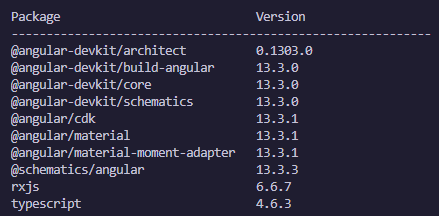
I had a similar issue but without tailwind. I solved the issue by ensuring @schematics/angular was updated. This likely means that tailwinds schematics could be in error.
From
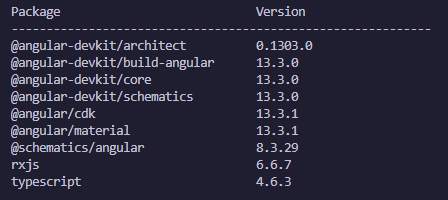
To