
forms
 forms copied to clipboard
 nextcloud
Allow embedding forms within other websites
-
Resolves #324
-
Add embedded endpoint for page controller and allow inserting submissions without CSFR as anonymous submissions for public shares.
-
Added sub-menu entry for copying the embedding code to the clipboard and added documentation on how to use the embedded view.
-
Switched to
vue-clipboard2to allow copying to clipboard from sub-menu entry (allows setting a container for the copy action).

Codecov Report
Attention: Patch coverage is 42.85714% with 8 lines in your changes are missing coverage. Please review.
:exclamation: No coverage uploaded for pull request base (
main@f4c0dc7). Click here to learn what that means. Report is 17 commits behind head on main.
:exclamation: Current head fe2ee8d differs from pull request most recent head fcec697. Consider uploading reports for the commit fcec697 to get more accurate results
Additional details and impacted files
@@           Coverage Diff           @@
##             main    #1353   +/-   ##
=======================================
  Coverage        ?   40.52%
  Complexity      ?      558
=======================================
  Files           ?       53
  Lines           ?     2307
  Branches        ?        0
=======================================
  Hits            ?      935
  Misses          ?     1372
  Partials        ?        0
![codecov[bot] avatar](https://avatars.githubusercontent.com/in/254?v=4 "Published by a pub.dev verified publisher")
Hmm, i'm not sure, if tweaking the csp is a good idea here. I would need to dig into that to properly judge it. Maybe @ChristophWurst or @nickvergessen could give a comment on that, if they find some time.
Probably also to allow the cors-requests now could allow to make it work without the csp stuff. CORS should work now with latest server 25. #1139 I personally have unfortunately no time for this until at least november. Sorry for that.

i'm not sure, if tweaking the csp is a good idea here
At least that is what appointments and calendar do (I draw inspiration from them).
With this changes CSFR protection is disabled for public shares, but at least you can not assign responses to an specific user, because if the CSFR token does not match (which happens if you embed the form) the responses are assigned to anonymous.
I personally have unfortunately no time for this until at least november. Sorry for that.
No problem :)

I think that you should try to further improve the styling of the embedded form. I opened the embedded route in a maximized browser window and got the following result:

For the embedded view, I'd suggest to remove the background and the rounded corners and only show the app content itself. Furthermore I'd suggest to keep the width of the form content the way we have it inside Nextcloud or for the public view 🙂

For the embedded view, I'd suggest to remove the background and the rounded corners and only show the app content itself.
That is already documented in the `Embedding.md":
#content-vue.app-forms-embedded {
    width: 100%;
    height: 100%;
    border-radius: 0;
    margin: 0;
}
But I could change it to be the default.
Furthermore I'd suggest to keep the width of the form content the way we have it inside Nextcloud or for the public view
The only difference to the public view is: No width limit (so taking 100%), that is also why it is not centered anymore.
I did this so the view is bound to the iframe size, as you would control the size and alignment normally by the iframe when embedding.
@Chartman123 Fixed that by removing the background on the embedded view by default but still using our styling on the form.
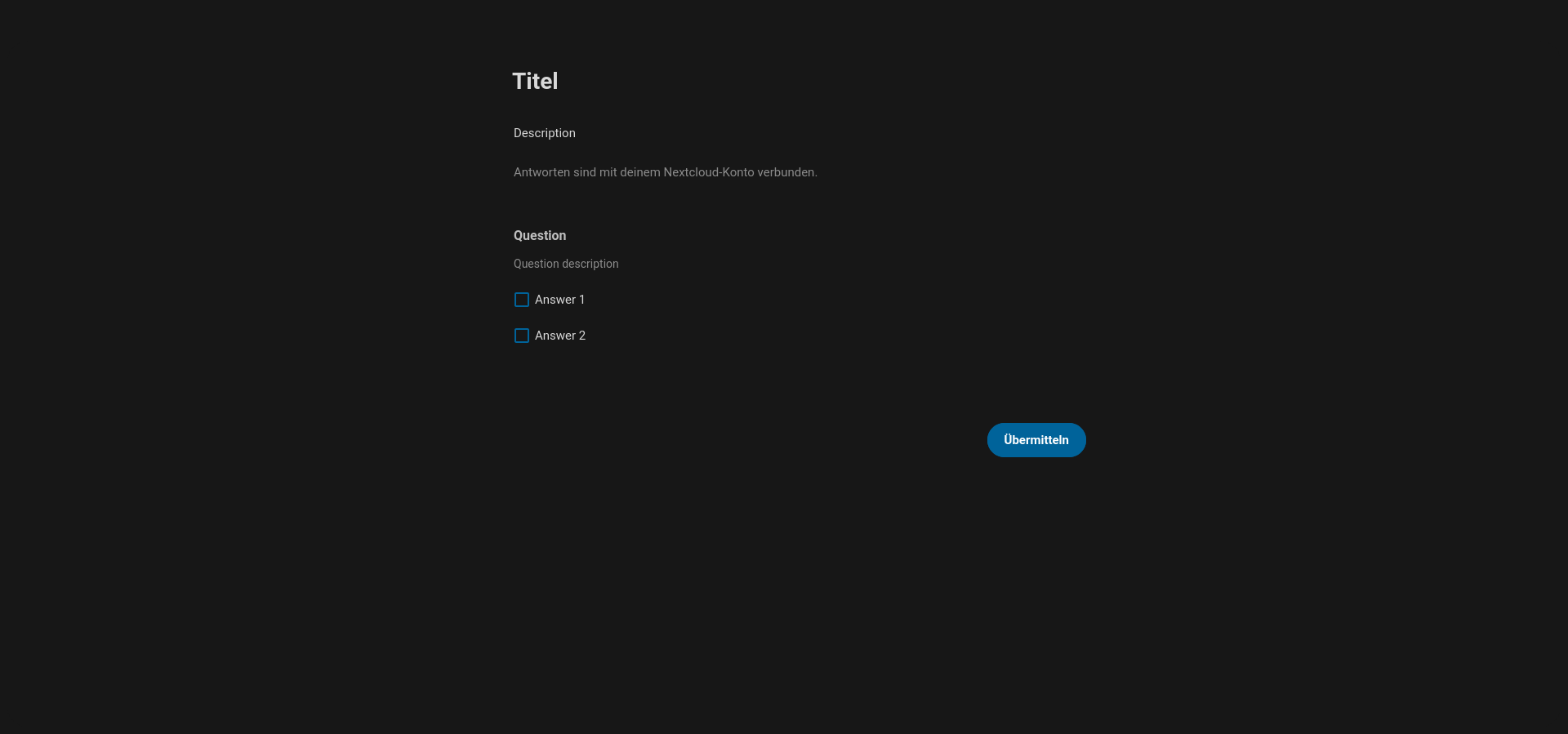
Nice work :) I think this way it can be embedded much nicer into other websites
Added a message event to allow parent windows to resize the iframe to match its content (as direct access is forbidden if embedded from a different domain).
(from user feedback)
@susnux where did the removal of the clipboard related stuff come from?
@susnux where did the removal of the clipboard related stuff come from?
I remember copying the embedding code was not possible, because of some bugs, but it seems line v-clipboard got some updates after 4 year (there is a release from December), I will try if it works now.
Ah ok, then it should also be OK, if we don't need this code anywhere else 👍🏻 Ah, now I see: You moved it from the view mixin to the share mixin. That's totally fine then :)
I split the copying related change to this PR https://github.com/nextcloud/forms/pull/1478 I will then rebase this onto that PR, I think this is much cleaner.
I split the copying related change to this PR #1478 I will then rebase this onto that PR, I think this is much cleaner.
Rebased, much cleaner now
Thank you for your review, I fixed most of the code comments.
* Generally, i think we shouldnt have the embedding active by default on share links. So some kind of setting to allow embedding would be good. Maybe UI-wise it could also be a nice way to have a button like "Convert to embedding link" or sth. like that.
Do you mean admin settings or per form settings for embedding?
* Submit currently doesn't work, since csrf check fails, even that a token is provided. Needs further investigation, but i can also have a look when i find some time thinking
I can not confirm this, we already use this feature and submitting works as expected (anonymous & logged in).
Do you mean admin settings or per form settings for embedding?
Admin Setting would be a nice thing, but that's separate then. What i meant was more like per link. So that not just every link is by default usable for embedding, but you have to activate that. Could be just a checkbox to allow embedding per share link. UI-wise it would probably be a bit nicer to have instead of the checkbox a convert-button, that converts the whole share-link line into an embedding-link line, probobly with the resp. icon and then copying the embedding code by default on the copy-button.
But as said - the main thought was, that not just every link is by default usable by everybody to embed it somewhere.
I can not confirm this, we already use this feature and submitting works as expected (anonymous & logged in).
I have to revoke my statement: I now can reproduce this:
It works because cloud and embedding website are on the same site, but if you try to embed on a different site you will get CORS issues.
Also if you are currently logged in the embedding view does not work either because of same site cookie.
I currently think the CSRF issues happen because you get a csrf token from the API, but the further API requests do not include the session (because the session is stored in a same site cookie which only allows same site or safe HTTP requests (GET)).
Reset to "developing", I will have to figure out how to fix submissions from embedded pages.
Generally, i think we shouldnt have the embedding active by default on share links. So some kind of setting to allow embedding would be good. Maybe UI-wise it could also be a nice way to have a button like "Convert to embedding link" or sth. like that.
Implemented a new permission for embedding a public link share and also adjuted the UI:
One change to note: The submission insert no longer sets the CSRF annotation, because this is already done by the CORS annotation:
- If a user session is found (logged in) on of the following must succeed:
- the CSRF check is performed
- check that basic auth is used
@susnux After rebasing it here via Github, we lost the DCO check ;) Could you please do another rebase and push it again? After that I think we're good to go :)
Nice - i'm looking forward to this. When will be the next release? Thanks for your work! <3

Thank you :)
When will be the next release?
Somewhen before Nextcloud 29 release, we do not have a strict schedule for the next release.