
coveragepy
 coveragepy copied to clipboard
 nedbat
under windows : load gdal (geo localisation) dll works fine without coverage, with CDLL show a winerror 127
I describe the situation here, as i really don't understand what's happenning. If you have a key to help.
This is only windows env pb. My env : Python 3.8 (with only coverage and pipenv) + GDal installed (with django and postgis and so on, but this happens in a simple config) + PostGreSQL.
the standard behaviour
My test file testgdal.py
from ctypes import CDLL
import traceback

d = "C:/OSGeo4W/bin/gdal303.dll"
try:
	CDLL(d)
except FileNotFoundError as e:
	print(f'Lib {d} is not found')
except Exception as e:
	print(f'Other error : {e}')
	print(traceback.format_exc())
else:
	print(f"OK ! Ret is {d}")
Output from python testgdal.py is : OK ! Ret is C:/OSGeo4W/bin/gdal303.dll
If a wrong path or dll is missing, normal, return is for example : Lib C:/unknown.dll is not found
If a use another dll, like C:/OSGeo4W/bin/tiff.dll, ir works with coverage run testgday.py : OK ! Ret is C:/OSGeo4W/bin/tiff.dll
This is my expected behaviour, which is working in django, pytest environment.
The coverage error ith the gdal dll
Now, when i try to use a coverage run testgdal.py, it fails.
Other error : [WinError 127] La procédure spécifiée est introuvable
Traceback (most recent call last):
  File "testgdal.py", line 7, in <module>
    CDLL(d)
  File "c:\users\sando\appdata\local\programs\python\python38\lib\ctypes\__init__.py", line 461, in __init__
    self._handle = _dlopen(self._name, mode)
OSError: [WinError 127] La procédure spécifiée est introuvable
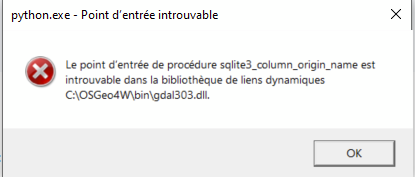
And the windows system show me a modal box
python.exe > missing entry point for sqllite3_column_origin_name in dll ..gdal303.dll
My question
How come coverage run this error with sqllite ?

After some time I was able to reproduce this as well.
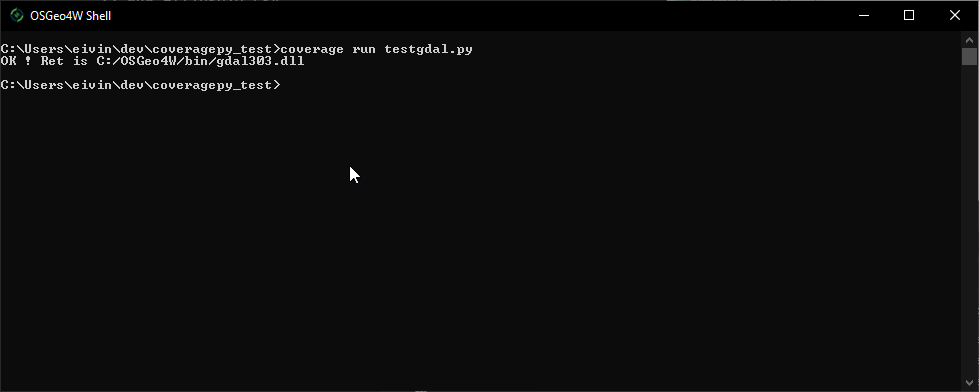
The interesting thing is that if I were to run this in the OSGeo4W Shell it works as expected.
could you also try this @esandorfi ?

Same problem here with Python 3.9.1, loading "C:\OSGeo4W64\bin\gdal300.dll" alone works, but loading it when using coverage.py triggers the sqlite3 error above.
The bug appeared on coverage==5.0a2 (previous versions work fine with gdal dll).
This alpha2 introduced "coverage/sqldata.py", maybe this new module or another breaks the loading of sqlite3.dll on Windows ? Or just triggers the loading of an sqlite3 subcomponent (because basically I don't use sqlite3 on my project, just django+postgis) ?

@pakal: @eivl said:
The interesting thing is that if I were to run this in the OSGeo4W Shell it works as expected.
Is that true for you too? What does that shell do?

BTW, this seems to be happening to many people: https://www.google.com/search?q=missing%20entry%20point%20for%20sqlite3_column_origin_name
From the OSGeo4W shell and the same python virtualenv as usual, gdal300.dll indeed gets loaded properly :)
It looks like a problem of precedence of "sqlite3.dll", between that of OSGeo4W and that of Python. I guess that Python's one doesn't have some necessary extensions (spatialite is it? or SQLITE_ENABLE_COLUMN_METADATA?), whereas OSGeo4W's has these extensions. That's why lots of problems have "sqlite3_column_origin_name" errors when using Django/Gis, but for very different reasons.
But coverage.py shouldn't change the way third-party DLLs are found and/or loaded (I don't know, when everything works, if sqlite3.dll doesn't get loaded at all, or is loaded but from OSGeo4W).
Additional investigations : ProcessExplorer shows that "working" python programs DO load sqlite3.dll and spatialite.dll from OSGeo4W's bin directory.
The PATH env variable of both succeeding (normal python) and failing (coverage.py run) is exactly the same.
So I suppose that sqlite3.dll is already (indirectly?) loaded, somewhere, by coverage.py, so that normal search in PATH is not used to find the sqlite3.dll, and the "wrong" Python's sqlite3.dll is used instead of OSGeo4W's sqlite3.dll
There are like conflicts together there:
- Python's sqlite3.dll doesn't support some extensions (I guess it's completely on purpose)
- GDAL dll always loads sqlite3, even when there is no need
- coverage.py triggers an early loading of python's sqlite3, preventing the override by OSGeo4W
Changing Python's sqlite3 DLL for one of https://sqlite.org/download.html solves the problem
Hi there, Just to put my own grain of salt : I've been running into this trouble recently when installing OSGeo4W from local, after long research it happens that I have indeed another sqlite3.dll located in C:/Windows/System32 (file version is from 2016 so that can also explain some of the missing dependencies ?), this one came from the installation of sqlserver / sqlserver management studio and seems to take precedence over the one inside the bin folder during installation, leading to those errors mentioned before.

@MI53RE Does the solution above work for you, or maybe you have another way to solve the problem?
@nedbat sorry for the late reply, I managed to achieve something similar as to copy past programmatically the sqlite3.dll from gdall to system32 (My use case is to create a full setup with Inno Setup), replacing the old one without side effect on my end. Before that I used to manually delete the sqlite3.dll found in system32 and everything would work fine.
In one of my attempt I tried to set the env var path for the one provided by Osgeo4W before System32 but with no success.
Also during my trials and errors I've managed to identify the real origin of that sqlite3, I previously falsely blamed sqlserver as the file would appears arround the same time of install but it was an old dotConnectUniversal version that would install it instead (DCU was silent install which made it less obvious). This explain why the sqlite3.dll version found was from 2016
I'm also running into this with GeoDjango when trying to run pytest with coverage.
The Python 3.13 environment's sqlite3.dll appear to get loaded instead of OSGeo4W - missing a number of functions.
Copying DLLs into system32 to workaround DLL loading issues is usually always causing more problems in the long run.
Replacing the Python installation sqlite3.dll is slightly less bad, but not really a good viable solution for a good reproducible environment.
The bug appeared on coverage==5.0a2 (previous versions work fine with gdal dll).
That's an interesting observation. This means the latest stable release that worked with GeoDjango on Windows is 4.x?
But looking at the commit that adds coverage/sqldata.py it doesn't appear to introduce any new dependency on sqlite. So it's still rather strange if that's the culprit. Unless that changed some subtle order of which coveragepy loaded sqlite.
I tried to add the Geo4W bin path to the front of PATH before running the tests with coverage (set PATH=C:\OSGeo4W\bin;%PATH%_, but that didn't work either.
