
webscript
 webscript copied to clipboard
 mudgen
Suggestion: .$listeners and .$style
It would be pretty great to be able to create event listeners in WebScript. Heres an example of what I mean:
const { div } = builders(createDOMElement);

document.body.appendChild(
   div.class`my-actions`(
      div.class`button first-button`.$listeners({
         'mousedown': (el, ev) => {
            console.log('The first button was pressed!');
         }
      }),
      div.class`button second-button`.$listeners({
         'mousedown': [
            (el, ev) => {
               console.log('The second button was pressed!')
            },
            (el, ev) => {
               console.log('I am also called when the second button is pressed!');
            }
         ]
      })));
In terms of implementation, I believe you would need to have something interject in setPropertyValue if the elementName is "$listener", and then store it somewhere until the actual element is constructed.
People may also find it useful to be able to set the styles with $style, but idk.
Hopefully this wouldn't be too painful to implement.

Hi @K4rakara thanks for this.
I should probably add a section to the documentation about different ways to do events.
Here is one way:
let button =
  div.class`button first-button`
    .onmousedown((el, ev) => {
      console.log('The first button was pressed!');
    });
But that doesn't use the addEventListener interface.
A way to use the addEventListener interface is to use the exact code that you wrote above and also use your own createElement function that wraps the createDOMElement function that you are using.
For example:
import createDOMElement from '../dist/createDOMElement.esm.js';

function createElementWithListeners(tagName, props, ...children) {
  let element = createDOMElement(tagName, props, ...children)
  if(isObject(props.$listeners)) {
    let listeners = props.$listeners;
    for(listenerName of Object.keys(listeners)) {
      for(listenerFunc of listeners[listenerName]) {
        element.addEventListener(listenerName, listenerFunc);
      }
    }
  }
}

const { div } = builders(createElementWithListeners);
The above is not a complete example but it shows creating your own createElement function with the functionality that you want by using an existing createElement function.
I would love to see what you create!

Thanks! I hadn't thought of the createElement functions until you mentioned it!
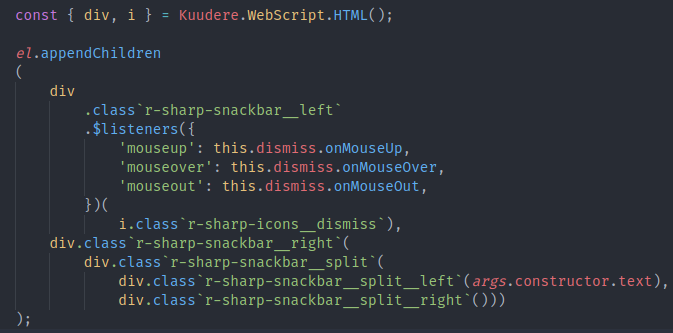
I've got a nice wrapper around WebScript set up in my Kuudere framework, and its pretty nice syntactically!
Another idea (not sure if its just too magic or something): if the value is of type function don't set the value but call the addEventListener function with the property name and the value? Maybe this could work.
