
Docker-Minecraft-PaperMC-Server
 Docker-Minecraft-PaperMC-Server copied to clipboard
 mtoensing
error: exec: "java": executable file not found in $PATH on migration from azul/zulu-openjdk-alpine to eclipse-temurin
How to solve this on Synology
Delete the old entry in the Synology Docker UI and make a new one.
- Action -> Delete
- Create -> Select "marctv/minecraft-papermc-server:latest
- Configure everything like the last time: ports, folders, RAM
When I migrate installtions with Watchtower from alpine to temurir I get
error: exec: "java": executable file not found in $PATH
If I start from scratch it works. So we still have a problem @automate-this ... Any idea? Something with the permissions? I reverted everything for now

I reverted my containers and everything is fine now. What could be the reason for that? A migration from your new base image from the old one produces the error "executable file not found in $PATH"
So you still have the error? I have made it a habit to run
docker buildx prune
docker container prune
docker image prune
After making changes.

Yes. I have the error. When I migrate from an old installation to the new one. If I remove all the data in the mounted volume / "/data" it works. But this container has to work for the thousands of ppl who use a synology nas and don't even know "docker image prune" or the shell at all.
Every update up to this point was no problem for everyone. And I changed the base images and many other things multiple times. =/ So this has to be analized and fixed. Mabybe is has something to do with the permissions?
Did you shell into the container when it throws the error? You can then run the entrypoint script manually and go from there. Is there an easy way for me to reproduce this?
Watchdog log just say "Updated containers" Nothing special.
But I can't reproduce this easily. I tried this on a copy of one of my servers on the shell and not with the Docker UI of Synology:
/* Start an old version on my copy
docker run -d --name minecraftbeta -p 25566:25565 -v /volume2/SSD/mcserver-beta:/data -it --rm  marctv/minecraft-papermc-server:latest
docker attach minecraftbeta
This runs fine
/* Start a new version on my copy
docker run -d --name minecraftbeta -p 25566:25565 -v /volume2/SSD/mcserver-beta:/data -it --rm  marctv/minecraft-papermc-server:beta
docker attach minecraftbeta
This runs fine as well...
Both images were built on GitHub with the latest branches before I tried that. So this happens If I have a server running and update it via Watchdog on my nas that has been added by the UI. I have no idea at the moment.
I will try to push the old code to "beta" and then mirgrate to the new code by copying back your new files to beta and let everything build on github and update the beta server by watchdogs.
I have tried different migration scenarios. Started an old 1.18 version, updated to latest, everything works. I cant reproduce it with watchtower since it cannot switch tags. So if you pull marctv/minecraft-papermc-server:1.18 watchtower cannot switch to latest and update. It always updates within the 1.18 tag.
Like I said, if you could shell into the broken container, that may be helpful.
docker run -d --name minecraftbeta -p 25566:25565 -v /volume2/SSD/mcserver-beta:/data -it --entrypoint sh --rm marctv/minecraft-papermc-server:beta
I could not reproduce this. I will try this again later with "Latest" branch
I don't know why but I pushed your changes to "latest" and updates all my server and the same error occured. But I copied the folder of the normal server and made the same procedure with "beta". I have not idea why this happens...
I now reverted back to the old alpine code and the server in the Synology Docker UI starts without a problem. This might be a special problem of Docker on Synology... but i can't reproduce it
ok. im away for a few weeks now. maybe i will find out later. you could post the issue on the watchtower github since i think it has to do with watchtower.
When I try to shell into the broken container using the shell it works. I think it has something to do with the Synology UI Docker. It also works if I start and migrate with a new Synology Docker UI project or cl only.
Okay, i got it. It was a PATH variable in the Synology Docker UI. I exported the new and old one. I have no idea why this has not been reseted. Watchdog did it's job. Maybe it is only related to my installation. I will keep this open.
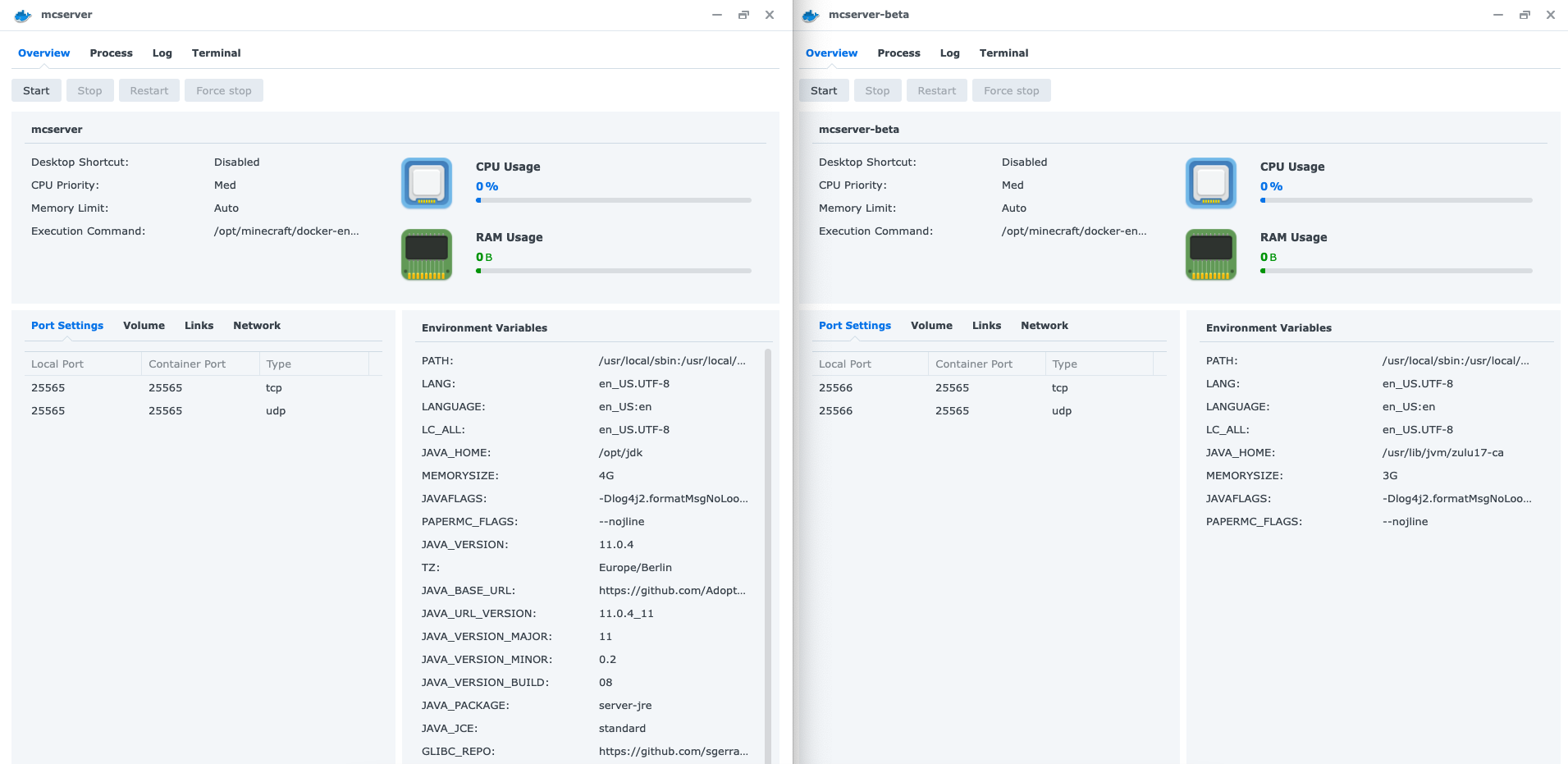 On the left is my old installation with many env variables. But even deleting them did not solve it.
How to solve this in Synology Docker UI:
Delete the old entry and make a new one.
- Action -> Delete
- Create -> Select "marctv/minecraft-papermc-server:latest
- Configure everything like the last time: ports, folders, RAM
I ran into the same issue updating to 1.19.1 using Synology Docker and was able to resolve it by removing the following Variables and resetting the container. Looks like its a Synology specific issue, where Docker Variables are not being reset correctly. Additional information was found on this thread: https://github.com/itzg/docker-minecraft-server/issues/749

