
geckodriver
 geckodriver copied to clipboard
 mozilla
geckodriver does not work with snap packaged firefox?
System
- Version: 0.31.0 (b617178ef491 2022-04-06 11:57 +0000)
- Platform: Ubuntu 22.04 LTS
- Firefox: 99.0.1 (snap Version: 99.0.1-1 Rev: 1232 Publisher: mozilla)
- Selenium: selenium-webdriver 4.1.1 (Javascript)
Stacktrace
Partial output from geckodriver; I think the command and arguments may be relevant:
26: 1651066926069	geckodriver	INFO	Listening on 127.0.0.1:39397
26: 1651066926080	mozrunner::runner	INFO	Running command: "/usr/bin/firefox" "--marionette" "-no-remote" "-profile" "/tmp/rust_mozprofileEmz3JC"
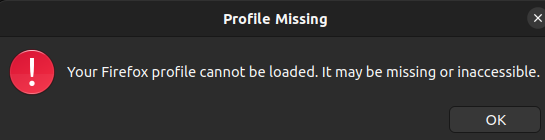
Firefox starts and shows this dialog:

Not sure what might be the cause or if this is really a geckodriver issue; not too familiar with snap either. Maybe the geckodriver generated(?) profile in /tmp/ (see trace above) is not accessible via the snap packaged firefox binary(?)

This has also been filed as https://bugzilla.mozilla.org/show_bug.cgi?id=1766125.
@ngladitz is that a new issue for you and started recently? Maybe you could check some older geckodriver and Firefox releases? Thanks.

@whimboo it started right after I upgraded my Ubuntu installation from 21.10 to 22.04 (was just released April 21).
With 21.10 my firefox installation was .deb based (also version 99.0 apparently). Since 22.04 Ubuntu itself apparently no longer provides the .deb and uses the snap build which is why I figured this to be most likely snap related.
geckodriver also used to be provided by the "firefox-geckodriver" .deb (version 0.30.0) with 21.10 but is no longer available with 22.04 (and not included in the firefox snap) which is why I switched to a release build (0.31.0) from github.
I tried using the previous geckodriver 0.30.0 release but see the same error.
Maybe the geckodriver generated(?) profile in /tmp/ (see trace above) is not accessible via the snap packaged firefox binary(?)
That is most likely the problem, indeed. Firefox packaged as a snap is strictly confined, and it is not permitted to access files in the system-wide /tmp. Is there a way to instruct geckodriver to use an alternative location for the temporary profile?

According to the documentation, setting TMPDIR to some location the snap can access (e.g. $HOME/snap/firefox/common/tmp) might help.
@oSoMoN thank you!
I've got to create the directory first (so geckodriver does not complain with No such file or directory) but then setting TMPDIR
as suggested does seem to work around the issue.
Complicates things slightly since I suppose I'll have to somehow detect how firefox was packaged first and limit setting TMPDIR as far as possible (other applications (started during testing) might unintentionally write into the same TMPDIR which may or may not be fine) and there might be issues with cleanup so I'd still appreciate an upstream fix assuming there is something sensible that can be done.
So if I understand correctly how things work, geckodriver picks a temporary directory, and launches firefox with that directory passed as a command-line parameter to use for profiles. How about adding an option to firefox to ask it to pick that temporary directory itself? It sounds like that would solve the problem at hand, but I'm not sure whether geckodriver wants control over that directory, to read/write things there too?
And / or package geckodriver with the firefox snap so both share / use the same temporary directory (not sure if / how that works on the snap side e.g. if this is implicit or the binaries have to be modified but presumably what ever is required already happens for firefox)?
The chromium snap that Ubuntu provides does itself package chromedriver (don't know if this happens for similar reasons) which is somewhat convenient since manually providing and keeping the chrome-/geckodriver in sync with the browser version is a little bothersome too.
Yes, I agree that would be best. I had a go at packaging geckodriver with the firefox snap a while ago, but because geckodriver tries to execute the firefox binary itself, and because this capability is denied by the strict confinement that's inherent to snaps, it wasn't working.
I'm not sure whether geckodriver wants control over that directory, to read/write things there too?
Yes, geckodriver needs to be able to set prefs in the profile, so they are avaiable at Firefox startup, and (more avoidably) needs to read the MarionetteActivePort file from the profile so that it can work out which port to connect to.
The chromium snap that Ubuntu provides does itself package chromedriver (don't know if this happens for similar reasons) which is somewhat convenient since manually providing and keeping the chrome-/geckodriver in sync with the browser version is a little bothersome too.
Chromedriver has a 1:1 relationship with a specific version of Chrome, whereas geckodriver is expected to work across multiple Firefox releases. So packaging geckodriver and Firefox together makes less sense than it does for Chrome (we don't want to have to ship a new geckodriver release for every Firefox release, even when there are no geckodriver changes).
because geckodriver tries to execute the firefox binary itself, and because this capability is denied by the strict confinement that's inherent to snaps, it wasn't working.
Hmm. I don't know a lot about snaps, but it seems like there must be some way to allow launching a child process, otherwise almost nothing would work.
Altogether the short term fix here is probably:
- Improve the error message when we can't write to the profile dir
- Allow specifying the profile directory as a geckodriver command line argument
That at least makes it possible to work around the issue relatively easily.

I had a go again at packaging geckodriver in the firefox snap. After installation, this requires setting up a manual alias: snap alias firefox.geckodriver geckodriver (per documentation this can be automated in the snap store).
However when running a test script that uses selenium and geckodriver, I'm getting this error: "binary is not a Firefox executable".
This error is raised when geckodriver tries to ascertain the version of the firefox executable, by first looking for application.ini or platform.ini in the directory of the executable (in this case /snap/bin/firefox, and none of these files exist in /snap/bin/), and falling back to executing the binary with the --version parameter and parsing the standard output.
The corresponding apparmor denial I'm seeing is:
may 03 16:38:51 jammyvm audit[8837]: AVC apparmor="DENIED" operation="exec" profile="snap.firefox.geckodriver" name="/snap/snapd/15534/usr/bin/snap" pid=8837 comm=776562647269766572206469737061 requested_mask="x" denied_mask="x" fsuid=1000 ouid=0
(/snap/bin/firefox is a symlink to /usr/bin/snap)
For reference, this is the test script I'm using:
#!/usr/bin/python3
# -*- coding: utf-8 -*-

from selenium import webdriver

if __name__ == "__main__":
    options = webdriver.firefox.options.Options()
    options.log.level = "trace"
    options.binary_location = "/snap/bin/firefox"
    options.add_argument("-headless")
    driver = webdriver.Firefox(options=options, service_args=["-v"])
    print(driver.capabilities["browserVersion"])
    driver.quit()
And I got it to work by changing the value of options.binary_location to /snap/firefox/current/firefox.launcher.
Snapd refuses to execute an arbitrary executable in /snap/bin/ (even though that executable is part of the same snap) because these executables are all symlinks to /usr/bin/snap, but it does allow executing an executable which it knows for sure is contained in the same snap (under /snap/firefox/current/).
One option here would be to patch geckodriver when built as part of the snap, to rewrite the binary location. Does that sound acceptable?
One option here would be to patch geckodriver when built as part of the snap, to rewrite the binary location. Does that sound acceptable?
I successfully tested this, rebuilding the firefox snap with the following patch applied:
--- a/testing/geckodriver/src/capabilities.rs
+++ b/testing/geckodriver/src/capabilities.rs
@@ -26,6 +26,8 @@ use std::str::{self, FromStr};
 use webdriver::capabilities::{BrowserCapabilities, Capabilities};
 use webdriver::error::{ErrorStatus, WebDriverError, WebDriverResult};

+const SNAP_LAUNCHER: &str = "/snap/firefox/current/firefox.launcher";
+
 #[derive(Clone, Debug)]
 enum VersionError {
     VersionError(mozversion::Error),
@@ -83,6 +85,7 @@ impl<'a> FirefoxCapabilities<'a> {
             .map(PathBuf::from)
             .or_else(|| self.fallback_binary.cloned())
             .or_else(firefox_default_path);
+        self.chosen_binary = Some(PathBuf::from(SNAP_LAUNCHER));
     }

     fn version(&mut self, binary: Option<&Path>) -> Result<Version, VersionError> {
@@ -222,9 +225,10 @@ impl<'a> BrowserCapabilities for Firefox
                             }
                         }
                         "binary" => {
-                            if let Some(binary) = value.as_str() {
+                            if let Some(_binary) = value.as_str() {
+                                debug!("Ignoring custom Firefox binary location, overriding it with '{}'", SNAP_LAUNCHER);
                                 if !data.contains_key("androidPackage")
-                                    && self.version(Some(Path::new(binary))).is_err()
+                                    && self.version(Some(Path::new(SNAP_LAUNCHER))).is_err()
                                 {
                                     return Err(WebDriverError::new(
                                         ErrorStatus::InvalidArgument,
This is obviously not suitable for merging as-is in the codebase, but if the approach sounds acceptable I could rework the patch to detect whether geckodriver is running under snap confinement (similarly to how firefox does it already), and rewrite the binary location only then.
Canonical's insistence on shipping Firefox via snap not only breaks the geckodriver, but even if/when this gets resolved, it won't be possible for those of using Firefox headlessly in Docker containers to continue doing so, as snap applications don't work in Docker.

For a workaround see our just updated release notes for the 0.31.0 release: https://github.com/mozilla/geckodriver/releases/tag/v0.31.0
With the next geckodriver release we will provide a --profile-root argument to customize the location of the temporary profile.
I rewrote my patch to override the binary path only when running under snap confinement, thus making it hopefully suitable for merging, and I submitted it at https://phabricator.services.mozilla.com/D146303.
FWIW, I had the same issue but I launch my python prog from the spyder IDE in a venv and it would not see the TMPDIR envt variable. After creating the $HOME/tmp dir,
export TMPDIR=$HOME/tmp geckodriver fixed it for me (i.e. export)

Thanks to @oSoMoN who added Snap support in geckodriver. The feature will be part of the next geckodriver 0.32.0 release, but note that we do not have an ETA yet.
For testing purposes you might already want to try it out via a nightly build that can be found at: https://treeherder.mozilla.org/jobs?repo=mozilla-central&searchStr=gd
Just click on one of the green gd-s jobs and download the binary from within the pane that gets opened at the bottom.
Any update on when geckodriver 0.32 will be released? I have to defer upgrading Ubuntu in our testing lab until geckodriver is compatible with snap.

Any update on when geckodriver 0.32 will be released? I have to defer upgrading Ubuntu in our testing lab until geckodriver is compatible with snap.
Please note that the firefox snap ships with the geckodriver executable and that patch, so you could use geckodriver from the snap directly.
Unfortunately, I can't do that with the current lab setup. WebDriver executables are pulled from their official release locations and those are the binaries we run. It's all automated and the same process used for chromedriver, edgedriver, and geckodriver.
It's possible to eventually add special cases for geckodriver, but that would have to include checks for a snap installation of firefox, too, so that we could still use the external geckodriver binaries for non-snap installs.
So at some point, we might be forced to write code for that. But I'd prefer to wait for the 0.32 release, if that's coming any time in the next few months.
Yes, the 0.32.0 release will be most likely shipped in October. Right now there is still some work left to do.
From the 0.32.0 changelog:
- The sandboxed Firefox binary is now automatically detected when geckodriver is used from within a Snap confinement.
Does this mean, that with gecko driver 0.32.0, Selenium should work as-is in combination with a Firefox installation via snap? Or is it still required to use the new --profile-root option?
Because I still get the Your Firefox profile cannot be loaded... error message.
- Firefox 105.0.3 installed via Snap
- Ubuntu 22.04.1 LTS
- Selenium 4.5.0
- Geckodriver 0.32.0

I was under the impression that with 0.32.0, running geckodriver from outside snap would work with Firefox from inside snap. Is that not the case? If it's not the case, could we please have this issue reopened?
You still need to specify where you want to put the profile, because the snap doesn't share /tmp with the host. We could perhaps pick a different default in this case, but that would be a different issue.
We could perhaps pick a different default in this case, but that would be a different issue.
I'll file one, then. I don't want to have to have my test infrastructure be intelligent enough to differentiate between snap and non-snap versions of Firefox and locate geckodriver in different places based on that.
I'm truly sorry if I'm being too dumb but I see the issue was close and I keep receiving a similar error. (Ubuntu 22.04.1 LTS)
Error:
/snap/firefox/1943/usr/lib/firefox/geckodriver: error: Unable to write to temporary directory; consider --profile-root with a writeable directory
geckodriver 0.31.0 ( 2022-10-07)
WebDriver implementation for Firefox
USAGE:
    geckodriver [OPTIONS]
etc
Plus the classic :
((I tried to let geckodriver inside of Downloads/drivers/geckodriver because I just need to test something fast in this computer then delete geckodriver file))
Code:
!geckodriver --profile-root=~/Downloads/drivers
!export PATH=$PATH:~/Downloads/drivers
!export PATH=$PATH:~/Downloads/drivers/geckodriver

from selenium import webdriver
from selenium.webdriver.common.keys import Keys
browser = webdriver.Firefox(executable_path="./drivers/geckodriver")
browser.get('https://www.linuxhint.com')
Shouldn't geckodriver be seen from out of snap already? Am I missing some required statement for that ?

geckodriver 0.31.0 ( 2022-10-07)
The change referred to in this issue was released in 0.32.0.
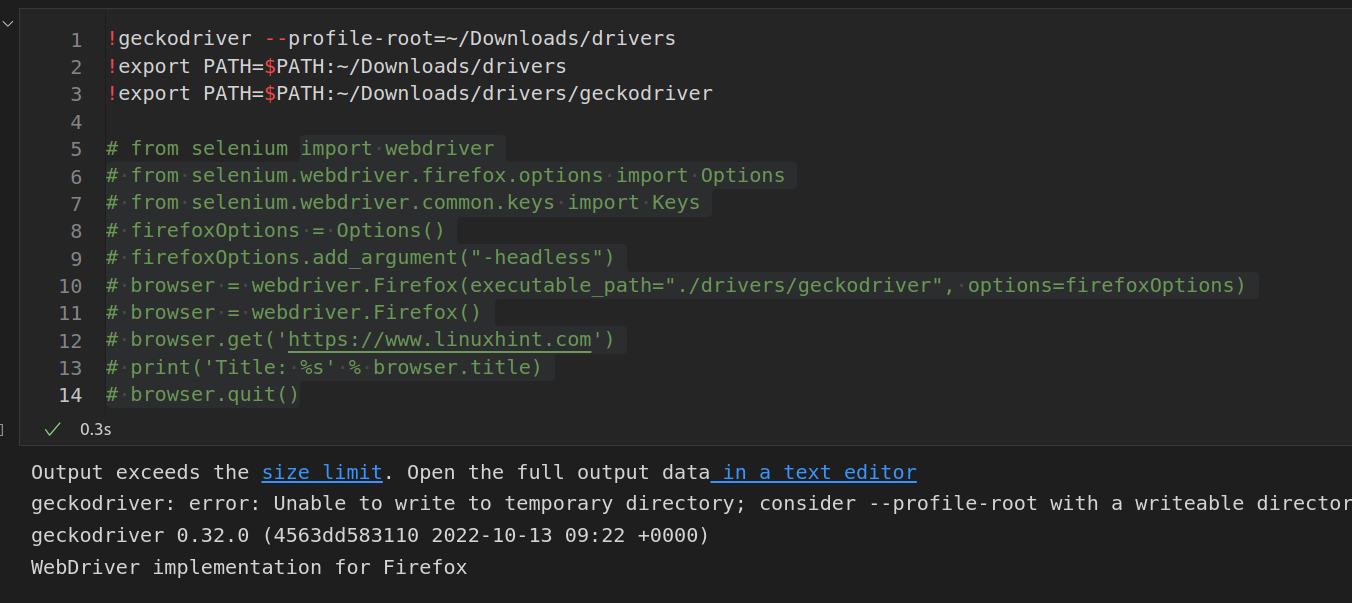
I mentioned it because in your message, you had output showing 0.31:
/snap/firefox/1943/usr/lib/firefox/geckodriver: error: Unable to write to temporary directory; consider --profile-root with a writeable directory
geckodriver 0.31.0 ( 2022-10-07)