
code-syntax-block
 code-syntax-block copied to clipboard
 mkaz
mkaz
Annotation Error
Hello, I have a problem using the plugin.
I have an error below —- when I use comments, how can I fix it?
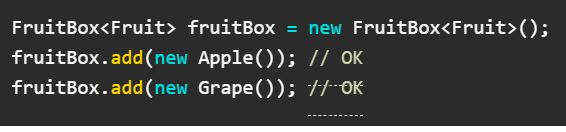

Testing out the same code above, setting to JavaScript and I'm not seeing the same issue.

What theme are you using for your WordPress site? What language is the code block set to?

The theme I am using is Newspaper. And the language I am using is Java, but the same problem occurred when I tested in C language. I'll link to the page where the problem occurred.
https://keepmind.net/java-generic-programming/
Hi, the link helped. The underline is due to the Newspaper theme CSS is adding
.comment {
  list-style: none;
  margin-left: 0;
  padding-bottom: 13px;
  border-bottom: 1px dashed #ededed;
  margin-bottom: 21px;
}
That probably should be more specific like .comments .comment { }
However, you may not want to alter the theme, since you would lose any changes on any update.
If you can add some custom CSS, adding the following should fix:
.wp-block-code .comment {
    border-bottom: none;
}
I'll look at updating the plugin CSS to try to prevent themes CSS from bleeding in.
Thank you very much for the quick reply. But I'm new to WordPress, so I don't quite understand the solution you mentioned. I tried deleting the .comment{ ... } part you mentioned and adding the .wp-block-code .comment { } part, but the problem still remains. Sorry to trouble you, but can you tell me how to do it?