

 minetest
[Manual Squash] Redesign/unify mainmenu settings interface
Fixes #12140, fixes #12452, fixes #3266
The settings tab and all settings has been replaced with a single interface for changing settings
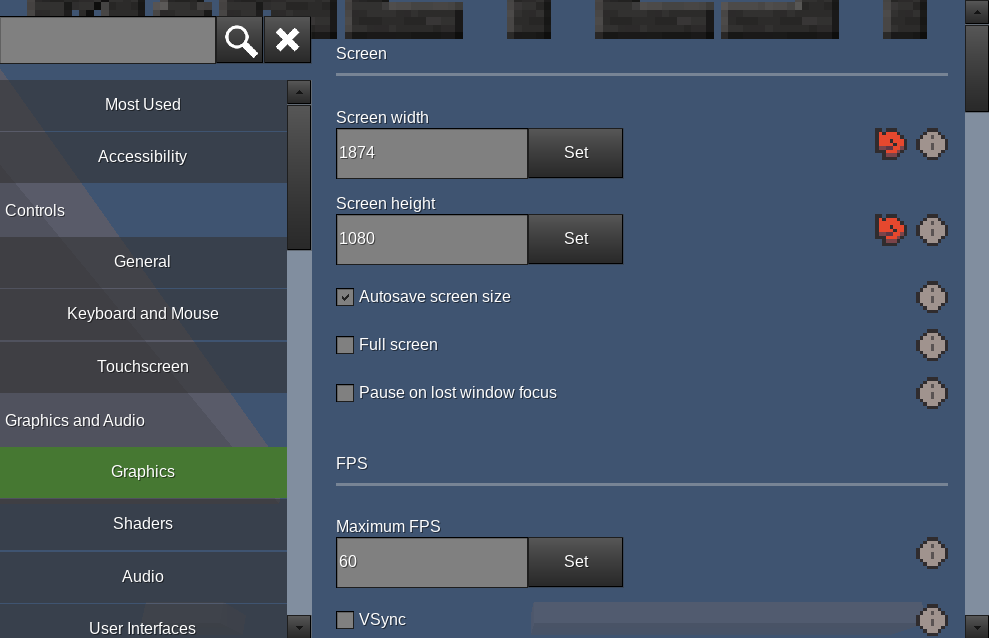
To do
This PR is a Work in Progress
- [x] Reimplement
- [x] Use scrollbar options to get proper scrollbars
- [x] Readd key changes
- [x] Show current page in leftpane
- [x] Restructure settingtypes.txt
- [x] Fix translation
- [x] Filter pages when searching
- [x] Validate min max
- [x] Readd reset
- [x] Restore element behaviour on "Most used" pane (what was the settings tab, eg: the shadow quality dropdown)
- [x] Readd show_technical_names
- [ ] Fix issue with dropdown events (see todo in bool component)
- [ ] Undersampling defaults to 0 in .cpp, but 1 in settingtypes.txt
- [ ] Improve keyboard use
- [ ] Finish support for path select dialog
- [ ] Noise dialog needs validation for Nan, inf, -inf.
- [ ] Noise dialog needs tooltips
- [ ] Replace dummy tab with settings icon
- [ ] Improve styling
For future PRs:
- Add color type
- Only show settings when relevant
- Fix dropdowns changing when scrolling
- Add flag utils to Settings ref
- Better way to show unchanged formspec
- Sort mods based on title when show_technical_names=false
How to test
Types of setting: int, float, string, bool, v3f, flags, path, filepath, noise, enum
- Try editing one of each type. Make sure reset icon appears when relevant
- Try resetting one of each type
- Browse through, checking layout/structure/etc

whereas i like the idea of the tab pane on the left and it's pretty nice, the double tab is clearly not convenient for the global UI. I think we should redesign the whole main pane model. Maybe settings must have his full view like many games, and not be in the main menu tab, at least for this first version.

whereas i like the idea of the tab pane on the left and it's pretty nice, the double tab is clearly not convenient for the global UI. I think we should redesign the whole main pane model. Maybe settings must have his full view like many games, and not be in the main menu tab, at least for this first version.
This is designed for the main menu redesign, which doesn't use tabs like we do now
What I could do is make this a modal dialog, and have the Settings tab open straight into it. Or I could just break convention and make the tab much bigger
What I could do is make this a modal dialog, and have the Settings tab open straight into it. Or I could just break convention and make the tab much bigger
Would be okay with me.

This is ready for review, although probably not ready to merge yet
If 5.6.0 is less than a month away, then I'd rather this waits for 5.7.0 as there's a lot of things left to refine
For example, here's a dependent settings feature: https://user-images.githubusercontent.com/2122943/176328135-4c65bc80-6039-4168-883f-0590d76bd952.mp4
Also, Zughy suggests that it be moved to a dialog accessed by a settings icon button. Rather than making the tab bigger
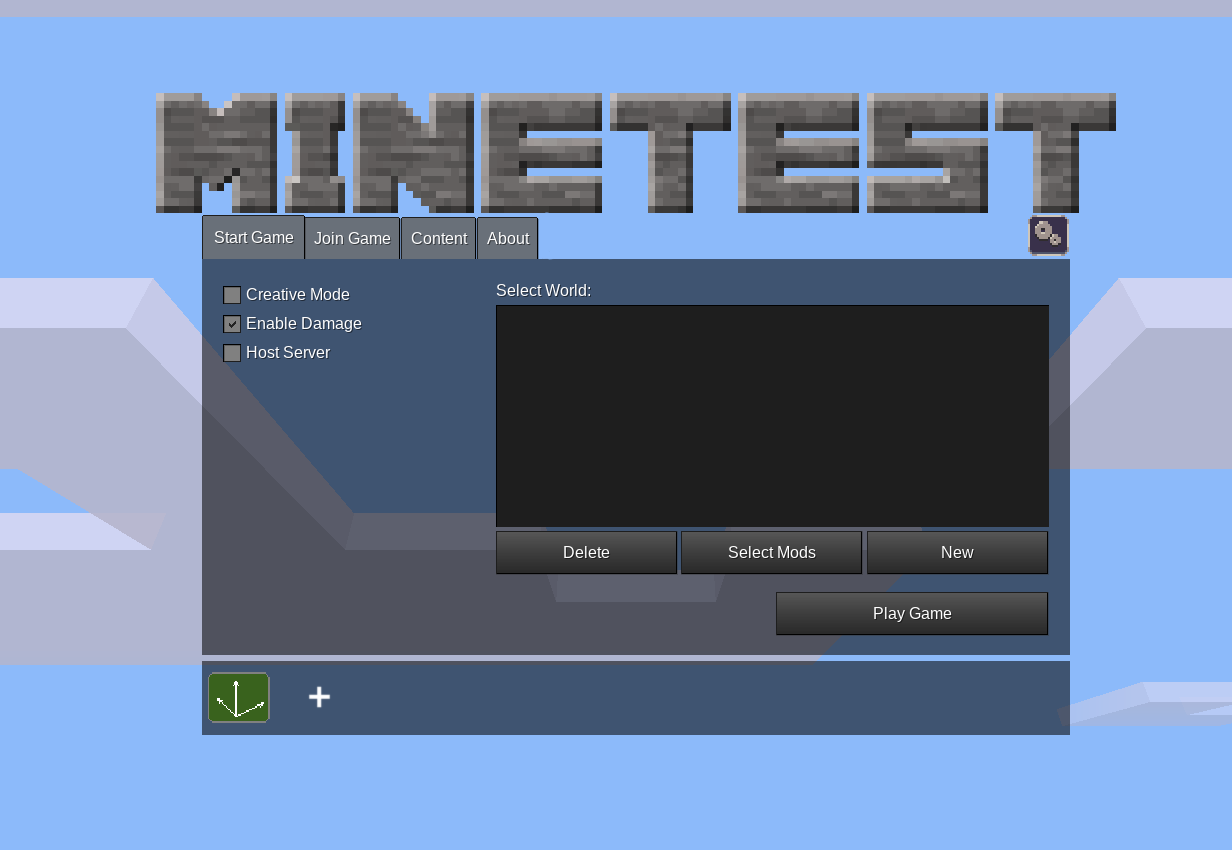
5.6.0 is less than a month away, then I'd rather this waits for 5.7.0 as there's a lot of things left to refine
Considering that it took you 2 days to do this, that I'm actively providing you feedback and graphical assets day by day, that the old settings are less user friendly than this anyway, and that we have a Minecraft situation out there we should bend in our favour, I think it's best to schedule this for 5.6; because right now a whole new main menu doesn't seem that far away for a 5.7 (seeing you working on it is fueling me up to finish the whole design). And we all know that the main menu is probably THE thing that keeps people away the most. If we schedule it for 5.7, we're talking about almost a year of waiting, plus at least another 6 months for the whole main menu. Please don't, this can really be the time where we can deliver it after years and years of conversations.
This doesn't have to be perfect, it just needs to work and not crash anything. Fanciness can come later (also because right now it has to stick with the design of the rest of menu)
Rather than making the tab bigger
Yeah, if definitely breaks the flow having a bigger tab. This approach should make everyone in this conversation happy (ruben, sfan, me)

I think it's best to schedule this for 5.6
Reviews take longer than implementation. It's going to need buy in from other devs, with faster reviews of this and subsequent PRs. I'm not that hopeful given how my other UX PRs wait around. #12284 is much smaller than this PR and has been waiting around for a month and a half
The PRs I know of include:
- #12490
- This one
- One to add dependent settings (ie: based on
enable_shaders) unless it's added to this PR - #12481
- Fixes to any settings that cause MT to crash if changed (eg: #12489)
Theoretically, going in feature freeze makes core devs focus only on things planned for the upcoming release, so that might help. Also, I'd like to stress again how much the MS backstabbing is important and how it could bring a lot of players on Minetest, meaning things like these should be prioritised
Unrelated note for reviewers: categories "Client and Server", "Mapgen" and "Games" are planned to be moved into their own menu sections (multiplayer, singleplayer and game selection respectively) if my main menu design will be followed (https://github.com/minetest/minetest/issues/6733#issuecomment-1130349592). So they won't be stay here forever, it should be just a temporary measure
UX Notes
-
No disrespect to Zughy's art abilities but a mix of pixel and smooth graphics is jarring. Unless we fully adopt the pixel aesthetic I would prefer higher resolution graphics for the reset and info icons.
-
I'm not sure if prefixing "Content:" onto Mods and Games helps in any way
-
I think the UX is still a little bit unclear about whether resetting a setting resets it to factory default or reverts the user's current changes, which might be exacerbated by some bugs.
-
The interface is no longer as keyboard-friendly.
- Keyboard-power-users like myself do fit in a weird space between direct minetest.conf editors and mouse-only operators, but I still edit my settings almost entirely in-game. I know keyboard controls is an afterthought for formspec, I don't think formspecs can even have a focused graphic to distinguish them while tabbing around, but
- The previous interface could basically be entirely navigated by keyboard, with expanding sections and so on, and by tabbing from the search box into the expanding sections. Hitting enter on the search bar would move between search results.
- I think the search results should remove the tabbing at left and just put headings in line with the right hand pane. That would be quite keyboard-navigable.
- Now you can't read the descriptions because they rely on mouseover to display as tooltips, and you have to hold the tab key for a good couple of seconds to tab from the sections at left to the current menu at right.
- The info icon has a lesser tab index than the corresponding reset icon for any setting. Thus, instead of tabbing Item-Reset-Info as it appears visually, the tabbing goes Item-Info-Reset.
- It would be good if the tooltip text could be activated on a formspec element by hitting space/enter while it's focused, or on the same timer as mouseover.
-
I know the existing settings menu doesn't do this, but it would be much better to sort the Mod entries by their displayed name. This would also probably require a different sort conditional on whether show_technical_names is enabled (when that gets re-implemented.
- Also related to show_technical_names: What about putting the technical name in the tooltip, at least in the interim?
-
When scrolling with the mousewheel over the left side, if the mouse hovers over a dropdown, it will start scrolling options in that dropdown instead of continuing to scroll. This is exacerbated by the above mentioned bug with the reset buttons on dropdowns not appearing. This is probably not a regression, but this is the single most common interface in minetest where most people will have a scrollbar and dropdowns present.
Interface Bugs Dropdown menus (enum) don't allow returning to defaults correctly:
1. Clear any line that has `language =` in your minetest.conf
2. Set language to anything other than "" in-game (I chose `de`) - the reset button will not appear next to the language dropdown as it should.
3. Quit the game so the setting is saved. Re-open Minetest. The reset button appears now for the first time.
4. Change the language setting to several others, including `""`. The reset button never disappears, even for the `""` setting. Change it back to `""` and close Minetest. You now have an entry `language = ` (yes, that has a trailing space) in your minetest.conf
5. Restart Minetest. Now the reset button for language will never appear, which means it is acting the same as in step 2.
6. Change the language setting to anything other than `""` again and restart again. Now press the reset button. Now switch it to various languages. No matter what you do with the language setting, the reset button will never appear again.
Int and float
- Clear any entry in minetest.conf with
undersampling = - Go to the graphics tab. Undersampling will have a value of 0 and a reset button, despite its default and range being 1 1 8 in settingtypes.txt
- Type -5 in the field and try to set it. It is clamped to 1. The reset button disappears because this is the default.
- Type -5 in the field again and set it. Close Minetest. The set button won't clamp the value, but the actual value that gets written to minetest.conf will be clamped properly.
- Unlike integers, setting a float setting does clamp it as soon as you press set (I used GUI scaling)
- Setting an integer setting (I used undersampling) to outside its range is not error-checked except in that when you leave the settings tab it gets clamped to the nearest in-range value.
- Typing anything other than a number in an int/float field and using the set button will result in a big ugly error message.
- Entering
NaNor-Infin an int/float field will convert it to 0 automatically, and clamping to minimum will work from there as well. - Entering
Infin an int/float field will convert it so it's clamped at the highest possible value for that setting.
v3f (I used mapgen fractal scale)
- Any permutation of capitalisation of
NaN(nan,NAN) will get normalised tonanand accepted as valid. - Any permutation of capitalisation of
Inf(inf,INF) will get normalised toinfand accepted as valid. - Good stuff? Negative zero is normalised to 0. Exponential notation works (e.g. 1e2 = 100).
- Excessively large positive values such as 1e4096 become inf; excessively large negatives become -inf.
- No feedback if input was invalid. It just ignores everything, doesn't show a reset button, and forgets the invalid value ever existed if you close and reopen Minetest.
string
- The crosshair colour defaults to black if the value is invalid as an RGB triplet, but the default in settingtypes.txt is white.
- Crosshair colour will dissappear if you attempt something like a formspec injection:
tooltip[0,0;8,8;pwned]. Thankfully the reset button can fix this easily. I'm not sure if it's possible to do a proper injection since I couldn't get my tooltip to appear.
bool
There is some kind of issue with bool with default false, but only for mods? Sorry I couldn't reproduce this for any builtin settings such as mip mapping, despite the lines in the respect settingtypes files looking fine...
- Install foodblocks
- Remove any
foodblocks_*settings fromminetest.conf. - Start Minetest. Type
foodinto the settings search and hit enter. - Despite being unchecked and the default false, the reset button appears.
- Use the reset button. Toggle the checkbox as many times as you want.
- Once some value is set in
minetest.conf, the reset button appears as expected. - Close and reopen Minetest. Checkbox and reset button still work as expected.
flags
The same bug that effects bool seems to effect mapgen v6 flags, mapgen v7 flags, carpathian flags, flat flags and valleys flags: if you don't have the default values recorded in minetest.conf, it will offer a reset despite being at the default. Once the reset is pushed it adds the default in and only offers a reset when sensible.
filepath
I have this version installed through dpkg made by cpack -G DEB; it is not a RUN_IN_PLACE version.
Font paths:
- Clear any
font_path_*settings fromminetest.conf - Open Minetest and go to the Advanced settings tab. The regular, bold, italic, bold&italic font paths all have all been set to
/usr/local/share/minetest/fonts/Arimo-*.ttfand not the suggested resettable path offonts/Arimo-Regular.ttfwhich is specified in settingtypes.txt. This would not be the correct relative path to the fonts from where my binary is located in/usr/local/bin/minetest; and surely it would be../fonts/instead for RUN_IN_PLACE builds of Minetest?
-
/dev/null as a font path is very disappointing :P
-
Setting the font path manually works fine
-
Selecting a file path through the file browser is NOT working (I tested 5.5.1 and it works fine)
- Open Minetest and go to the Advanced settings tab
- Click the Browse button next to Regular font path
- Type/paste
/usr/share/fonts/truetype/liberation(or some other path if you don't have those fonts or are on a different OS) and press enter. - Click LiberationSerif-Regular.ttf
- Click OK
- Notice that the font path in the field has not actually changed
noise Accepts Inf, -inf, NaN as valid values. Sets octaves and seed to 0 if invalid. I set most values in the heat noise (mg_biome_np_heat) to NaN and it results no soil at all, probably due to NaNs propagating.
Could at least defaults, eased, and absvalue, if not all parameters, get tooltips please?

a mix of pixel and smooth graphics is jarring
You're right. I guess the general thought was "it's ugly anyway, so why not". It's also done in CDB window
I'm not sure if prefixing "Content:" onto Mods and Games helps in any way
Agree, it's just redundant
I think the UX is still a little bit unclear about whether resetting a setting resets it to factory default or reverts the user's current changes, which might be exacerbated by some bugs
Looks pretty straightforward to me
Now you can't read the descriptions because they rely on mouseover to display as tooltips
Option names should be straightforward, I don't see the point in putting text everywhere. Tooltips exist for a reason
I know the existing settings menu doesn't do this, but it would be much better to sort the Mod entries by their displayed name
Out of scope, and mods (as well as games) are not expected to remain there for long anyway
When scrolling with the mousewheel over the left side, if the mouse hovers over a dropdown, it will start scrolling options in that dropdown instead of continuing to scroll
This should be fixed on a formspec level, it's not ruben's fault
In general, thank you so much for the in-depth review (I'll leave the rest to ruben I guess)!
Option names should be straightforward, I don't see the point in putting text everywhere. Tooltips exist for a reason
Well yes, but no that's not quite the point. In those bullet points I'm talking about how the whole interface should be keyboard-navigable, including the tooltips. Like the mod name sorting this is probably out of scope and should get filed under 'keyboard control improvements for formspec', which so far would be at least: (1) visual focus indication on buttons and so on (2) tooltips on keyboard focus.
I think the UX is still a little bit unclear ... which might be exacerbated by some bugs
Looks pretty straightforward to me
As long as we get the bugs ironed out there should be no confusion.
In general, thank you so much for the in-depth review (I'll leave the rest to ruben I guess)!
It's easier to tear apart than to build, but anyway I wasn't going to let something like this which looks pretty important go without a proper testing :)

Thanks for the review @Montandalar, that's insanely helpful
Note: I've put "TODO" as reminders for me to add to the PR's to do list
I think the UX is still a little bit unclear about whether resetting a setting resets it to factory default or reverts the user's current changes, which might be exacerbated by some bugs.
Updated tooltip to "Reset setting to default"
- The interface is no longer as keyboard-friendly.
- Keyboard-power-users like myself do fit in a weird space between direct minetest.conf editors and mouse-only operators, but I still edit my settings almost entirely in-game. I know keyboard controls is an afterthought for formspec, I don't think formspecs can even have a focused graphic to distinguish them while tabbing around, but
- The previous interface could basically be entirely navigated by keyboard, with expanding sections and so on, and by tabbing from the search box into the expanding sections. Hitting enter on the search bar would move between search results.
- I think the search results should remove the tabbing at left and just put headings in line with the right hand pane. That would be quite keyboard-navigable.
- you have to hold the tab key for a good couple of seconds to tab from the sections at left to the current menu at right.
Yeah, formspecs make it really hard to handle this unfortunately, not sure how to deal with it
- It would be good if the tooltip text could be activated on a formspec element by hitting space/enter while it's focused, or on the same timer as mouseover.
Tooltips should maybe be shown when focused as well, but not something I can do in this PR. Maybe pressing enter on the info icon can show the info dialog
- The info icon has a lesser tab index than the corresponding reset icon for any setting. Thus, instead of tabbing Item-Reset-Info as it appears visually, the tabbing goes Item-Info-Reset.
Fixed
- I know the existing settings menu doesn't do this, but it would be much better to sort the Mod entries by their displayed name. This would also probably require a different sort conditional on whether show_technical_names is enabled (when that gets re-implemented.
Done based on technical name for now. TODO for titles
- Also related to show_technical_names: What about putting the technical name in the tooltip, at least in the interim?
Implemented show_technical_names
- When scrolling with the mousewheel over the left side, if the mouse hovers over a dropdown, it will start scrolling options in that dropdown instead of continuing to scroll. This is exacerbated by the above mentioned bug with the reset buttons on dropdowns not appearing. This is probably not a regression, but this is the single most common interface in minetest where most people will have a scrollbar and dropdowns present.
See #12481
Interface Bugs Dropdown menus (enum) don't allow returning to defaults correctly:
1. Clear any line that has `language =` in your minetest.conf
2. Set language to anything other than "" in-game (I chose `de`) - the reset button will not appear next to the language dropdown as it should.
3. Quit the game so the setting is saved. Re-open Minetest. The reset button appears now for the first time.
4. Change the language setting to several others, including `""`. The reset button never disappears, even for the `""` setting. Change it back to `""` and close Minetest. You now have an entry `language = ` (yes, that has a trailing space) in your minetest.conf
5. Restart Minetest. Now the reset button for language will never appear, which means it is acting the same as in step 2.
6. Change the language setting to anything other than `""` again and restart again. Now press the reset button. Now switch it to various languages. No matter what you do with the language setting, the reset button will never appear again.
This is a known issue - I'm currently not triggering a rerender when the dropdown changes due to an issue with reliably getting dropdown actions. So the reset button won't appear until something else causes a render, such as editing another setting
I previously added a TODO to track this, will add to PR description todo list as well
Int and float
- Clear any entry in minetest.conf with
undersampling =- Go to the graphics tab. Undersampling will have a value of 0 and a reset button, despite its default and range being 1 1 8 in settingtypes.txt
Undersampling's default is 0 in the .cpp, not sure which default is correct. TODO.
- Type -5 in the field and try to set it. It is clamped to 1. The reset button disappears because this is the default.
- Type -5 in the field again and set it. Close Minetest. The set button won't clamp the value, but the actual value that gets written to minetest.conf will be clamped properly.
- Setting an integer setting (I used undersampling) to outside its range is not error-checked except in that when you leave the settings tab it gets clamped to the nearest in-range value.
This is a bug with formspecs in general, it doesn't detect the change so doesn't reset. Added a workaround.
- Typing anything other than a number in an int/float field and using the set button will result in a big ugly error message.
- Entering
NaNor-Infin an int/float field will convert it to 0 automatically, and clamping to minimum will work from there as well.- Entering
Infin an int/float field will convert it so it's clamped at the highest possible value for that setting.
Fixed
v3f (I used mapgen fractal scale)
- Any permutation of capitalisation of
NaN(nan,NAN) will get normalised tonanand accepted as valid.- Any permutation of capitalisation of
Inf(inf,INF) will get normalised toinfand accepted as valid.- Good stuff? Negative zero is normalised to 0. Exponential notation works (e.g. 1e2 = 100).
- Excessively large positive values such as 1e4096 become inf; excessively large negatives become -inf.
Fixed
- No feedback if input was invalid. It just ignores everything, doesn't show a reset button, and forgets the invalid value ever existed if you close and reopen Minetest.
Can't reproduce, maybe it was fixed by the work around for formspecs not detecting changes
string
- The crosshair colour defaults to black if the value is invalid as an RGB triplet, but the default in settingtypes.txt is white.
- Crosshair colour will dissappear if you attempt something like a formspec injection:
tooltip[0,0;8,8;pwned]. Thankfully the reset button can fix this easily. I'm not sure if it's possible to do a proper injection since I couldn't get my tooltip to appear.
There is no color setting type currently, so it's just reading it as a string. This is unrelated to this PR, idk whether I should introduce new setting types here
bool There is some kind of issue with
boolwith defaultfalse, but only for mods? Sorry I couldn't reproduce this for any builtin settings such as mip mapping, despite the lines in the respect settingtypes files looking fine...
- Install foodblocks
- Remove any
foodblocks_*settings fromminetest.conf.- Start Minetest. Type
foodinto the settings search and hit enter.- Despite being unchecked and the default false, the reset button appears.
- Use the reset button. Toggle the checkbox as many times as you want.
- Once some value is set in
minetest.conf, the reset button appears as expected.- Close and reopen Minetest. Checkbox and reset button still work as expected.
Fixed
flags The same bug that effects
boolseems to effect mapgen v6 flags, mapgen v7 flags, carpathian flags, flat flags and valleys flags: if you don't have the default values recorded in minetest.conf, it will offer a reset despite being at the default. Once the reset is pushed it adds the default in and only offers a reset when sensible.
Fixed, although in a brittle way. We need a better API at the engine level for flags
filepath I have this version installed through dpkg made by
cpack -G DEB; it is not aRUN_IN_PLACEversion.Font paths:
- Clear any
font_path_*settings fromminetest.conf- Open Minetest and go to the Advanced settings tab. The regular, bold, italic, bold&italic font paths all have all been set to
/usr/local/share/minetest/fonts/Arimo-*.ttfand not the suggested resettable path offonts/Arimo-Regular.ttfwhich is specified in settingtypes.txt. This would not be the correct relative path to the fonts from where my binary is located in/usr/local/bin/minetest; and surely it would be../fonts/instead for RUN_IN_PLACE builds of Minetest?
This is an engine issue, the settings UI just makes it more obvious
- Selecting a file path through the file browser is NOT working (I tested 5.5.1 and it works fine)
- Open Minetest and go to the Advanced settings tab
- Click the Browse button next to Regular font path
- Type/paste
/usr/share/fonts/truetype/liberation(or some other path if you don't have those fonts or are on a different OS) and press enter.- Click LiberationSerif-Regular.ttf
- Click OK
- Notice that the font path in the field has not actually changed
TODO. Looks like I forgot to implement this
noise Accepts Inf, -inf, NaN as valid values. Sets octaves and seed to 0 if invalid. I set most values in the heat noise (mg_biome_np_heat) to NaN and it results no soil at all, probably due to NaNs propagating. Could at least defaults, eased, and absvalue, if not all parameters, get tooltips please?
This is unchanged from the current main menu. TODO.
I have tested this, and I am leaving some quick comments and problems I found here:
- Overall, I think this is a big improvement over the complicated tree.
- I don't like the Advanced > Advanced section, it is WAY too large. My biggest problem is the lack of a clear distinction between clientside and serverside settings. Probably at least split this section into two
Some bugs and problems:
- Some numbers are considered "different" from the default value even if it is equal. E.g. if the value entered is "1", it is considered different from the default value "1.0" or vice-versa and the "reset from default" arrow appears.
- The "Edit" button for the mapgen noises should be a bit wider (in German, the translation barely fits)
- You can click the info icon and it behaves like a button. This feels wrong. Better solution IMHO: Turn this into an
image[]and add atooltip[]in the area of that image. That way, the tooltip will also instantly appear (no delay). I've used this trick in Repixture and it works - The caption of the text edit fields is sometimes too short. Either in a translation or with the technical name. Examples:
map_compression_level_net,full_block_send_enable_min_time_???,max_simultaneaous_block_sends_p???(the 3 question marks mean I don't know the full name :D ) - Editing the font size is very dangerous and can completely break the GUI. This needs some special care: Set the font size to large or too small, and the interface becomes almost completely unusable and the user cannot trivially back out. There are already caps at 6pt and 72pt, but maybe the limits should be even narrower, especially the upper limit. At 72pt, clicking the widgets often does not work. Or maybe do something like many OSes do when you change the screen resolution: Change the resolution, but pop up a window to force the user to confirm the result within 10 seconds (no response = change the resolution back).
- The info icon is missing for noise settings
- The settings
update_last_checkedandupdate_last_knownshould not be user-visible at all IMHO, these seem to be for internal use by Minetest only. Instead, add a separate checkbox for disabling update-checking.
Broader stuff for later PRs to keep in mind:
- Overall, the settings as a whole are still quite daunting because there's just so much. I still think the smaller simpler settings screen with the most important settings (+ an "advanced" button for the full list) is the best solution
Stuff that is probably for later PRs:
- A few advanced settings are quite dangerous, I suggest to move them to a separate sub-section under something like "Experimental" or "Danger Zone". I think all settings, including advanced settings should be (mostly) safe to edit unless they are specifically moved into the Danger Zone. Example:
ignore_world_load_errors,chunksize - The drop-down values should probably be translated. In some cases, this PR actually destroys a translation that already exists, like with
fancy_leaves - Mapgen flags should probably be translated as well.
- We shouldn't call mapgen flags "flags" in front of the user. This is too technical. Maybe let's use "modifiers" or something like that
- Each mapgen flag should also have its own info icon instead of a help for all flags together
- In general, I think the GUI currently works very poorly with non-default font-sizes unless you only do a small change. Even at 32pt, most of the text just overflows.
- Missing help for the specific mapgen flags (e.g.
caves,dungeons, etc.) - I think it would be better to remove the mapgen settings from the big settings menu since they only affect the creation of new worlds (or are there exceptions?). It is more natural and intuitive to move them to the "new world" dialog (perhaps with an "advanced" button or something) because this is the only place where they actually have an effect.
- A few settings like mouse sensitivity and audio volume should be sliders
Problem I have with specific settings (probably PR-unrelated):
- The "3D mode" is confusingly named. Minetest is always 3D! A better term would be "stereoscopy"
- The language selector is confusing. It's not obvious what the empty entry means. Should be rendered as "System default" IMHO
invert_mouseclaims it inverts the vertical mouse movement but this is not completely true. It inverts the vertical mouse-movement of the camera. In the main menu, it's normal. Important difference!
Probably unrelated problems (that my testing revealed):
- If you click the arrow up or down of the scrollbar or a dropdown, the arrow becomes invisible.
- The tooltip only do a line-break when absolutely neccessary, i.e. when the full width of the screen was used or there is a newline. This can result in very long tooltips if the setting description does not have a manual line-break. Tooltips should line-break automatically earlier; a tooltip should never be as wide as the screen under normal circumstances (example:
debug_log_size_maxin German)

More bugs!
- The technical names of settings of all Shader settings in Most Used are never shown, even if you enabled technical names
- An error message appears if you edit a text field, no matter if it was a valid or invalid value. Example:
selectionbox_color
Runtime error from mod '' in callback handleMainMenuButtons(): ...test/git/bin/../builtin/mainmenu/settings/components.lua:90: attempt to call upvalue 'converter' (a nil value)
stack traceback:
	...test/git/bin/../builtin/mainmenu/settings/components.lua:90: in function 'on_submit'
	...st/git/bin/../builtin/mainmenu/settings/dlg_settings.lua:487: in function 'handle_buttons'
	/home/wuzzy/src/minetest/git/bin/../builtin/fstk/ui.lua:142: in function 'handle_buttons'
	/home/wuzzy/src/minetest/git/bin/../builtin/fstk/ui.lua:186: in function </home/wuzzy/src/minetest/git/bin/../builtin/fstk/ui.lua:172>
- If a setting has no description/tooltip, there is still an info icon next to it (but it is useless). Example:
font_bold - Note sure if a bug, but the buttons in the left scroll widget (containing the section names) lack a margin to the right, although they have one to the left
And now a few general comments about the whole PR:
I am very glad this exists. A rework of the tree structure was desperately needed. The current tree is not great, my biggest problem is that it just has way too many levels and branches. Your approach essentially reduces the "depth" of that tree, which was very important. The overall structure is good and is far superior to the tree.
The graphics of all this are still very ugly (Minetest default style) but this is obviously PR-unrelated; the layout itself is obviously more important. I still think the main menu needs a more appealing design that look like an actual game thing, not like a tech-demo.
I like the setting descriptions are available as a tooltip this time. However, there is a small issue when the description contains a weblink. It is really inconvenient to remember this, you can't click the weblink nor copy it into the clipboard, you must awkwardly type it by hand. I also like the easy way to reset any setting to the default and you can see which settings were changed in the first place. I like that you went with "pixel" icons, overall, this is the style that the whole Minetest main menu should go in the long run (i.e. including all widgets).
What I think could be a bit better is font size. The font size of the sub sections should be larger to emphasize it more. I know the hypertext element supports this, but I didn't check if this is used here. I'm not sure if we can enlarge the font size outside of the hypertext element. :-(
I think it is OK to keep the "technical name" checkbox, although the box around it should be larger (more room for translations). A tooltip for this one is missing because the point of this is not clear.
About the Most Used section
First of all, there is a glaring omission: Volume. :-)
Also, I think a few things can be safely removed from there since they don't really make sense to toggle in most circumstances:
enable_particles(rationale: I highly doubt many players have a problem with the digging particles)enable_3d_clouds(rationale: I think flat clouds are not very popular)opaque_water(rationale: This makes playing at oceans worse, you now must enter the water to see what's inside; IMO turning this on only makes sense for performance reasons)
I suggest to add show_entity_selectionbox to the Most Used. It fits well together with node_highlighting IMO and opinions vary greatly about whether entities shall have visible selectionboxes.
I suggest to completely hide the other shader settings when the Shader checkbox is turned off. The issue with the grayed-out text is that it weirdly shifts and the dropdown disappears. I know formspecs don't currently support disabled widgets so the closest alternative is to just completely make them disappear. (This should not affect the scroll bar, however, to avoid annoying "jumping")
Complaints about specific settings (again)
show_debugended up under "Advanced > Advanced > Network" somehow (should be moved to the developer section instead)- Move
enable_mapgen_debug_infofrom Advanced > Advanced to the developer section - Move
enable_bloom_debugto the developer section - I don't think
arm_inertiais an accessibility setting, this is purely just eye-candy and a very subtle effect so it should not be in Accessibility - Add a Camera sub-sub section in Controls > General to keep the camera settings separate from the movement settings
- In Graphics and Sound > Graphics, the settings
view_bobbing_amountandfall_bobbing_amountare about the camera so they should be moved to Camera. Andarm_inertia, I would move that to the graphical effects (belowenable_particles) - Why is
enable_mesh_cachenot enabled by default? Sounds like this could be a nice performance boost for no real drawback - Why is
connected_glassoff by default? - In Advanced > Advanced > Server/Environment Performance, a lot of settings are not really all about performance. For example,
abm_intervalcan make all ABMs execute more often, which directly affects gameplay (e.g. trees will grow faster). Orliquid_updatewill make liquids flow faster. - Hide
List of settings I would move to the Danger Zone (explained in my previous comment)
ignore_world_load_errorschunksizeworld_aligned_mode(experimental)autoscale_mode(experimental)client_modding(experimental)- And possibly all other settings that are officially declared as experimental
Thanks for the feedback, it's appreciated
This whole PR is a huge pain because formspecs are so limited. It's very hard to make a good user experience using formspecs, compared to something more capable like HTML/CSS. There are also conflicting goals - Minetest is way too configurable and has way too many settings to be able to reduce this to a user-friendly experience.
Overall, the settings as a whole are still quite daunting because there's just so much. I still think the smaller simpler settings screen with the most important settings (+ an "advanced" button for the full list) is the best solution
The current settings tab is pretty awful, the selection of settings is weird (no language setting?) and it ruins discoverability. This new design should be the default that users use, but I'm not against separating out advanced settings. This could be done using an advanced section, a checkbox, or keeping the advanced dialog in as a separate thing.
[suggestions relating to setting names / sections / descriptions / placement]
Any changes to where settings are placed or what they're named should be done in a separate PR to avoid merge conflicts, as the settingtypes file changes quite a lot. I had noticed that a lot of the settings don't have good names, but didn't want to complicate this PR further. This also includes settings like update_last_checked and update_last_known, these didn't exist when I started this PR - I never added them, they should be in the hidden redundant section at the bottom. Same for the debug (F5). Maybe you'd like to make such a PR?
The drop-down values should probably be translated. In some cases, this PR actually destroys a translation that already exists, like with fancy_leaves
This was hard coded in the current settings tab, there's no way to specify translatable options in settingtypes.txt. As a temporary fix, I could hard code the option labels for certain settings to allow them to be translated
If you were to hardcode options, you could use this to fix the language = "" issue as well, and get it to show "System default". It would also be nice if the name of the language could be shown rather than the lang code.
I think it would be better to remove the mapgen settings from the big settings menu since they only affect the creation of new worlds (or are there exceptions?). It is more natural and intuitive to move them to the "new world" dialog (perhaps with an "advanced" button or something) because this is the only place where they actually have an effect.
I agree with this, users should use the settings in the Create World dialog. There are a lot of settings that don't appear in Create World, maybe these should be moved to advanced sections
A few settings like mouse sensitivity and audio volume should be sliders
For a future PR, there's no slider setting or formspec element (you could use a scrollbar, but not sure that would be understandable)
If you click the arrow up or down of the scrollbar or a dropdown, the arrow becomes invisible.
I can't reproduce this
Not sure if a bug, but the buttons in the left scroll widget (containing the section names) lack a margin to the right, although they have one to the left
This is part of the design given by Zughy
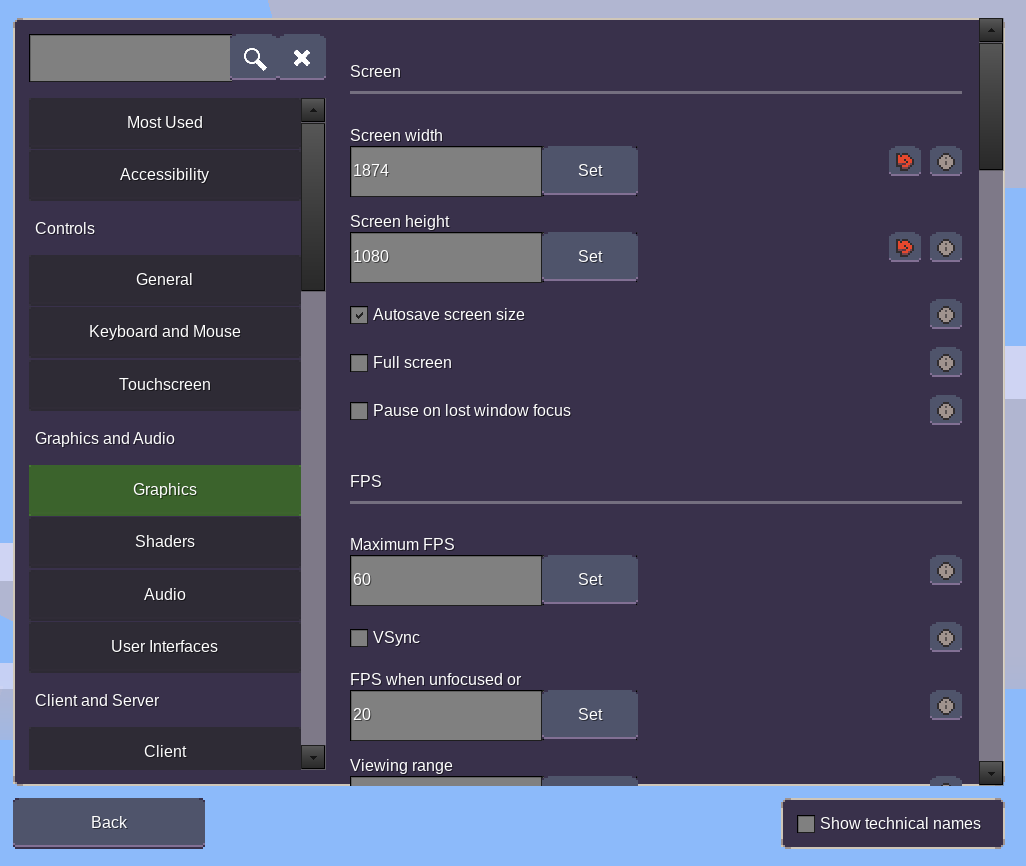
The graphics of all this are still very ugly (Minetest default style) but this is obviously PR-unrelated; the layout itself is obviously more important. I still think the main menu needs a more appealing design that look like an actual game thing, not like a tech-demo.
I could start using Zughy's theme in this PR, but wasn't sure whether it was the best idea to do it before the rest of the menu
The lack of scrollbar/field styling and the font also ruins it a bit. Also ignore the lack of pixel perfection on the border, I haven't inset the content properly
However, there is a small issue when the description contains a weblink. It is really inconvenient to remember this, you can't click the weblink nor copy it into the clipboard, you must awkwardly type it by hand.
There's only one non-advanced setting that has a weblink - contentdb_flag_blacklist. I don't think that is enough to justify adding special handling of this.
First of all, there is a glaring omission: Volume. :-)
This is redundant with Pause > Volume and Audio > Volume, I don't think it needs to be promoted that much
Also, I think a few things can be safely removed from there
I mostly just tried to copy the existing settings tab
I don't think arm_inertia is an accessibility setting, this is purely just eye-candy and a very subtle effect so it should not be in Accessibility
Unnecessary movement can cause motion sickness, so being able to turn of such animations is an accessibility thing
Obviously it makes sense to not address everything in this PR, that wasn't my intention anyway, just a couple of stuff to keep in mind for later.
Moved to 5.8.0 to keep a better overview for the 5.7.0 priorities. Decision based on https://irc.minetest.net/minetest-dev/2023-01-08#i_6045993

Most Used should probably be completely removed - I've only kept it there because it has some components to change settings that aren't available elsewhere yet
It would be good to get this in as soon as possible so it can be iterated on during this release
Tried out again. My experience, and suggestions for improvements:
- The overall layout is nice. It invites much more to explore all the settings.
- It's not super easy to spot a section in the left list. It would be good to have more pregnant titles (i.e. color them yellow, like in the credits). And icons would also be nice at some point.
- Many setting names are cut-off when used as field title (both, technical names and translated description-names). This is a really severe issue imho.
One possible fix for this would be to just make the fields much wider.
Or you could also add the (technical or descriptive, whatever is currently selected) name as a tooltip to each
field[]element. You could also add the setting name as title to the tooltips of the info / (i) elements. - I'd like to get old setting change menu if I click on an (i). (For clarity: I'm referring to the menu that you get after you click on "change" in the current old advanced settings tree.)
Reasons:
- Reading a long setting description in a tooltip is kinda weird, might not work in small windows, and is hard because the tooltip is far on the right of the screen.
- Idk how the tooltips work on touch devices. But if you have to hold a finger down, it's probably quite annoying.
- If some settings will get sliders, people may still want to manually enter values. The old setting change menu could provide this.
- The old setting change menu can also show the full setting name, in case it got cut off earlier.

It's not super easy to spot a section in the left list. It would be good to have more pregnant titles (i.e. color them yellow, like in the credits). And icons would also be nice at some point.
Done
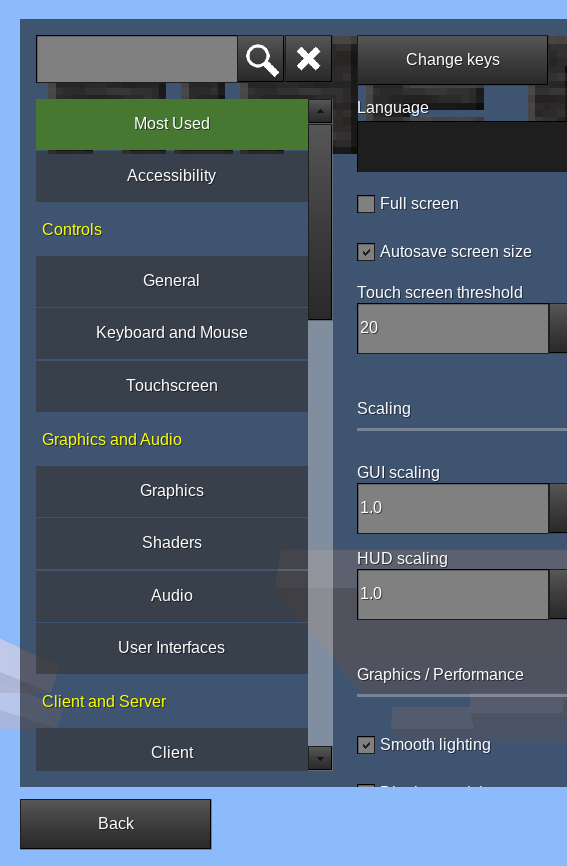
Many setting names are cut-off when used as field title (both, technical names and translated description-names). This is a really severe issue imho.
Any examples? Are you using a non-default font size / gui scaling? It all fits for me without clipping at default screen size
I'd like to get old setting change menu if I click on an (i). (For clarity: I'm referring to the menu that you get after you click on "change" in the current old advanced settings tree.)
Obviously the (i) button should be made to work on Android - adding a dialog for this is fine by me. But I don't think there's a need for a the old setting change dialog, for things like slider values I'd rather have that inline as a slider component
Any examples? Are you using a non-default font size / gui scaling? It all fits for me without clipping at default screen size
I'm using default scaling settings. (It gets very slightly less bad when I maximize my window though.)
Examples:
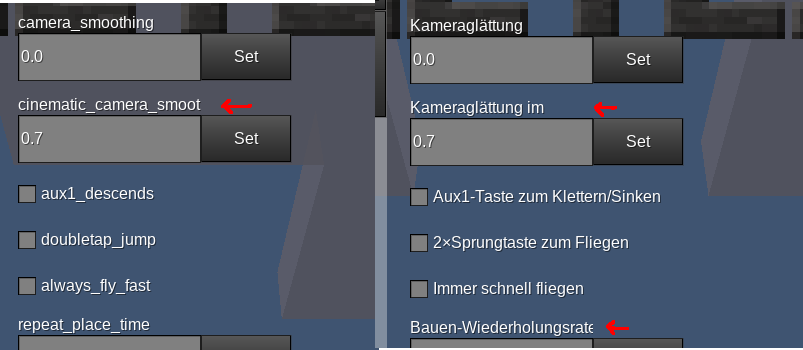 FYI, the "camera smoothing in cinematic mode" is also broken in english.
I like this PR. Just wanted that the mouse sensivity should be able to be adjusted via a slider. That is more user friendly and is easier to adjust.

I like this PR. Just wanted that the mouse sensivity should be able to be adjusted via a slider. That is more user friendly and is easier to adjust.
Thanks! Added that to the future improvements list, I was planning on doing that in the future but hadn't noted it down
Colors in the format (r, g, b) allow wacky values like (0, asd, NaN), which is out of scope for the PR to fix since there is no setting type for colors AFAICT. Hex/named color notation à la ColorString would be far nicer than this clunky settings-specific RGB triple syntax anyway.
Yeah, one of the "future improvements" would be to add a color type. Currently, colors are just strings
Is it intentional that mapgen settings don't have reset buttons?
Noise params don't have reset buttons because they are setting groups, and so core.settings:get() doesn't work. I'll need to add a way to compare two setting groups - Minetest doesn't have a table deep equal util though
Edit: the settingtypes noiseparams parser also returns different types, which makes it a pain to compare. It's a lot of pain for an advanced setting that won't be visible by default in the future
[comments on settingtypes.lua]
I'd rather not make changes to the settingtypes parser as that would be unnecessary risk for a PR that's big enough already
Please note that shader_component.lua is just code from the existing tab_settings.lua updated to the new GUI
Edit: I suppose that means that the license comment is incorrect, will need to double check those