
microsoft-graph-comms-samples
 microsoft-graph-comms-samples copied to clipboard
 microsoftgraph
Bot occasionally unable to join with internal error
Describe the issue Occasionally, the bot goes into a sort of failed state where it is unable to join the calls with an internal error with diagnostic code 500#7117
error logs: Publish to recordingbotevents subject CallTerminated message Call.ID a71f5d00-4f80-4cda-9276-8512e98056c1 Sender.Id a71f5d00-4f80-4cda-9276-8512e98056c1 status updated to Terminated - Server Internal Error. DiagCode: 500#7117.@
Is this due to something on our end or is it due to general instability of the teams bot application?
Expected behavior Bot is supposed to join the call normally.
Graph SDK (please complete the following information): Microsoft.Graph - 3.8.0 (nuget) Microsoft.Graph.Communications.Calls - 1.2.0.850 (nuget)
Call ID a71f5d00-4f80-4cda-9276-8512e98056c1
Mon, 04 Apr 2022 21:47:17 GMT
Additional context Bot is deployed to kubernetes.

This should be due to something on your end, from my experience the infrastructure and sdk is stable, I can't really say from this what the actual problem is maybe you can look up where this message is published to the recordingbotevents and check if you get more information there. Also I am not working at Microsoft, so I can't look up further logs in the infrastructure of microsoft.

Is there anyone from Microsoft here who can take a look at the infrastructure logs?
@1fabi0 we are now also getting error code 500#7112 occasionally with the same symptoms. Is there any way to get more information about what happens here you would recommend?

Hi @MaslinuPoimal and @lstappen Were you able to solve it? I am getting this error (Server Internal Error. DiagCode: 500#7112) once I deploy it to Azure Kubernetes. Though it's working fine locally with ngrok. I doubt it might be due to TCP mappings OR certificates. But as per the logs, it seems fine. I am not sure how to see the additional logs once deployed to AKS.
I doubt TCP mapping because: I cannot telnet to prod.bot.virtuosis.net 28550
I don't know how to fix it.

Cert-manager: version v1.8.0
AKS version : 1.23.8
@1fabi0 @ksikorsk Please review the below log once and let me know what I am missing.
Here are details of pods and certificates deployed to AKS:
1. kubectl get pods -n teams-recording-bot

2. Some logs:
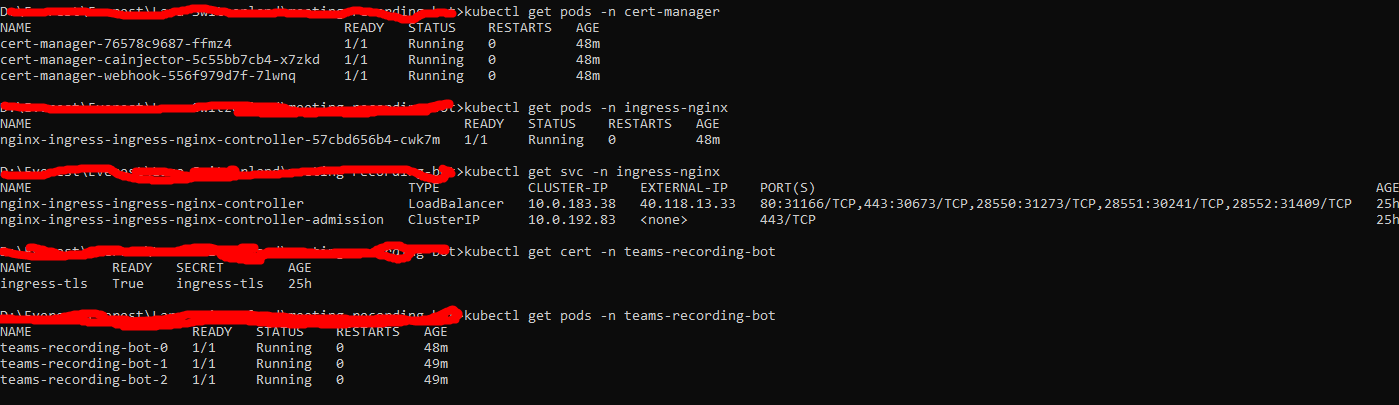
3. kubectl describe certificate -n teams-recording-bot
Name: ingress-tls Namespace: teams-recording-bot Labels: app.kubernetes.io/managed-by=Helm helmAppVersion=1.0.3 helmName=teams-recording-bot helmVersion=1.0.0 Annotations:
API Version: cert-manager.io/v1 Kind: Certificate Metadata: Creation Timestamp: 2022-09-16T16:17:14Z Generation: 1 Managed Fields: API Version: cert-manager.io/v1 Fields Type: FieldsV1 fieldsV1: f:status: .: f:conditions: .: k:{"type":"Ready"}: .: f:lastTransitionTime: f:message: f:observedGeneration: f:reason: f:status: f:type: f:notAfter: f:notBefore: f:renewalTime: Manager: cert-manager-certificates-readiness Operation: Update Subresource: status Time: 2022-09-16T16:17:14Z API Version: cert-manager.io/v1 Fields Type: FieldsV1 fieldsV1: f:metadata: f:labels: .: f:app.kubernetes.io/managed-by: f:helmAppVersion: f:helmName: f:helmVersion: f:ownerReferences: .: k:{"uid":"a26a4d7e-3228-48da-ba07-79974549e1f6"}: f:spec: .: f:dnsNames: f:issuerRef: .: f:group: f:kind: f:name: f:secretName: f:usages: Manager: cert-manager-ingress-shim Operation: Update Time: 2022-09-16T16:17:14Z Owner References: API Version: networking.k8s.io/v1 Block Owner Deletion: true Controller: true Kind: Ingress Name: teams-recording-bot UID: a26a4d7e-3228-48da-ba07-79974549e1f6 Resource Version: 657054 UID: 318b47fc-5ae0-41cd-9370-b085095a21df Spec: Dns Names: prod.bot.virtuosis.net Issuer Ref: Group: cert-manager.io Kind: ClusterIssuer Name: letsencrypt Secret Name: ingress-tls Usages: digital signature key encipherment Status: Conditions: Last Transition Time: 2022-09-16T16:17:14Z Message: Certificate is up to date and has not expired Observed Generation: 1 Reason: Ready Status: True Type: Ready Not After: 2022-12-14T19:24:49Z Not Before: 2022-09-15T19:24:50Z Renewal Time: 2022-11-14T19:24:49Z Events:
4. kubectl describe pod teams-recording-bot-0 -n teams-recording-bot
Name: teams-recording-bot-0 Namespace: teams-recording-bot Priority: 0 Service Account: default Node: aksscale000005/10.240.0.113 Start Time: Sat, 17 Sep 2022 22:49:39 +0545 Labels: app=teams-recording-bot controller-revision-hash=teams-recording-bot-76f8574954 statefulset.kubernetes.io/pod-name=teams-recording-bot-0 Annotations:
Status: Running IP: 10.240.0.134 IPs: IP: 10.240.0.134 Controlled By: StatefulSet/teams-recording-bot Containers: recording-bot: Container ID: containerd://d20d72c11f6ae9dda4fcf0f67f430ecc8c0905fa2ae42e42ff017da85f2b9a7e Image: acrmeetingrecordingbot.azurecr.io/teams-recording-bot:1.0.3 Image ID: acrmeetingrecordingbot.azurecr.io/teams-recording-bot@sha256:f5dda1002fdaf4277f0b015158549ba7704e7f824e7bf6f66eb61b695cbc389f Ports: 9441/TCP, 8445/TCP Host Ports: 0/TCP, 0/TCP State: Running Started: Sat, 17 Sep 2022 22:59:20 +0545 Ready: True Restart Count: 0 Environment: AzureSettings__BotName: <set to the key 'botName' in secret 'bot-application-secrets'> Optional: false AzureSettings__AadAppId: <set to the key 'applicationId' in secret 'bot-application-secrets'> Optional: false AzureSettings__AadAppSecret: <set to the key 'applicationSecret' in secret 'bot-application-secrets'> Optional: false AzureSettings__ServiceDnsName: prod.bot.virtuosis.net AzureSettings__InstancePublicPort: 28550 AzureSettings__InstanceInternalPort: 8445 AzureSettings__CallSignalingPort: 9441 AzureSettings__PlaceCallEndpointUrl: https://graph.microsoft.com/v1.0 AzureSettings__CaptureEvents: false AzureSettings__EventsFolder: events AzureSettings__MediaFolder: archive AzureSettings__TopicKey: AzureSettings__TopicName: recordingbotevents AzureSettings__RegionName: AzureSettings__IsStereo: false AzureSettings__WAVSampleRate: 0 AzureSettings__WAVQuality: 100 AzureSettings__AzureStorageAccountConnectionString: DefaultEndpointsProtocol=https;AccountName=meetingrecordingbot;AccountKey=XuqtdV4wggeuT3BhvO8iyPSCsjNpAN6pzyOXrhUCqnJpAnU7N66WOI0W1Xh6kJ5ZI9bSKiHw76bh+AStpOre4Q==;EndpointSuffix=core.windows.net AzureSettings__AzureStorageAccountContainerName: audiofiles AzureSettings__PodName: teams-recording-bot-0 (v1:metadata.name) Mounts: /var/run/secrets/kubernetes.io/serviceaccount from kube-api-access-sfhs9 (ro) C:/certs/ from certificate (ro) Conditions: Type Status Initialized True Ready True ContainersReady True PodScheduled True Volumes: certificate: Type: Secret (a volume populated by a Secret) SecretName: ingress-tls Optional: false kube-api-access-sfhs9: Type: Projected (a volume that contains injected data from multiple sources) TokenExpirationSeconds: 3607 ConfigMapName: kube-root-ca.crt ConfigMapOptional: DownwardAPI: true QoS Class: BestEffort Node-Selectors: agentpool=scale Tolerations: node.kubernetes.io/not-ready:NoExecute op=Exists for 300s node.kubernetes.io/unreachable:NoExecute op=Exists for 300s Events:
5. Same type of logs for teams-recording-bot-1 and teams-recording-bot-2

@dongkyunn Please have a look at my comment above. It is somewhat similar to this issue: 457 Please help me figure out this.

Hi @MaslinuPoimal
Did you ever figure this out? Was your bot running in Azure or elsewhere?
