
vscode
 vscode copied to clipboard
 microsoft
Building and debugging extensions is freezing the editor
Does this issue occur when all extensions are disabled?: Yes/No
- VS Code Version:
- OS Version:
Version: 1.74.0
Commit: 5235c6bb189b60b01b1f49062f4ffa42384f8c91
Date: 2022-12-05T16:37:54.581Z
Electron: 19.1.8
Chromium: 102.0.5005.167
Node.js: 16.14.2
V8: 10.2.154.15-electron.0
OS: Darwin arm64 22.1.0
Sandboxed: No
Steps to Reproduce:
- Create a new extension
     _-----_     ╭──────────────────────────╮
    |       |    │   Welcome to the Visual  │
    |--(o)--|    │   Studio Code Extension  │
   `---------´   │        generator!        │
    ( _´U`_ )    ╰──────────────────────────╯
    /___A___\   /
     |  ~  |
   __'.___.'__
 ´   `  |° ´ Y `

? What type of extension do you want to create? New Extension (TypeScript)
? What's the name of your extension? demo
? What's the identifier of your extension? demo
? What's the description of your extension? demo
? Initialize a git repository? No
? Bundle the source code with webpack? Yes
? Which package manager to use? npm

Writing in /Users/user/demo...
   create demo/.vscode/extensions.json
   create demo/.vscode/launch.json
   create demo/.vscode/settings.json
   create demo/.vscode/tasks.json
   create demo/package.json
   create demo/tsconfig.json
   create demo/.vscodeignore
   create demo/webpack.config.js
   create demo/vsc-extension-quickstart.md
   create demo/README.md
   create demo/CHANGELOG.md
   create demo/src/extension.ts
   create demo/src/test/runTest.ts
   create demo/src/test/suite/extension.test.ts
   create demo/src/test/suite/index.ts
   create demo/.eslintrc.json

Changes to package.json were detected.

Running npm install for you to install the required dependencies.

added 303 packages in 8s

58 packages are looking for funding
  run `npm fund` for details

Your extension demo has been created!
- Enter directory and run VS Code inside
code .
- Run the plugin in Debug mode (
F5).
The response inside the DEBUG CONSOLE is
Could not read source map for file:///Applications/Visual%20Studio%20Code.app/Contents/Resources/app/out/vs/out-vscode/vs/loader.js: ENOENT: no such file or directory, open '/Applications/Visual Studio Code.app/Contents/Resources/app/out/vs/out-vscode/vs/nls.js.map'
Could not read source map for file:///Users/user/demo/node_modules/universal-user-agent/dist-web/index.js: ENOENT: no such file or directory, open '/Users/user/demo/node_modules/universal-user-agent/dist-web/index.js.map'
Could not read source map for file:///Users/user/demo/node_modules/%40octokit/endpoint/dist-web/index.js: ENOENT: no such file or directory, open '/Users/user/demo/node_modules/@octokit/endpoint/dist-web/index.js.map'
Could not read source map for file:///Users/user/demo/node_modules/%40octokit/request-error/dist-web/index.js: ENOENT: no such file or directory, open '/Users/user/demo/node_modules/@octokit/request-error/dist-web/index.js.map'
Could not read source map for file:///Users/user/demo/node_modules/%40octokit/request/dist-web/index.js: ENOENT: no such file or directory, open '/Users/user/demo/node_modules/@octokit/request/dist-web/index.js.map'
Could not read source map for file:///Users/user/demo/node_modules/%40octokit/graphql/dist-web/index.js: ENOENT: no such file or directory, open '/Users/user/demo/node_modules/@octokit/graphql/dist-web/index.js.map'
Could not read source map for file:///Users/user/demo/node_modules/%40octokit/auth-token/dist-web/index.js: ENOENT: no such file or directory, open '/Users/user/demo/node_modules/@octokit/auth-token/dist-web/index.js.map'
Could not read source map for file:///Users/user/demo/node_modules/%40octokit/core/dist-web/index.js: ENOENT: no such file or directory, open '/Users/user/demo/node_modules/@octokit/core/dist-web/index.js.map'
Could not read source map for file:///Users/user/demo/node_modules/%40octokit/plugin-request-log/dist-web/index.js: ENOENT: no such file or directory, open '/Users/user/demo/node_modules/@octokit/plugin-request-log/dist-web/index.js.map'
Could not read source map for file:///Users/user/demo/node_modules/%40octokit/plugin-paginate-rest/dist-web/index.js: ENOENT: no such file or directory, open '/Users/user/demo/node_modules/@octokit/plugin-paginate-rest/dist-web/index.js.map'
Could not read source map for file:///Users/user/demo/node_modules/%40octokit/plugin-rest-endpoint-methods/dist-web/index.js: ENOENT: no such file or directory, open '/Users/user/demo/node_modules/@octokit/plugin-rest-endpoint-methods/dist-web/index.js.map'
Could not read source map for file:///Users/user/demo/node_modules/%40octokit/rest/dist-web/index.js: ENOENT: no such file or directory, open '/Users/user/demo/node_modules/@octokit/rest/dist-web/index.js.map'
The editor becomes unresponsive and needs to restart it.
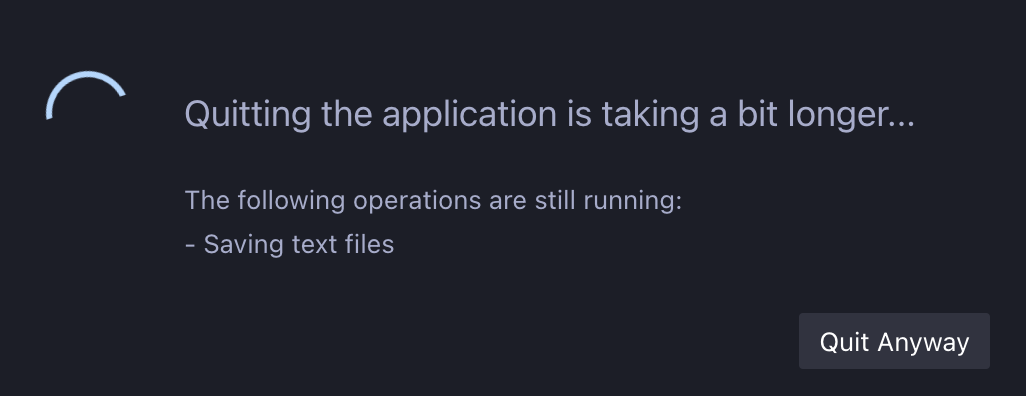
On version 1.73.0 - this error is not presented.
Is something changed?
Do I need to change some configurations?
I try this for the launch.json
	"resolveSourceMapLocations": [
		"${workspaceFolder}/**",
		"!**/node_modules/**"
	],
	"skipFiles": [
		"<node_internals>/**"
	],
And it's not working or helping.

Are there unsaved files when you try to quit? This probably isn't related to debugging

When I try to stop the debugging session it becomes unresponsive, also I could not reload it. The only way to continue is to quit the editor.
When making any change to the file , I could not save or make any additional actions. Every plugin become unresponsive
But you maybe right it could be related to something else? But it is easier to reproduce in debugger mode.
This probably related to #168076 and https://github.com/microsoft/vscode-js-debug/issues/1469.

I would like to upvote this issue, i'm seeing it as well in both existing extensions as well as newly created ones

I'm seeing this as well. Completely makes extension development unusable. It has halted progress, dead in it's tracks.

Duplicates https://github.com/microsoft/vscode-js-debug/issues/1469. This is now released; run the Check for Updates command and restart VS Code to get the fix.
