
vscode-pull-request-github
 vscode-pull-request-github copied to clipboard
 microsoft
add option `githubPullRequests.strictSSL=False`
Hello,
I'm testing this extension with enterprise GHE, once I set the github PAT, the output gives the error:
[Error  - 14:54:15.83] request to https://github.enterprise/api/v3/ failed, reason: unable to verify the first certificate
[Error  - 14:54:15.84] Error: network error
From the chrome or IE, the site opens without any SSL warning, I didn't ignroe any SSL warning before, becasue I'm on a fresh remastered machine.
I tried some tips found on the internet:
1/ set the env var NODE_EXTRA_CA_CERTS to the intermediate cert PEM path
2/ launch vscode with param --ignore-certificate-errors
3/ set "http.proxyStrictSSL": false
The error persists.
Could you please add the a new option for example githubPullRequests.strictSSL=False in order to just ignore the cert error?

@copdips where do you see those errors? Are then in the developer console, or in the Output panel? And, if in the Output panel, which output are they associated with?

@alexr00
from the output tab, and select Github Authentication, i know it's not the Github Pull Request.
But when you test Github Pull Request Nightly with GHE, you'll see the output in Github Authentication
Thanks @copdips.
@TylerLeonhardt is there anything that can be done from the auth side for this?
I know there might be something bad configured at internal entreprise cert level, but it's difficult to ask the entreprise admin to fix this, that's why I asked the new option githubPullRequests.strictSSL=False to just bypass the check, whcih is often seen in many other extensions.
@copdips what URL did you have set for the github-enterprise.uri setting? Also, it's not clear to me what githubPullRequests.strictSSL=False would do to the outbound requests.

@TylerLeonhardt
My setting is "github-enterprise.uri": "https://github.enterprise/", after that, as per wiki, I find a new option for GHE:
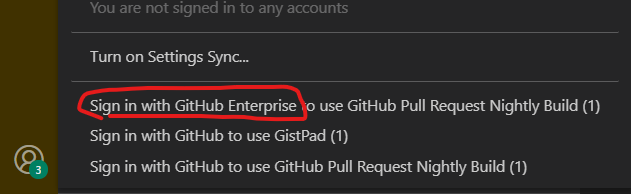
By adding githubPullRequests.strictSSL=False, it will help us to bypass the ssl check, as explained above, the error might be from our side, but sometimes it's difficult to fix, becasue we're not admin of our PCs, nor the GHE.
I'm not 100% sure what "http.proxyStrictSSL": false does today... @chrmarti is this the same as the proxy stuff and is at the chromium/electron layer?
"http.proxyStrictSSL" is only supported by a few extensions. I think turning off certificate verification is not a good idea.

@chrmarti thx for your confirmation, but nevertheless, nothing works for the moment, that's why open this issue for requesting a new feature by implementing skip ssl inside this exntension itself which is widely used in many other extensions or tools outside of vscode.
The new feature will set verify ssl by default, but give the end users the choice to skip the check.
@copdips We do load the OS' root certificates and add these to the certificates recognized by requests made through the Node.js https library. One case where we have seen this work different from browsers is when the server sends an incomplete chain of certificates. The recommendation appears to be for servers to always send the complete chain. See https://github.com/microsoft/vscode/issues/124655#issuecomment-873647518 for how to check if this is the case here.
@chrmarti, I fully understand your solution. but as I mentionned previsouly, it's not easy for us to ask our enterprise github (GHE) admins or desktop admins to fix the ssl error. They've too many work loads for other stuff. That's why I asked for adding the feature to let us to bypass the ssl check by ourselves in this vscode extension.
Same thing like curl -k in bash or Invoke-WebRequest -SkipCertificateCheck in powershell.
I'm also running into this problem. When working with a GitHub Enterprise Server that has unrecognized certificates, I have to use the setting git config http.sslVerify "false" to push/pull to a repository. It would be helpful if this extension could somehow circumvent this.

GitHub Enterprise support in this extension has changed significantly since August. Will re-open if there are more reports!