
vscode-pull-request-github
 vscode-pull-request-github copied to clipboard
 microsoft
Visually out of place drop down in pull requests views with Safari
Repro
- Using the latest nightly in a codespace loaded in Safari
- Create a pull request
Bug In the pull requests view, the drop downs are using the standard aqua-styling from safari:
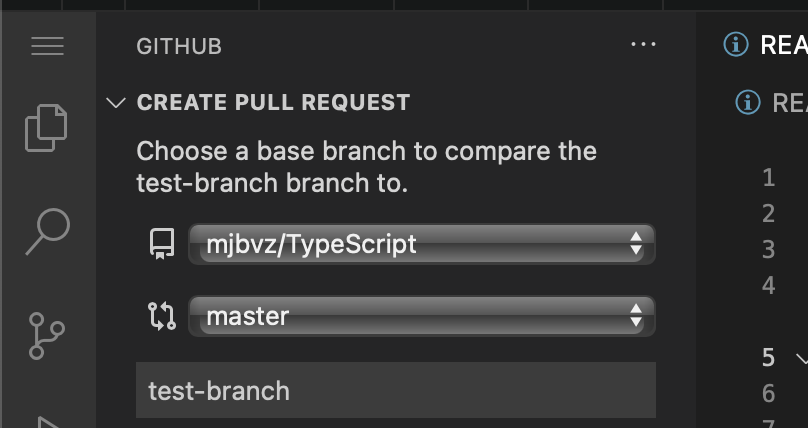
This looks out of place compared to our other dropdowns:


The dropdowns are here:
https://github.com/microsoft/vscode-pull-request-github/blob/b4bb8a6c63109e838ae54797ce608c61123f19b3/webviews/createPullRequestView/app.tsx#L12-L49
I haven't done any investigation into this issue, but I assume there is some styling that can be done to make the dropdowns look more like VS Code dropdowns. Styles are here: https://github.com/microsoft/vscode-pull-request-github/blob/09a489f8dd15d0a6c98e927879e863d234ebd68a/webviews/createPullRequestView/index.css
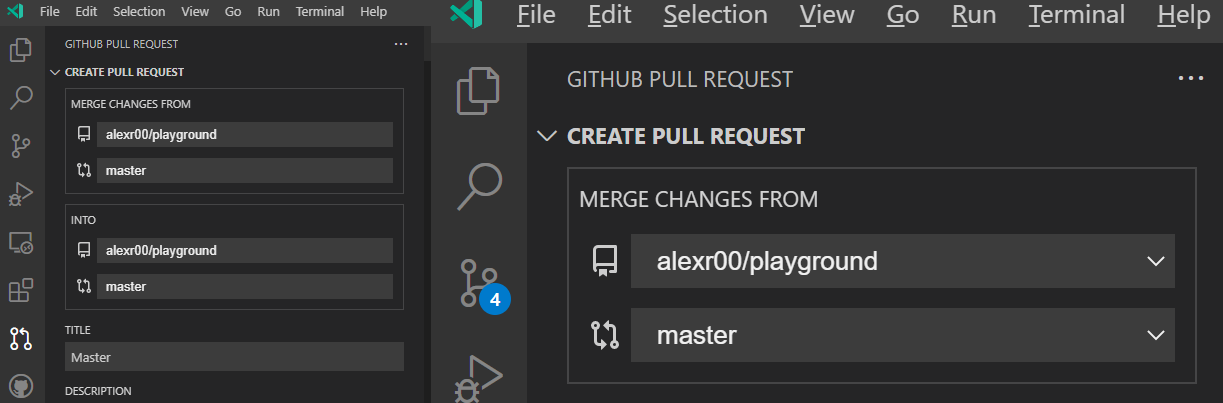
Looks like we lost some of the original styling (the arrow on the right of the select is gone):
The select now also has rounded corners, which isn't consistent with other selects in VS Code:
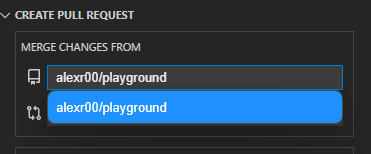
The colors look good though. Do you know if there's a way to fix the lost styling?
@alexr00
Hey there!
Is there a way to install the version of the extension that I'm working on in Codespaces? I had a look through this page on remote development and Codespaces, but couldn't get it to work.
I tried opening my repository in Codespaces, then packaging the extension into a VSIX using vsce package and installing that way, but I got an error:
Command 'Extensions: Install from VSIX...' resulted in an error (Unable to install extension 'github.vscode-pull-request-github' as it is not compatible with VS Code '1.69.2'.)
Also, it seems like this GitHub Pull Requests and Issues extension is installed by default in Codespaces and can't be removed or have other versions installed 🤔
I'm thinking I might need to use Insiders or something, but I don't think I can use that with Safari, right?
Any pointers would be great 😄
