
vscode-java-debug
 vscode-java-debug copied to clipboard
 microsoft
Support for overriding properties in Spring Boot apps
From @mattcobley on October 1, 2018 20:28
It would be great if the ability to override values for properties was made available when running/debugging Spring Boot applications.
This would allow a file like application.properties - which might contain variables instead of real values for use with something like Octopus Deploy - to be left as they are, but values for running locally to be specified in the debug config, in a similar manner to the "override properties" feature for Spring Boot apps in Spring Tool Suite:
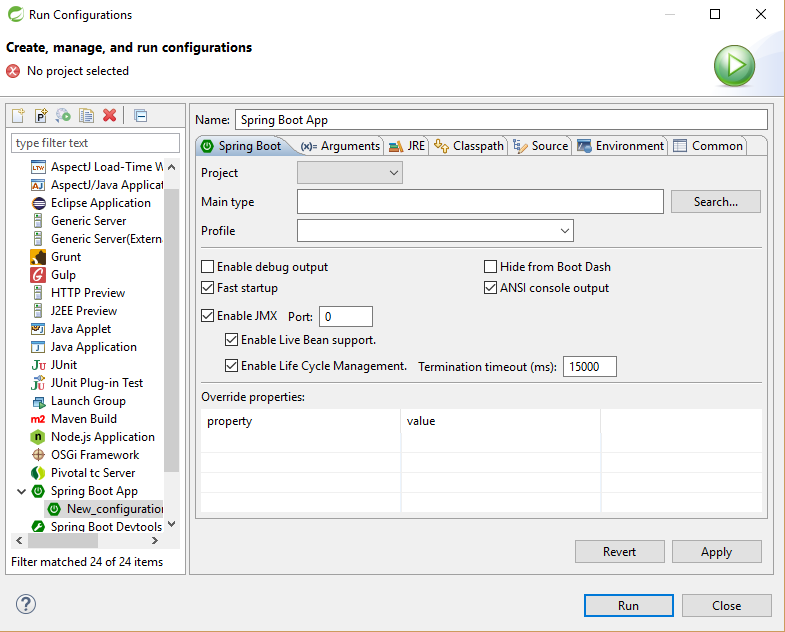
Copied from original issue: Microsoft/vscode-java-pack#41

@kdvolder @martinlippert could you please help evaluate this issue and share your thoughts?
To me, this is a spring-specific feature.

Firs, I think this is a useful feature. Might not be easy to implement.
For one, I am not certain how hard it is to implement UI for this sort of thing in a vscode extension.
For another, if you want nice completion help in the table, you need to read the properties metadata from the classpath and parse/use it (vscode-spring-boot language server already does that, but the vscode boot dash does not).
I should also mention that in Eclipse we are probably going to remove the current table-based ui. Not because we think it is bad/useless but because we think an embedded application.properties editor will be easier to maintain (since we basically already have it) and serve the same purpose as the table. In some ways it will probably be even a better user-experience (provides completions, validations and documentation hovers for property names and types).
BTW: Currently in vscode-boot-dash, even though there isn't any nice completions etc. I think it is already possible right now for the user to 'override' properties by editing their launch.json file. Since setting these 'override properties' values is really just a convenient ui for adding arguments to the commandline of the form --property=value (Or it can be done equivalently via vm arguments of format -Dproperty=value.
So instead of adding a fancy table-based ui, an alternate approah to supporting this use-case better could be to somehow have completion assist when editing launch.json. But also don't know how extensible the vscode editor for 'launch.json' files is to make something like that possible.
This is more or less my thoughts about this. Not sure if that helps? If it raises more questions than it answers feel free to ask more. I'll try my best to answer any question.
Or, if it seems like we need a bit more 'bandwidth' to brainstorm ideas about this, maybe we should setup a zoom face to face chat to think about how/what/when/where to implement something to support this use-case.

My thoughts on this:
- this feature would make a lot of sense. Assisting developers in overriding spring-boot-related properties easily for individual launch configs makes a lot of sense.
- I would also vote against a fancy UI with check boxes, tables, etc. and instead try to provide a meaningful content-assist in either the launch.json file when people add vm arguments, so that all the spring-boot properties show up there as content-assist
- I could also imagine people storing an extra properties file alongside the launch.json that is named after the launch config or something (like
launch-run-my-boot-app.propertiesif the launch config is calledrun-my-boot-app) and then re-use the existing property editor for spring-boot property files (that uses our spring-boot-language-server to do all the magic around content-assist)
Just a few thoughts. Opinions?

Just made a question on StackOverflow about it
It is actually the only reason that i am using Eclipse ... please can we implement it or have a workaround ?
I have a local.properties file which i want to override the application.properties file .
@martinlippert @yaohaizh @kdvolder @akaroml

@goxr3plus As a workaround, perhaps you can consider using spring profiles to help you out. Something like this:
- place your 'local.properties' file alongside the normal 'application.properties' file.
- rename 'local.properties' to 'application-local.properties'.
- Enable the 'local' profile when launching your app. (To do this simply add a command line argument
--spring.profiles.active=localor system property (via VM args)-Dspring.profiles.active=local.
With this setup, when the app is launched, spring boot will read both the main application.properties and the application-local.properties, with the 'local' taking precedence.
I think this is fairly close in setup to what you want and would give you pretty good experience (you will get content assist as normal for your application-local.properties for example). The only sort of 'manual' and tedious step in here would be to edit your launch.json file to add command line or vm argument that enables the 'local' profile.
BTW: That doesn't mean I'm arguing its a bad idea to explicitly support for overriding properties through the 'launch.json' file. I just think maybe as a workaround this might be pretty good for you until there is something better.
Thanks for the comments, all.
Personally, I agree that a text-based solution would suffice, and for now I'm not even sure if context assist is essential - the main thing initially is to make users aware of how to override the properties using what is currently available.
Given the options that have been mentioned, if Spring profiles or launch arguments can be used to perform the same function as these override properties for the time being, it might be that a simple addition to the extension README giving examples of how to do it would be enough - just to get users going.
The next step would then - as mentioned - be to offer some context assist, or similar, but I think that a simple link to somewhere such as https://docs.spring.io/spring-boot/docs/current/reference/html/common-application-properties.html in the extension README might again cover this in the short time.
Thanks again for your time considering this.
