
vscode-cpptools
 vscode-cpptools copied to clipboard
 microsoft
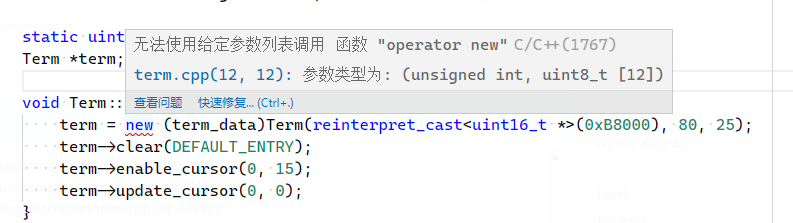
Calls to placement new cannot be resolved for cross compiler
Bug type: Language Service
Describe the bug
- OS and Version: Windows10 Home 20H2 19042.1526
- VS Code Version: 1.64.2
- C/C++ Extension Version: 1.8.4
- Other extensions you installed (and if the issue persists after disabling them):
- If using SSH remote, specify OS of remote machine: WSL2 - Archlinux x64
- A clear and concise description of what the bug is, including information about the workspace (i.e. is the workspace a single project or multiple projects, size of the project, etc). Similar to #5457 , but using a cross compiler targeting i686-elf. It's a single project.
Steps to reproduce
- Create hearder or source which includes
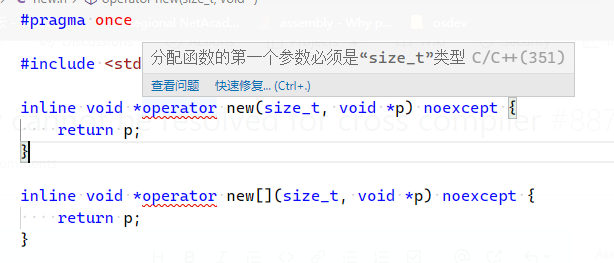
stddef.h, and declare placement operator new - Error message about size_t comes out.
Expected behavior
No message should be raised.
Code sample and logs
- Code sample
#pragma once

#include <stddef.h>

inline void *operator new(size_t, void *p) noexcept {
    return p;
}

inline void *operator new[](size_t, void *p) noexcept {
    return p;
}
- Configurations in
c_cpp_properties.json
{
    "configurations": [
        {
            "name": "cross-dev",
            "includePath": [
                "${workspaceFolder}/**"
            ],
            "defines": [],
            "cStandard": "c99",
            "cppStandard": "c++11",
            "intelliSenseMode": "gcc-x86",
            "compilerPath": "/home/nekosu/osdev/inst/bin/i686-elf-g++",
            "compilerArgs": [
                "-ffreestanding",
                "-Wall",
                "-Wextra"
            ]
        }
    ],
    "version": 4
}
-
Logs from running
C/C++: Log Diagnosticsfrom the VS Code command palette Nothing comes out. I cannot find where it prints message (is it does). I've checked also subwindow inside output. -
Logs from the language server logging
快速信息操作失败: FE: 'Unknown error'
loggingLevel 已更改为: Debug
cpptools/didChangeCppProperties
$/setTraceNotification
cpptools/getCodeActions: /home/nekosu/nos/kernel/term.cpp (id: 11779)
cpptools/textEditorSelectionChange
cpptools/textEditorSelectionChange
cpptools/activeDocumentChange: /home/nekosu/nos/kernel/term.cpp
cpptools/getFoldingRanges: /home/nekosu/nos/kernel/term.cpp (id: 11780)
cpptools/getCodeActions: /home/nekosu/nos/kernel/term.cpp (id: 11781)
cpptools/textEditorSelectionChange
cpptools/getCodeActions: /home/nekosu/nos/kernel/term.cpp (id: 11782)
cpptools/textEditorSelectionChange
textDocument/definition: /home/nekosu/nos/kernel/term.cpp (id: 11783)
cpptools/getCodeActions: /home/nekosu/nos/kernel/term.cpp (id: 11784)
textDocument/didClose: /home/nekosu/nos/kernel/term.cpp
cpptools/getCodeActions: /home/nekosu/nos/kernel/term.cpp (id: 11785)
textDocument/didOpen: /home/nekosu/nos/kernel/term.cpp
正在检查语法错误: /home/nekosu/nos/kernel/term.cpp
正在为以下项的翻译单元中文件的 IntelliSense 更新进行排队: /home/nekosu/nos/kernel/term.cpp
cpptools/textEditorSelectionChange
cpptools/getDocumentSymbols: /home/nekosu/nos/kernel/term.cpp (id: 11786)
cpptools/textEditorSelectionChange
cpptools/getDocumentSymbols
cpptools/getSemanticTokens: /home/nekosu/nos/kernel/term.cpp (id: 11787)
cpptools/activeDocumentChange: /home/nekosu/nos/kernel/term.cpp
cpptools/getFoldingRanges: /home/nekosu/nos/kernel/term.cpp (id: 11788)
cpptools/getCodeActions: /home/nekosu/nos/kernel/term.cpp (id: 11789)
cpptools/finishUpdateSquiggles
错误波形曲线计数: 0
错误波形曲线计数: 1
正在终止子进程: 19063
更新 IntelliSense 时间(秒): 0.469
cpptools/getSemanticTokens: /home/nekosu/nos/kernel/term.h (id: 11790)
cpptools/getCodeActions: /home/nekosu/nos/kernel/term.cpp (id: 11791)
cpptools/getFoldingRanges: /home/nekosu/nos/kernel/term.cpp (id: 11792)
Screenshots
Additional context
cross compiler info:
i686-elf-g++ -v
使用内建 specs。
COLLECT_GCC=i686-elf-g++
COLLECT_LTO_WRAPPER=/home/nekosu/osdev/inst/libexec/gcc/i686-elf/11.2.0/lto-wrapper
目标:i686-elf
配置为:../../gcc-11.2.0/configure --target=i686-elf --prefix=/home/nekosu/osdev/inst --enable-nls --enable-languages=c,c++ --without-headers
线程模型:single
Supported LTO compression algorithms: zlib zstd
gcc 版本 11.2.0 (GCC)


When you run the C/C++: Log Diagnostics command, the output should be in the "C/C++ Diagnostics".

@neko-para Could you also provide the logs from the language server logging where it shows the compilerPath being queried?

@sean-mcmanus This time it comes out.
-------- Diagnostics - 2022/2/20 下午4:08:52
Version: 1.8.4
Current Configuration:
{
    "name": "Linux",
    "includePath": [
        "${workspaceFolder}/**"
    ],
    "defines": [],
    "compilerArgs": [
        "-ffreestanding"
    ],
    "compilerPath": "/home/nekosu/osdev/inst/bin/i686-elf-gcc",
    "cStandard": "c99",
    "cppStandard": "c++11",
    "intelliSenseMode": "gcc-x86",
    "compilerPathIsExplicit": true,
    "cStandardIsExplicit": true,
    "cppStandardIsExplicit": true,
    "intelliSenseModeIsExplicit": true,
    "mergeConfigurations": false,
    "browse": {
        "path": [
            "${workspaceFolder}/**"
        ],
        "limitSymbolsToIncludedHeaders": true
    }
}
Translation Unit Mappings:
[ /home/nekosu/nos/kernel/term.cpp ]:
    /home/nekosu/nos/kernel/term.cpp
Translation Unit Configurations:
[ /home/nekosu/nos/kernel/term.cpp ]:
    Process ID: 19713
    Memory Usage: 20 MB
    Compiler Path: /home/nekosu/osdev/inst/bin/i686-elf-gcc
    Includes:
        /home/nekosu/osdev/inst/lib/gcc/i686-elf/11.2.0/include
        /home/nekosu/osdev/inst/lib/gcc/i686-elf/11.2.0/include-fixed
    Standard Version: c++11
    IntelliSense Mode: linux-gcc-x86
    Other Flags:
        --g++
        --gnu_version=110200
Total Memory Usage: 20 MB

------- Workspace parsing diagnostics -------
Number of files discovered (not excluded): 192
@michelleangela
无法访问浏览数据库。(remove_file)
无法访问浏览数据库。(remove_file)
loggingLevel 已更改为: Debug
cpptools/didChangeCppProperties
$/setTraceNotification
cpptools/getCodeActions: /home/nekosu/nos/kernel/term.cpp (id: 579)
cpptools/textEditorSelectionChange
cpptools/textEditorSelectionChange
cpptools/activeDocumentChange: /home/nekosu/nos/kernel/term.cpp
cpptools/getFoldingRanges: /home/nekosu/nos/kernel/term.cpp (id: 580)
cpptools/getCodeActions: /home/nekosu/nos/kernel/term.cpp (id: 581)
cpptools/textEditorSelectionChange
textDocument/documentHighlight: /home/nekosu/nos/kernel/term.cpp (id: 582)
cpptools/textEditorSelectionChange
cpptools/activeDocumentChange: /home/nekosu/nos/kernel/term.cpp
cpptools/getCodeActions: /home/nekosu/nos/kernel/term.cpp (id: 583)
textDocument/hover: /home/nekosu/nos/kernel/term.cpp (id: 584)
textDocument/definition: /home/nekosu/nos/kernel/term.cpp (id: 585)
textDocument/hover: /home/nekosu/nos/kernel/term.cpp (id: 586)
textDocument/didClose: /home/nekosu/nos/kernel/term.cpp
cpptools/getCodeActions: /home/nekosu/nos/kernel/new.h (id: 587)
已发现 0 个包含路径建议。
Database safe to open
cpptools/textEditorSelectionChange
cpptools/textEditorSelectionChange
cpptools/activeDocumentChange: /home/nekosu/nos/kernel/new.h
cpptools/getFoldingRanges: /home/nekosu/nos/kernel/new.h (id: 588)
textDocument/definition: /home/nekosu/nos/kernel/new.h (id: 589)
cpptools/getCodeActions: /home/nekosu/nos/kernel/term.cpp (id: 590)
textDocument/didOpen: /home/nekosu/nos/kernel/term.cpp
正在检查语法错误: /home/nekosu/nos/kernel/term.cpp
正在为以下项的翻译单元中文件的 IntelliSense 更新进行排队: /home/nekosu/nos/kernel/term.cpp
cpptools/textEditorSelectionChange
cpptools/getDocumentSymbols: /home/nekosu/nos/kernel/term.cpp (id: 591)
cpptools/textEditorSelectionChange
textDocument/documentHighlight: /home/nekosu/nos/kernel/term.cpp (id: 592)
cpptools/getDocumentSymbols
cpptools/getSemanticTokens: /home/nekosu/nos/kernel/term.cpp (id: 593)
cpptools/activeDocumentChange: /home/nekosu/nos/kernel/term.cpp
cpptools/getFoldingRanges: /home/nekosu/nos/kernel/term.cpp (id: 594)
cpptools/getCodeActions: /home/nekosu/nos/kernel/term.cpp (id: 595)
cpptools/finishUpdateSquiggles
错误波形曲线计数: 1
正在终止子进程: 19818
错误波形曲线计数: 2
更新 IntelliSense 时间(秒): 0.458
cpptools/getSemanticTokens: /home/nekosu/nos/kernel/new.h (id: 596)
cpptools/getCodeActions: /home/nekosu/nos/kernel/term.cpp (id: 597)
cpptools/getFoldingRanges: /home/nekosu/nos/kernel/term.cpp (id: 598)
空闲环路: 重新分析活动文档
正在检查语法错误: /home/nekosu/nos/kernel/term.cpp
正在为以下项的翻译单元中文件的 IntelliSense 更新进行排队: /home/nekosu/nos/kernel/term.cpp
cpptools/finishUpdateSquiggles
错误波形曲线计数: 1
错误波形曲线计数: 2
更新 IntelliSense 时间(秒): 0.256
cpptools/getSemanticTokens: /home/nekosu/nos/kernel/new.h (id: 599)
cpptools/getSemanticTokens: /home/nekosu/nos/kernel/term.cpp (id: 600)
cpptools/getFoldingRanges: /home/nekosu/nos/kernel/term.cpp (id: 601)
cpptools/getCodeActions: /home/nekosu/nos/kernel/term.cpp (id: 602)
It looks like IntelliSense is using the correct IntelliSense mode linux-gcc-x86 to simulate for x86 or 32bit Linux.
For the IntelliSense server logging, do you see something like the following where the extension gets information from the compiler? If so, could you share that part of the logging?
loggingLevel: Debug
cpptools/didChangeCppProperties
Attempting to get defaults from C compiler in "compilerPath" property: '/usr/bin/gcc-9'
Querying compiler for default C++ language standard using command line: "/usr/bin/gcc-9" -x c++ -E -dM /dev/null
terminating child process: 784
Querying compiler for default C language standard using command line: "/usr/bin/gcc-9" -x c -E -dM /dev/null
terminating child process: 788
Detected language standard version: gnu17
Querying compiler's default target using command line: "/usr/bin/gcc-9" -dumpmachine
Compiler returned default target value: x86_64-linux-gnu

terminating child process: 790
Compiler query command line: "/usr/bin/gcc-9" -std=c11 -Wp,-v -E -dM -x c -m64  /dev/null
terminating child process: 791
Code browsing service initialized
Attempting to get defaults from C++ compiler in "compilerPath" property: '/usr/bin/gcc-9'
Compiler query command line: "/usr/bin/gcc-9" -std=c++14 -Wp,-v -E -dM -x c++ -m64  /dev/null
Failed to query compiler. Falling back to 32-bit intelliSenseMode.
terminating child process: 794
Compiler query command line: "/usr/bin/gcc-9" -std=c++14 -Wp,-v -E -dM -x c++ -m32  /dev/null
Failed to query compiler. Falling back to no bitness.
terminating child process: 796
Compiler query command line: "/usr/bin/gcc-9" -std=c++14 -Wp,-v -E -dM -x c++   /dev/null
gcc-9: fatal error: cannot execute ‘cc1plus’: execvp: No such file or directory
compilation terminated.

terminating child process: 798
  Folder: /usr/include/ will be indexed
  Folder: /usr/lib/llvm-9/lib/clang/9.0.1/include/ will be indexed
  Folder: /usr/lib/gcc/x86_64-linux-gnu/9/include/ will be indexed
  Folder: /usr/local/include/ will be indexed
  Folder: /home/blue/tests/empty/ will be indexed
cpptools/didChangeSettings
IntelliSense Engine = Default.
Enhanced Colorization is enabled.
Error squiggles are enabled if all header dependencies are resolved.
Discovering files...
Autocomplete is enabled.
loggingLevel: Debug
cpptools/didChangeCppProperties
正在尝试从 "compilerPath" 属性中的 C 编译器获取默认值:“/home/nekosu/osdev/inst/bin/i686-elf-g++”
正在使用命令行查询默认 C++ 语言标准的编译器: "/home/nekosu/osdev/inst/bin/i686-elf-g++" -x c++ -E -dM /dev/null
正在终止子进程: 293
检测到的语言标准版本: gnu++17
正在使用命令行查询默认 C 语言标准的编译器: "/home/nekosu/osdev/inst/bin/i686-elf-g++" -x c -E -dM /dev/null
正在终止子进程: 295
检测到的语言标准版本: gnu17
正在使用命令行查询编译器的目标:“/home/nekosu/osdev/inst/bin/i686-elf-g++”-dumpmachine
编译器返回的默认目标值: i686-elf

正在终止子进程: 297
编译器查询命令行: "/home/nekosu/osdev/inst/bin/i686-elf-g++" -ffreestanding -std=c99 -Wp,-v -E -dM -x c -m32  /dev/null
正在终止子进程: 298
已初始化代码浏览服务
正在尝试从 "compilerPath" 属性中的 C++ 编译器获取默认值:“/home/nekosu/osdev/inst/bin/i686-elf-g++”
编译器查询命令行: "/home/nekosu/osdev/inst/bin/i686-elf-g++" -ffreestanding -std=c++11 -Wp,-v -E -dM -x c++ -m32  /dev/null
正在终止子进程: 301
  文件夹 /home/nekosu/osdev/inst/lib/gcc/i686-elf/11.2.0/include/ 将编入索引
  文件夹 /home/nekosu/osdev/inst/lib/gcc/i686-elf/11.2.0/include-fixed/ 将编入索引
  文件夹 /home/nekosu/nos/ 将编入索引
cpptools/didChangeSettings
正在发现文件...
IntelliSense 引擎 = Default。
已启用增强的着色。
如果已解决所有标头依赖项,则启用错误波形曲线。
已启用自动完成。
cpptools/didChangeSettings
IntelliSense 引擎 = Default。
已启用增强的着色。
如果已解决所有标头依赖项,则启用错误波形曲线。
已启用自动完成。
cpptools/didChangeSettings
IntelliSense 引擎 = Default。
已启用增强的着色。
如果已解决所有标头依赖项,则启用错误波形曲线。
已启用自动完成。
Hey @michelleangela, this issue might need further attention.
@neko-para, you can help us out by closing this issue if the problem no longer exists, or adding more information.
![github-actions[bot] avatar](https://avatars.githubusercontent.com/in/15368?v=4 "Published by a pub.dev verified publisher")
This issue has been closed because it needs more information and has not had recent activity.
@michelleangela Sorry to bother you, but could you please give me some suggestions about this problem? I can only disable all squiggles to get over this. but if so, there's no difference with disabling this plugin. So what else do I need to do to get this problem solved?
@neko-para
Thank you for the follow up. The IntelliSense engine is incorrectly defining the value of unsigned long for size_t.
The current workaround is to add this definition to the c_cpp_properties.json file: __SIZE_TYPE__=unsigned int
Example:
{
    "configurations": [
        {
            "name": "Linux",
            "includePath": [
                "${workspaceFolder}/**"
            ],
            "defines": ["__SIZE_TYPE__=unsigned int"],
            "compilerPath": "/home/blue/build-i686-elf/bin/i686-elf-g++",
            "cStandard": "c11",
            "cppStandard": "c++11",
            "intelliSenseMode": "linux-gcc-x86",
            "compilerArgs": []
        }
    ],
    "version": 4
}
@neko-para Thank you for the follow up. The IntelliSense engine is incorrectly defining the value of
unsigned longforsize_t.The current workaround is to add this definition to the c_cpp_properties.json file:
__SIZE_TYPE__=unsigned intExample:
{
    "configurations": [
        {
            "name": "Linux",
            "includePath": [
                "${workspaceFolder}/**"
            ],
            "defines": ["__SIZE_TYPE__=unsigned int"],
            "compilerPath": "/home/blue/build-i686-elf/bin/i686-elf-g++",
            "cStandard": "c11",
            "cppStandard": "c++11",
            "intelliSenseMode": "linux-gcc-x86",
            "compilerArgs": []
        }
    ],
    "version": 4
}
Thanks! Previously, I've found a possible workaround like this:
#ifdef VSCODE_CPPTOOL
#define __size_t
typedef unsigned int size_t;
#endif

#include <stddef.h>
Things are similar. After all, thanks for your suggestion! Then this problem won't affect much now.
Also, instead of checking for VSCODE_CPPTOOL, you can use __INTELLISENSE__, which is defined by our IntelliSense parser.
Related to issue https://github.com/microsoft/vscode-cpptools/issues/4653 for supporting other compilers.
Changing this issue to feature request to support i686-elf-tools.