
vscode-cpptools
 vscode-cpptools copied to clipboard
 microsoft
Language Service: Unable to resolve type when managing namespaces via header and preprocessor
Bug type: Language Service
Describe the bug
- OS and Version: Windows 10 Pro 21H1 19043.1288
- VS Code Version: 1.61.2 (user setup)
- C/C++ Extension Version: v1.7.1
- Other extensions you installed (and if the issue persists after disabling them):
- Local
- jeff-hykin.better-cpp-syntax (disabled)
- usernamehw.errorlens (disabled)
- ms-vscode-remote.remote-ssh
- ms-vscode-remote.remote-ssh-edit (disabled)
- ms-vscode-remote.remote-wsl (disabled)
- SSH
- ms-vscode.cpptools
- twxs.cmake (disabled)
- ms-vscode.cmake-tools (disabled)
- mhutchie.git-graph (disabled)
- eamodio.gitlens (disabled)
- ms-python.vscode-pylance (disabled)
- ms-python.python (disabled)
- Local
- If using SSH remote, specify OS of remote machine: Ubuntu 20.04.3 LTS
- When managing a nested namespace with the preprocessor via a header file, a type inside the nested namespace is not recognized from inside the namespace when specifying the inner namespace explicitly. See Steps to reproduce for clarification.
Steps to reproduce
-
Open a folder with the following two files:
// main.cpp

#include "namespace.hpp"

class Foo {};

b::Foo *foo;

#include "namespace.hpp"

int main() {}
// namespace.hpp #ifndef NAMESPACE_A_B_OPEN #define NAMESPACE_A_B_OPEN namespace a { namespace b { #else } } #endif -
See the following errors:
b::has error squiggles with the following two problems:
this declaration has no storage class or type specifier C/C++(77)expected a ';'C/C++(65)-
b::Foodoes not correctly link to its declaration above when pressingCTRL+CLICKand shows no information when hovering the mouse over it. -
endifhas error squiggles with the following two problems (this one might be unrelated to the other errors - I don't really care about this one):
PCH warning: header stop not at file scope. An IntelliSense PCH file was not generated. C/C++(2923)expected a '}' C/C++(67)
Expected behavior
No error squiggles in main.cpp and correctly resolving b::Foo.
Additional context
The following changes to the code circumvent the problem:
-
Specify the outer namespace as well:
-b::Foo *foo; +a::b::Foo *foo; -
Don't specify the inner namespace:
-b::Foo *foo; +Foo *foo; -
Manually including
namespace.hppby copying the content ofnamespace.hppto the two lines with#include "namespace.hpp".

@mkroening
Regarding code sample in namespace.hpp, if the first conditional is true, then the namespaces will be missing } as the } are only included in the #else conditional. So it seems it's expected that it would squiggle. Also, the code sample does not compile. I tested it on https://godbolt.org/ using Clang and GCC. Is there something I was supposed to add to the code sample that I missed?
// namespace.hpp

#ifndef NAMESPACE_A_B_OPEN
    #define NAMESPACE_A_B_OPEN
    namespace a {
        namespace b {
#else
        }
    }
#endif
For code sample in main.cpp, I don't understand why "namespace.hpp" is included twice. Also, class Foo is not defined in any namespace.
// main.cpp

#include "namespace.hpp"

class Foo {};

b::Foo *foo;

#include "namespace.hpp"

int main() {}
Is there an example that compiles that you could provide?

@michelleangela, thanks for your reply!
Sorry for not being specific enough.
Regarding the error in namespace.hpp: You are right, this is expected when looking at namespace.hpp itself. Like I said “this one might be unrelated to the other errors”. I just stumbled upon it, as it comes with the actual problem:
The two files actually form one code sample. The errors I care about are in main.cpp. Placing both files in the same folder and compiling with g++ main.cpp works fine. Foo is defined in a namespace, but this namespace is managed through namespace.hpp. The preprocessor will transform main.cpp the following way:
-
Process the
#includedirective. If this step is performed manually,Foois being recognized correctly by the language service.// main.cpp #ifndef NAMESPACE_A_B_OPEN #define NAMESPACE_A_B_OPEN namespace a { namespace b { #else } } #endif class Foo {}; b::Foo *foo; #ifndef NAMESPACE_A_B_OPEN #define NAMESPACE_A_B_OPEN namespace a { namespace b { #else } } #endif int main() {} -
Evaluate
#ifndefdirectives (formatting adjusted manually).// main.cpp namespace a { namespace b { class Foo {}; b::Foo *foo; } } int main() {}
Just to be clear: this problem is awfully specific. As listed in my original comment, the issue is gone if you either write a::b::Foo or Foo instead of b::Foo. Thus you need at least two nested namespaces to trigger this problem. It's also gone when not #includeing the namespace construct via the preprocessor but manually, as explained above.
Those two workarounds are not feasible for me in the bigger project this is happening in, though. And as the code does compile, it would be nice to use this extension in it's full capacity. In the meantime, switching to the "Tag Parser" Intelli Sense Engine removes the squiggles and makes it possible to use some features.
Now I managed to put multiple files into Compiler Explorer. It is working as expected: https://godbolt.org/z/fz7eoTevn
@mkroening Thank you for clarifying the issue. Since the IntelliSense engine is a shared component with Visual Studio's C++ and VS Code's C++ extension, I've created an internal bug for the IntelliSense engine team to address the issue.
This GitHub issue will be updated as the internal bug's status changes.
Setting C_Cpp.intelliSenseCacheSize to 0 should be a workaround (it worked around the issue for my repro with the boost/geometry library).

Setting C_Cpp.intelliSenseCacheSize to 0 should be a workaround (it worked around the issue for my repro with the boost/geometry library).
I have the same issue in my protobuf generated c++ code. And Setting C_Cpp.intelliSenseCacheSize to 0 doesn't work. Have you any other solutions or work arounds about this so far?

@zgz682000 The symptom you're seeing has a different root cause. You should file a new issue with more repro details so we can investigate.

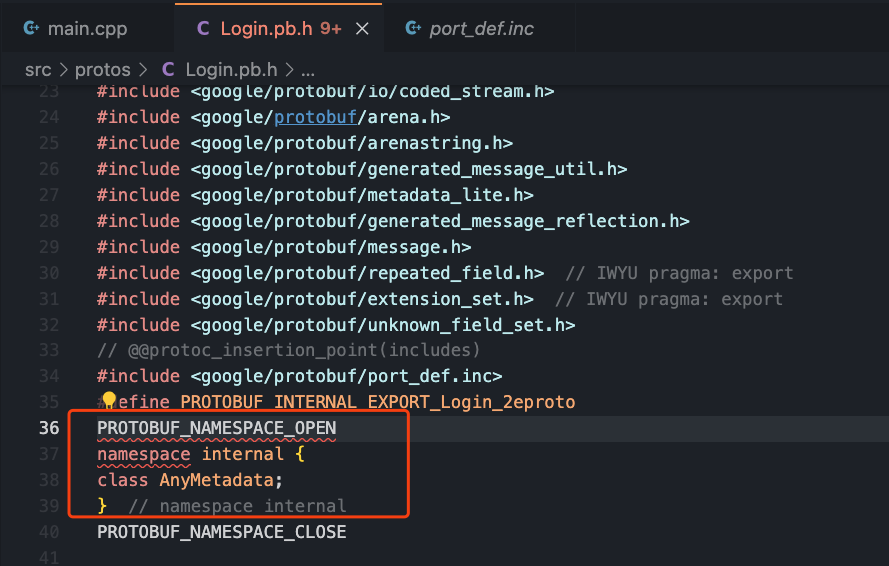

By the way, My case happens in a remote docker container instead of normal env.
@zgz682000 Okay, I think you're right, it's the same issue, and setting the intelliSenseCache to 0 isn't a workaround (it was only a workaround for the other pch error that was mentioned).
This is being tracked also on the VS side at https://developercommunity.visualstudio.com/t/Intellisense-fails-on-most-files-in-my-p/10073586 . However, they're saying it's a known limitation of the current implementation, i.e. sounds like it would be hard to fix.