
vscode-azurefunctions
 vscode-azurefunctions copied to clipboard
 microsoft
Provide intellisense completions in function.json bindings
I wanted to add a new blob output binding. My first intuition was to trigger intellisense for a new bindings object, like how launch.json files work in vscode code, but there wasn't anything relevant there

It looks like there is some suggestion of properties after specifying a type, so having intellisense on the object types might be a good way to start. Without this I am required to either memorize the exact type names or cross-reference with documentation. Having intellisense here would let me be able to write most triggers without needing to leave VS Code 🙂


The intellisense you see comes from the json schema for that file: http://json.schemastore.org/function
We also have an "Add Binding..." command which you can access by right clicking in that file or from the "Local Project" node in the Azure Functions view.
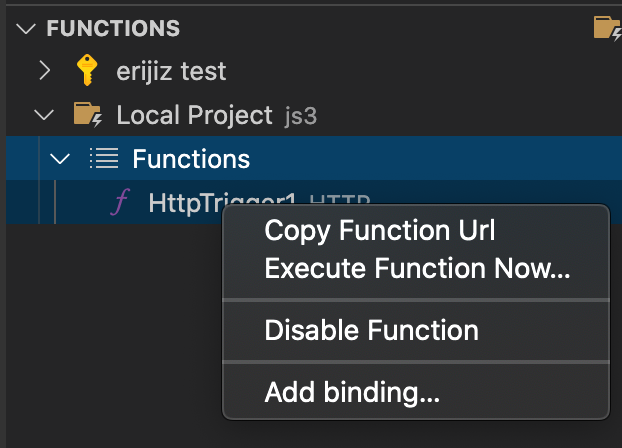
AFAIK the example you gave ("like how launch.json files work in vscode") is using static json snippets? The main reason we use a command instead is because we dynamically retrieve these templates from a feed managed by the Azure Functions team. If we added some snippets, I think we'd have to hard-code some stuff instead of dynamically retrieving it

Thanks for the hint on the context menu, I didn't know that was there.
The implementation of launch.json configurations are pulled from static sections of the package.json, but the underyling implementation is a CompletionItemProvider which you can leverage to provide your own dynamic information.
I actually do that in the extension for which I was writing this Azure Function 🙂
This issue has become stale and is at risk of being closed. The community has 60 days to upvote the issue. If it receives 5 upvotes we will keep it open and take another look. If not, we will close it. To learn more about how we handle issues, please see our documentation.
Happy Coding!

:slightly_smiling_face: This feature request received a sufficient number of community upvotes and we moved it to our backlog. To learn more about how we handle feature requests, please see our documentation.
Happy Coding!