python-language-server
 python-language-server copied to clipboard
 microsoft
Python parser becomes mad
Environment data
- VS Code version: Version: 1.44.0 (user setup) Commit:
- Extension version (available under the Extensions sidebar): 2020.4.76186 + reload required. So most likely 2020.4.0
- OS and version: OS: Windows_NT x64 10.0.18362
- Python version: 3.7.4
- Type of virtual environment used: N/A
- Jedi or Language Server? (i.e. what is
"python.jediEnabled"set to; more info microsoft/vscode-python#3977): Jedi - Value of the
python.languageServersetting: Microsoft
Expected behaviour
I expect python parser, linter and intellisense to remain sane.
Actual behaviour
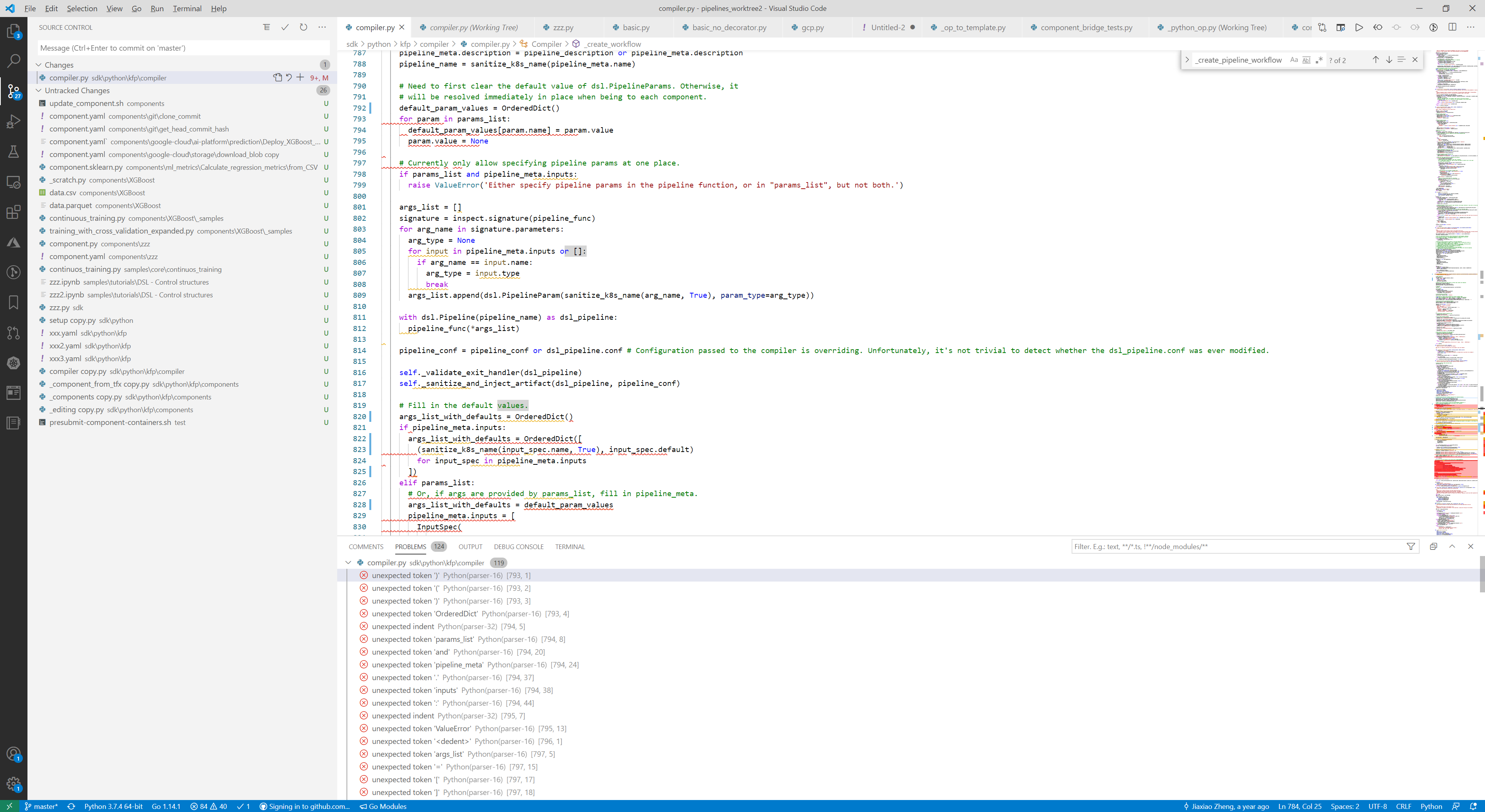
First comes linter amnesia. Linter stops recognizing some (say, every 5th) pythons standard library imports, function parameters, functions etc ("undefined variable"). Then the parser starts going mad. It starts blabbling nonsense and putting red squiggles under, say part of the called function name (not the whole name) or starts complaining about completely empty lines. Then the parser goes completely mad. See the screenshot: See, for example, how it gets mad about the following line:
        stream.seek(0)
~~~~~~    --- ~~~~~~ ~

Reopening the file does not solve the problem.
Steps to reproduce:
Use VSCode to edit python files for awhile.
- XXX
Logs
Output for Python in the Output panel (View→Output, change the drop-down the upper-right of the Output panel to Python)
 ~\AppData\Local\Programs\Python\Python37\python.exe c:\Users\Ark\.vscode\extensions\ms-python.python-2020.4.74986\pythonFiles\pyvsc-run-isolated.py pylint --msg-template='{line},{column},{category},{symbol}:{msg}' --reports=n --output-format=text a:\_All\My.Work\2018.Google\pipelines_worktree3\sdk\python\kfp\components\_components.py
cwd: a:\_All\My.Work\2018.Google\pipelines_worktree3
> ~\AppData\Local\Programs\Python\Python37\python.exe c:\Users\Ark\.vscode\extensions\ms-python.python-2020.4.74986\pythonFiles\pyvsc-run-isolated.py pylint --msg-template='{line},{column},{category},{symbol}:{msg}' --reports=n --output-format=text a:\_All\My.Work\2018.Google\pipelines_worktree3\sdk\python\kfp\components\_components.py
cwd: a:\_All\My.Work\2018.Google\pipelines_worktree3
##########Linting Output - pylint##########
************* Module kfp.components._components

...
28,0,warning,unused-wildcard-import:Unused import ModelBase from wildcard import
28,0,warning,unused-wildcard-import:Unused import v1 from wildcard import

--------------------------------------------------------------------

Your code has been rated at -6.46/10 (previous run: -7.47/10, +1.01)
Output from Console under the Developer Tools panel (toggle Developer Tools on under Help; turn on source maps to make any tracebacks be useful by running Enable source map support for extension debugging)
[Extension Host] Info Python Extension: 2020-05-08 00:33:38: Get Interpreters, Class name = m, completed in 3ms, has a truthy return value, Arg 1: <Uri:extension-output-#4>, Return Value: [{"architecture":3,"path":"C:\\Users\\Ark\\AppData\\Local\\Programs\\Python\\Python36\\python.exe","version":{"options":{"loose":false,"includePrerelease":false},"loose":false,"raw":"3.6.8-final","major":3,"minor":6,"patch":8,"prerelease":["final"],"build":[],"version":"3.6.8-final"},"sysPrefix":"C:\\Users\\Ark\\AppData\\Local\\Programs\\Python\\Python36","fileHash":"d8960e12ef07ddaee6375e767551fbfd0694ab5d58f1d8622d33f38c6fe51446664190bf3ac8243070f7c81292f440552fcc9dbe98bd725da821975be7805025","companyDisplayName":"Python Software Foundation","type":"Unknown"},{"architecture":3,"path":"C:\\Users\\Ark\\AppData\\Local\\Programs\\Python\\Python37\\python.exe","version":{"options":{"loose":false,"includePrerelease":false},"loose":false,"raw":"3.7.4-final","major":3,"minor":7,"patch":4,"prerelease":["final"],"build":[],"version":"3.7.4-final"},"sysPrefix":"C:\\Users\\Ark\\AppData\\Local\\Programs\\Python\\Python37","fileHash":"d591d478a633ceff71969a58af7ba651bb29d7736de0b464e7c67e8f7b5d156de6b92ce7af76e761879b679422a72aec2efbf3569b890f0b764651097b5f7b6e","companyDisplayName":"Python Software Foundation","type":"Unknown"},{"architecture":3,"path":"C:\\Users\\Ark\\AppData\\Local\\Programs\\Python\\Python38\\python.exe","version":{"options":{"loose":false,"includePrerelease":false},"loose":false,"raw":"3.8.0-final","major":3,"minor":8,"patch":0,"prerelease":["final"],"build":[],"version":"3.8.0-final"},"sysPrefix":"C:\\Users\\Ark\\AppData\\Local\\Programs\\Python\\Python38","fileHash":"ed512353e78684e176ddff3b84fe349ab306ec6012a7b002a86592a2eb55cba0908251c2a10e82d4834e45d329f860b4eda06f1b6ff428a4c58613d3c0de1933","companyDisplayName":"Python Software Foundation","type":"Unknown"},{"architecture":3,"path":"C:\\Users\\Ark\\.conda\\envs\\cntk-py36\\python.exe","version":{"options":{"loose":false,"includePrerelease":false},"loose":false,"raw":"3.6.3-final","major":3,"minor":6,"patch":3,"prerelease":["final"],"build":[],"version":"3.6.3-final"},"sysPrefix":"C:\\Users\\Ark\\.conda\\envs\\cntk-py36","fileHash":"a0bd41de85351be4071992206e7ffed3fb9e599cd024a75736f319df12ba9410bff6663c6366192c5d63e3f19d48f8f823083ff77ea7cf831a19ea8260d7b0bb","companyDisplayName":"Custom environment","type":"Conda","envName":"cntk-py36","envPath":"C:\\Users\\Ark\\.conda\\envs\\cntk-py36"},{"architecture":3,"path":"C:\\Program Files (x86)\\Microsoft Visual Studio\\Shared\\Python37_64\\python.exe","version":{"options":{"loose":false,"includePrerelease":false},"loose":false,"raw":"3.7.3-final","major":3,"minor":7,"patch":3,"prerelease":["final"],"build":[],"version":"3.7.3-final"},"sysPrefix":"C:\\Program Files (x86)\\Microsoft Visual Studio\\Shared\\Python37_64","fileHash":"8b14b406fe0312567826cda18b2ef868b1e9b5efae0f9a42957223ce946b08797d08ea2ca2ff928f5bd93803962851270e572cfa8e3eac63e248ef703cbc1ae5","companyDisplayName":"Python Software Foundation","type":"Unknown"},{"architecture":3,"path":"C:\\Users\\Ark\\.conda\\envs\\tensorflow35\\python.exe","version":{"options":{"loose":false,"includePrerelease":false},"loose":false,"raw":"3.5.3-final","major":3,"minor":5,"patch":3,"prerelease":["final"],"build":[],"version":"3.5.3-final"},"sysPrefix":"C:\\Users\\Ark\\.conda\\envs\\tensorflow35","fileHash":"a3a5a8b24569b4c7f3168897abccc23a3d6d37348b387b92dc3876432086347fd57d7837cd172f8d69b046f877269365f014b6d2c0b7d8553ed8706f3cc81305","companyDisplayName":"Anaconda, Inc.","type":"Conda","envPath":"C:\\Users\\Ark\\.conda\\envs\\tensorflow35","envName":"tensorflow35"}]
Python language server logs only have intellisense exceptions:
[Error - 23:59:38] Exception in IntelliCode extension for Microsoft Python Language Server: System.IO.IOException: The process cannot access the file 'c:\Users\Ark\.vscode\extensions\visualstudioexptteam.vscodeintellicode-1.2.6\cache\15708AE89896CA5DF1690433B7A8D93D28B7_215F8B4FAB1F4663ABD624559FD205B9' because it is being used by another process.
   at System.IO.FileStream.ValidateFileHandle(SafeFileHandle fileHandle)
   at System.IO.FileStream.CreateFileOpenHandle(FileMode mode, FileShare share, FileOptions options)
   at System.IO.FileStream..ctor(String path, FileMode mode, FileAccess access, FileShare share, Int32 bufferSize, FileOptions options)
   at System.IO.FileStream..ctor(String path, FileMode mode, FileAccess access, FileShare share, Int32 bufferSize, Boolean useAsync)
   at System.IO.Compression.ZipFile.Open(String archiveFileName, ZipArchiveMode mode, Encoding entryNameEncoding)
   at System.IO.Compression.ZipFile.ExtractToDirectory(String sourceArchiveFileName, String destinationDirectoryName, Encoding entryNameEncoding, Boolean overwriteFiles)
   at System.IO.Compression.ZipFile.ExtractToDirectory(String sourceArchiveFileName, String destinationDirectoryName, Boolean overwriteFiles)
   at Microsoft.PythonTools.Analysis.Pythia.PythiaModelLoader.LoadModel(String modelPath, ILogger logger, IDictionary`2& tokenIdMap, IList`1& tokens, InferenceSession& session, PythiaModelMetaData& modelMetaData)
   at Microsoft.PythonTools.Analysis.Pythia.PythiaService.<LoadModel>b__18_0()
   at System.Threading.Tasks.Task.InnerInvoke()
   at System.Threading.Tasks.Task.<>c.<.cctor>b__274_0(Object obj)
   at System.Threading.ExecutionContext.RunFromThreadPoolDispatchLoop(Thread threadPoolThread, ExecutionContext executionContext, ContextCallback callback, Object state)
--- End of stack trace from previous location where exception was thrown ---
   at System.Threading.ExecutionContext.RunFromThreadPoolDispatchLoop(Thread threadPoolThread, ExecutionContext executionContext, ContextCallback callback, Object state)
   at System.Threading.Tasks.Task.ExecuteWithThreadLocal(Task& currentTaskSlot, Thread threadPoolThread)
--- End of stack trace from previous location where exception was thrown ---
   at Microsoft.PythonTools.Analysis.Pythia.PythiaService.GetRecommendationsAsync(IDocumentAnalysis analysis, CompletionList completionList, SourceLocation location, Int32 recommendataionLimit, CancellationToken cancellationToken)
   at Microsoft.PythonTools.Analysis.Pythia.LanguageServerExtension.HandleCompletionAsync(IDocumentAnalysis analysis, SourceLocation location, CompletionList completionList, CancellationToken token)
[Error - 23:59:38] For more information about IntelliCode deep learning model, see https://aka.ms/intellicode/vscode-experiments

The exception should not affect LS since it should be handled.
The issue with squiggles is not the parser, it is when somehow text buffer goes out of sync between LS and VS Code. We haven't been able to repro reliable. Fixed some suspicious places, but occasionally it still shows up. https://github.com/microsoft/python-language-server/issues/1637
Does it happen right from the start when you open project and LS starts or shows up some time later?

Does it happen right from the start when you open project and LS starts or shows up some time later?
It usually happens after a long time. Days or weeks of editing.
Happened again on
Python: v2020.8.108011 Vscode: Version: 1.48.2 (user setup) Commit: a0479759d6e9ea56afa657e454193f72aef85bd0 Date: 2020-08-25T10:13:11.295Z (1 mo ago) Electron: 7.3.2 Chrome: 78.0.3904.130 Node.js: 12.8.1 V8: 7.8.279.23-electron.0 OS: Windows_NT x64 10.0.18362