
onnxruntime
 onnxruntime copied to clipboard
 microsoft
[Performance] Model gets slower after Training, when nchwc is used
Describe the issue
I trained a pytorch model
model = timm.create_model('mobilenetv2_100', pretrained=True)
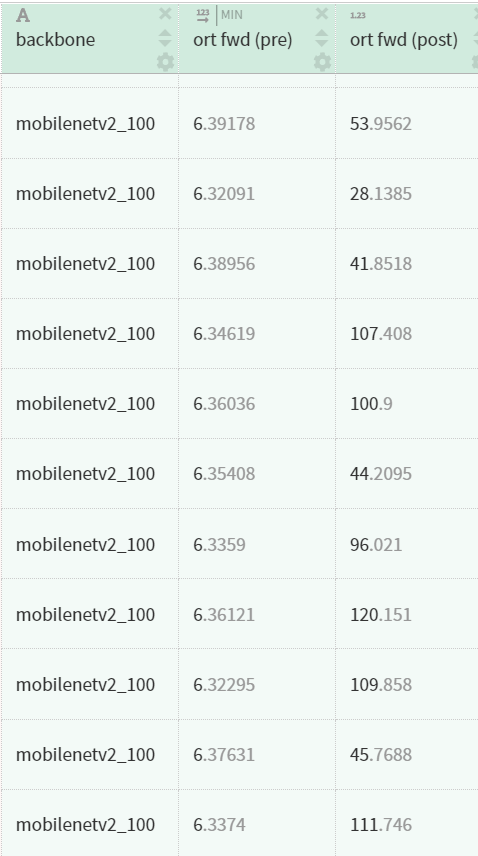
I converted it before and after the training to onnx and measured the forward time. The model is slower after training though the architecture did not change.
This only happens if the optimization level is set to rt.GraphOptimizationLevel.ORT_ENABLE_ALL before both models are ~18ms after max optimization, the trained model takes ~50ms and the other one 6ms
All models were forwarded on CPU
i noticed this on my system with python Ubuntu 20.04 python 3.9.12 onnxruntime 1.11.1 and also on another system with a C++ Application using onnxruntime Windows 10 visual studio 2019 onnxruntime 1.10.0
To reproduce
run both models and measure time
Urgency
None
Platform
Linux
OS Version
Ubuntu 20.04
ONNX Runtime Installation
Released Package
ONNX Runtime Version or Commit ID
1.11.1
ONNX Runtime API
Python
Architecture
X64
Execution Provider
Default CPU
Execution Provider Library Version
No response
Model File
Is this a quantized model?
No


This is just my guess. Without training, some tensors are initialized to 0 so those operators such as y=Add(x, 0) can be eliminated. To confirm, I need to see the ONNX graph before and after optimization.

@wschin the faster model is pretrained and literally no weight is exactly 0
forward speed is also not constant, sometimes its faster, somtimes its worse
@radikalliberal, did you compare the ONNX model before and after? Standard ONNX doesn't support nchwc format. I guess the exporter may introduce extra subgraph to convert nchwc to nchw format and those subgraphs lead to the extra cost.

Hi @yufenglee, as far as i know there is no conversion from nchwc to nchw. I download the pretrained pytorch model weights and convert the model to onnx. This model will forward in 6ms. After the conversion to onnx there are only conventional nodes like Conv, ReLu, Cast, MatMul in the model. When I trained the pytorch model and convert it then to onnx the generated model looks the same but is slower when using rt.GraphOptimizationLevel.ORT_ENABLE_ALL. Conversion to nchwc only happens after conversion when the onnxruntime optimizes the model
I also attached the models in the first post. I would be grateful if somebody could reproduce my observations.
I used the following settings to initialize the session with the model
opts = rt.SessionOptions()
opts.intra_op_num_threads = 1
opts.inter_op_num_threads = 1
opts.execution_mode = rt.ExecutionMode.ORT_SEQUENTIAL
opts.graph_optimization_level = rt.GraphOptimizationLevel.ORT_ENABLE_ALL
opts.enable_cpu_mem_arena = True
opts.enable_mem_pattern = True
sess = rt.InferenceSession(model_proto.SerializeToString(), opts)
@radikalliberal It's caused by FPU_DENORMAL onnxruntime-1.13.0-cp37-cp37m-linux_x86_64.whl.zip
I built this whl to disable FPU_denormal detection and it achieve the same performance.
How to use it: Once you install that WHL
opts = rt.SessionOptions()
opts.intra_op_num_threads = 1
opts.inter_op_num_threads = 1
opts.execution_mode = rt.ExecutionMode.ORT_SEQUENTIAL
opts.graph_optimization_level = rt.GraphOptimizationLevel.ORT_ENABLE_ALL
opts.enable_cpu_mem_arena = True
opts.enable_mem_pattern = True
opts.add_session_config_entry("session.intra_op.use_xnnpack_threadpool", "1") ########### It's the key code
sess = rt.InferenceSession(model_proto.SerializeToString(), opts)
Then for any of the two model they run about 5-6ms.

Thanks @wejoncy ! What do i have to take into account to build this myself?
Thanks @wejoncy ! What do i have to take into account to build this myself?
You can build it from my personal branch if you want https://github.com/microsoft/onnxruntime/tree/jicwen/xnnpack_multithreading_v2
And Enable XNNPACK EP by adding "--use_xnnpack" in the build command.
You don't need to rebuild. We have a session option to set_denormal_as_zero, which can handle this issue: https://github.com/microsoft/onnxruntime/blob/8e2528bad24fde3f5d3f90047408140be975f9f3/include/onnxruntime/core/session/onnxruntime_session_options_config_keys.h#L42
Python API example: https://github.com/microsoft/onnxruntime/blob/69f7cc6494cb88f2b51acee70ff7b1f0c3b0505e/onnxruntime/test/python/onnxruntime_test_python.py#L866
C++ API example: https://github.com/microsoft/onnxruntime/blob/d3b684cd9e36e085ffd4dced826e98cc50ef2bc3/onnxruntime/test/onnx/main.cc#L342
