
fast
 fast copied to clipboard
 microsoft
FEAT: add virtual list component
📖 Description
Adds the virtual-list component which can render an array of data using templates and also only render the items currently in/near the bounds of a viewport element.
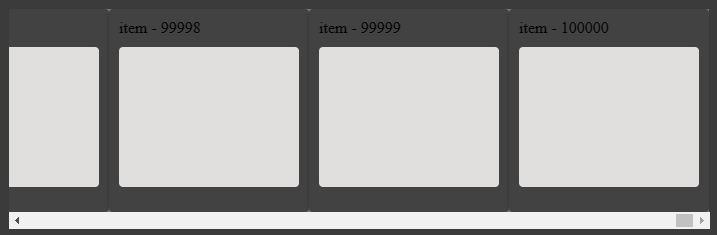
By virtualizing out of view elements the list can be used to efficiently display large data sets:
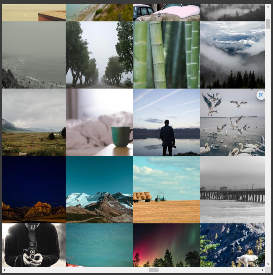
Lists can be nested, on either the horizontal or vertical axis, and authors can assign almost any element to be the "viewport". The sample grid is a vertical list of horizontal lists that virtualizes on both axis:
How it works
Whenever prompted to update its layout, either by having the update() function called or by one of the events specified by the current auto-update-mode setting, the component will request position updates for the viewport element and its internal item container from the intersection service.
When the positioning information is updated on the next frame the component determines which portion of the item container overlaps with the viewport and calculates which items would fall into that range. Those items are then used to populate the observable visibleItems property which is bound to a repeat directive which renders the visible items using the provided itemTemplate.
The component also populates a spanMap observable property with the positioning information for each object in the visibleItems array using the SpanMap interface.
Virtualization alone doesn't make for a buttery smooth ui, so there is more to the story. For example, suddenly rendering a large number of items at once after/during large scroll operations can cause some jankiness so authors will want to be smart about loading complex item templates. This prototype branch has the same virtual list samples but using a prototype "loader-card" that delays/staggers content loading which further smooths the experience.
🎫 Issues
Very large edits of the base items array can cause lengthy splice calculations in the array observer. We don't actually need the splices, just a change notification so we can operate against the substantially smaller list of visible items. Edits of large data sets could be very slow until we resolve this through modifications to array observation or a different change detection mechanism.
👩💻 Reviewer Notes
📑 Test Plan
Base tests included. Need to add more.
✅ Checklist
General
- [x] I have included a change request file using
$ yarn change - [x] I have added tests for my changes.
- [x] I have tested my changes.
- [x] I have updated the project documentation to reflect my changes.
- [x] I have read the CONTRIBUTING documentation and followed the standards for this project.
Component-specific
- [x] I have added a new component
- [ ] I have modified an existing component
- [x] I have updated the definition file
- [x] I have updated the configuration file
⏭ Next Steps

After pulling this down and running it, I'm wondering if we can make scrolling smoother.
Can you be more specific about what isn't smooth? Is the scrolling janky or are you commenting on that thing with large/fast scrolls where you can see the edge of element creation? I just found an unnecessary queueUpdate which should clip the update delay slightly, but we're doing asynchronous things so it would always be possible to "outrun" element creation with big scroll changes. I'm looking at fancy background tricks today to make that last bit look better.
Edit: moved discussion about <regular-table> to the RFC: https://github.com/microsoft/fast/issues/5256#issuecomment-1028186367

What's left to get this in, even with a beta tag? People are asking for an updated Color Explorer and for technical and site publishing reasons I'm waiting for this for the last refactor to remove React.

What's left to get this in, even with a beta tag? People are asking for an updated Color Explorer and for technical and site publishing reasons I'm waiting for this for the last refactor to remove React.
This isn't necessarily trivial - I'm lost on how this blocks the color work. Do we need really need that to be virtualized for the 90ish colors?

What's left to get this in, even with a beta tag? People are asking for an updated Color Explorer and for technical and site publishing reasons I'm waiting for this for the last refactor to remove React.
This isn't necessarily trivial - I'm lost on how this blocks the color work. Do we need really need that to be virtualized for the 90ish colors?
It currently is, but possibly we don't need it. I believe @nicholasrice added it for perf reasons, but maybe that was an issue we no longer have. I will try removing it when I get a chance and see.
What's left to get this in, even with a beta tag? People are asking for an updated Color Explorer and for technical and site publishing reasons I'm waiting for this for the last refactor to remove React.
This isn't necessarily trivial - I'm lost on how this blocks the color work. Do we need really need that to be virtualized for the 90ish colors?
It currently is, but possibly we don't need it. I believe @nicholasrice added it for perf reasons, but maybe that was an issue we no longer have. I will try removing it when I get a chance and see.
Let’s roll without it for now. Worst case we can addd it back in. Thanks!
What's left to get this in, even with a beta tag? People are asking for an updated Color Explorer and for technical and site publishing reasons I'm waiting for this for the last refactor to remove React.
This isn't necessarily trivial - I'm lost on how this blocks the color work. Do we need really need that to be virtualized for the 90ish colors?
It currently is, but possibly we don't need it. I believe @nicholasrice added it for perf reasons, but maybe that was an issue we no longer have. I will try removing it when I get a chance and see.
I suspect that is a non-issue in the WC world. The issue was closely tied to the React implementation.

So the PR is in a bit of a transition state as I rework how variable heights work.
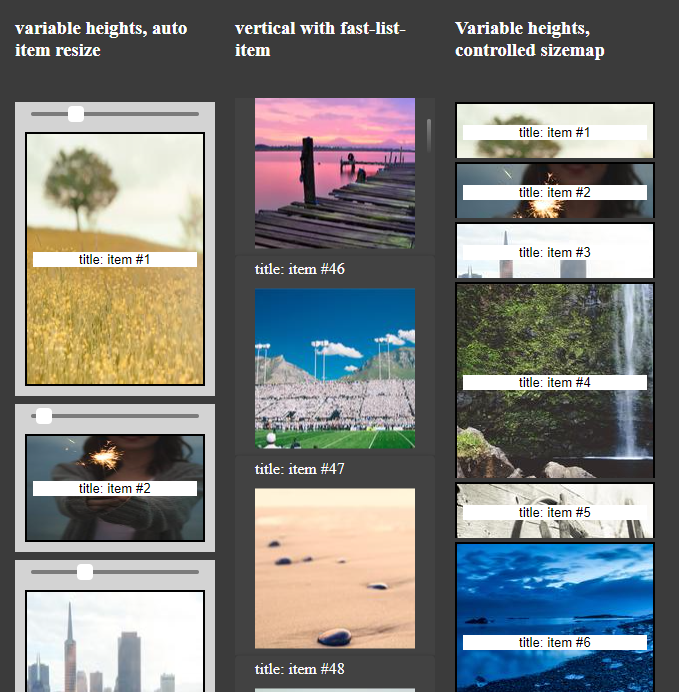
The good news is that I managed to get a resize observer based mechanism to dynamically handle variable height content, and let the content resize itself so there should be a relatively easy thing that works out of the box. Folks that need to edit/reorder their lists may need to do some "sizemap management" to get the best behavior though.
The storybook samples in fast-components have two vertical lists that are variable heights. The one on the right is a "managed sizemap" where elements sizes are controlled by the map, the one on the left updates the sizemap as elements render. The slider simulates resizing content. Give it a try.
Azure Static Web Apps: Your stage site is ready! Visit it here: https://purple-sand-03fe10e10-5529.centralus.azurestaticapps.net
![github-actions[bot] avatar](https://avatars.githubusercontent.com/in/15368?v=4 "Published by a pub.dev verified publisher")
Azure Static Web Apps: Your stage site is ready! Visit it here: https://blue-coast-0df7a6610-5529.centralus.azurestaticapps.net
Azure Static Web Apps: Your stage site is ready! Visit it here: https://purple-ocean-0b7ce3410-5529.centralus.azurestaticapps.net
Azure Static Web Apps: Your stage site is ready! Visit it here: https://purple-sand-03fe10e10-5529.centralus.azurestaticapps.net
Azure Static Web Apps: Your stage site is ready! Visit it here: https://blue-coast-0df7a6610-5529.centralus.azurestaticapps.net
Azure Static Web Apps: Your stage site is ready! Visit it here: https://purple-ocean-0b7ce3410-5529.centralus.azurestaticapps.net
Azure Static Web Apps: Your stage site is ready! Visit it here: https://purple-sand-03fe10e10-5529.centralus.azurestaticapps.net
Azure Static Web Apps: Your stage site is ready! Visit it here: https://blue-coast-0df7a6610-5529.centralus.azurestaticapps.net
Azure Static Web Apps: Your stage site is ready! Visit it here: https://purple-ocean-0b7ce3410-5529.centralus.azurestaticapps.net
Azure Static Web Apps: Your stage site is ready! Visit it here: https://purple-sand-03fe10e10-5529.centralus.azurestaticapps.net
Azure Static Web Apps: Your stage site is ready! Visit it here: https://blue-coast-0df7a6610-5529.centralus.azurestaticapps.net
Azure Static Web Apps: Your stage site is ready! Visit it here: https://purple-ocean-0b7ce3410-5529.centralus.azurestaticapps.net
Azure Static Web Apps: Your stage site is ready! Visit it here: https://purple-sand-03fe10e10-5529.centralus.azurestaticapps.net
Azure Static Web Apps: Your stage site is ready! Visit it here: https://blue-coast-0df7a6610-5529.centralus.azurestaticapps.net
Azure Static Web Apps: Your stage site is ready! Visit it here: https://purple-ocean-0b7ce3410-5529.centralus.azurestaticapps.net
Azure Static Web Apps: Your stage site is ready! Visit it here: https://blue-coast-0df7a6610-5529.centralus.azurestaticapps.net
Azure Static Web Apps: Your stage site is ready! Visit it here: https://purple-ocean-0b7ce3410-5529.centralus.azurestaticapps.net
Azure Static Web Apps: Your stage site is ready! Visit it here: https://purple-ocean-0b7ce3410-5529.centralus.azurestaticapps.net
Azure Static Web Apps: Your stage site is ready! Visit it here: https://purple-ocean-0b7ce3410-5529.centralus.azurestaticapps.net
Azure Static Web Apps: Your stage site is ready! Visit it here: https://purple-ocean-0b7ce3410-5529.centralus.azurestaticapps.net
Azure Static Web Apps: Your stage site is ready! Visit it here: https://purple-ocean-0b7ce3410-5529.centralus.azurestaticapps.net