
PowerToys
 PowerToys copied to clipboard
 microsoft
[Image Resizer] Context Menu not shown
ℹ Computer information
- PowerToys version: 0.29.3
- PowerToy Utility: Image Resizer, Power Rename
- Running PowerToys as Admin: True
- Windows build number: 1909 build 18363.1256
📝 Provide detailed reproduction steps (if any)
- Install/Update powertoys to latest version running installer as both normal user or admin.
- Image Resizer option is never added to context menu.
Are there registry keys I can just add manually? I've read through a bunch of the other context menu bugs, and each time it gets closed and supposedly fixed I try it again and still no luck. This is a corporate machine... would there be policies that are keeping it from being added? Most other applications have no issue installing context menus. I find it odd this application has so many issues with it.
📷 Screenshots
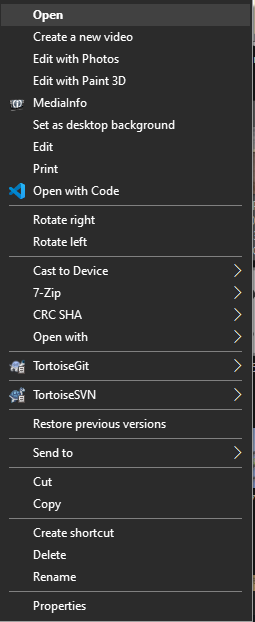

Not sure if this will work.. but can you turn off, then on the different modules in PT settings?

Unfortunately no... I've tried
- disabling, enabling
- Uninstalling, reinstalling, enabling options
- disabling options, closing powertoys, opening, reenabling
- and all the above with Admin and without.
@enricogior we should have the log tool verify this and see if this is in the reg appropriately for the logged in user


Can confirm i'm also having this issue.
Windows 10 - 1909 / 18363.1256 64-bit
I did have previous image resizers installed, i've unstalled them and ran registry cleaners and rebooted a number of times.


Anything keeping this open?
I'm still not seeing the Image Resize option when right clicking images within Windows 10. its enabled, and restarted app / system. Over many versions. I do see PowerRename for example. Are there any know apps or menu settings that could cause a conflict here?
@mitchproclaim , can you please send a /bugreport ? That might be useful in figuring out if we can spot something here.

Hi there!
We need a bit more information to really debug this issue. Can you add a "Report Bug" zip file here? You right click on our system tray icon and just go to report bug. Then drag the zipfile from your desktop onto the GitHub comment box in this issue. Thanks! 

This issue has been automatically marked as stale because it has been marked as requiring author feedback but has not had any activity for 5 days. It will be closed if no further activity occurs within 5 days of this comment.