
PowerToys
 PowerToys copied to clipboard
 microsoft
[Settings]Singleton doesn't work
ℹ Computer information
- PowerToys version: 0.25
- PowerToy Utility: Settings
- Running PowerToys as Admin: Yes
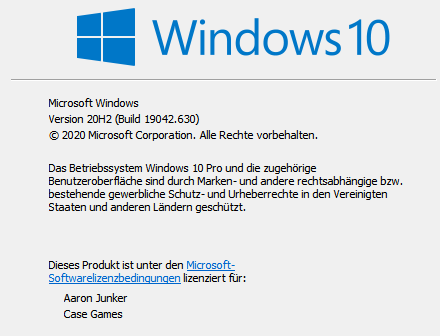
- Windows build number:
📝 Provide detailed reproduction steps (if any)
- Open settings window
- Open a second settings window with middle click on the taskbar icon
✔️ Expected result
The second settings window open
❌ Actual result
A error message appears
📷 Screenshots
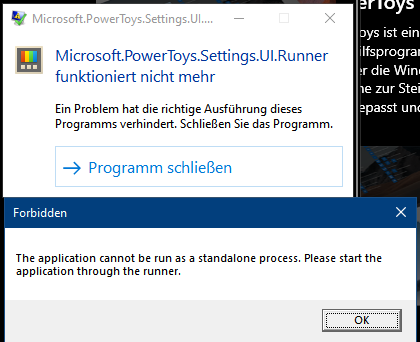

Middle clicking the PT run icon in the taskbar directly runs the Microsoft.PowerToys.Settings.UI.Runner.exe which cannot be run by the user manually but only by PowerToys Runner. That's what I think is the reason
Also I don't think you can launch multiple instances of PowerToys Settings (Why would you?)

If i'm fast i can press on start of PT multiple times on the icon and the settings window appears so multiple times
No, you don't need more then one instance. But the software should handle this smoothly. ~https://docs.microsoft.com/en-us/windows/uwp/launch-resume/multi-instance-uwp~

No, you don't need more then one instance. But the software should handle this smoothly. https://docs.microsoft.com/en-us/windows/uwp/launch-resume/multi-instance-uwp
That's for a UWP App. PowerToys is not UWP
In ColorPickerUI Mutex is used to allow single instance https://github.com/microsoft/PowerToys/blob/6cee767ddfdc1a95c90c1ba3feb45038c681ea4f/src/modules/colorPicker/ColorPickerUI/App.xaml.cs#L51

That's for a UWP App. PowerToys is not UWP
UWP, WinUI(3), WPF, Fluent Design, XAML ... So many terms. "software should handle this smoothly" is the thing I really wanted to say.
Can we get crisp repro steps here without VS possibly running?
- Settings is actually a UWP technically under the hood. It is a WPF app with a XAML Island.
- In theory, this scenario is actually handled.
- if i map a button on my logitech mouse to 'middle' it doesn't interact with the tray icon. I can't repro this. Only way i can get settings to fire is:
- left click tray icon
- right click tray icon and go to settings
- Start PowerToys via PT Run / Start menu with PowerToys already running
- Typically that error you see there happens if you run the Settings app via Visual Studio directly or try to launch the app directly.

Also you'll never get two instances of Settings open, only one. If that is the ask here, we don't have plans.
Can we get crisp repro steps here without VS possibly running?
- Settings is actually a UWP technically under the hood. It is a WPF app with a XAML Island.
- In theory, this scenario is actually handled.
- if i map a button on my logitech mouse to 'middle' it doesn't interact with the tray icon. I can't repro this. Only way i can get settings to fire is:
- left click tray icon
- right click tray icon and go to settings
- Start PowerToys via PT Run / Start menu with PowerToys already running
- Typically that error you see there happens if you run the Settings app via Visual Studio directly or try to launch the app directly.
See my comment in issue #6471.

I think for repro you need a hp elitedesk 800 g1 with 250 apllications installed.
I will do my best to give you a good repro.
@Aaron-Junker Not for the repro of opening two windows via
- Press Win+B
- Selecting the PT Tray Icon
- Pressing Enter or NumPad Enter
My repro is
- Open Settings
- right-click the taskbar button
- click the top menu item
See also #5234. (I know the body of Niels's issue only focuses on the text, but the behavior of this issue is well mentioned in the comments)
I see what i was doing. I was doing systray! not taskbar. Suprised the singleton isn't catching this.
Betting this and https://github.com/microsoft/PowerToys/issues/6471 could be solved by fixing the singleton. I still think this is a lower priority bug
Changed the title to reflect that actual problem: the Settings app can only be opened from the runner.

@enricogior Can't we just allow users to run Microsoft.PowerToys.Settings.UI.Runner.exe and have it open without error?
(Of course, don't allow multiple instances)
@alannt777 with the current architecture we cannot, the Settings should only be opened by the runner.
no, this is also a bug only i would say "PT community" has really hit based on bug reports. This is a low priority issue based on other things we're seeing reports of.
https://blogs.windows.com/windowsdeveloper/2022/01/28/making-the-app-single-instanced-part-3/
I believe this issue stems from from the open_menu_from_another_instance method.
PowerToys/src/runner/main.cpp
This function is called successfully, however in WinMain the check for --open-settings on line 425 ends up yielding an empty string leading to the open_menu_from_another_instance call parameter "". The check on Line 85 checks the std::optional has a value, but doesn't check for an empty string.
I have included this fix in #23220 to ensure the settings window can be open even with a hidden icon.


@stefansjfw https://github.com/microsoft/PowerToys/pull/23220 was supposed to have the fix for this, wouldn't it still happen?
My fix is part of #23220 because it was giving me problems while testing. I'm not sure what the current status on getting that merged is.
There was a single change to the function that is supposed to do this already since a blank string was passed rather than null. It fixed the issue locally, however, it may not be the full solution.
Would you like me to extract that and make it a separate PR? We could get that merged earlier than the icon removal if it works.
I see what i was doing. I was doing systray! not taskbar. Suprised the singleton isn't catching this.
Got it now. This opened my eyes :)
Would you like me to extract that and make it a separate PR? We could get that merged earlier than the icon removal if it works.
That would be cool. Please open the PR with that fix. Although, I believe opening settings app from taskbar item right click opens Settings App directly, not through runner, so not sure that cpp change will fix it, but let's see
Apparently not everyone experiences this crash on the latest version. Is this still a reproducible issue in v0.69.1? I was experiencing a crash relating to this, however that might have been on one of my dev versions rather than a stable release.