
PowerToys
 PowerToys copied to clipboard
 microsoft
PT Run activation shortcut, replace Window Search
Summary of the Pull Request
This PR adds a new mode for PT Run that allows it to act more like a Windows Search replacement. It was implemented in a way to try to not interfere in any way with the current model, as some really like the way it is.
This new mode DOES require elevated PT (Just like some of the other global shortcuts). That is why in this mode you don't need to pick any other options/settings, and that's nice.
This is the DEFAULT mode:
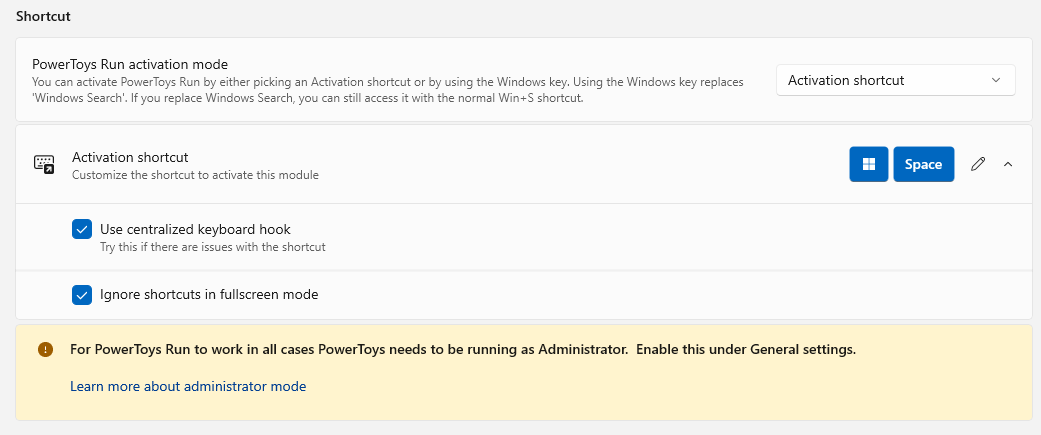
Here it is "Power Search", mode:
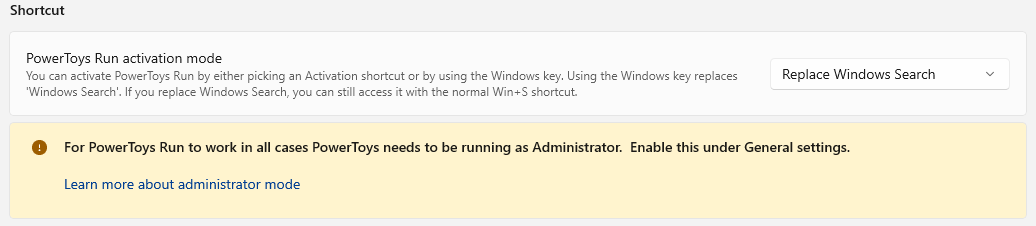
Also, the message and view of the warning/info will change based on whether PT is currently elevated:

Verbiage/naming needs work.
PR Checklist
- [X] Closes: #17906
- [ ] Communication: I've discussed this with core contributors already. If work hasn't been agreed, this work might be rejected
- [ ] Documentation updated: If checked, please file a pull request on our docs repo and link it here: #xxx
- [ ] Tests: Added/updated and all pass
- [ ] Localization: All end user facing strings can be localized
- [ ] New binaries: Added on the required places
- [ ] JSON for signing for new binaries
- [ ] WXS for installer for new binaries and localization folder
- [ ] YML for CI pipeline for new test projects
- [ ] YML for signed pipeline
- [ ] Dev docs: Added/updated
Detailed Description of the Pull Request / Additional comments
I understand this is not a simple PR because some people might not want this functionality.
- Since (the great!) Windows Vista, Start Menu and Windows Search have been joined. This was a great thing, but it changed what "windows key" did fundamentally. Some people use it to bring up the menu, other use it to be the fastest way to search.
- Using this new "Power Search" mode, does not prevent access to "Windows Search". It's still there with Win+S.
- An essential goal was/is to make sure 100% previous Win modifiers still work. E.g. Win+E, Win+X, ...

@htcfreek, @jaimecbernardo, @stefansjfw
This might be a divisive PR. Please let me know what it takes to get this one accepted!
I zhink the default mode should be the custom hotkey. As I understand currently you made it the other way.
We should have a warning bar or some other type of hint that replacement needs elevation.
What is happening if you choose replacement mode and start PT without elevation. Does the code fallback in this case?

And please update the PR description based on our current template!! The checkboxes have valid use cases.
I zhink the default mode should be the custom hotkey. As I understand currently you made it the other way.
Yes, the legacy mode certainly would be the default. I swapped the images, I will correct that.
We should have a warning bar or some other type of hint that replacement needs elevation.
We should, but we then also need that for the other plugs. I will address this!
What is happening if you choose replacement mode and start PT without elevation. Does the code fallback in this case?
So far as I can tell, all of the hotkeys (shortcut guide and others?) just don't work, and the user is never told. To be clear, elevated is not needed for the hotkey to work in general. It's just that the hotkey will not work if you have an elevated program in the foreground and PT is not also elevated. This will be explained in the "warning bar" you requested above.
And please update the PR description based on our current template!! The checkboxes have valid use cases.
Sure thing. I can.
We should have a warning bar or some other type of hint that replacement needs elevation.
We should, but we then also need that for the other plugs. I will address this!
What is happening if you choose replacement mode and start PT without elevation. Does the code fallback in this case?
So far as I can tell, all of the hotkeys (shortcut guide and others?) just don't work, and the user is never told. To be clear, elevated is not needed for the hotkey to work in general. It's just that the hotkey will not work if you have an elevated program in the foreground and PT is not also elevated. This will be explained in the "warning bar" you requested above.
In this case I am not sure if we need the info bar. Misunderstood you first and thought the shortcut only works in admin mode.
Misunderstood you first and thought the shortcut only works in admin mode.
I don't want to beat this into the ground but, I think that if something works and also does not work, based on the foreground apps permission level, it's confusing enough to say, "it does not work".
I will say this another way, BOTH the current custom shortcut and new mode will always work if you never have an elevated app in the foreground. I think this is hard enough to convey to the end user that we really should say PT Run requires elevated PT, and that is the default method.
Inverting the PT admin setting means that it will use it by default and if a user decided NOT to use the default, then only then warns that something might not work.
In any case, all the above is just icing on the cake and verbiage, I am not good with. So, I have made some changes to these messages, seen in the screenshot above. I am happy with the above but if this is not what we want, I am certainly happy change based on some specific suggestions.
Misunderstood you first and thought the shortcut only works in admin mode.
I don't want to beat this into the ground but, I think that if something works and also does not work, based on the foreground apps permission level, it's confusing enough to say, "it does not work".
I will say this another way, BOTH the current custom shortcut and new mode will always work if you never have an elevated app in the foreground. I think this is hard enough to convey to the end user that we really should say PT Run requires elevated PT, and that is the default method.
Inverting the PT admin setting means that it will use it by default and if a user decided NOT to use the default, then only then warns that something might not work.
In any case, all the above is just icing on the cake and verbiage, I am not good with. So, I have made some changes to these messages, seen in the screenshot above. I am happy with the above but if this is not what we want, I am certainly happy change based on some specific suggestions.
Let's have a look from @jaimecbernardo and wait for his opinion and thoughts.
@jaimecbernardo, @htcfreek
I am eagerly awaiting this. Is there anything that I can do to help, or anything waiting on me that is preventing this from getting merged?
This personally breaks my workflow since I use <win> to open start menu without intending to search. Why did you choose binding to <win> compared to something like javascript -> URI as seen in @krlvm/BeautySearch?

@jefflord Thanks for the enthusiasm and contribution. As mentioned in the issue, this is something that's likely not going to be accepted. It's been discussed before and at the time the decision was not to do it. The team's looking into the 0.60 release cycle right now, as this PR is something that needs further discussion after that. Please have a little patience ;)

As mentioned in the issue, this is something that's likely not going to be accepted. It's been discussed before and at the time the decision was not to do it.
Yes, just wishful thinking as I felt the implementation was both "good" and "optional". But I totally understand! In fact, if this mode of operation is deeded not inline project goals, that's not a terrible thing. Because maybe a fork, trimmed down to just PT Run running in this mode is simpler for a lot of people that just want either "Start Menu" replacement or just "better Windows Search".
I am of course not wanting to maintain that project. That sounds like real work!
The team's looking into the 0.60 release cycle right now, as this PR is something that needs further discussion after that. Please have a little patience ;)
I understand and will chill out, unless crying like a baby helps this get into 0.60, because I'll do it =)
So, thanks for your (and team's) patience with me.
@rcmaehl
This personally breaks my workflow since I use
<win>to open start menu without intending to search.
You are right and I understand. If you don't want this mode (because you use the Windows Start Menu) then you should ignore this option and use the default. Like many PowerToys settings, if you don't want/need to alter you experience, don't enable that PowerToys option. This is the spirit of PowerToys. I actually have most of the PowerToys tricks disable. Just like you, I like my current workflow in many regards. So, I am 100% with you, NEVER EVER move my cheese without asking.
Why did you choose binding to
<win>compared to something like javascript -> URI as seen in @krlvm/BeautySearch?
This seems like something that just makes the Windows Search look better but be the same. PT Run has much more power. @krlvm/BeautySearch should be called BeautyStartMenu instead?
I just want to bump this again, to see where it stands. Also, to reiterate, this will be off by default, so nobody is affected by default.
I just want to bump this again, to see where it stands. Also, to reiterate, this will be off by default, so nobody is affected by default.
Sorry for the wait. This is still in consideration. Overriding Start Menu is not something that we can release lightly ;)
Hi, @jefflord , The decision here is that there might be too many unintended effects from overriding the Windows key. So this can't really be accepted. Other shortcuts, like Win+S (search) or Win+R (run) can be overridden, but overriding the Windows key is a no go design wise for PowerToys.
Thanks for the update.
I certainly understand that making this a "supported" feature or configuration is not without risks and "breaking Windows" is just not an option. I do appreciate the consideration.
As a last-ditch effort, hear me out... Is there a place in PT/PTRun for experimental or unsupported features? Features or options that do not normally appear on the settings screens and not supported when in use?
I ask because, I would love to know if there is a way hide this new "activation mode" option from the settings menu, but enable it via some other means?
So, is it possible that we could update this PR, hiding this option from the interface, and provide a hidden way to enable it?
Side note: As you can see, I will be sad to see this dream die. I am getting used to my custom activation shortcut of Win+Space, but I have ask, how did ALT+Space become the default?
This wouldn't be accepted as a change in the repo, but if you want to try it locally, how about turning centralized keyboard hooks on and then changing "%localappdata%\Microsoft\PowerToys\PowerToys Run\settings.json" to have this config for the shortcut?
"open_powerlauncher":{"win":false,"ctrl":false,"alt":false,"shift":false,"code":91,"key":""} (91 is the left win key)
It works for me on Win 10.
@jaimecbernardo
Hmm, thanks but I am not looking for a way to do this. The PR does this, and it does it correctly.
The suggestion that you have will not work because it will have every single side effect you can think of. It breaks all "Windows logo key keyboard shortcuts". This is why this PR was so tricky to do and why I expect it has not been done before. The PR does MORE than just change the UI to allow the user to set the binding you mentioned.
It was imperative that using Win alone to activate PT Run should never-ever break any "Windows logo key keyboard shortcuts". Based on you suggested hack, maybe that was not clear.
The PR I have allows all "Windows logo key keyboard shortcuts" to still work.
The fact that you sent such a rudimentary non-solution as a suggestion makes me think the PR was never even examined.
I won't try to drag this out, but will say, this is a feature that has been requested before me and likely will be requested again after me, and this PR implements it properly and in a 100% optional way. It would be sad to see it be killed based out of misunderstanding.
Side note: I originally updated the UI to allow selecting just Win as the activation shortcut (something you know it does not allow right now). However, I decided to leave that 100% alone and make it a completely new option (seen above). The reason it was done this way was to..
- Make sure it cannot affect the current code or users in any way, at all.
- Cannot be "accidentally" enabled without understanding it's a new "activation mode".
- Removes the odd questions regarding "centralized shortcut" and "full screen" that most users don't understand.
Since this feature was asked for by more than just me, has been implemented as an optional feature with no "unintended effects" (that I am aware of), perhaps we can reconsider this PR?
Fake FAQ:
- Q: Will this break any of the past, present or future "Windows logo shortcuts"? A: No, never. If it, does it will be considered a high priority bug. If somehow there is an insurmountable issue or limitation, this limitation will be made clear in the UI.
- Q: Will this change my current workflow, I like my current activation shortcut. A: No, never. It will have no effect any user that does not want to use this mode. (No cheese will be moved)
- Q: How will I access the Start Menu if I use this new mode?
A: You can access it by clicking the Windows logo or pressing
CTRL+ESC. This should be explained in the UI, but currently is not. - Q: Why is the done as a new "Activation Mode" instead of just allowing me to select just the Win key in the screen to pick the activation shortcut?
A.0: There are many reasons.
A.1: It's a mode that is a replacement to current key, and not net new shortcut.
A.2: To make sure it cannot affect current user OR be activated by accident. A.3: To remove the confusion around the unnecessary "centralized keyboard" and "full screen" options, since they are not relevant in this new mode. - Q: What's was so bad about
Alt+Space? A: That is used for a lot of programs, it was never an option for many users that need access to the "window menu of the currently-opened program" - Q: Why not just use
Win+Space? A.0: This is a good suggestion, but you have to make sure that you run with "Admin" and "centralized keyboard". This is not really made clear by the current interface, and that's OK, since it does work. However, there are two real reasons. A.1: Primarily, because some users have a lot of years of muscle memory, using just Win key to access a search mechanism. Since that is what we are replacing that is how we want to access it. Also, and this is important, we want to avoid to different ways to do the same thing, which is to access a way to search and find things on our PC fast. When there are two ways, Win or PTRun, you need to decide each time. A.2. Secondarily, this is a VERY important PowerToy feature. It disserves to be a single key away. Never a thought to what the shortcut should be needed. A.3. Finally, there are some input devices (like mini one-handed devices, or on-screen keyboards, etc.) Where a combo shortcut is hard (or at least harder) to do. And if you need to use PT Run a lot like I do, it's very cumbersome in this scenario. - Q: There is a lot of reverence for the "Start Menu". It IS Windows. This is takes away from that, how can you do this? A: The Start Menu is a fantastic and iconic part of Windows, for many years. It's not going away, there will still be two ways to access it at a minimum.
- Q: Why not just use
Win+S? A: Another really good point. Since PT Run just replaces Windows Search, this makes sense. But again it's because some users have a lot of years of muscle memory, using just Win key to access a search mechanism. Since that is what we are replacing that is how we want to access it.
This feature is optional, and would not break my workflow. There are also multiple methods to access to the standard Win start menu, even when using "Win" to activate PT Run.

We've brought this back to discussion to check if it was possible to consider this PR if it was done in a way that was JSON-activated only, was well isolated and made it clear in the logs that it was being used. However, it's been decided against, since this is something that the development team would be asked to support and deal with possible unintended consequences, after consulting with other teams. Thanks for the effort 😄 , but our hands are tied here. 🤷
@jaimecbernardo thanks for the update and I agree that the total cost of ownership here is hard to calculate. Dreams are crushed... (JK 😉!)
Anyway, if this PR were accepted, it actually might not be seen in the proper light because it can exacerbate our elevated-process/focus bugs, which are troubling me. I think all are related.
https://github.com/microsoft/PowerToys/issues/19687 https://github.com/microsoft/PowerToys/issues/19182 https://github.com/microsoft/PowerToys/issues/19152 https://github.com/microsoft/PowerToys/issues/18450
Again, thanks!