
sublime-levels
 sublime-levels copied to clipboard
 mazurov
Plugin broken on this code, but works in online demo
I am able to run this plugin on simple code, but when I tried it on a bit more complex of code, it breaks.
This is the code in question:
"use strict";

var stockTickerUI = {

	updateStockElems: function foo(stockInfoChildElemList,data) {
		var getDataVal = curry( reverseArgs( prop ), 2 )( data );
		var extractInfoChildElemVal = pipe(
			getClassName,
			curry( stripPrefix )( /\bstock-/i ),
			getDataVal
		);
		var orderedDataVals =
			map( extractInfoChildElemVal )( stockInfoChildElemList );
		var elemsValsTuples =
			filterOut( function updateValueMissing([infoChildElem,val]){
				return val === undefined;
			} )
			( zip( stockInfoChildElemList, orderedDataVals ) );

		// !!SIDE EFFECTS!!
		compose( each, spreadArgs )( setDOMContent )
		( elemsValsTuples );
	}

};
As far as I can tell, there's nothing weird or unsupported about that code. In fact, it highlights fine in the online demo:
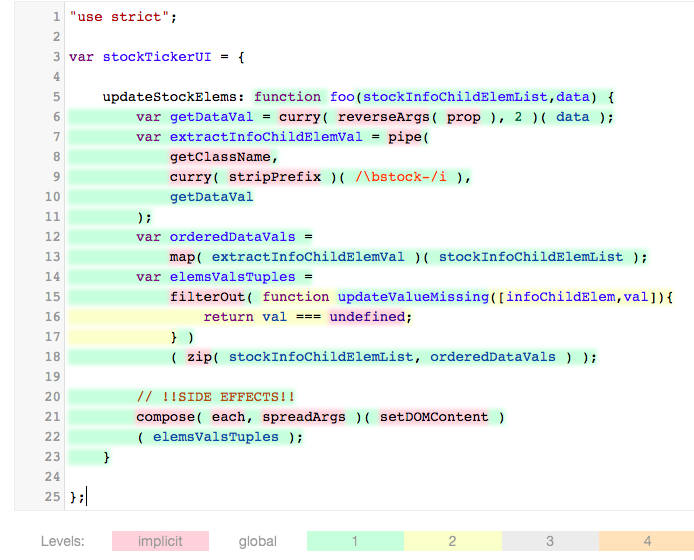
However, using the plugin in my ST3, it fails to do any highlighting. I see the following error in the ST3/mac console:
Traceback (most recent call last):
  File "/Applications/Sublime Text.app/Contents/MacOS/sublime_plugin.py", line 818, in run_
    return self.run(edit)
  File "levels_plugin in /Users/ABCXYZ/Library/Application Support/Sublime Text 3/Installed Packages/Levels.sublime-package", line 176, in run
  File "levels_plugin in /Users/ABCXYZ/Library/Application Support/Sublime Text 3/Installed Packages/Levels.sublime-package", line 135, in update_view
  File "/Users/ABCXYZ/Library/Application Support/Sublime Text 3/Installed Packages/Levels.sublime-package/levels/js.py", line 98, in run
PyV8.JSError: JSError: Error: Line 15: Unexpected token [ (  @ 3859 : 18 )  ->             throw e;
What's wrong, why is it failing to highlight on my code?
Actually, in addition to this failure to parse my code, the plugin gets into a totally broken state:
-
It switches the color scheme, and then fails, and does no highlighting. In other words, in this error state, it's not gracefully turning itself back off and undoing the color scheme.
-
Once it's "broken" like this, I can't even turn the plugin back off.
Ctrl+Shift+Oand the command palette entryLevels: Offboth are unresponsive and don't turn off the plugin to restore the color scheme. -
The only way to restore my correct color scheme is to close the tab and re-open that file.
I would expect that if the plugin has any error at all, whether that be internal or whether it be simply failing to parse the code, it should stay in a disabled state, and probably give some sort of error message or indication of what went wrong.
It should not break in the current way, which leaves it hung and unresponsive to any further commands.
