material-components-ios
 material-components-ios copied to clipboard
 material-components
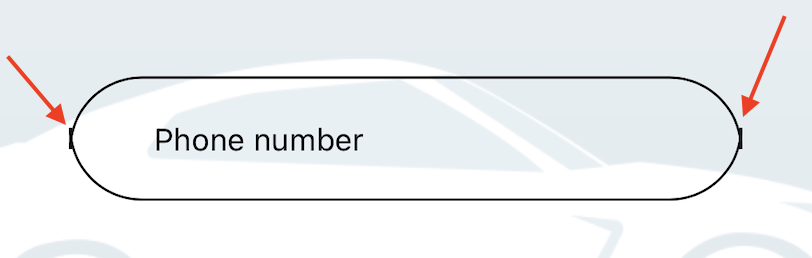
[MDCOutlinedTextField] can't setup corner radius from new Theme. Creating this from property containerRadius.
iOS(11, *) Xcode 12.4
My code:
static var newShapeScheme: MDCShapeScheme {
    let cornerTreatment = MDCRoundedCornerTreatment.corner(withRadius: 0.5, valueType: .percentage)
    let shapeScheme = MDCShapeScheme()
    shapeScheme.smallComponentShape.bottomLeftCorner = cornerTreatment
    shapeScheme.smallComponentShape.topLeftCorner = cornerTreatment
    shapeScheme.smallComponentShape.topRightCorner = cornerTreatment
    shapeScheme.smallComponentShape.bottomRightCorner = cornerTreatment

    return shapeScheme
}
Doesn't working for MDCOutlinedTextField, but working to MDCButton.
Can you help me?

Exactly... same thinking here... if they at least make MDCOutlinedTextField open class, we could subclass

Hi, have you tried setting the containerRadius property on MDCOutlinedTextField's superclass MDCBaseTextFIeld?

Hi, I have tried setting up the corner radius with the two properties but the view is getting distorted with a extra lines in the end. It is not setting up properly in MDCOutlinedTextField as it should in the case of UITextField with layer.cornerradius and layer.borderColor.
_floatTextField.leadingEdgePaddingOverride = @35;
_floatTextField.containerRadius = 30;
Please Help. Tried everything.