
tf2-patches
 tf2-patches copied to clipboard
 mastercomfig
Allow more than 33 maxplayers
Description
You can only have up to 32 maxplayers normally, but the limit is raised to 33 with tv_enable 1.
Checklist
- [x] None of the open or closed issues document this idea.
- [x] This is a new idea, not a bug.
- [ ] This idea does not seriously affect game balance.
- [x] This idea is for the code of the game, not for textures, sounds, or other resources.
- [x] This is not an idea for new game content (e.g. new weapons, maps, sounds).
- [ ] This is obviously an improvement, not something that people commonly disagree on.
- [ ] This idea has been implemented in vanilla TF2.
- [ ] There is proof that this idea is well liked (e.g. a history of use of a similar mod in a competitive league).
- [ ] This idea has been implemented in a mod.
- [ ] This feature has existed in the vanilla game but was removed.
- [ ] This idea is for internal procedures or tooling (e.g. improving the build process, supporting new systems).
Screenshots
Alternatives
In team-comtress-2\game\server\tf\tf_gameinterface.cpp, in the function CServerGameClients the max player limit is set to 32 and was probably set for performance reasons. But, since the multithreading performance was added it could be raised. I'm trying to test it but I can't join the dedicated server from the client. If your able to try to change it and add some bots and see how it goes! I'm very confused if multiplayer even works for Comtress.


I'm very confused if multiplayer even works for Comtress.
It does.
How did you set it up?
I just created a server on the client and set it up with 64 max players. When adding more than 32 bots the game crashes and hl2 spits out "CUtlLinkedList overflow! (exhausted memory allocator)". Adding 48 bots throws a different error: "Exception thrown: read access violation. pTable was nullptr.". I'm not sure if it's fine with regular players or not. It's definitely possible to have more than 32 bots and players like in Team Fortress 2 Classic. I'll check Open Fortress for more than 32 players and see how they did it.
How did you set it up?
Hiya,
I run the current 24/7(ish) Team Comtress server. Setting up the server isn't too difficult.
-
Make a new copy of your Team Comtress install This will prevent potential file in-use conflicts that would crash both the server and client.
-
Edit your start_server.bat file to the following format:
@echo off
srcds.bat +sv_lan 0 +sv_pure 1 +maxplayers 32 +map <map name from tf/maps> %* < nul
For example:
@echo off
srcds.bat +sv_lan 0 +sv_pure 1 +maxplayers 32 +map ctf_2fort %* < nul
-
Edit your tf/cfg/server.cfg file You can find an example file here: https://wiki.teamfortress.com/wiki/Dedicated_server_configuration#Example_Server.cfg_for_TF2_dedicated_server
-
Run start_server.bat This, obviously, starts the server
-
Port forward your router and/or modem Unfortunately, there are hundreds if not thousands of models, so I can't provide exact steps. A quick Google search of <your router model #> port forwarding should help. If you have multiple modems/routers between the cable from your ISP to your PC you may need to do this step for each one.
-
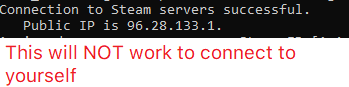
Connect to your server This ensures the server is actually working. You'll need the local network IP (e.g. 192.168.x.x, 10.x.x.x, 172.x.x.x) for whatever computer is running the server. Neither your public IP (seen below), nor loopback IP (127.0.0.1) will allow you to connect.
-
Provide the Pubic IP to players The image from above WILL allow external players to connect however.

The game doesn't immediately crash with "CUtlLinkedList overflow! (exhausted memory allocator)" if during the waiting for players phase before the round starts but once it does it crashes. The game is still incredibly laggy with 32 bots and probably worse with cosmetics and more from players. Until bot performance is improved you wouldn't want to change it. Maybe it's different when not rendering frames but I couldn't connect to the dedicated server.
Might be a good idea to raise the entity limit #134 before allowing more players.
