
unifi-protect-x86
 unifi-protect-x86 copied to clipboard
 markdegrootnl
Connecting to your NVR... (x86 docker)
Hey Mark,
First of all thank you for constructing this docker so we can try this out. I'm looking for a way to use Unifi Protect because i wanted to buy a Unifi doorbell and maybe some camera's. There is little hope (so says the internet) in an easy to use docker that's "plug-and-play" so i've started using my basic command knowledge to give it a go and use your docker.
I'm using Unraid as server so i'm trying to get this to work on my device.
Here's where i'm at:
I've installed the docker succesfully, remapping the ports, using bridge because the docker needs internet and giving my files the correct accessability
docker run -d --name unifi-protect-x86
--privileged
--tmpfs "/mnt/user/Unifi Protect/unifi-protect/temp"
-p 7080:7080
-p 7443:7443
-p 7444:7444
-p 7447:7447
-p 7550:7550
-p 7442:7442
--network="bridge"
-v "/mnt/user/Unifi Protect/unifi-protect-db":/var/lib/postgresql/10/main
-v "/mnt/user/Unifi Protect/unifi-protect":/srv/unifi-protect
markdegroot/unifi-protect-x86:latest

I think i edited the commands correctly. /mnt/user/Unifi Protect is the map i use for all of this. Let me know if i did something wrong here. I also did a 'chown' for 101 and 999.
chown 101:101 "/mnt/user/Unifi Protect/unifi-protect"
chown 999:999 "/mnt/user/Unifi Protect/unifi-protect-db"
My docker runs. But i can't connect at port 7447. There is nothing there. When i use 7080 i do get the webgui. I start the small setup. And then it gives me a blue screen that says 'Connectinto your NVR...' and it stays like that forever.

This is the log from my unraid server:
Database exists, checking ownership
Database is already owned by unifi-protect
CONFIG LOADED : /usr/share/unifi-protect/app/config/config.json
workers pool `Read` is set to 4 concurrent workers
workers pool `Write` is set to 8 concurrent workers
workers pool `Transcode` is set to 4 concurrent workers
workers pool `DnsResolve` is set to 16 concurrent workers
workers pool `Misc` is set to 1 concurrent workers
workers pool `Global` is set to 1 concurrent workers
workers pool `Serve` is set to 110 concurrent workers
Cannot find module 'pg-native'
CONFIG LOADED : /usr/share/unifi-protect/app/config/config.json
Mon, 30 Nov 2020 12:12:27 GMT sequelize deprecated String based operators are now deprecated. Please use Symbol based operators for better security, read more at http://docs.sequelizejs.com/manual/tutorial/querying.html#operators at usr/share/unifi-protect/app/node_modules/sequelize/lib/sequelize.js:245:13
(node:69) MaxListenersExceededWarning: Possible EventEmitter memory leak detected. 11 delete listeners added. Use emitter.setMaxListeners() to increase limit
Maybe it has something to do with the "Possible EventEmitter memory leak"? No clue. i'm not super qualified for this :). Any help would be great.
Thank you and let me know if you need more info.

Hi,
Please try this run command:
docker run -d --name unifi-protect-x86  \
    --tmpfs /srv/unifi-protect/temp \
    -p 7080:7080 \
    -p 7443:7443 \
    -p 7444:7444 \
    -p 7447:7447 \
    -p 7550:7550 \
    -p 7442:7442 \
    -m 2048m \
    -v "/mnt/user/Unifi Protect/unifi-protect-db":/var/lib/postgresql/10/main \
    -v "/mnt/user/Unifi Protect/unifi-protect":/srv/unifi-protect \
    markdegroot/unifi-protect-x86:latest
The web interface should run at https://localhost:7443/ but http on port 7080 might also work.
The MemoryLeak could be fixed with the -m 2048m in the run command, but should not cause problems starting protect. When the initial setup is stuck at the loading screen you posted, try restarting the container.

The MemoryLeak could be fixed with the
-m 2048min the run command, but should not cause problems starting protect. When the initial setup is stuck at the loading screen you posted, try restarting the container.
That does remove the error. But the interface is still giving me the "Connecting to your NVR..." with the endless loading icon. :)
Maybe something to do with connection to STUN servers that are not working (UDP port 3478)?
I managed to install the docker as per https://www.youtube.com/watch?v=a-VjH5M-8O0, thanks for the work @markdegrootnl !
I'm also testing it out in consideration to purchase some Unifi cams to utilize my existing Synology NAS.
Did you manage to connect your mobile app to the NVR? Unfortunately only the webgui is reachable on the LAN via 7443. Cloud remote access is enabled and I forwarded it on my router just in case but to luck over the internet neither, despite the login screen on the app showing the NVR with a green online icon. (just concerned if it's already locked down to verify the hardware to be a CKGen2P).
While container running and webgui reachable

While container is stopped

UPDATE
strange before remote access enabled just fine, now when disabling and re-enabling I get this error.

Then refreshed the page and then it enabled again, but app login still won't work. :(


Turns out the current mobile app v 1.3.15 is having issues https://community.ui.com/questions/android-protect-app-not-connecting-to-controller-393222/e35ca485-a6b3-424f-9e7b-5eab5e9b9529
I managed to connect via v1.3.8 at last, over LAN and internet.

Nevertheless makes me concerned about this basic connection issue given other users reported this issue using their CloudKeyGen2+.
Turns out the current mobile app v 1.3.15 is having issues https://community.ui.com/questions/android-protect-app-not-connecting-to-controller-393222/e35ca485-a6b3-424f-9e7b-5eab5e9b9529
I managed to connect via v1.3.8 at last, over LAN and internet. Nevertheless makes me concerned about this basic connection issue given other users reported this issue using their CloudKeyGen2+.
Did you do anything special? Can i maybe see you unraid container setup page? Mine is working via cloud via a webbrowser, but the app is "unable to connect to the cloud key"

As mentioned I run the container on my Synology NAS, see YT video I posted.
Did you manage to enable remote access in the backend and tried the same app version?
My biggest fear is whether camera's firmware can auto update to a fw which might stop working with that old self hosted Protect version, being forced to buy a CKG2+.
Hi,
Turns out i was using the wrong version of the app, 1.3.8 is need. But it works now! Thanks for pointing that out.
Thanks for pointing out the version problem. Had the same aswell :D
Any plans to release a container with the newest version ?


@sonicsjuuh did you ever get the instant running?
That's what I'm struggling with, too. I'm running version 1.5.2 of the UniFi Protect app on iOS 15 Beta 3. The docker is running on my Synology NAS and is set up per the YouTube video. I'm able to access the web interface for UniFi Protect via my computer's web browser but the iOS app can't find the console.

@martinjuhasz Sorry for the late respons. I did not get it running. I bought an UDM Pro some time ago with the doorbell and some cams because i really wanted to test out the platform to it's maximum. So i can't comment on it working or not.
It looks like there was an issue with the base image or one of the packages. After rebuilding the docker-image the "Connecting to your NVR..." issue is fixed.
I've just pushed a new version of the image to docker hub. Please try again with this version and let me know if it's fixed.
It looks like there was an issue with the base image or one of the packages. After rebuilding the docker-image the "Connecting to your NVR..." issue is fixed.
I've just pushed a new version of the image to docker hub. Please try again with this version and let me know if it's fixed.
Sorry, but it doesent seem fixed. I can logon fine in my browser Chrome on my Android phone, on home network, both lan and remote (ddns), But not on my laptop or stationary pc....? Tried different browser aswell... Chrome, edge and Firefox
To others trying to connect Instant... I bealive that its because we cant get latest Android/IOS app working with this image. If am not wrong the camera must be paired witth Bluetooth, but the old Android(1.3.8) app does not support it... :/ Maybe IOS does? I think Ive heard someone managed...

I had the same issues... so I did "network_mode: host" in my docker-compose.yaml and it fixed it.

I think we're discussing two different issues in this topic:
- In the Webui, you get a blue screen with the text "Connecting to your NVR...". This should be fixed with the latest docker image.
- Newer versions of the Protect app for iOS and Android can't find/discover the Protect server. This might be due to UniFi trying to discover the protect server via Bluetooth or broadcasting network packets. Bluetooth discovery will never work with this Docker image. Network discovery might work, but only when using
network_mode: host. If you Adopt the Protect server with your UI.com Account during the setup, the app should connect not matter what.
I think we're discussing two different issues in this topic:
- In the Webui, you get a blue screen with the text "Connecting to your NVR...". This should be fixed with the latest docker image.
- Newer versions of the Protect app for iOS and Android can't find/discover the Protect server. This might be due to UniFi trying to discover the protect server via Bluetooth or broadcasting network packets. Bluetooth discovery will never work with this Docker image. Network discovery might work, but only when using
network_mode: host. If you Adopt the Protect server with your UI.com Account during the setup, the app should connect not matter what.
Yes you are right. . Sorry I was not detailed enough, my English is not the best :)
-
I still, with the new Docker Image get the blue screen Loading NVR when I try to logg in on all of my PC`s with WIN10. Tried different browsers (FF, edge, chrome). Tried my son´s pc aswell. But it works on my android phone using chrome browser...
-
All versions above 1.3.8 on Android Protect app cant connect. I have adopted to UI.com I believe it needs a version higher then 1.3.8 in order to connect Instant camera using bluetooth.
So it works, but only with v1.3.8 android protect app, but cant add instant camera.
Meybe I am doing something wrong. I see there is linked above to a YT tutorial. I have not done any ssh, only installed image with docker... I will try again.
Hope this makes sence, and thanks for your hard work @markdegrootnl
Hi,
first of all thanks for all the great work @markdegrootnl !
@Gizmopower1 issue nr 1 could be related to this: https://community.ui.com/questions/Google-Chrome-NET-ERRCERTREVOKED-for-UNMS/1947bccb-07df-4134-8c7f-fc01bf4b187d Try accessing with http on port 7080
Issue nr 2
I followed the youtube video because I am also running it on a Synology Diskstation. I have it running with network_mode: host
I have a G4 Doorbell and a G3 Instant Using an Apple device (with latest version of the App) I was able to add both devices. Using my Android device (with App 1.3.8) I was able to add the G4 Doorbell but it was unable to find the G3 Instant. (When adopting the Doorbell it automatically asked if I wanted to add the device on Apple and Android) Trying to manually adopt the G3 on android I noticed the it is not in the Camera list. So my guess is the 1.3.8 doesn't know this camera and therefore cannot add it to your system.
After adding the G3 Instant with an Apple device it works perfectly in the Android device with App 1.3.8

@arjanrenting Thank you for answering. Now I really know that it should work with Instant camera! Followed this tut: https://www.youtube.com/watch?v=a-VjH5M-8O0
I cant get the container running using --network="host" \ It just stops.
If I use the ports setting:
    -p 7080:7080 \
    -p 7443:7443 \
    -p 7444:7444 \
    -p 7447:7447 \
    -p 7550:7550 \
    -p 7442:7442 \
it works, but still loading blue screen Port 7080 also loading blue screen What am I doing wrong?
docker run -d --name unifi-protect-x86  \
    --tmpfs /srv/unifi-protect/temp \
    --network="host" \
    -m 2048m \
    -v /volume1/docker/unifi-protect-db:/var/lib/postgresql/10/main \
    -v /volume1/docker/unifi-protect:/srv/unifi-protect \
    markdegroot/unifi-protect-x86:latest
Cool, i was able to connect after updating (not sure if it had worked before). I still was unable to discover it (even with host mode) locally so i connected to my unifi account which then let me connect. This is fine for me as i only wanted this instance to configure my UVC G3 Instant. Using the latest iOS version of protect i was able to setup the wifi access for the Instant. Then it got stuck when trying to name the camera. But it is in my wifi now, which means i could access the http interface of the camera itself to configure it. Sad thing is, i cant see RTSP settings in there :(
There isn't local rtsp (standalone) in the uvc-instant. I have managed to get SSH direct into the camera now and am trying to see what I can enable, hack etc ;)
I had the same issues... so I did "network_mode: host" in my docker-compose.yaml and it fixed it.
Could you tell me how to do this? Could try and see if it fixes my issue :)
@Gizmopower1 you can run it like this:
docker run -d --name unifi-protect-x86  \
    --tmpfs /srv/unifi-protect/temp \
    --network="host" \
    -m 2048m \
    -v unifi-protect-db:/var/lib/postgresql/10/main \
    -v unifi-protect:/srv/unifi-protect \
    markdegroot/unifi-protect-x86:latest
or remove all the port references in your docker-compose file and add network_mode: "host".
Also, to be absolutely sure you're using the latest docker image, run:
docker pull markdegroot/unifi-protect-x86:latest
@Gizmopower1 you can run it like this:
docker run -d --name unifi-protect-x86  \
    --tmpfs /srv/unifi-protect/temp \
    --network="host" \
    -m 2048m \
    -v unifi-protect-db:/var/lib/postgresql/10/main \
    -v unifi-protect:/srv/unifi-protect \
    markdegroot/unifi-protect-x86:latest
or remove all the port references in your docker-compose file and add
network_mode: "host".
@markdegrootnl When i run like that, the container stops after 7 sek. :/
@Gizmopower1 Could you run it without the -d to see the output? Anything there that might give info why this happens? Maybe also add --privileged and remove -m 2048m just to try.
Output removing -d
database exists
Removed stale pid file.
su: System error
Database does not exist
mount: /srv/unifi-protect/temp: cannot mount tmpfs read-only.
CONFIG LOADED : /usr/share/unifi-protect/app/config/config.json
workers pool Read is set to 4 concurrent workers
workers pool Write is set to 8 concurrent workers
workers pool Transcode is set to 8 concurrent workers
workers pool DnsResolve is set to 16 concurrent workers
workers pool Misc is set to 1 concurrent workers
workers pool Global is set to 1 concurrent workers
workers pool Serve is set to 106 concurrent workers
Cannot find module 'pg-native'
CONFIG LOADED : /usr/share/unifi-protect/app/config/config.json
Could not connect to database postgres...
RECOVERY MODE
Fetching recovery script : http://dl-origin.ubnt.com/unifi-video/internal/recover?v=1.13.3&mac=
Executing recovery script : /srv/unifi-protect/recover
@Gizmopower1 Did you execute the following on the folder you created for docker? chown 101:101 "/mnt/user/Unifi Protect/unifi-protect" chown 999:999 "/mnt/user/Unifi Protect/unifi-protect-db"
Without executing it it wouldn't create files in the 2 directories. Do you have files created there?
Also removing everything and start over helps.
Stop your docker image and execute docker volume prune.
My log looks like this.
The files belonging to this database system will be owned by user "postgres".
This user must also own the server process.
The database cluster will be initialized with locale "C".
The default database encoding has accordingly been set to "SQL_ASCII".
The default text search configuration will be set to "english".
Data page checksums are disabled.
fixing permissions on existing directory /var/lib/postgresql/10/main ... ok
creating subdirectories ... ok
selecting default max_connections ... 100
selecting default shared_buffers ... 128MB
selecting default timezone ... Etc/UTC
selecting dynamic shared memory implementation ... posix
creating configuration files ... ok
running bootstrap script ... ok
performing post-bootstrap initialization ... ok
syncing data to disk ... ok
Success. You can now start the database server using:
/usr/lib/postgresql/10/bin/pg_ctl -D /var/lib/postgresql/10/main -l logfile start
WARNING: enabling "trust" authentication for local connections
You can change this by editing pg_hba.conf or using the option -A, or
--auth-local and --auth-host, the next time you run initdb.
Database does not exist
mount: /srv/unifi-protect/temp: cannot mount tmpfs read-only.
CONFIG LOADED : /usr/share/unifi-protect/app/config/config.json
2021-08-05T20:29:23.732Z - error: Watchdog fails to open log file Error: ENOENT: no such file or directory, open '/srv/unifi-protect/logs/watchdog.log'
2021-08-05T20:29:23.733Z - info: Initializing rollbar
workers pool Read is set to 4 concurrent workers
workers pool Write is set to 8 concurrent workers
workers pool Transcode is set to 4 concurrent workers
workers pool DnsResolve is set to 16 concurrent workers
workers pool Misc is set to 1 concurrent workers
workers pool Global is set to 1 concurrent workers
workers pool Serve is set to 110 concurrent workers
Cannot find module 'pg-native'
CONFIG LOADED : /usr/share/unifi-protect/app/config/config.json
Certificate /srv/unifi-protect/data/unifi-protect.crt not found.... generating
Device certificate /srv/unifi-protect/data/devices.crt not found.... generating
2021-08-05T20:29:35.840Z - info: Parent receives startup-init
Thu, 05 Aug 2021 20:29:49 GMT sequelize deprecated String based operators are now deprecated. Please use Symbol based operators for better security, read more at http://docs.sequelizejs.com/manual/tutorial/querying.html#operators at usr/share/unifi-protect/app/node_modules/sequelize/lib/sequelize.js:245:13
2021-08-05T20:30:00.770Z - info: Parent process received startup-complete.
Yes, the database is created. Files are in both unifi-protect and unifi-protect-db folders... Done the chown as well.
This allows container to run properly, but blue loading screen.
docker run --name unifi-protect-x86
--tmpfs /srv/unifi-protect/temp
-p 7080:7080
-p 7443:7443
-p 7444:7444
-p 7447:7447
-p 7550:7550
-p 7442:7442
-m 2048m
-v /volume1/docker/unifi-protect-db:/var/lib/postgresql/10/main
-v /volume1/docker/unifi-protect:/srv/unifi-protect
markdegroot/unifi-protect-x86:lates
Output is:
Database exists, checking ownership
Database is already owned by unifi-protect
mount: /srv/unifi-protect/temp: cannot mount tmpfs read-only.
CONFIG LOADED : /usr/share/unifi-protect/app/config/config.json
workers pool Read is set to 4 concurrent workers
workers pool Write is set to 8 concurrent workers
workers pool Transcode is set to 8 concurrent workers
workers pool DnsResolve is set to 16 concurrent workers
workers pool Misc is set to 1 concurrent workers
workers pool Global is set to 1 concurrent workers
workers pool Serve is set to 106 concurrent workers
Cannot find module 'pg-native'
CONFIG LOADED : /usr/share/unifi-protect/app/config/config.json
Sat, 07 Aug 2021 12:17:58 GMT sequelize deprecated String based operators are now deprecated. Please use Symbol based operators for better security, read more at http://docs.sequelizejs.com/manual/tutorial/querying.html#operators at usr/share/unifi-protect/app/node_modules/sequelize/lib/sequelize.js:245:13
I have done docker volume prune
When adding --privileged and removing -m 2048m Still stops after 10sek..
output is:
database exists
Removed stale pid file.
su: System error
Database exists, checking ownership
Database is already owned by unifi-protect
CONFIG LOADED : /usr/share/unifi-protect/app/config/config.json
workers pool Read is set to 4 concurrent workers
workers pool Write is set to 8 concurrent workers
workers pool Transcode is set to 8 concurrent workers
workers pool DnsResolve is set to 16 concurrent workers
workers pool Misc is set to 1 concurrent workers
workers pool Global is set to 1 concurrent workers
workers pool Serve is set to 106 concurrent workers
Cannot find module 'pg-native'
CONFIG LOADED : /usr/share/unifi-protect/app/config/config.json
Sat, 07 Aug 2021 12:48:54 GMT sequelize deprecated String based operators are no w deprecated. Please use Symbol based operators for better security, read more a t http://docs.sequelizejs.com/manual/tutorial/querying.html#operators at usr/sha re/unifi-protect/app/node_modules/sequelize/lib/sequelize.js:245:13
Very similar situation here, installed into Synology NAS. If I set -network="host" it doesnt work, the container doesn't load, but if i leave ports it works. I can connect to admin panel from my android phone but not PC, also it does work with android app version 1.3.8, the latest version is asking for a Cloud KEY GEN 2 Plus.
I can see these messages in the chrome console while I see blue screen and "Connecting to your NVR..." message, maybe those could track down where is the issue:


I'm not 100% certain, but I believe, when you don't use network="host" it thinks the only IP is the 172...* one from the docker container. web-rtc then sends that as the only IP that your browser can connect to, this means it will fail...as your computer can't connect to that IP.
But...when you connect with network="host", it will know your networks IP...and it can then connect.
I guess...with the android app...it figures out your IP through the cloud.
I don't have a solution yet...but this is just some info for you...
Oh...and the container probably fails to load with network="host" because it wants to use some ports that NAS is already using...port 80/443 likely.
Hi, for those running this container in Synology NAS and having an issue with network="host", I have found a way to run it. What I did I have created a virtual machine in Virtual Machine Manager, in my case it was Ubuntu 18 without GUI, installed docker there, and ran command:
docker run -d --name unifi-protect-x86
--tmpfs /srv/unifi-protect/temp
--network="host"
-m 2048m
-v /home/your_name/unifi/unifi-protect-db:/var/lib/postgresql/10/main
-v /home/your_name/unifi/unifi-protect:/srv/unifi-protect
markdegroot/unifi-protect-x86:latest
And now it works without any issues, I can connect from my browser, from iPad, and the phone, after some testing it seems to run just fine. This solution is limited because I'm not sure if all Synology NAS supports virtualization on virtual machine manager, but this solution works for those who have it.
Still not able to run --network=host
But it´s ok! I have it running in docker on synology and using Android app 1.3.8 and https://protect.ui.com/ on pc
I manage to add Instant G3 camera with an IphoneXS and latest protect app. :)
Now another issue, or question. I am trying to add Unifi-protect to Homey.
When I try to log in from app in Homey, I get an error saying: Error: Invalid x-csrf-token header.
Anyone know what this error is, and can I get around it?
I know that people using the unifi dream machine, or unifi keygen2 can log on protect with Homey without problems.

I keep getting this error:
` This user must also own the server process.
The database cluster will be initialized with locale "C". The default database encoding has accordingly been set to "SQL_ASCII". The default text search configuration will be set to "english". Data page checksums are disabled.
initdb: could not change permissions of directory "/var/lib/postgresql/10/main": Operation not permitted fixing permissions on existing directory /var/lib/postgresql/10/main ... `
On Ubuntu 20.04 Docker I tried these: chown 101:101 "/docker/unifi-protect" chown 999:999 "/docker/unifi-protect-db"
But still it doesn't work. Just shuts down immediately after starting the container.

I have the Docker container running now for a few days and I can connect to it via the Unifi Protect app on my iPhone, iPad, and browsers. But I have 2 issues currently:
- I installed the Unifi Protect app on MacOS. When I start the app, the local console running as container on my Synology is detected by the app. When I however click on the console, I get an error message stating that the firmware is outdated: "Please update to newest firmware in order to use local connect. Open your Network app or go to Device Settings in the browser". According Mark, the Docker image is based on the latest X86 release from Unify. So why do I get this message then?
- The Unifi Protect App is very slow on my iPhone and iPad. I've seen today what may cause this, since the app is telling me that it has remotely connected to my Docker container running Unifi Protect. Could this be related to my first issue on the outdated firmware?

Hi Guys
first of all thanks for all the great work @markdegrootnl !
I have installed the protect all working well except the microphone, i can hear the person at the door but he cant hear me. WiFi signal is 100% on the same VLAN, alerts are working. it happen before i had to restart the G4 and the Mic came back, but now restart wont help. any idea what is the issue or what can i try? also does anyone know the port number the Mic use? thank you

@sonicsjuuh
Was wondering if you could post your unraid docker template? I'm having issues getting it to even run.
Thanks!


As mentioned I run the container on my Synology NAS, see YT video I posted.
Did you manage to enable remote access in the backend and tried the same app version?
My biggest fear is whether camera's firmware can auto update to a fw which might stop working with that old self hosted Protect version, being forced to buy a CKG2+.
Are you still running version 1.3.8 ? Im getting the same error you did in 1.3.8

As mentioned I run the container on my Synology NAS, see YT video I posted. Did you manage to enable remote access in the backend and tried the same app version? My biggest fear is whether camera's firmware can auto update to a fw which might stop working with that old self hosted Protect version, being forced to buy a CKG2+.
Are you still running version 1.3.8 ? Im getting the same error you did in 1.3.8
Nevermind i had a dns manager running on my phone. When i disabled it i got it working.
I just installed the docker-image on my Synology NAS, and can install and adopt the application. However, i can't connect the iOS app to the console, it isn't discoverable.
- Network is configured as host
- accessable via 7080 http and 7443 https
- Get some errors in Chrome ->Uncaught (in promise) Error: timeout creating datachannel updates?lastUpdateId=cc0e2bc7-2176-4a4c-aea1-65a0222dfaca
- Can't connect via the apps (iOS and Android)
- Controller 1.13.3
- Web UI 1.20.0
- Latest app version
Any ideas what i'm missing?

@rkops-bd Did you connect the controller to your unifi account? Maybe try that.
@rkops-bd Did you connect the controller to your unifi account? Maybe try that.
If you mean that the controller is adopted, yes. The strange thing is, is that the IP-adress of the controller isn't visible in the gui. Is that normal? And it says, that there is no update availble, but versio 1.20.* is already available at UI
This is the x86 (amd64) version. UniFi stopped supporting x86 at version 1.13.3, so that's why it shows no update.
Hello,
I have the same issue like @rkops-bd. Network is configured as host accessible via 7080 http and 7443 https Can't connect via the apps (iOS and Android) Controller 1.13.3 Web UI 1.20.0 Latest app version
My controller is connect to my unified account.
Any suggest ?
Thank you

use this config worked for me
docker run -d --name unifi-protect-x86  \
--tmpfs /srv/unifi-protect/temp \
--network="host" \
-p 7080:7080 \
-p 7443:7443 \
-p 7444:7444 \
-p 7447:7447 \
-p 7550:7550 \
-p 7442:7442 \
-m 6144m \
-v unifi-protect-db:/var/lib/postgresql/10/main \
-v unifi-protect:/srv/unifi-protect \
markdegroot/unifi-protect-x86:latest

@markdegrootnl
Ding my utmost here to get this working on docker desktop MAC. I too have the blue screen endlessly searching for "the NVR"
If I run as you describe in your reply
docker run -d --name unifi-protect-x86
--tmpfs /srv/unifi-protect/temp
-p 7080:7080
-p 7443:7443
-p 7444:7444
-p 7447:7447
-p 7550:7550
-p 7442:7442
-m 2048m
-v "/mnt/user/Unifi Protect/unifi-protect-db":/var/lib/postgresql/10/main
-v "/mnt/user/Unifi Protect/unifi-protect":/srv/unifi-protect
markdegroot/unifi-protect-x86:latest
I get en error: The path /mnt/user/Unifi Protect/unifi-protect-db is not shared from the host and is not known to Docker. You can configure shared paths from Docker -> Preferences... -> Resources -> File Sharing. See https://docs.docker.com/desktop/mac for more info.
Even if I try:
docker run -d --name unifi-protect-x86
--tmpfs /srv/unifi-protect/temp
-p 7080:7080
-p 7443:7443
-p 7444:7444
-p 7447:7447
-p 7550:7550
-p 7442:7442
-m 2048m
-v "/mnt/user/Unifi Protect/unifi-protect-db":/private/var/lib/postgresql/10/main
-v "/mnt/user/Unifi Protect/unifi-protect":/srv/unifi-protect
markdegroot/unifi-protect-x86:latest
There is the same error in return
If I add those paths to the json file in docker manually, and re-run, it shortly loads, but exits again.
database exists
Database does not exist
CONFIG LOADED : /usr/share/unifi-protect/app/config/config.json
mount: /srv/unifi-protect/temp: permission denied.
workers pool Read is set to 4 concurrent workers
workers pool Write is set to 8 concurrent workers
workers pool Transcode is set to 4 concurrent workers
workers pool DnsResolve is set to 16 concurrent workers
workers pool Misc is set to 1 concurrent workers
workers pool Global is set to 1 concurrent workers
workers pool Serve is set to 110 concurrent workers
Cannot find module 'pg-native'
CONFIG LOADED : /usr/share/unifi-protect/app/config/config.json
Fri, 04 Feb 2022 15:25:58 GMT sequelize deprecated String based operators are now deprecated. Please use Symbol based operators for better security, read more at http://docs.sequelizejs.com/manual/tutorial/querying.html#operators at usr/share/unifi-protect/app/node_modules/sequelize/lib/sequelize.js:245:13
What can I try here?

Try the configuration I posted
@markdegrootnl
Ding my utmost here to get this working on docker desktop MAC. I too have the blue screen endlessly searching for "the NVR"
If I run as you describe in your reply docker run -d --name unifi-protect-x86 --tmpfs /srv/unifi-protect/temp -p 7080:7080 -p 7443:7443 -p 7444:7444 -p 7447:7447 -p 7550:7550 -p 7442:7442 -m 2048m -v "/mnt/user/Unifi Protect/unifi-protect-db":/var/lib/postgresql/10/main -v "/mnt/user/Unifi Protect/unifi-protect":/srv/unifi-protect markdegroot/unifi-protect-x86:latest
I get en error: The path /mnt/user/Unifi Protect/unifi-protect-db is not shared from the host and is not known to Docker. You can configure shared paths from Docker -> Preferences... -> Resources -> File Sharing. See https://docs.docker.com/desktop/mac for more info.
Even if I try: docker run -d --name unifi-protect-x86 --tmpfs /srv/unifi-protect/temp -p 7080:7080 -p 7443:7443 -p 7444:7444 -p 7447:7447 -p 7550:7550 -p 7442:7442 -m 2048m -v "/mnt/user/Unifi Protect/unifi-protect-db":/private/var/lib/postgresql/10/main -v "/mnt/user/Unifi Protect/unifi-protect":/srv/unifi-protect markdegroot/unifi-protect-x86:latest
There is the same error in return
If I add those paths to the json file in docker manually, and re-run, it shortly loads, but exits again.
database exists
Database does not exist
CONFIG LOADED : /usr/share/unifi-protect/app/config/config.json
mount: /srv/unifi-protect/temp: permission denied.
workers pool
Readis set to 4 concurrent workersworkers pool
Writeis set to 8 concurrent workersworkers pool
Transcodeis set to 4 concurrent workersworkers pool
DnsResolveis set to 16 concurrent workersworkers pool
Miscis set to 1 concurrent workersworkers pool
Globalis set to 1 concurrent workersworkers pool
Serveis set to 110 concurrent workersCannot find module 'pg-native'
CONFIG LOADED : /usr/share/unifi-protect/app/config/config.json
Fri, 04 Feb 2022 15:25:58 GMT sequelize deprecated String based operators are now deprecated. Please use Symbol based operators for better security, read more at http://docs.sequelizejs.com/manual/tutorial/querying.html#operators at usr/share/unifi-protect/app/node_modules/sequelize/lib/sequelize.js:245:13
What can I try here?
Try the configuration I posted. It works on windows/ Linux should work on Mac. Https://(IP or local host):7443 Http://(IP or local host):7080
@Quantum99k Thx for your reply.
It states "Running Port: 7080" But there are no WEB GUI showing on either port.
logs: database exists
Database does not exist
CONFIG LOADED : /usr/share/unifi-protect/app/config/config.json
2022-02-04T15:51:53.880Z - error: Watchdog fails to open log file Error: ENOENT: no such file or directory, open '/srv/unifi-protect/logs/watchdog.log'
2022-02-04T15:51:53.880Z - info: Initializing rollbar
mount: /srv/unifi-protect/temp: permission denied.
workers pool Read is set to 4 concurrent workers
workers pool Write is set to 8 concurrent workers
workers pool Transcode is set to 4 concurrent workers
workers pool DnsResolve is set to 16 concurrent workers
workers pool Misc is set to 1 concurrent workers
workers pool Global is set to 1 concurrent workers
workers pool Serve is set to 110 concurrent workers
Cannot find module 'pg-native'
Fri, 04 Feb 2022 15:51:56 GMT sequelize deprecated String based operators are now deprecated. Please use Symbol based operators for better security, read more at http://docs.sequelizejs.com/manual/tutorial/querying.html#operators at usr/share/unifi-protect/app/node_modules/sequelize/lib/sequelize.js:245:13
CONFIG LOADED : /usr/share/unifi-protect/app/config/config.json
Certificate /srv/unifi-protect/data/unifi-protect.crt not found.... generating
Device certificate /srv/unifi-protect/data/devices.crt not found.... generating
2022-02-04T15:51:55.262Z - info: Parent receives startup-init
2022-02-04T15:51:56.674Z - info: Parent process received startup-complete.
Try removing the container and images copy and paste the config I posted in the terminal. I'm not sure where config.json is coming from. Also try using elevated privileges.
Side not I'm currently Im currently trying to get this in a docker-compose.yml but haven't figured out yet.
Try removing the container and images copy and paste the config I posted in the terminal. I'm not sure where config.json is coming from. Also try using elevated privileges.
Side not I'm currently Im currently trying to get this in a docker-compose.yml but haven't figured out yet.
I delete everything after every try. Not sure how to elevate privileges?
you mean with —privileged? (Same outcome)
Weird too that is claims it is running on port x. But doesn’t show up in listing open ports.
Elevated is like Linux. Use ". sudo" before your command
ah OK.
So, I deleted everything once more, sudo [your code]
database exists
Database does not exist
CONFIG LOADED : /usr/share/unifi-protect/app/config/config.json
2022-02-05T08:23:58.442Z - error: Watchdog fails to open log file Error: ENOENT: no such file or directory, open '/srv/unifi-protect/logs/watchdog.log'
2022-02-05T08:23:58.442Z - info: Initializing rollbar
mount: /srv/unifi-protect/temp: permission denied.
workers pool Read is set to 4 concurrent workers
workers pool Write is set to 8 concurrent workers
workers pool Transcode is set to 4 concurrent workers
workers pool DnsResolve is set to 16 concurrent workers
workers pool Misc is set to 1 concurrent workers
workers pool Global is set to 1 concurrent workers
workers pool Serve is set to 110 concurrent workers
Cannot find module 'pg-native'
Sat, 05 Feb 2022 08:24:00 GMT sequelize deprecated String based operators are now deprecated. Please use Symbol based operators for better security, read more at http://docs.sequelizejs.com/manual/tutorial/querying.html#operators at usr/share/unifi-protect/app/node_modules/sequelize/lib/sequelize.js:245:13
CONFIG LOADED : /usr/share/unifi-protect/app/config/config.json
Certificate /srv/unifi-protect/data/unifi-protect.crt not found.... generating
Device certificate /srv/unifi-protect/data/devices.crt not found.... generating
2022-02-05T08:23:59.702Z - info: Parent receives startup-init
2022-02-05T08:24:01.261Z - info: Parent process received startup-complete.
Again "running at port 7080", but there is no port running in the set range.
@Quantum99k
OK weird...
now if I run
docker run -d --name unifi-protect-x86
--tmpfs /srv/unifi-protect/temp
-p 7080:7080
-p 7443:7443
-p 7444:7444
-p 7447:7447
-p 7550:7550
-p 7442:7442
-m 2048m
-v unifi-protect-db:/var/lib/postgresql/10/main
-v unifi-protect:/srv/unifi-protect
markdegroot/unifi-protect-x86:latest
The thing runs but hangs at connecting to NVR. This only differs from your network line.
So after running this, I added
docker network create host NETWORK
restart the docker, and now it goes!
I now see that this way, protect is running on IP 172. etc, so not 'host' Can't wrap my head around this why it won't function...
use this config worked for me
docker run -d --name unifi-protect-x86  \
--tmpfs /srv/unifi-protect/temp \
--network="host" \
-p 7080:7080 \
-p 7443:7443 \
-p 7444:7444 \
-p 7447:7447 \
-p 7550:7550 \
-p 7442:7442 \
-m 6144m \
-v unifi-protect-db:/var/lib/postgresql/10/main \
-v unifi-protect:/srv/unifi-protect \
markdegroot/unifi-protect-x86:latest
from the docker site: The host networking driver only works on Linux hosts, and is not supported on Docker Desktop for Mac, Docker Desktop for Windows, or Docker EE for Windows Server.
@paqpaqpaq Keep in mind that this doesn't connect to the newest protect app on IOS unless you have downloaded it previously.
Before you run anything below.
docker run -p 7080:7080 -p 7443:7443 -d unifi-protect-x86
Then see if you can access it.
If that doesn't work try what's below here -----.
try running these commands first.
docker volume create unifi-protect
docker volume create unifi-protect-postgresql
then run this (found this on another docker page): Create a Docker interface to your video network. Suppose your video network is on VLAN 100 with subnet 192.168.100.0/24 and accessible via the host interface eth0. Run the following: #find your ethernet interface name. using the command "ifconfig"
docker network create \
  --driver macvlan \
  --subnet 192.168.100.0/24 \
  --gateway 192.168.100.1 \
  --opt parent=eth0.100 \
  video
under "-- ip" use host ip (127.0.0.1), or new ip without quotes. (I have tried it with the same ip as my device I have protect running on in linux and it disconnected from putty on windows... so I don't think that works)
docker run -d --name unifi-protect-x86\
--tmpfs /srv/unifi-protect/temp\
--net video \
--ip 192.168.XX.XX \
-p 7080:7080 \
-p 7443:7443 \
-p 7444:7444 \
-p 7447:7447 \
-p 7550:7550 \
-p 7442:7442 \
-m 2048m \
-v unifi-protect-db:/var/lib/postgresql/10/main \
-v unifi-protect:/srv/unifi-protect \
markdegroot/unifi-protect-x86:latest \
@Quantum99k Thanks again for your efforts.
I'll reply as I go. First option. I can access the web gui and get to the main gui. However, in settings the IP is still 172.17.0.2 (Which I can't access.) By the way, the docker command needs markdegroot/ for path docker run -p 7080:7080 -p 7443:7443 -d markdegroot/unifi-protect-x86
the second option hangs with lines -- net video. It tries to load, but does nothing. (no error, just nothing)
However, since there now is a host network active, I fired it back to "host" then there was the message again because of "host" all ports are disregarded. Stopped that container, ran again docker run -p 7080:7080 -p 7443:7443 -d markdegroot/unifi-protect-x86. It opened a container where I can do anything again, however, still not on the host... yet on 172.17.0.2
I tried
docker run --ip 192.168.108.25 -p 7080:7080 markdegroot/unifi-protect-x86
same results...
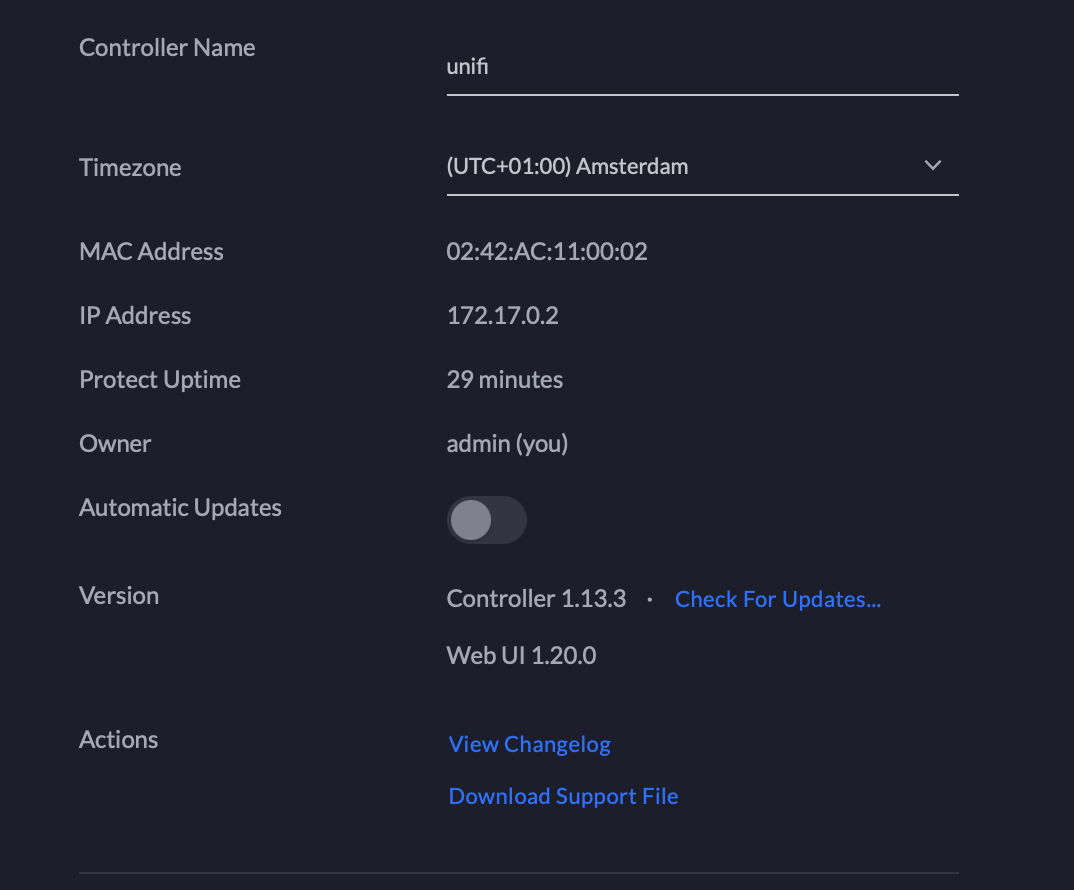
@paqpaqpaq
I saw you were able to access the main gui what happened after that? also what browser are you using?
@Quantum99k
Yes I can reach the main GUI, but that is about it. I feel because it 'hosts' the wrong IP address (docker's internal one) there is nothing to be traced by any unifi device. This is in Safari, but same for Chrome
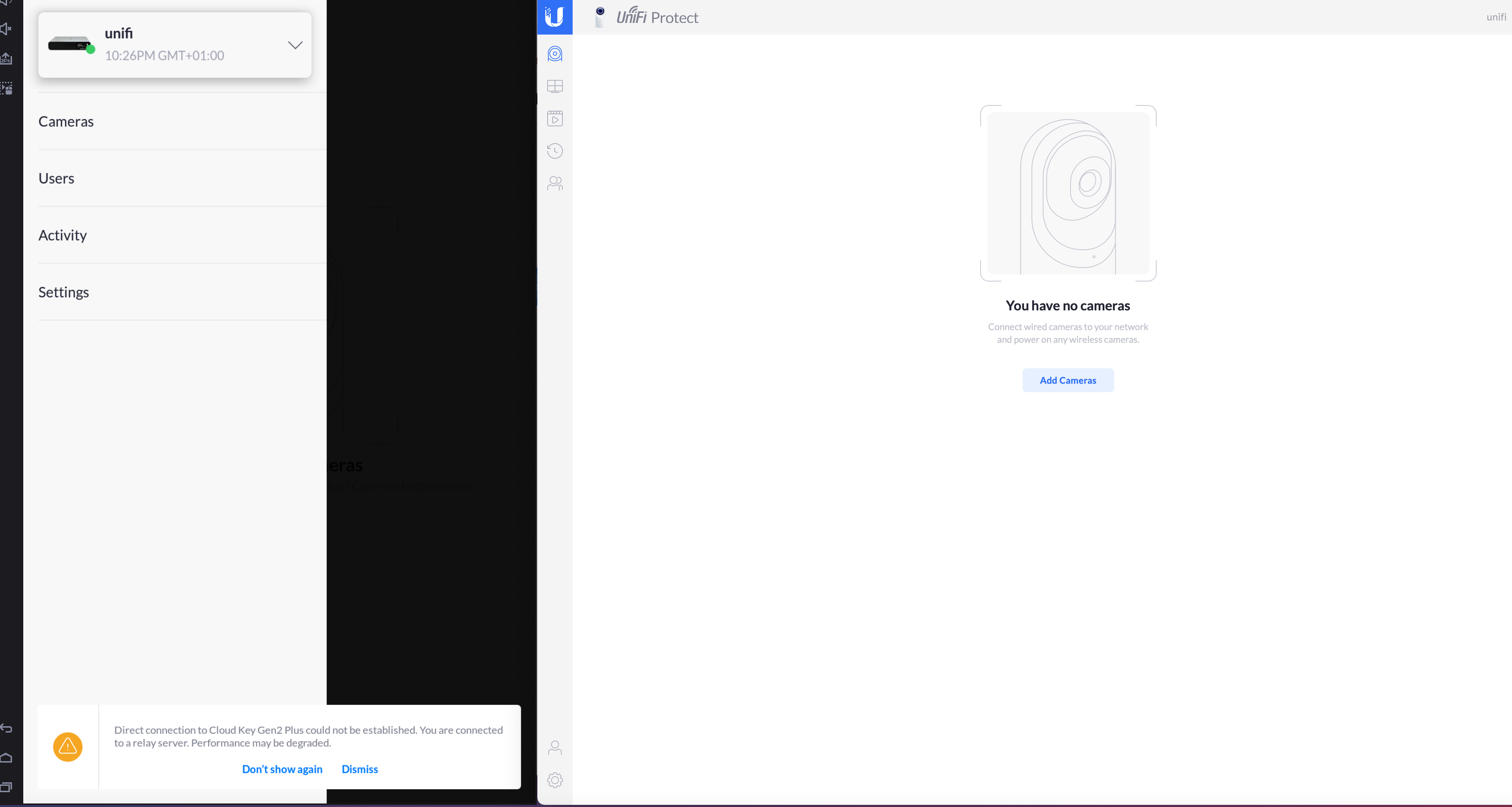 I do get to this now using an Android emulator.
Adding a doorbell via Bluetooth won't work, but it does via QR code on the web UI. However, that doesn't show the doorbell in either.
OK beats me...
all of the sudden I see the doorbell in the (new) iPhone app.
But after installing it, the doorbell says oh oh... red ring flash, and no devices.
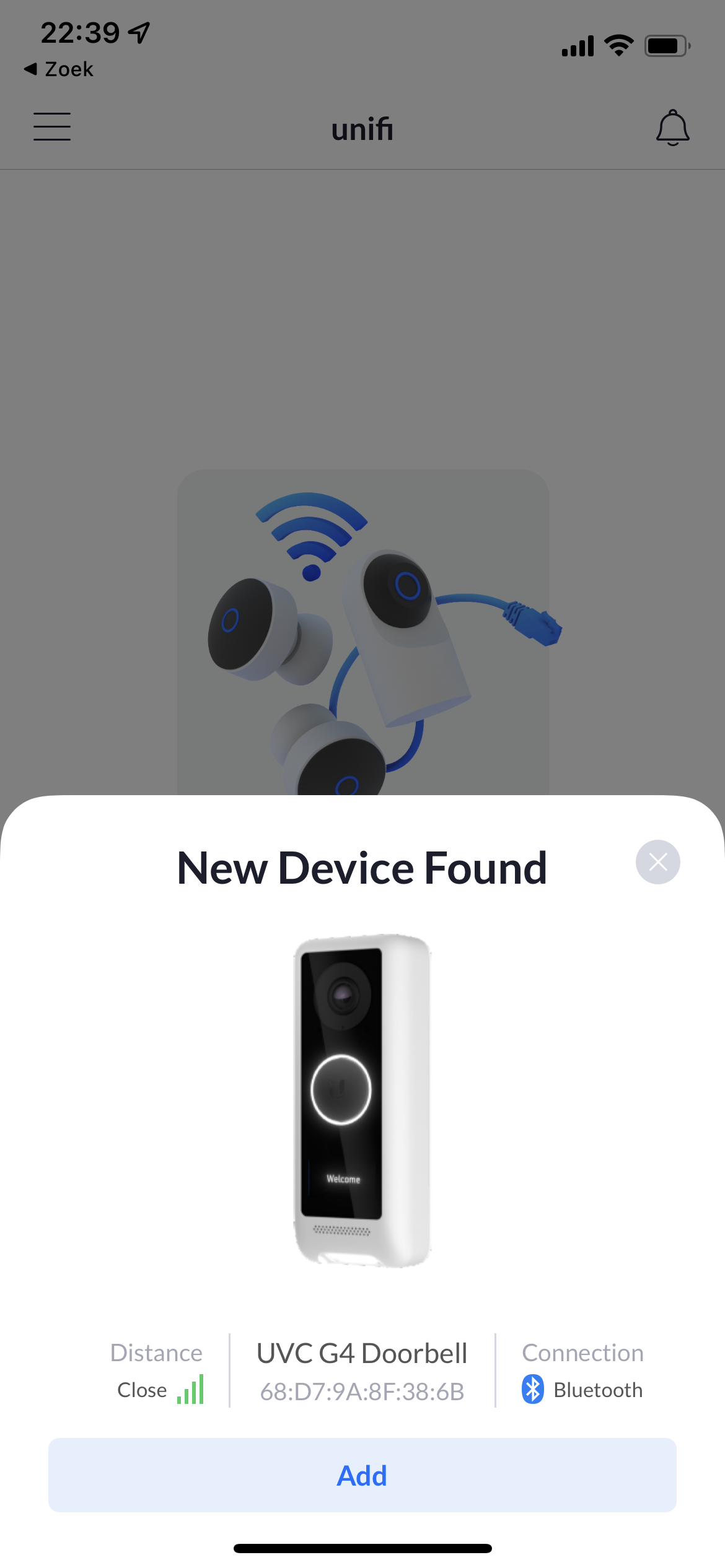
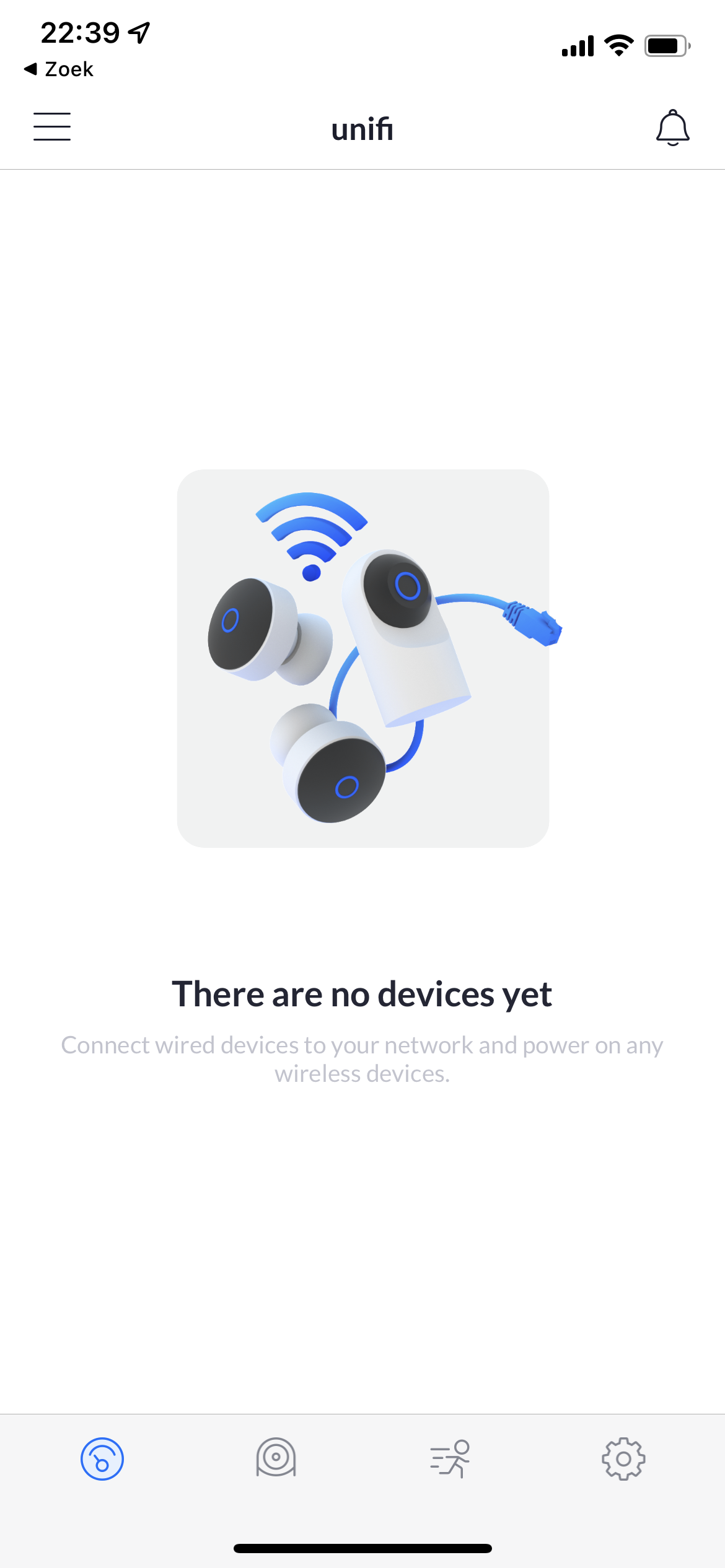
I can access the doorbell directly. (but that is nothing new since I could see the QR codes)
@paqpaqpaq I'm unsure about the door bell as I do not have one. So it would be quite hard for me to diagnose. However, I can help with adding 3rd party cameras to the controller. Your controller works with the new app?
@paqpaqpaq I'm unsure about the door bell as I do not have one. So it would be quite hard for me to diagnose. However, I can help with adding 3rd party cameras to the controller. Your controller works with the new app?
the controller 'works' It shows an active unifi cloud key gen2 plus I can add the doorbell > "setup complete" and after about 10 secs... not so much anymore. The doorbell returns to "pending device", and so on and so on
With Android you must use a previous version of the app. ubnt.unifi.protect_1.3.8 will work, none higher v.
With Android you must use a previous version of the app. ubnt.unifi.protect_1.3.8 will work, none higher v.
I have that. 1.3.8. Strangely enough, I get farther with my iPhone app than with the android app.
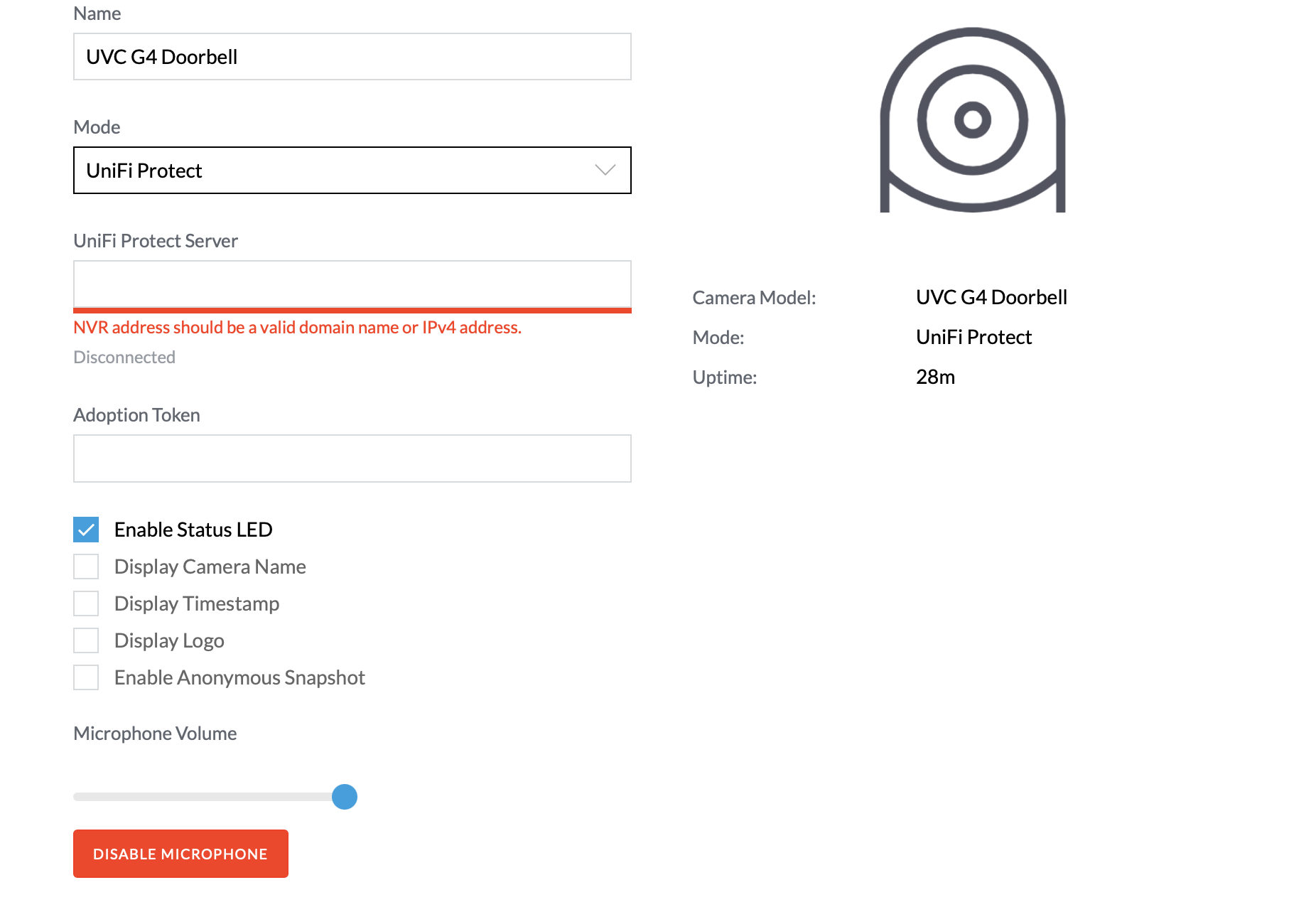 The issue remains that it can never bind with an IP address out of the subnet.
Since I can't run this as "host", the docker seems to be quite ... well... isolated?
The issue remains that it can never bind with an IP address out of the subnet.
Since I can't run this as "host", the docker seems to be quite ... well... isolated?
Try setting up a separate vlan for the nvr and run the nvr and the door bell on that same vlan. Also check for an update bin file with the door bell. I've had issues with g3 not live streaming and an update fixed it.
Not sure what you mean by that, nor how a Vlan would solve that issue?
 This should be an IP address within my sub. (192.168.108.x)
like here https://github.com/markdegrootnl/unifi-protect-x86/issues/1#issuecomment-761604049
@paqpaqpaq Do you have any other devices to run docker on I believe since you can't get it on your host. Because docker containers are running in a vm on Mac. Because it using a different subnet.
When you tried this what was your exact config?
docker network create \
  --driver macvlan \
  --subnet 192.168.100.0/24 \
  --gateway 192.168.100.1 \
  --opt parent=eth0.100 \
  video
@paqpaqpaq Do you have any other devices to run docker on I believe since you can't get it on your host. Because docker containers are running in a vm on Mac. Because it using a different subnet.
When you tried this what was your exact config?
docker network create \
  --driver macvlan \
  --subnet 192.168.100.0/24 \
  --gateway 192.168.100.1 \
  --opt parent=eth0.100 \
  video
I did try to get it running on a raspberry ARM64 setup, but without luck. Can't get to a open port with a pi local browser.
as for the docker create, I took my own subnet.
5KiMac:~ 5KiMac$ docker network create \
--driver macvlan
--subnet 192.168.108.0/24
--gateway 192.168.108.1
--opt parent=eth0.100
video 3c50be04c402596e6c1d2d1d647f441b3845d56b040691af807b804adc1bc173 5KiMac:~ 5KiMac$ docker network ls NETWORK ID NAME DRIVER SCOPE 738aa8058c9c bridge bridge local 01b20c13f455 host host local 697f28331644 none null local 3c50be04c402 video macvlan local
so when I run this, I receive an error.
5KiMac:~ 5KiMac$ docker run -d --name unifi-protect-x86\
--tmpfs /srv/unifi-protect/temp
--network=“video”
--ip 192.168.108.112
-p 7080:7080
-p 7443:7443
-p 7444:7444
-p 7447:7447
-p 7550:7550
-p 7442:7442
-m 2048m
-v unifi-protect-db:/var/lib/postgresql/10/main
-v unifi-protect:/srv/unifi-protect
markdegroot/unifi-protect-x86:latest docker: invalid reference format.
5KiMac:~ 5KiMac$ docker run --net video --ip 192.168.108.112 -p 7080:7080 -p 7443:7443 -d markdegroot/unifi-protect-x86 5484f50012177447874bd320791f4cfdf426b9b0bad7e609956501bbf0ae5aeb
This runs, creating a container which is running, but I cannot access. 5KiMac:~ 5KiMac$ docker ps CONTAINER ID IMAGE COMMAND CREATED STATUS PORTS NAMES 5484f5001217 markdegroot/unifi-protect-x86 "/docker-entrypoint.…" About a minute ago Up About a minute quizzical_tharp
(no port)
5KiMac:~ 5KiMac$ docker inspect video
[
    {
        "Name": "video",
        "Id": "3c50be04c402596e6c1d2d1d647f441b3845d56b040691af807b804adc1bc173",
        "Created": "2022-02-07T08:25:04.501594542Z",
        "Scope": "local",
        "Driver": "macvlan",
        "EnableIPv6": false,
        "IPAM": {
            "Driver": "default",
            "Options": {},
            "Config": [
                {
                    "Subnet": "192.168.108.0/24",
                    "Gateway": "192.168.108.1"
                }
            ]
        },
        "Internal": false,
        "Attachable": false,
        "Ingress": false,
        "ConfigFrom": {
            "Network": ""
        },
        "ConfigOnly": false,
        "Containers": {
            "69871cae53c6d39d08cec96b44e413b3d045c9c3f8b53ec9e4d271be954d9c1b": {
                "Name": "gifted_kepler",
                "EndpointID": "474383d83cd8bd94055021ef59981e0129edf8f1bb6192c22474c520ba62c9e6",
                "MacAddress": "02:42:c0:a8:6c:02",
                "IPv4Address": "192.168.108.2/24",
                "IPv6Address": ""
            }
        },
        "Options": {
            "parent": "eth0.100"
        },
        "Labels": {}
    }
]
Trying to get UniFi Protect to run on Synology Docker, with limited results. Perhaps my problem is familiar to someone?
Using Youtube method (https://www.youtube.com/watch?v=a-VjH5M-8O0) using:
docker run -d
--name UniFi-Protect
--tmpfs /srv/unifi-protect/temp
--network="host"
-m 2048m
-v /volume1/docker/unifi-protect-db:/var/lib/postgresql/10/main
-v /volume1/docker/unifi-protect:/srv/unifi-protect
markdegroot/unifi-protect-x86:latest
I'm able to connect to the container, configure Protect, enable remote access, and adopt the device successfully with message "Cloud Access Enabled". However, nothing shows in unifi.ui.com, or network.unifi.ui.com, however it does show up in protect.ui.com. The app lists the Protect instance, but fails with "Unable to connect Cloud Key Gen2 Plus.
What I think it most interesting is that no IP address shows in the settings page.
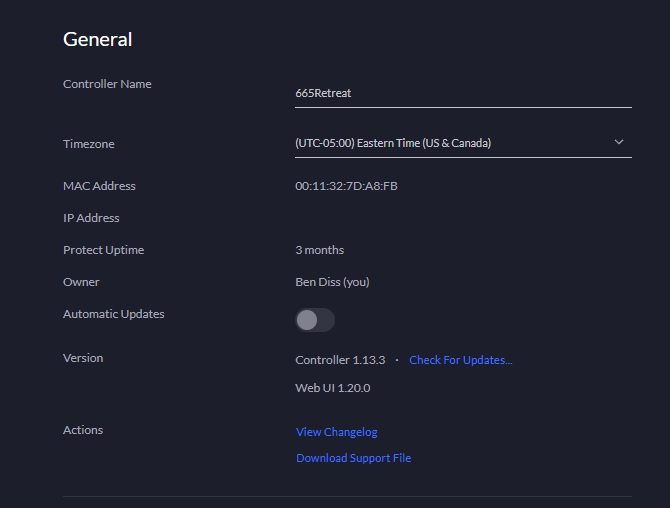
I would appreciate any help getting this to work.

I managed to solve this problem, and was successful in locating the local console with the app. Sadly, this is what it says:
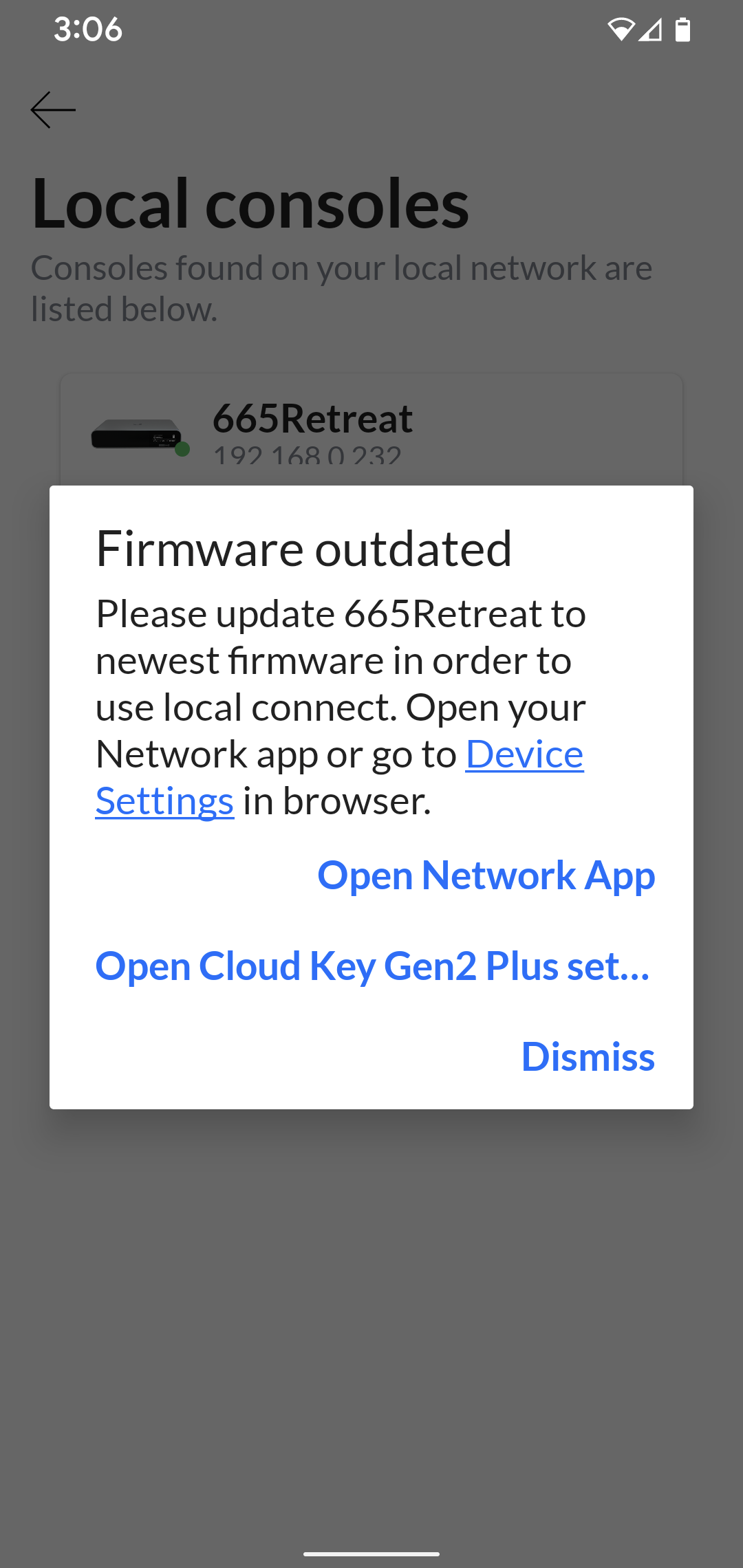
In case anyone is interested in how I got this work on Synology, I first created a MACVLAN on Synology. My local subnet is 192.168.0/24.
ip link add macvlan0 link bond0 type macvlan mode bridge ip addr add 192.168.0.239/32 dev macvlan0 ip link set macvlan0 up ip route add 192.168.0.232/29 dev macvlan0
I then created a docker network like this:
docker network create
--driver macvlan
--subnet 192.168.0.0/24
--gateway 192.168.0.1
--ip-range 192.168.0.232/29
--aux-address 'host=192.168.0.239'
--opt parent=bond0
NVR
And finally, the docker container:
docker run -d
--name UniFi-Protect
--tmpfs /srv/unifi-protect/temp
--network NVR
--dns 8.8.8.8
-m 2048m
-v /volume1/docker/unifi-protect-db:/var/lib/postgresql/10/main
-v /volume1/docker/unifi-protect:/srv/unifi-protect
markdegroot/unifi-protect-x86:latest
Hello @bjdiss, I have the same problems you had. So I basically followed the steps of the youtube video... I can access from my browser the unifi protect, even managed to put some certs to enable HTTPS. The remote access was configured with my ui login. I can see the controller from protect.ui.com, but not from unifi.ui.com neither network.unifi.ui.com. Creating the MACVLAN and docker network to use it does really solve the issue? Did you manage to see it correctly in the mobile app? I would like to disable remote access so that none of my video goes to the cloud. Can the mobile app connect locally on the protect controller? I do not mind to create what you show above in my Synology but I do not understand it... Can you tell me how it allows all of it to work? I have installed the Doorbell G4, it works fine and I see it in my browser but since the app on the phone does not work, no way to get a notification on my phone when someone rings. :(

Is there someone here that can say if the latest version of the app (1.6.4) is still able to discover this 1.13 protect controller? I have the feeling the app is now looking for UnifiOS only and there is no way to make it see the protect controller that is not 2.x...
Ohh, is there a way I can get an older version of the app on my iPhone? Otherwise I will need to return the G4 Doorbell. No way I'm gonna buy a cloudkey because I want to use a doorbell!
I use Android, and the latest working is 1.3.8 But I think later versions should work with iPhone of what Ive read
Gizmopower1 Thanks for number version for Android apps!
I found an apk here and it works fine!
p.s. (Current version Android applications from GooglePlay not working with this unifi-protect-x86 Controller v1.13.3)

For Browser over https://protect.ui.com or vpn to local network - need change browser config
For Chrome:
- Disable the feature flag, Anonymize local IPs exposed by WebRTC :
- Copy and paste the following into your address bar: chrome://flags/#enable-webrtc-hide-local-ips-with-mdns
- Select Disabled , then restart Chrome.
For Firefox:
- go to configuration about:config
- set media.peerconnection.ice.obfuscate_host_addresses to false
I have a synology and setup Unifi Protect via the YT video method. I can get to the web interface and create my local account. I can even sso to protect.unifi.com but I am not able to find the controller from my iPhone Unifi Protect app. When I try to enable remote access in the website I get Adoption Failed. Is this due to Ubiquiti blocking the process on our own hardware or am I missing something
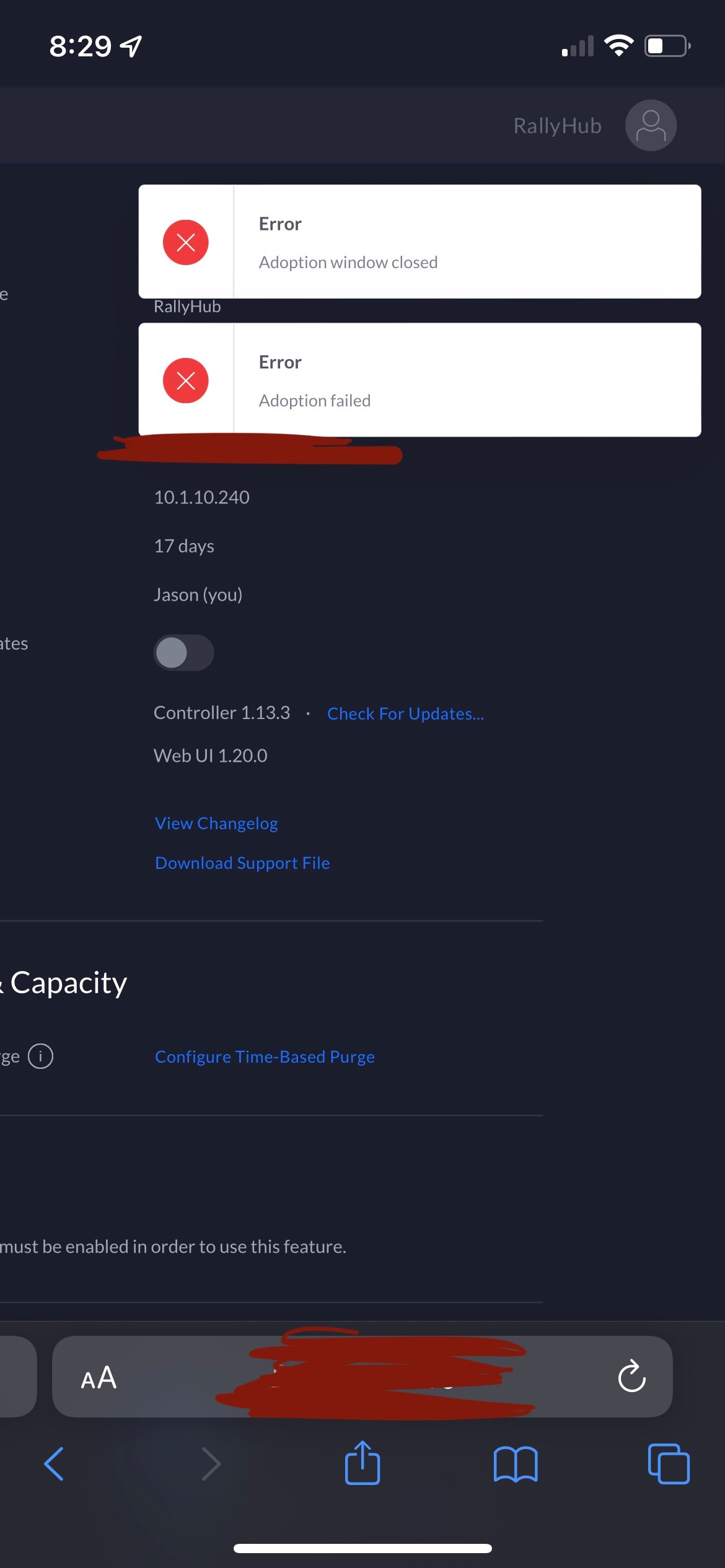 ?
?

From what I understand, the locally running protect controller can be accessed from the browser. The App can only connect through the remote protect controller. If you disable remote access, their is no way to connect the iPhone app. But it is worst than this, now that UI uses the UnifiOS that regroups all the controllers, the iPhone app will not accept to connect to the older docker version of the Protect Controller we run in docker on Synology. :( And this even if you can access the remote controller from the browser. So there is no way you can get the push notification on your phone when someone rings the door unless you run the UnifiOS. Pretty useless isn't it?
I'm waiting to buy the Dream Router when it becomes available here in Canada but it pisses me off a little that I need to change my setup that worked so well for the past years. Also I bought Unifi Doorbell thinking my camera feed would not get on the cloud but since the App only connects to the cloud, it forces you to enable the remote access. So it means you network controller will be on the cloud too. I hate that. I loved UI because I could run locally all my services. I have absolutely no thrust in the cloud...
I've been trying for days to get this to work, because I don't think it's right that Ubiquiti has locked their security cameras behind a paywall. I've followed the instructions completely and thoroughly, but I fear this project may be dead now. I installed the Unifi Protect 1.3.8 app on my phone, and it does not allow me to log in to my Ubiquiti account.
Regardless, after running this container and setting up my local account, I get stuck on the "Connecting to your NVR," and it shows V1.20.0 at the bottom of the page.
I've tried removing the container completely and re-running it, and it just goes directly back to the "Connecting to your NVR" loop.
I am running this on a self-hosted Debian 11 server. I am able to access the gui at https://x192.168.X.X:7443/
I have tried clearing cache, but the NVR loop remains. I don't understand how it's still stuck on that after I completely removed the container via sudo docker system prune -a
If anyone has a work-around or might know where I went wrong, I am definitely all ears.
Thank you in advance to anyone who may attempt to assist me in this matter.

I've been trying for days to get this to work, because I don't think it's right that Ubiquiti has locked their security cameras behind a paywall. I've followed the instructions completely and thoroughly, but I fear this project may be dead now. I installed the Unifi Protect 1.3.8 app on my phone, and it does not allow me to log in to my Ubiquiti account.
Regardless, after running this container and setting up my local account, I get stuck on the "Connecting to your NVR," and it shows V1.20.0 at the bottom of the page.
I've tried removing the container completely and re-running it, and it just goes directly back to the "Connecting to your NVR" loop.
I am running this on a self-hosted Debian 11 server. I am able to access the gui at https://x192.168.X.X:7443/
I have tried clearing cache, but the NVR loop remains. I don't understand how it's still stuck on that after I completely removed the container via
sudo docker system prune -aIf anyone has a work-around or might know where I went wrong, I am definitely all ears.
Thank you in advance to anyone who may attempt to assist me in this matter.
Have you tried to activate remote access at settings startup startup and connected remote: https://protect.ui.com/select-nvr ?
Have you tried to activate remote access at settings startup startup and connected remote: https://protect.ui.com/select-nvr ?
I saw many people mention this, but I am at a loss for how to accomplish this. The initial setup, which I can't get back to now, only asked me for my NVR name (which I do not own an NVR, so I wrote in "Test"), the username I wanted to use, and the password I wanted to use. After I filled those fields out and hit enter, that's when I was presented with the NVR loop I am currently stuck at.
When I go to the URl you provided, it just tells me there's no devices found and asks if I want to re-scan my network.
Edit: I should also mention, the only reason I am putting myself through this headache, is to HOPEFULLY enable RTSP streaming on this G3 Instant I bought a couple months ago. I was a fool and did not read the "fine print" that says this requires a $200+ piece of hardware to use it.
U probably need to setup the container again for remote access. It will ask you in the begining... The url I sent you requires an account, wich alows you to connect remote to your local
U probably need to setup the container again for remote access. It will ask you in the begining... The url I sent you requires an account, wich alows you to connect remote to your local
I believe I left out a crucial piece of information with my setup. My Debian 11 server is completely headless and gui-less. When I run the command provided on the main page of this repo, it downloads from Mark's repo and starts the container. Then I access the GUI via a web browser, and that's where I'm stuck at the NVR loop. I was never asked to enable remote access.
Is there a way to enable remote access from the CLI?
When I say I stopped and removed the container completely, this is the method I used, and the results from that method:
`homeserver@debian:/home$ sudo docker stop unifi-protect-x86 unifi-protect-x86 homeserver@debian:/home$ sudo docker system prune -a WARNING! This will remove:
- all stopped containers
- all networks not used by at least one container
- all images without at least one container associated to them
- all build cache
Are you sure you want to continue? [y/N] y Deleted Containers: 99cff059f1a28874f842564b95be08531ab8d76afab20ad533c09cda4d5cdf91
Deleted Images: untagged: markdegroot/unifi-protect-x86:latest untagged: markdegroot/unifi-protect-x86@sha256:4e2a23020765e1db99610c6f6428398c900642cff863a850d8da0e5ff48597ff deleted: sha256:3cf77dafd624c5fc651bd63b13805a05ecd769e53dae43df09763fb50d1d9d4b deleted: sha256:d37561ceb51bdccf99a238c69a3aaf2490ecc330dd5c37063bf38f59dbd620d5 deleted: sha256:1e5e46f761b07cc7522814829df46dd81b95d698bdd7815e67d4d3cc0a18402d deleted: sha256:7c65351a6c01b7a1a673f30cc6ee5f82f2fa2aab588bbc2e6d763d7b2b14455d deleted: sha256:909a666a8006b9746488733ca812133ff5f316b488181e6b816726ab973209db deleted: sha256:cae5db52c3227dd6cc9449e84adc8898245ff5ee402534c423bb6c4b4dd28933 deleted: sha256:2615c2d7e8b5917542cd9f5b8d9d413271c46e119bb8d5add5cec125da33c957 deleted: sha256:21639b09744fc39b4e1fe31c79cdf54470afe4d7239a517c4060bd181f8e3039
Total reclaimed space: 403.2MB homeserver@debian:/home$ `
After I do that, I run this command and this is the output:
homeserver@debian:/home$ sudo docker run -d --name unifi-protect-x86 \ --tmpfs /srv/unifi-protect/temp \ -p 7080:7080 \ -p 7443:7443 \ -p 7444:7444 \ -p 7447:7447 \ -p 7550:7550 \ -p 7442:7442 \ -m 2048m \ -v unifi-protect-db:/var/lib/postgresql/10/main \ -v unifi-protect:/srv/unifi-protect \ markdegroot/unifi-protect-x86:latest Unable to find image 'markdegroot/unifi-protect-x86:latest' locally latest: Pulling from markdegroot/unifi-protect-x86 feac53061382: Pull complete 10c0bab8008a: Pull complete 7da152b565fc: Pull complete 910b1b9e8269: Pull complete 784de7c49706: Pull complete 4de759a5cae6: Pull complete cfa3bb277c29: Pull complete Digest: sha256:4e2a23020765e1db99610c6f6428398c900642cff863a850d8da0e5ff48597ff Status: Downloaded newer image for markdegroot/unifi-protect-x86:latest 10c3468832a9b219e1954d969ce21be22990a5e6859b883eb257c46bfc2a9a47 homeserver@debian:/home$
After starting the container again with the above code, I access the web gui and it still shows the NVR loop instead of prompting me for a username and password.
I very much appreciate the help you've provided, Gizmo.
Yeah, i know the loop your are talking about. I dont know why that happens. I forwarded the 7443 port and could log on from outside my local network. (Work) 4g or whatever. Try that, or see if you can you log on local with the 1.3.8 android app? With Iphone i think u can use latest. From the app you can enable remote access and use the url i posted to connect with browser.
EDIT: I have the same loop in pc browser logging in local https://192.168.1.xxx:7443 When using my browser on android phone it works.
Unifi protect on the unvr uses both port rstp at port 7447 and rstps at port 7441 try one of these.

I think it is a browser compability problem The https port is 7443 The http port is 7080