
mapbox-maps-ios
 mapbox-maps-ios copied to clipboard
 mapbox
[OFFLINE DOWNLOADS BROKEN] Layers disappearing instead of being overzoomed if offline tile region/style pack downloaded
Environment
- Xcode version: 14.2
- iOS version: 16.2
- Devices affected: all
- Maps SDK Version: 10.12.0
Observed behavior and steps to reproduce
When downloading an offline tile region and style pack for a style that has sources with different max zooms, the layers from the sources with the smaller max zooms completely disappear when zooming in instead of overzooming as they regularly do.
Example: a layer for streets from a tileset that goes from z0 to z16, and a layer for land that goes from z0 to z12. If a pack and region are downloaded for this style, once you zoom in past z12 the land disappears and only the streets are visible, despite the style normally overzooming the land.
https://user-images.githubusercontent.com/12274098/227966302-7957c869-f07d-4c35-88ce-04f1af9e8b75.mov
I have also made a gist modifying the OfflineManagerExample.swift and adding a style that combines mapbox streets with a custom tileset with z12 max zoom that reproduces this:
https://gist.github.com/msfstef/09f9b5b0e2a5ad0090c487510a7f2466
Expected behavior
Should behave exactly the same as if there wasn't a style pack and tile region downloaded and the user is online, which is to overzoom layers from sources with a smaller max zoom. It should look like it does when online or in the style editor.
Notes / preliminary analysis
From testing a few things it seems to me that sources with different max zooms are at fault, as when I tried downloading a region from a style that only contained the same data from a source with max zoom 12, it overzoomed correctly with the offline tile region. It only showed issues when it was within a style with sources with a higher max zoom.
Additional links and references
The same exact issue is on the Android SDK, and I believe some issues that have been closed without being addressed refer to the same issue, see https://github.com/mapbox/mapbox-maps-android/issues/1428


Hi, @msfstef , thanks for the report. Can you please publish the style you are referring to in the example, so we could reproduce the issue. You can also download it from the studio or provide us with the access token.

Hey @persidskiy thanks for picking this up.
The style in the gist is a minimal version that reproduces the issue and it should already be public and published: mapbox://styles/savvynavvy/clfqv8mo3001201pewwym83p1
Hey @persidskiy and @msfstef , any update on this?
Any update on this? We have been having the extract same issue since last fall which has essentially broken our offline maps functionality for all our customers.
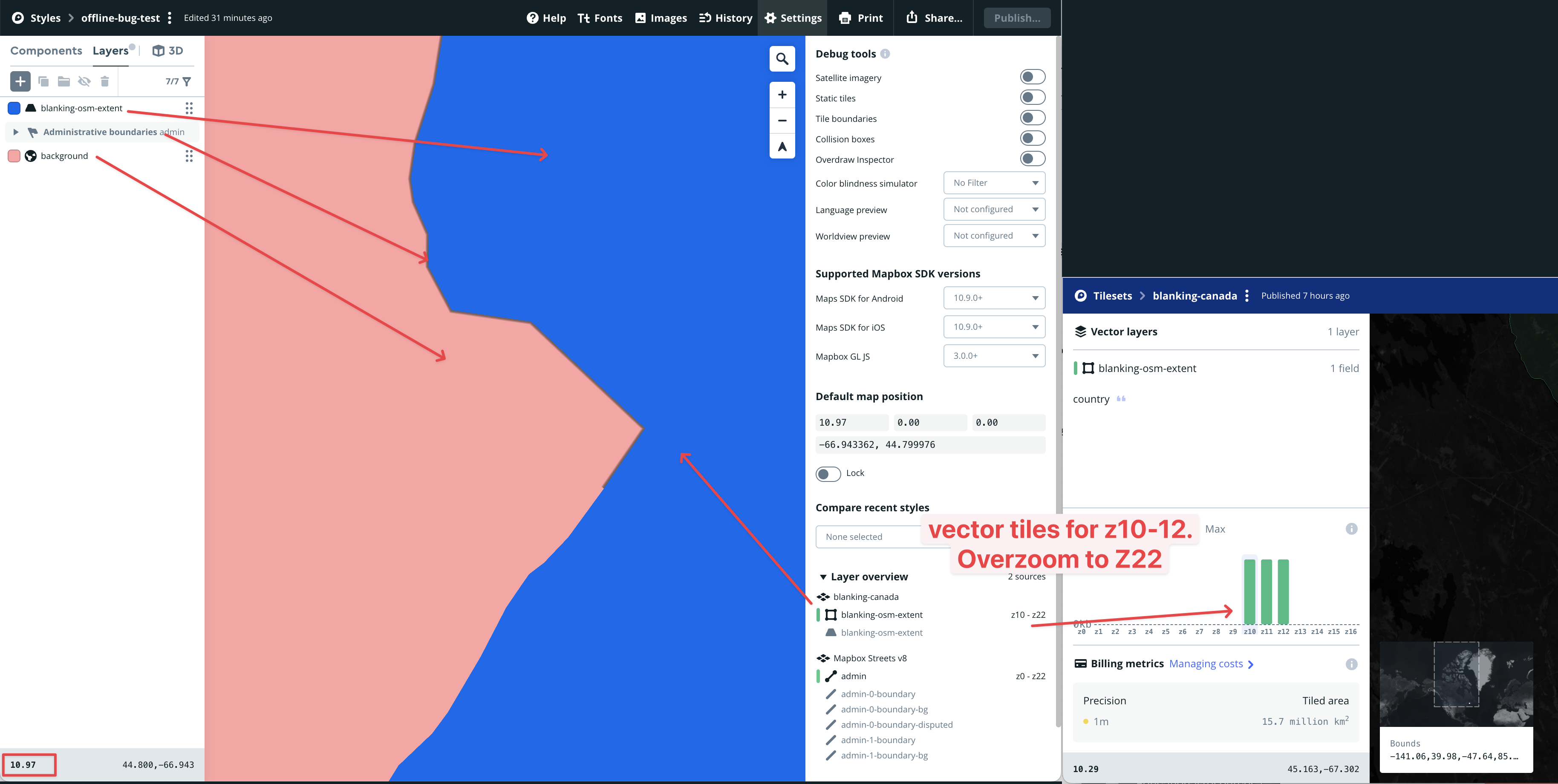
We experience it on our main map but I am able to reproduce it with a very simple style which includes only 3 layers. Style is here: https://api.mapbox.com/styles/v1/aes-dev-maps/clh83u7lo01pz01p8d2612up2.html?title=copy&zoomwheel=true&fresh=true#0/0/0
- Polygon of Canada: custom title set uploaded via MTS. Blue polygon. Vector tiles for Z10-12 and over zoom from Z12-22
- Administrative boundaries (from Mapbox streets v8). Only added so that its easier to navigate
- Background fill - pink
Step to Reproduce
- Using Android or iOS Mapbox SDK v10.X (issue occurs in both cases), zoom into the American/Canadian border between Z10-13. The blue polygon appears correctly.
- Download a tile pack of the same region for z11-13
- Clear map cache
- Reopen the map and zoom into he downloaded tile. The Blue polygon appears at Z10 but then disappears between zoom 13.00 -14.99 and then reappears from zoom 15.0 until 22.
Any help would be much appreciated!

Seeing the same issue on the maps in our product as well as a simple test map. Getting a fix out for this soon would be huge for us. Thanks in advance!!
Here is a video of the example app in the ios sdk. The only change made here were the coordinates of the download and the map style: mapbox://styles/onwaterllc/clhcm7yjv00dl01rh4d0thgaz
https://github.com/mapbox/mapbox-maps-ios/assets/2521298/0381abef-0008-44d4-81d4-ea4ffd4d5f22

For what its worth I'm unable to reproduce this issue with the deprecated OfflineRegionManager
seeing the same issue after the offline tile region/style pack downloaded. When I zoom into see our layers they disappear at a closer zoom level. We are big fans of the offline download features map box provides but this seems to be a big blocker. =(

I'm seeing the same issue. I migrated my app from v6 to v10, and am only seeing the issue in v10. (Worked fine in v6.)
Any workaround for this? I'm using MTS for the layers where I encounter this issue. Would increasing the maxZoom in my tileset recipes help? (I am loath to do this as it will increase the MTS costs...)

Hello @Mapbox, We are seeing the same issue. Please fix this ASAP. After we migrated from v6 to v10, we are facing this issue.

I found a decent workaround for our use case (thanks to mapbox support). Turn off source compositing in the custom style:
Make sure to do that first thing when you create the map then add the custom sources to the map.
It sounds like there is a slight performance degradation when source compositing is off but it hasn't been noticeable for us. Here is the link to the docs on source compositing: https://docs.mapbox.com/studio-manual/reference/styles/#source-compositing
@kevinmanncito
Make sure to do that first thing when you create the map then add the custom sources to the map.
It sounds like this didn't work for you without having to perform some additional steps... Did you have to create a new custom map and then add your custom sources again?
(I tried just turning off source compositing without doing anything else, and it didn't fix the problem.)
Yeah I had to make a new style, turn off source compositing, then add my custom layers again
@kevinmanncito Thanks very much. I'll try that. I really didn't want to have to wait for a fix for this bug before releasing an update to my app :)
I've been experimenting, and when I turn off source compositing, I run into a different (but no less bad) problem.
Disabling source compositing seems to solve the issue for downloaded tile regions. But now my custom layer gradually disappears as I zoom in. I don't even need to check the rendering in my app to see this – it even happens right in Mapbox Studio.
https://github.com/mapbox/mapbox-maps-ios/assets/432817/9c638b33-7fe2-4007-88c0-e92a88839a10
And the culprit seems to be 3D maps. If I turn off 3D Terrain, the problem goes away. Which kinda sucks, because 3D support is one of the main reasons I upgraded to v10 :(
Someone from Mapbox – should I open this as a separate bug?

hi @ianharoldonwater -> its not working for us -> can you put the exact steps you took to make source compositing work for us? Or can we do a zoom screenshare if possible?
Addendum to my previous comment. For me, turning off source compositing wasn't enough. I had to turn off both source compositing AND 3D terrain. (I did some more testing and this was the only thing that worked.)
But I want my 3D terrain, dammit! :)
