

 mapbox
Map is grey after a geocoding search
Hi,
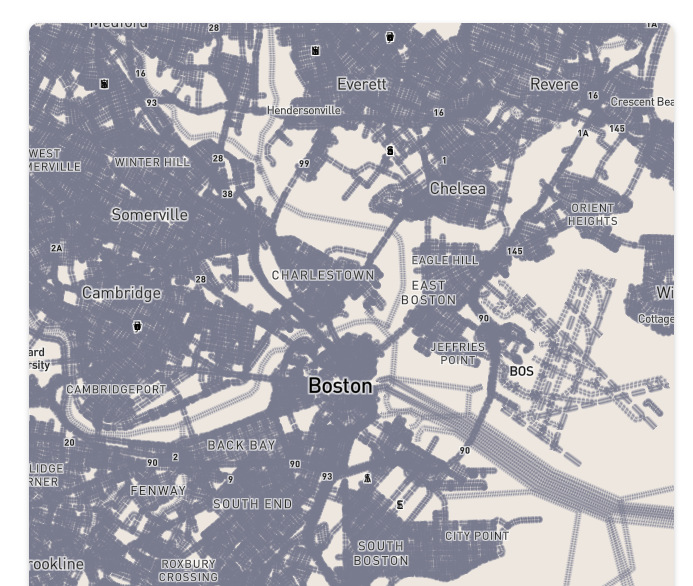
when a create a Geocoder html element after the map have already been loaded, the map turns grey after the geocoder search.
My use case: i have a Vue app where i first load the map when the user arrive on the view. In this view, the user have the possibility to open a form with the geocoder input (outside the map). So the creation of the geocoder input is made by a function that can or can't be called (if the user open the form or not).
See screenshot:
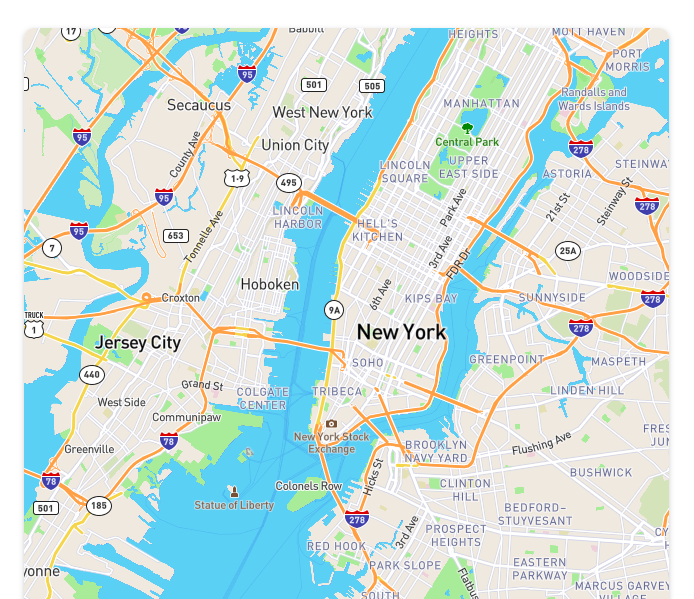
on page load, the map is displayed correctly
after a create a geocoder input and do a search
this is my Map class that i use (init is called when the view is loaded, and getGeocoder is called when required and the htmlElement is then inserted into the DOM.
import mapboxgl from 'mapbox-gl';
import 'mapbox-gl/dist/mapbox-gl.css';
import MapboxGeocoder from '@mapbox/mapbox-gl-geocoder';
import '@mapbox/mapbox-gl-geocoder/dist/mapbox-gl-geocoder.css';

export default new class Map {
  constructor() {
    mapboxgl.accessToken = 'myToken';
  }

  init() {
    this.map = new mapboxgl.Map({
      container: 'mapContainer',
      style: 'mapbox://styles/mapbox/streets-v9',
      zoom: 11,
      center: [-74.006, 40.7128]
    });
  }

  getGeocoder() {
    const geocoder = new MapboxGeocoder({
      accessToken: mapboxgl.accessToken
    });
    const htmlElement = geocoder.onAdd(this.map);

    return { geocoder, htmlElement };
  }
}();
What is also odd, is that when I load the view directly with the form open, the geocoder search works correctly. But when I open the form after some time, the geocoder search transform the map into grey.

@CaptainYouz Do you have a minimal example of the issue you can link to?

I ran into something like this in a completely different context, in that case setData on a geojson source cause the map to glitch similar to your screenshot. It was also a Vue app. I couldn't replicate without Vue.