

 m32
m32
Sign not show in acrobat
Hello, I have a similar problem/ When I signed pdf, it didn't show in acrobat but it show in chrome.
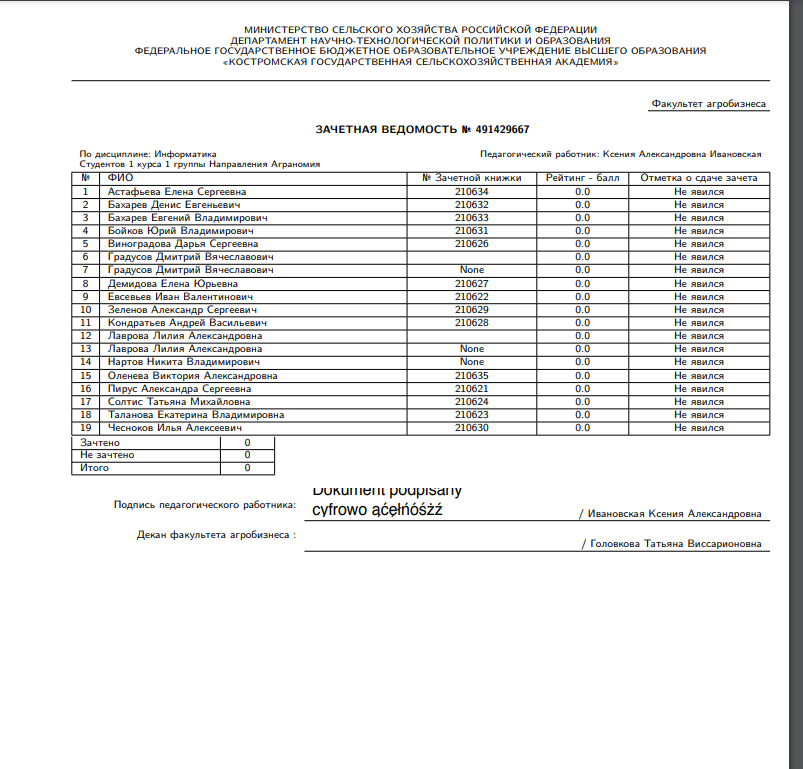
In chrome
 In acrobat
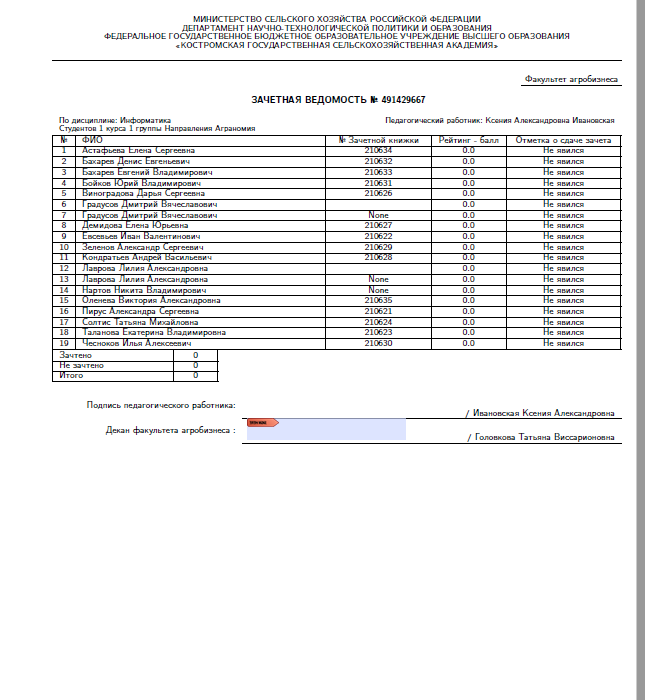
not signed PDF: 411_Ивановская_Ксения_Александровна_Информатика_зачет_2MUmP4W.pdf Signed pdf: 411_Ивановская_Ксения_Александровна_Информатика_зачет_2MUmP4W-signed.pdf
My code(endesive v2.0.6 and python 3.8)
class PdfWorkerTwo:
    def __init__(self, user, digital_certificate, file, sig_box, page_number=0, date=None, step=0):
        self.user = user
        self.page_number = page_number
        self.sig_box = sig_box
        self.step = step
        if date is None:
            self.date = timezone.localtime(timezone.now())
        else:
            self.date = date
        self.pdf_file = file
        self.pdf = b''
        cert = digital_certificate
        if cert:
            self.password = digital_certificate.password
            self.cert_path = digital_certificate.file
        else:
            raise APIException(detail='Подпись не загружена')
        self.location = b'Kostroma'
        self.contact = bytes(str(user.email), 'utf-8')
        self.reason = b'Kostromskaya GSXA'
        self.sign_step = False

    @staticmethod
    def eprint(error):
        print(error, file=sys.stderr)

    # @property
    # def coords(self) -> tuple:
    #     """
    #         [x,y, Координаты левого нижнего угла
    #         x,y]  Координаты правого верхнего угла
    #         TODO: перенести координаты в модель
    #     """
    #     if self.instance_type == 'rating_plan':
    #         return tuple([550, 520, 650, 550])
    #     elif self.instance_type == 'statement':
    #         return self.instance.sign_coords
    #     elif self.instance_type == 'order':
    #         return tuple([210, 520, 305, 550])
    #     elif self.instance_type == 'ind_plan':
    #         return tuple([210, 560, 305, 590])
    #     else:
    #         return tuple([0, 0, 0, 0])

    def pdf_time(self) -> str:
        date = datetime.datetime.utcnow() - datetime.timedelta(hours=12)
        date = date.strftime("D:%Y%m%d%H%M%S+00'00'")
        return date

    @property
    def page_size(self) -> str:
        return "A4 landscape"

    def draw(self):
        template = get_template('sign.html')
        render_pdf = template.render({'user': self.user, 'sign_date': self.date.strftime('%d.%m.%Y'),
                                      'static_dir': settings.STATIC_ROOT})
        file_path = settings.BASE_DIR / 'cert' / 'sign_pdfs' / str(str(self.user.id) + '.pdf')
        f = file_path.open('wb+')
        pisa.CreatePDF(render_pdf, dest=f)
        f.close()

    # @property
    # def page_number(self) -> int:
    #     pdfReader = PdfFileReader(open(self.pdf_file.name, 'rb'))
    #     if self.step == 2:
    #         return 0
    #     return len(pdfReader.pages) - 1

    # @property
    # def instance_type(self) -> str:
    #     if self.instance._meta.model_name == apps.get_model('mrs', 'RatingPlan')._meta.model_name:
    #         return 'rating_plan'
    #     elif self.instance._meta.model_name == apps.get_model('mrs', 'CloseSubject')._meta.model_name:
    #         return 'statement'
    #     elif self.instance._meta.model_name == apps.get_model('mrs', 'Order')._meta.model_name:
    #         return 'order'
    #     elif self.instance._meta.model_name == apps.get_model('mrs', 'InduvidualPlan')._meta.model_name:
    #         return 'ind_plan'
    #     else:
    #         return 1

    @property
    def dct(self) -> dict:
        return {
            "aligned": 0,
            "sigflags": 3,
            # "sigflagsft": 132,
            # "sigpage": 0,
            "sigbutton": True,
            "sigfield": "teacher",
            "signform": True,
            # "auto_sigfield": True,
            "sigandcertify": True,
            "signaturebox": (470, 840, 570, 640),
            "signature": "Dokument podpisany cyfrowo ąćęłńóśżź",
            #        "signature_img": "signature_test.png",
            "contact": "[email protected]",
            "location": "Szczecin",
            "signingdate": self.pdf_time(),
            "reason": "Dokument podpisany cyfrowo aą cć eę lł nń oó sś zż zź",
            "password": self.password,
        }


    def sign(self):
        cert_path = BASE_DIR / str(self.cert_path)
        p12 = load_pkcs12(cert_path.open('rb').read(), bytes(self.password, encoding='utf-8'))
        self.draw()
        pdf_for_img = Path(settings.BASE_DIR) / 'cert' / 'sign_pdfs' / str(str(self.user.id) + '.pdf')
        images = convert_from_path(pdf_for_img, 600)
        images[0].save(Path(settings.BASE_DIR) / 'cert' / 'sign_pngs' / str(str(self.user.id) + '.png'), 'PNG')
        pdf_bytes = open(self.pdf_file.path, 'rb+').read()
        signature = cms.sign(pdf_bytes, self.dct, p12.get_privatekey().to_cryptography_key(),
                             p12.get_certificate().to_cryptography(), [], 'sha256')

        with open(self.pdf_file.path.replace('.pdf', '-signed.pdf'), 'wb') as file:
            file.write(pdf_bytes)
            file.write(signature)
            signed_pdf = file
        # copy = open(self.pdf_file.path, 'wb')
        # copy.write(signed_pdf)
        # copy.close()
        return self.pdf_file

The document is signed but the validator shows a lot of errors. I do not know how acrobat should behave, but I had problems with incorrect digitally signed documents.
I don't know what to do to get acrobat to show the document.
The file:/devel/signed.pdf is not valid, error(s) : 6.2.2 : Action is forbidden, The AA field is forbidden for the Catalog when the PDF is a PDF/A 1.4 : Trailer Syntax error, /XRef cross reference streams are not allowed 1.2.3 : Body Syntax error, NeedAppearance is present with the value "true" 6.2.3 : Action is forbidden, "AA" must not be used in a Field dictionary 2.4.1 : Invalid Color space, The operator "rg" can't be used with CMYK Profile 3.1.11 : Invalid Font definition, MPDFAA+Helvetica: The CIDSet entry is missing for the Composite Subset 2.4.1 : Invalid Color space, The operator "rg" can't be used with CMYK Profile 2.4.1 : Invalid Color space, The operator "rg" can't be used with CMYK Profile 5.2.5 : Forbidden field in an annotation definition 6.2.3 : Action is forbidden, "AA" must not be used in a Field dictionary 5.2.5 : Forbidden field in an annotation definition 5.2.5 : Forbidden field in an annotation definition 5.2.5 : Forbidden field in an annotation definition 2.4.3 : Invalid Color space, /DeviceGray default for operator "TJ" can't be used without Color Profile
