
OneList
 OneList copied to clipboard
 lolo-io
Main font looks as if it has no anti-aliasing or hinting applied
Hi, the app looks really smooth, but the font doesn't! One user on the Play Store wrote "the fonts look too grainy, better fonts would be seriously appreciated". From your reply to that review I gather you don't experience this yourself. For me, I'm seeing it both on my device and in the Android Studio emulator, which emulates a "Nexus 5X API 28 x86".
I don't know much about Android development, but I managed to change the font in the source code to other system fonts, but they have the same problem.
Here's a screenshot from the emulator. When you look closely or zoom in you can see that the issue is only with the list items, all the other UI text (e.g. app name, list names, add new item) looks smooth. Maybe you can find out what you did differently for the list items?


This is right, the grainy fonts never jmped to my eyes before I zoomed on your screenshot. Now I can see them. To be able to swipe the items the system "draws" the text on a canvas. I don't think I can do much for it as this is handled by a lib I'm using (advancedrecyclerview). I'll see if I can make it look bettter.

I have an even worse experience than the OP:
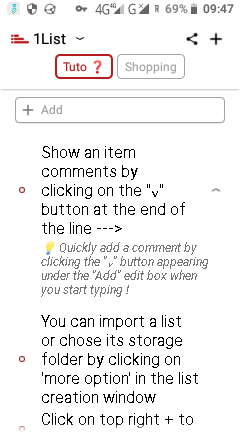 It's a pity, because I would love to use 1List, but it puts too much strain on the eyes to work with the list.

@lolo-io Isn't the issue fixed in the develop branch by commit 4f6b2c65f5a2888835bba8f34ffc58eae597e94e ?
