

 loboris
FTP Root directory changes
I set up the FTP server as described in the Wiki. Now when using IntelliJ I can configure the FTP server and I do see the folders. However, when it first loads the directory structure there is a folder called "flash". This is not a problem as such but when I hit the refresh then the flash folder is removed and everything that was in the flash folder is now in the root of the directory.
This would only be a minor issue, but when I want to upload a file I get errors. I would assume that is because IntelliJ tries to upload the file to flash which will then no longer be present.
I wonder how to get the proper root folder right from the start so that I could directly upload files from IntelliJ, which would fit my workflow perfectly.
I'm happy to provide more debugging information. Thanks and kind regards
Initial folder with flash as the root
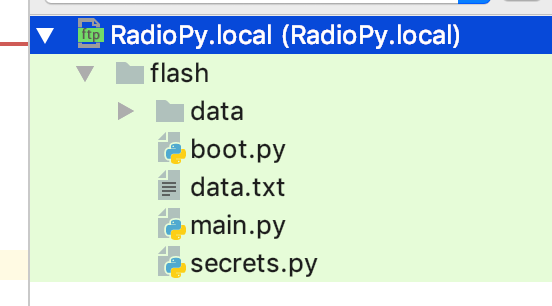
Hitting refresh


My solution is to put all project files within a folder named flash. Then for the remote connection settings I set / as my "Mappings -> Deployment path" and / as my "Connection -> Root path".
You may also be able to simply specify /flash as your "Mappings -> Deployment path" if you don't also need an sd/ directory as I did.
Unfortunately Pycharm still gets stuck "Refreshing Server Files" if you leave the Remote Host pane open.
My project structure:
- flash/
- boot.py
- main.py
- lib/
- module1.py
- other_files.py
- sd/
- other_files.txt

Hmmm.. After more testing I realize I have the same problem. The actual root of the FTP server seems to change to /flash for some reason.
I don't really care, if there is a flash-root folder as long as it stays that way, but if it changes at some point this has to leave to problems as soon as some caching mechanisms are in place.
I guess if I create a flash folder, then it will simply be alternating between /flash/flash and flash...
⚡️